

You're parked outside the last decent cell tower for miles, or sitting at a kitchen table in a farmhouse where the Wi-Fi drops every time the wind kicks up, or trying to run school, work, and a camera system from an RV stop that has “internet” only in the brochure. That's the rural connectivity problem. Rural LTE Internet is still the anchor the majority can use, because it reaches farther than wired broadband and behaves better than satellite when you care about latency, weather, and day-to-day reliability.
The mistake is treating it like a shopping spree. It's an engineering problem. The right carrier matters. The right band matters. Antenna height, placement, and line of sight matter more than glossy marketing ever will. If you want a setup that works at the edge of coverage, you need to think in terms of link budget, not brand hype.
Why Rural LTE Internet Still Matters in 2026
A lot of rural properties still have the same problem they had years ago. The road may be paved, the driveway may be long, and the house may be beautiful, but the fiber build stops somewhere back at the county line. In that situation, LTE is often the only realistic anchor for a cabin, a farm office, or an RV that needs steady service without waiting on trenching, permits, or promises.
The reason LTE remains relevant is simple. It's already there in more places than fiber, and it's usually far more usable than weak DSL or high-latency satellite when you need live calls, cloud access, or cameras. The FCC's rural coverage figures have long shown that LTE is unevenly built out, but still a major step forward, with rural access and provider choice lagging urban markets (FCC rural LTE analysis).
Practical rule: start with the network that actually reaches your address, not the one with the flashiest ad. If LTE is marginal, hardware can help. If there's no signal, no amount of router shopping fixes that.
You also need honest expectations. The FCC says its 4G LTE mobile coverage map reflects at least 5 Mbps down and 1 Mbps up outdoors and stationary, and it doesn't promise indoor or moving-vehicle performance (FCC mobile map guidance). That matters because a service that looks fine on a map can still fail inside a metal RV, behind a hill, or through a thick farm building. The rest of this guide is about pulling the right levers first, then spending money where it moves the needle.
How Rural LTE Works
At a remote cabin, farm office, or RV, LTE performance depends on the path between your device and the serving tower. Coverage layers, antenna placement, link budget, and carrier choice determine whether that path delivers a usable connection.
Low-band LTE provides the long rural reach. 600 MHz, 700 MHz, and 850 MHz travel farther and bend around terrain more effectively, keeping distant sites connected. Mid-band LTE offers more capacity, but its reach is tighter and it needs a cleaner, stronger signal to perform well. Bands such as 2.5 GHz, 3.5 GHz, and C-band make sense when towers are closer or the path has fewer obstructions. ITU guidance for remote, sparsely populated areas describes the same layering approach: low-band maintains coverage continuity, while higher bands add capacity where conditions support it (ITU remote area LTE guidance).
Tower access is part of the engineering problem. A site may sit within mapped coverage yet lose performance behind a ridge, dense trees, or a metal building. For a concrete example of how cellular gate access works in the field, see this walkthrough.
Three measurements show what the connection is dealing with. RSRP measures the strength of the tower's reference signal. RSRQ shows signal quality relative to interference and network load. SINR measures useful signal against noise. Strong RSRP cannot rescue a connection with poor SINR, so check all three before blaming the router or plan.
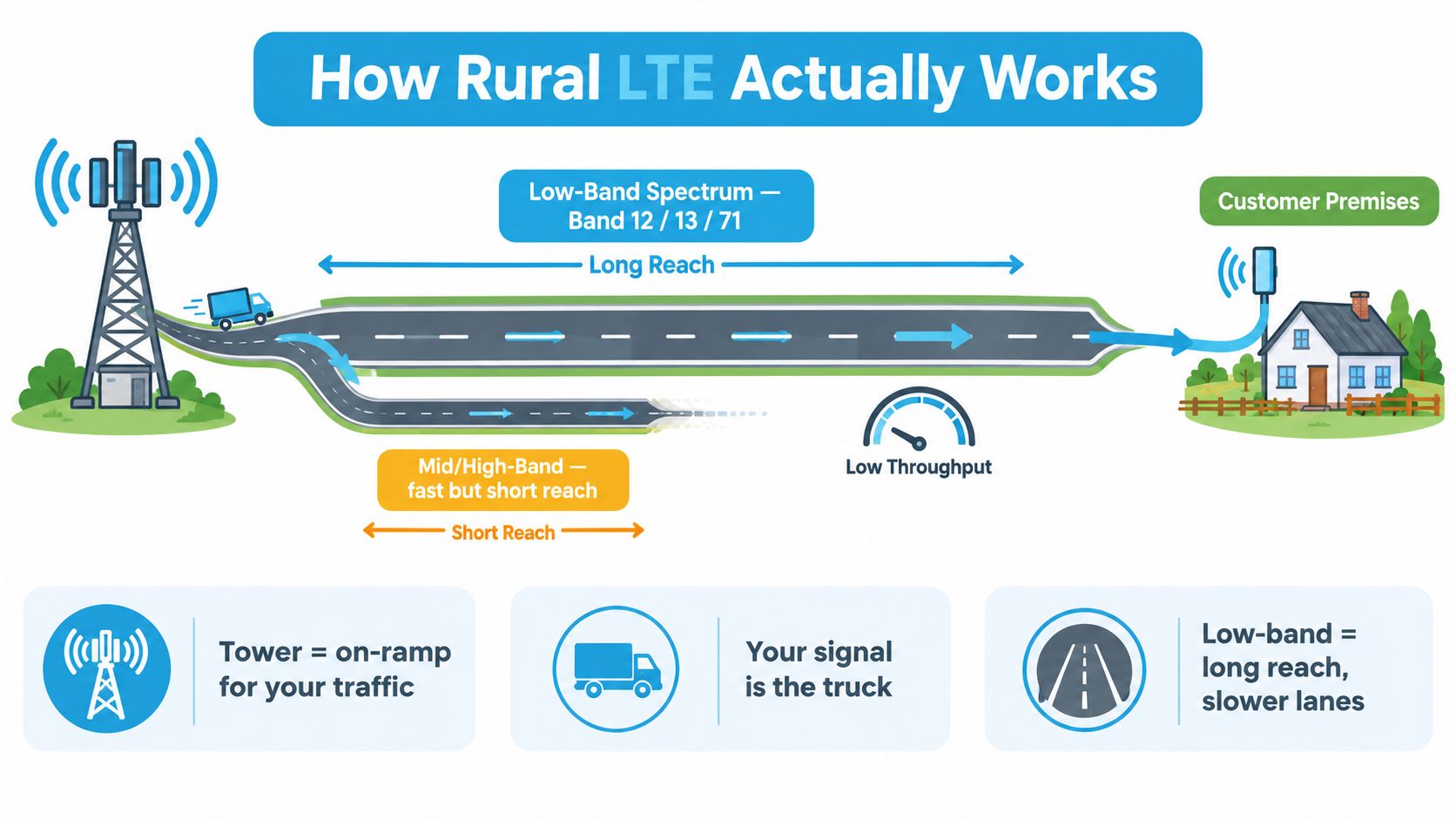
Link budget accounts for every gain and loss along that path. Coax length, connectors, walls, trees, terrain, and antenna aim all affect the signal arriving at the modem. Improve the path before paying for a faster plan: place the antenna higher, shorten cable runs, and aim it toward the usable tower.
Carrier aggregation can combine multiple bands when the modem and network support it. Read this explanation of carrier aggregation before choosing hardware.
Choosing a Carrier When You Live Off the Grid
Carrier choice is where most rural setups go wrong. People buy whatever looks good on a coverage map, then discover that the map didn't tell them which bands are usable at the house, how congested the tower is, or whether the signal survives inside their building. That's why the right approach is address-by-address, not zip-code by zip-code.
What to look for first
Verizon and AT&T have historically been the strongest rural anchors because they've pushed deeper low-band footprints. T-Mobile has improved fast, especially where its mid-band holdings help, but it still behaves differently from the other two in edge-of-cell rural terrain. The FCC's more recent 4G LTE analysis found about 97% of the non-rural population was covered by at least three providers, compared with about 81% of the rural population, and estimated rural coverage near 95% for AT&T, 92% for Verizon Wireless, and 75% for T-Mobile (FCC 4G LTE analysis).
That doesn't mean one carrier wins everywhere. It means you need to match the carrier to the local band environment. In a lot of Plains and Appalachian terrain, Verizon Band 13 and AT&T Band 5 have been the workhorses. In parts of the Mountain West, T-Mobile can surprise people where mid-band or cleaner tower spacing helps. Still, the only opinion that matters is the one measured at your actual site.
Check the nearest tower bands before you commit. If the local tower only gives you weak low-band, you buy a system built for weak low-band. If a better carrier sits on a cleaner path, use that instead.
MVNOs and multi-IMSI services
Resold plans can make sense, but only when you understand the trade-offs. MVNOs and multi-IMSI SIM aggregators can give you flexibility and sometimes easier multi-network testing, but they can also come with deprioritization, hotspot limits, or weaker support for serious fixed-use cases. If your location is borderline, the SIM is part of the engineering stack, not just the billing stack.
The cleanest decision rule is this. Check tower location and bands in the FCC ASR database or a mapping tool like CellMapper, test SIMs from at least two carriers, and only then decide on the hardware. You're buying the best path, not the prettiest plan.
| Rural LTE Carrier Comparison at a Glance | Strongest Rural Bands | Typical Rural Use Case | Watch Out For |
|---|---|---|---|
| Verizon | Low-band coverage layers | Farms, cabins, long-driveway homes | Congestion and weak indoor performance |
| AT&T | Low-band coverage layers | Rural primary internet and backup lines | Local tower quality varies a lot |
| T-Mobile | Mid-band plus improving low-band | Sites with cleaner tower access | Edge-of-cell reliability can be uneven |
| MVNOs and multi-IMSI services | Depends on host network | Testing, backup, and flexible routing | Deprioritization and hotspot restrictions |
Hotspots, Routers, and Antennas That Make LTE Work
A rural LTE setup is one system, not three separate purchases. The modem talks to the tower, the router serves your devices, and the antenna fixes the part that usually hurts most, the actual radio path. If one piece is weak, the whole stack feels weak.
A phone hotspot is fine for one laptop and a quick email check. It's not what I'd put in a cabin, a fifth wheel, or a remote office. The internal antennas are tiny, the device gets hot, and the connection gets shared among whatever else your family throws at it. For a real install, a dedicated hotspot or router with external antenna ports is the baseline, not the luxury.
Consumer-grade hotspots like the Netgear Nighthawk M6, MoFi 5500, and Pepwave units give you much better flexibility because they're built to accept outside antennas. For whole-home or RV use, Cradlepoint and Peplink style routers go farther, with Ethernet ports, dual-SIM failover, and stronger Wi-Fi coverage for multiple users. If you want a practical rundown of portable router categories, this portable wireless router guide is a useful reference.
Match the hardware to the job
- Phone or tether: good for temporary use, but poor at range, heat, and client count.
- Consumer hotspot: better for travel and light fixed use, especially when you need external antennas.
- Home or industrial router: the right choice for multi-device homes, RVs, and wired backhaul.
Antennas are where the gains happen. A MIMO panel or LPDA log-periodic aimed at the tower can transform a weak setup, especially when the modem is decent but the signal path is messy. Keep the system matched, 50 ohm impedance, the right connector type, and band support that fits the carrier you picked. Otherwise you just buy expensive parts that don't talk to each other well.
Antenna Placement and Signal-Boosting That Works
Antenna choice matters, but placement matters more. I've seen good antennas perform badly when mounted too low, aimed poorly, or connected with cheap cable that consumes the gain before it reaches the modem. In the field, height is the first lever I pull.
A higher antenna clears more terrain, trees, and rooflines between your site and the tower. A mast, eave mount, or non-penetrating roof mount usually outperforms an indoor setup. Use the carrier map or CellMapper to identify the tower bearing. Aim the antenna, test it, and only then secure the mount.
Field rule: raise first, then aim, then test. If the signal improves at each step, continue. If it does not, stop testing that direction.
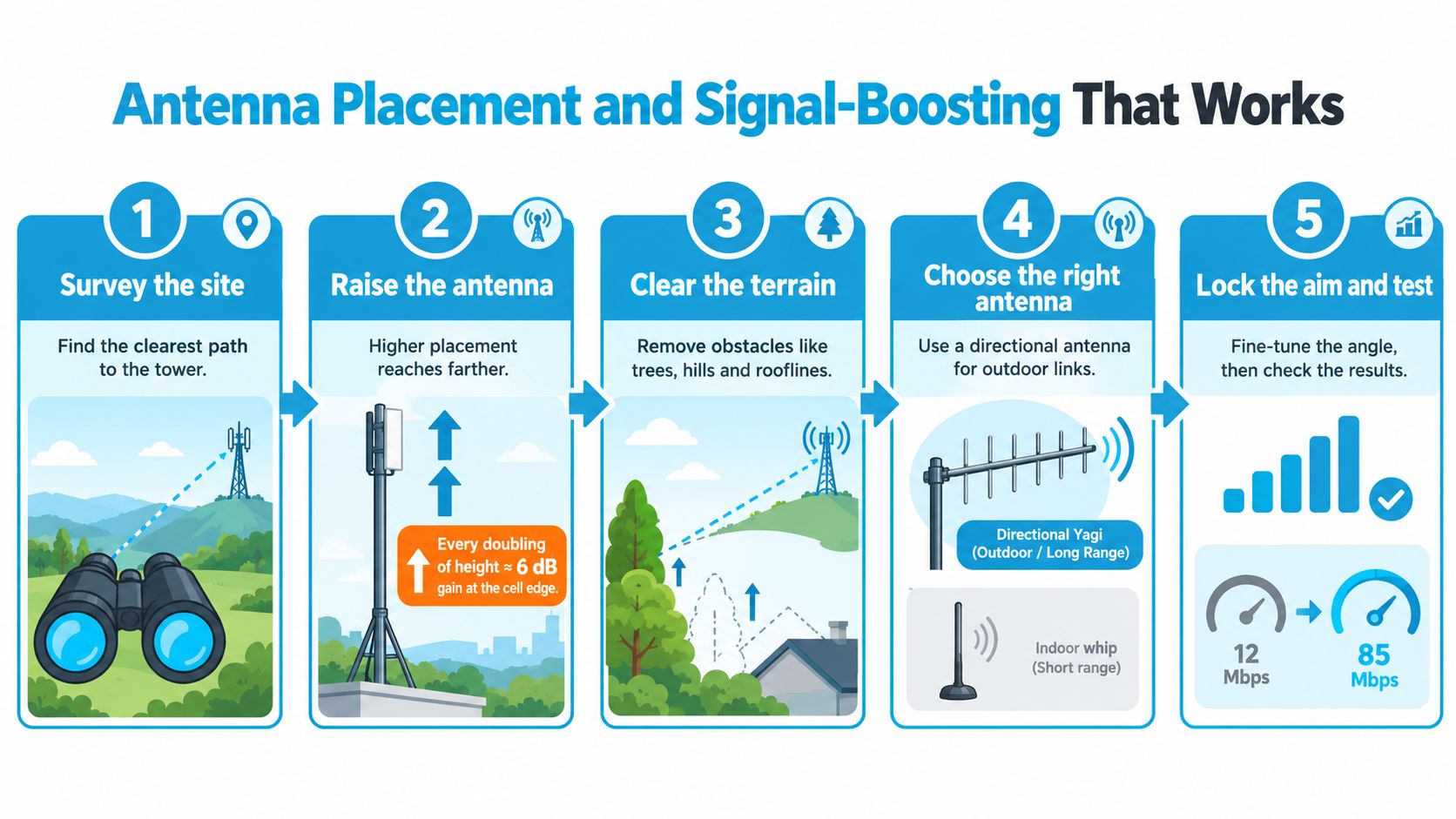
Directional antennas usually beat omnis when you know the tower location. Omnis are easier to mount and make sense for mobile use or properties served by towers in several directions, but they sacrifice performance compared with a properly aimed directional antenna. For a fixed site, choose the directional model with low-loss coax, even when an omni would be simpler to install.
Cable quality and routing decide whether that antenna gain reaches the modem. Use LMR-400 or better, keep the run short, add a lightning arrestor, and ground the mast properly. If placement still leaves the link short, review this guide to cellular signal boosters. A booster can help with a usable outside signal, but it cannot create coverage where the tower path is absent. Retest at each height with the same modem and SIM you will keep. One honest test at the final mounting point beats ten optimistic readings from the truck seat.
Real-World Performance and Speed Expectations
People get burned when they judge rural LTE against urban marketing numbers. Carrier ads are built for the best-case customer, not the person sitting at the far edge of coverage with trees in the way and one tower serving a wide area. If you want a usable setup, plan for actual conditions, not the brochure.
On a strong low-band signal with a good outdoor antenna, 10-25 Mbps down and 3-10 Mbps up is a sensible expectation. That's enough for one TV streaming, a video call, and several browsing devices without drama. On cleaner mid-band with line of sight, 25-75 Mbps is realistic. At the far cell edge with no external antenna, sub-5 Mbps is still common, and that's where people start blaming the router when the actual issue is the signal path.
The FCC's rural LTE coverage data also helps explain the pain. In 2016, it noted 11% of U.S. road miles had no 4G LTE coverage, 16% of square miles had no LTE coverage or only subsidized coverage, 1.4 million Americans had no LTE access, and 1.7 million lived where LTE depended on subsidy (FCC rural wireless coverage blog). That's a coverage problem, not a plan problem.
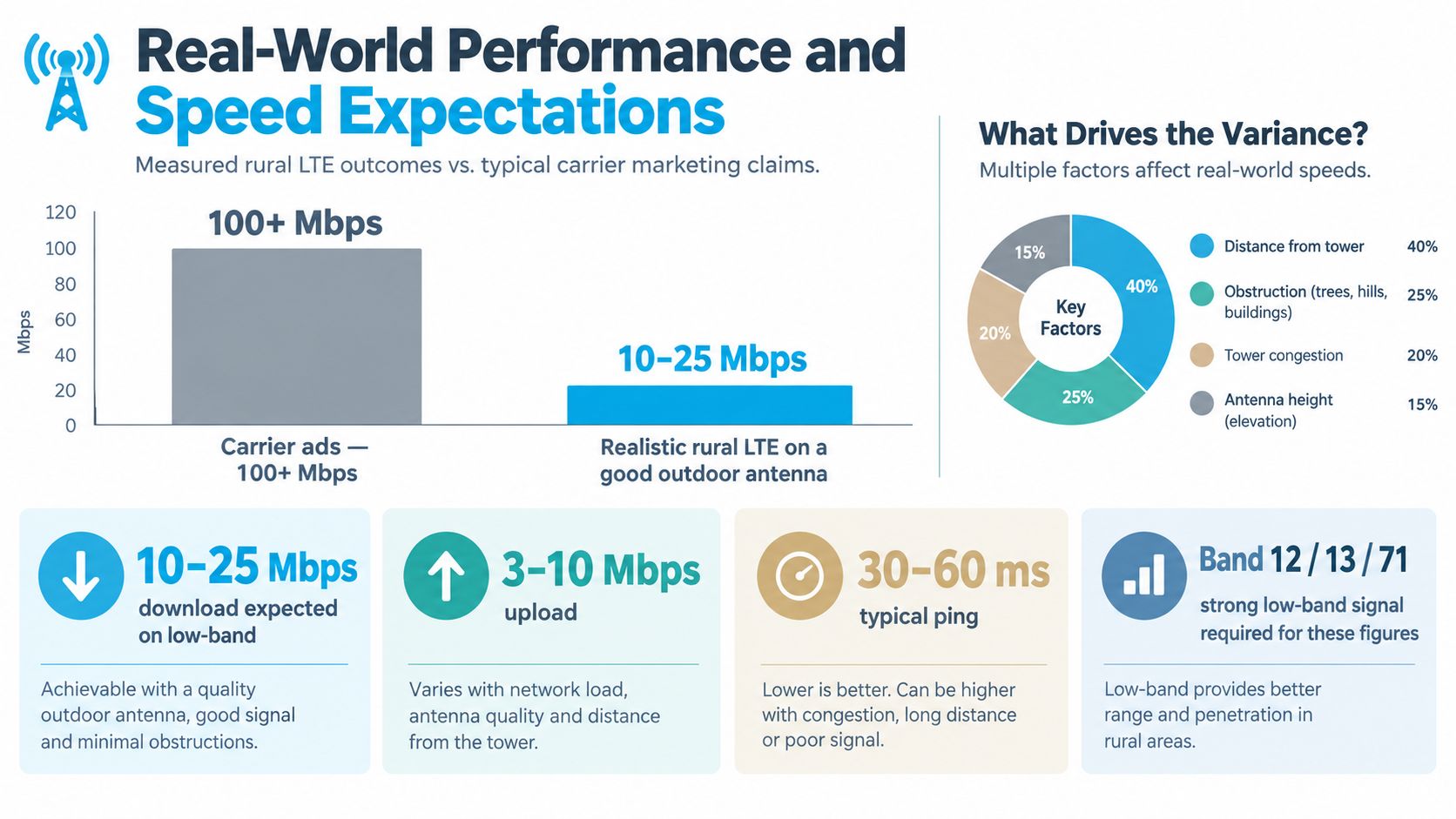
Latency on LTE is usually fine for video calls and cloud apps, but it won't feel like fiber. In field measurements of rural and tribal LTE networks, performance was dramatically worse than urban deployments, with throughput 11× lower, latency 3× higher, video streaming quality 9× poorer, video start-up delay 10× higher, and web browsing more than 2× slower under the same LTE plans (field study on rural and tribal LTE performance). That's why I tell people to test real workloads, not just run a speed test and call it done.
How SwiftNet Simplifies the Whole Setup
Anyone who needs rural LTE internet typically avoids acting as their own RF engineer. The goal is a connection that works at the house, in the RV, or out by the barn, without spending weekends comparing bands and decoding signal graphs. A managed service can help when the problem is fragmentation, not lack of technology.
That fragmentation is the ugly part of rural LTE. Different carriers behave differently in different counties, some plans get deprioritized faster than others, and a hotspot that works fine in one location may underperform two ridges over. SwiftNet Wifi offers virtual SIM-based 4G and 5G internet options that connect through major U.S. carriers, plus a 7-day risk-free trial and support for households, RVs, and rural users who need a simpler path to a working setup.
The practical value is in the process. A service like this can pre-qualify coverage, pair the router with the antenna setup, and reduce the guesswork around carrier selection and hardware sizing. It doesn't create signal where none exists, and it won't turn a dead zone into magic internet. It does give you a shorter path from “maybe” to “usable,” which is often exactly what rural and RV users need.
Your Next Steps for Better Rural Connectivity
Start with the address, not the product. Check the coverage maps for the two strongest carriers at your exact location, then identify the best roofline, window, or mast position for an external antenna. If you can't improve the radio path, don't spend more on the router.
Then buy with a return window. Order a router and antenna combo that fits the bands you found, test it under realistic load, and run video calls and streaming at the same time you'd use them. If the signal improves when you raise the antenna and clean up the line of sight, keep that install. If it doesn't, switch carriers or rethink the tower path before you lock yourself into a bad setup.
SwiftNet Wifi helps people turn that process into something practical instead of guesswork. If you want a managed rural LTE setup with carrier access, matched hardware, and real support, visit SwiftNet Wifi and see whether your address is a fit for a trial.


