

You're halfway through a Zoom call when the lights flicker, the screen freezes, and the modem goes dark. At a remote campsite, the same failure can happen just as you're checking a storm alert or sending a work file. A modem backup battery can keep your local network powered, but it can't guarantee that the internet beyond your property is still operating.
That distinction drives every sensible buying decision. You need to know which equipment must stay alive, how many watts it draws, how many hours you need, and whether your carrier's network will still deliver a signal. The right setup is sized in usable watt-hours, tested under real conditions, and matched to your home, RV, or rural connection.
Why the Lights Go Out and the Wi-Fi Goes With Them
A power failure rarely affects only the lamps. The electricity feeding your fiber ONT, cable modem, DSL modem, Wi-Fi router, mesh nodes, and VoIP adapter disappears at the same time. Your phone may still show a full battery, but it has no useful Wi-Fi connection because the network equipment has shut down.
Even a short flicker can be disruptive. A modem or ONT may reboot and need to resynchronize with the provider before service returns. A two-second interruption can therefore create several minutes of lost connectivity, especially when the equipment restarts in sequence instead of all at once.
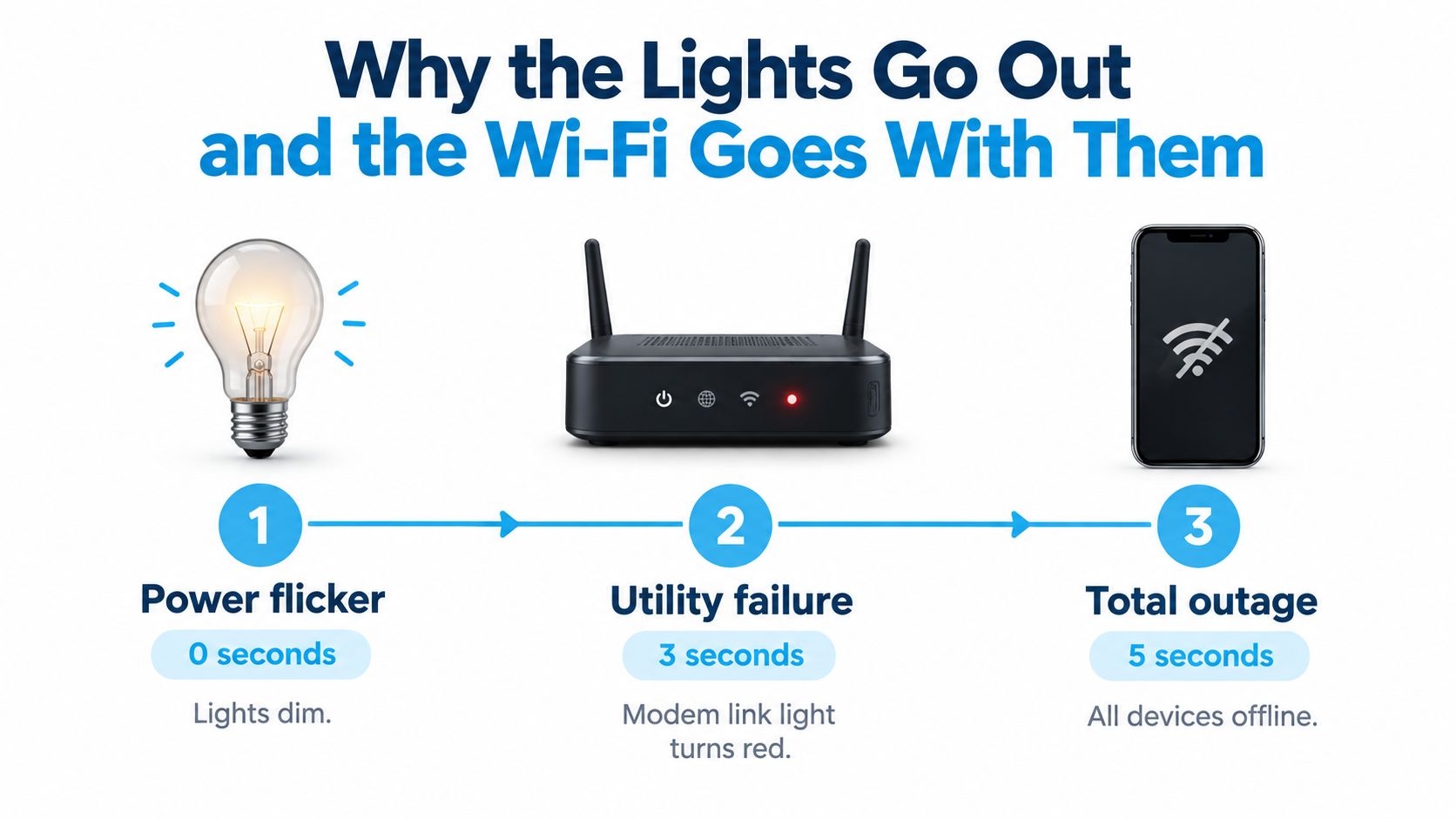
The equipment chain matters
Think of your connection as a chain:
- The ONT or modem translates the provider's signal into a usable connection.
- The router distributes that connection to wired and wireless devices.
- Mesh nodes and switches extend or route service around the property.
- Your laptop, phone, camera, and smart devices depend on that powered chain.
If one essential link fails, the network can fail even when the other devices remain charged. Powering the router alone won't help if the fiber ONT is off. Powering the modem won't give you Wi-Fi if the router has no electricity.
For a useful look at modem status indicators and what their flashing patterns mean, see this guide to flashing lights on a modem. Clear customer communication around these failures also matters, particularly for teams trying to improve telecom customer satisfaction.
Field rule: A battery protects the equipment you control. It doesn't repair a damaged line, restart a carrier node, or restore service after an upstream failure.
Telecommunications resilience policy became more prominent after Hurricane Katrina in 2005. In 2007, the FCC adopted a backup power rule requiring U.S. providers to maintain emergency backup power for network assets normally supplied by the electric utility. The rule specified 24 hours for central offices and 8 hours for cell sites, remote switches, and digital loop carrier remote terminals, applying across roughly 220,000 U.S. cell sites. Light Reading documents that resilience milestone.
Your household setup is smaller, but the principle is the same. Resilience depends on what stays powered when the grid doesn't.
What a Modem Backup Battery Actually Does
A modem backup battery is a DC or AC power source that keeps networking equipment operating after utility power drops. The simplest version may be a battery pack supplied by an internet or phone provider. Another version is a UPS with battery-backed outlets. A larger option is a portable power station with a lithium battery, AC outlets, USB ports, and an inverter.
The operating sequence is straightforward. While utility power is available, the unit passes power to your equipment and charges its battery. When the outlet loses power, the battery takes over. A fast transfer helps prevent the modem, ONT, or router from rebooting.
What it can power
Connect the devices that form your actual internet path:
- Cable modem, if your service uses coaxial cable.
- Fiber ONT, which converts the optical signal for your home network.
- DSL modem, where telephone-line broadband remains in use.
- Standalone router, including a cellular or fixed-wireless router.
- Mesh nodes and small switches, but only when they're necessary for the area you need to cover.
- Small VoIP adapters, if voice service is part of your emergency plan.
A battery doesn't power the fiber tap, neighborhood cabinet, cable headend, wireless tower, or carrier backhaul. It also doesn't guarantee that a fixed-wireless or cellular network will remain available during a major storm.
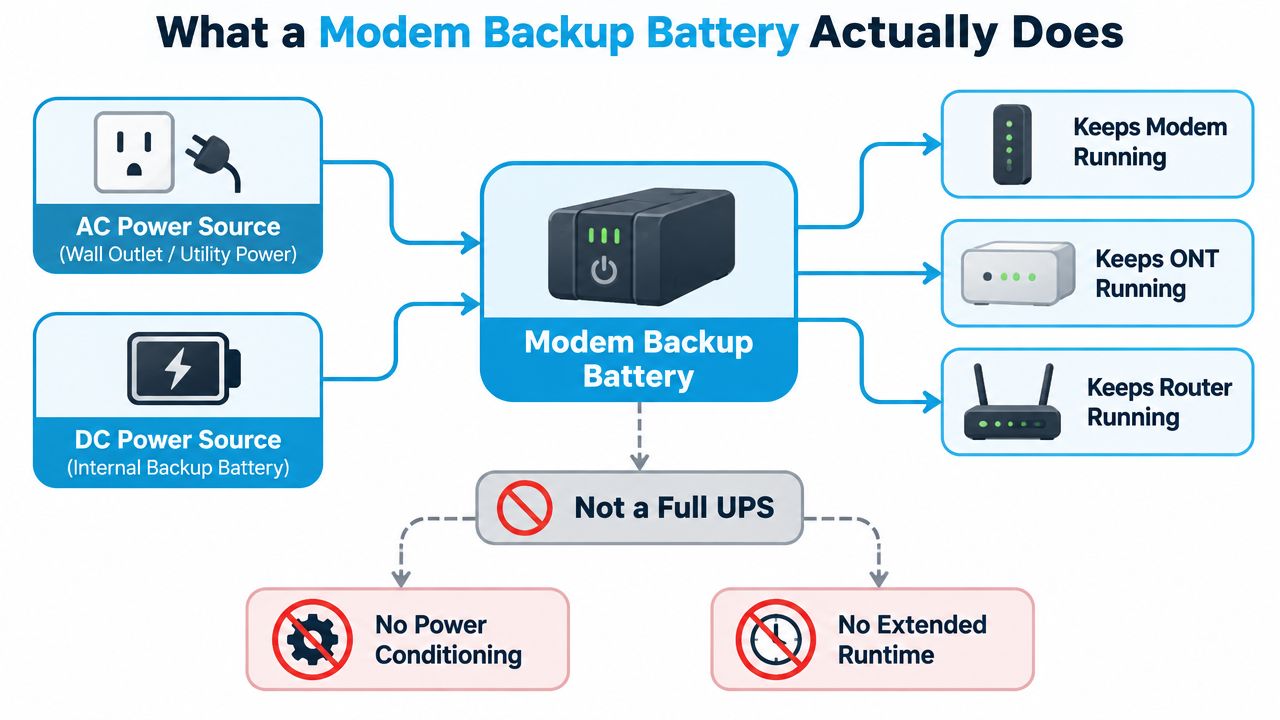
Battery, UPS, and power station are different tools
A dedicated modem battery is compact and usually designed around particular ISP equipment. It may provide DC output that avoids inverter losses, but compatibility is narrow.
A UPS generally adds surge protection and power conditioning. It can be the better choice where brownouts, voltage swings, or repeated flickers threaten sensitive equipment. A portable power station offers more capacity and flexibility, but its AC inverter can waste energy compared with direct DC power.
The practical test is simple: connect every required device, unplug utility power, and verify that the modem or ONT remains synchronized and the router still provides usable internet. A battery that keeps LEDs lit but leaves the connection unusable isn't a successful backup.
UPS, Power Station, or Dedicated Modem Battery
There are three sensible paths, and each solves a different problem. A dedicated modem battery is the smallest and easiest choice. A UPS is better for a desk-based network that needs power conditioning. A portable power station is the strongest option for RV use, rural outages, and equipment beyond the modem-router pair.
The table below uses only the capacity and pricing ranges supplied for these options. The runtime column is a theoretical guide at a 15-watt load, before real-world conversion losses and battery aging.
Modem Backup Power Options Compared
| Option | Typical Capacity | Runtime (15W load) | Cost Range | Best For |
|---|---|---|---|---|
| Dedicated modem battery | Provider-specific DC or AC pack | Short outage coverage, commonly about 2 to 8 hours for modem-only use (Bell support guidance) | Provider-dependent | One compatible modem or ONT |
| Small UPS | 300 to 1000 VA | About 5 to 15 minutes for a modem-router combination | $40 to $120 | Home office protection and short interruptions |
| Portable power station | 150Wh to 1500Wh lithium unit | About 3 to 30+ hours, depending on load and efficiency | $100 to $1500 | RV travel, rural backup, and multiple devices |
A dedicated battery wins when your provider supplies compatible hardware and your goal is to bridge a short interruption. It's cheap, tidy, and often supports the correct voltage without an inverter. Its weakness is dependence on specific equipment and limited capacity.
A small UPS is the practical desk solution. It keeps the modem, router, monitor, or VoIP equipment connected to battery-backed outlets and can reduce the damage caused by unstable utility power. A conventional UPS guide such as this uninterruptible power supply guide is useful when you need to understand conditioning and battery-backed outlet behavior.
A power station costs more and takes up more room, but it belongs in an RV or rural emergency kit. It can run networking gear, charge phones, and support other small loads. Choose pure sine wave output when your ONT or other sensitive equipment requires it, and choose DC output where possible to avoid converting battery power to AC and back again.
For many households, the best answer is not the biggest unit. It's the smallest compatible device that powers the entire required network chain for the outage duration you face.
Sizing Your Backup in Watt-Hours Not Marketing Hype
Ignore the runtime printed on a box until you know the load behind it. A modem backup battery must be sized for the combined wattage of the modem, ONT, router, mesh hardware, and switches you intend to keep online.
Start with the labels on each device. The supplied guidance gives these practical ranges:
- A cable modem commonly draws 8 to 15 watts.
- A fiber ONT commonly draws 10 to 20 watts.
- A Wi-Fi 6 router commonly draws 10 to 25 watts.
- A mesh node commonly draws 8 to 15 watts.
Those figures are equipment ranges, not a guarantee for your hardware. Use a plug-in watt meter if you want a real measurement, especially when the network includes several mesh nodes or a switch.
The calculation
The core formula is:
Total watts × hours needed = watt-hours required
If you're using an inverter-based UPS or power station, add a margin for conversion losses, reserve capacity, standby draw, and battery aging. The practical guidance also recommends sizing for the total load, not the modem alone, and accounting for inverter losses. BLUETTI explains the load and runtime relationship.
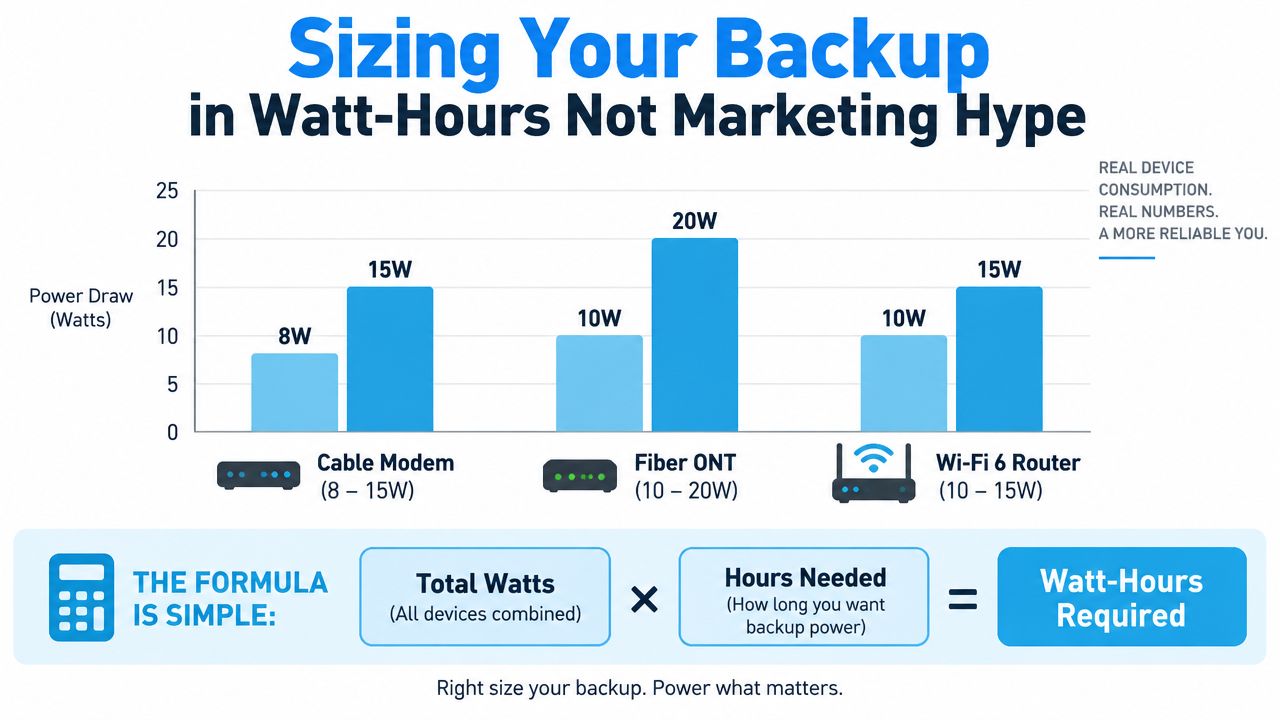
Consider a setup with a 12-watt modem, 15-watt ONT, and 15-watt router. The direct load is 42 watts. Four hours of coverage requires 168 watt-hours before losses. With roughly 30% added for conversion losses, the shopping target is about 218 watt-hours, so a 300Wh power station is a safer choice than a 150Wh unit marketed as sufficient.
A small networking UPS may provide only 2 to 4 hours, a traditional UPS about 4 to 8 hours, and a larger power station a full day or more, depending on load. Anker Solix discusses realistic runtime and maintenance. Another guide notes that some UPS units keep a modem-router setup running for only about 15 minutes at a 100-watt load, while carrier guidance places modem-only backup around 2 to 8 hours. EcoFlow explains why wattage changes runtime.
Use this router and modem UPS guide alongside your measured load, not instead of it.
Installation Tips and Safety Habits That Actually Matter
A correctly sized battery can still fail if it's installed carelessly. Start by identifying every device that must remain powered, then place the backup source close enough to connect those devices without stretched cables or improvised adapters.
Build the power path cleanly
Plug the UPS or battery into a suitable wall outlet. Don't daisy-chain power strips, and don't bury the unit behind furniture where heat can accumulate. A power station under a warm router or inside a closed cabinet is asking for trouble.
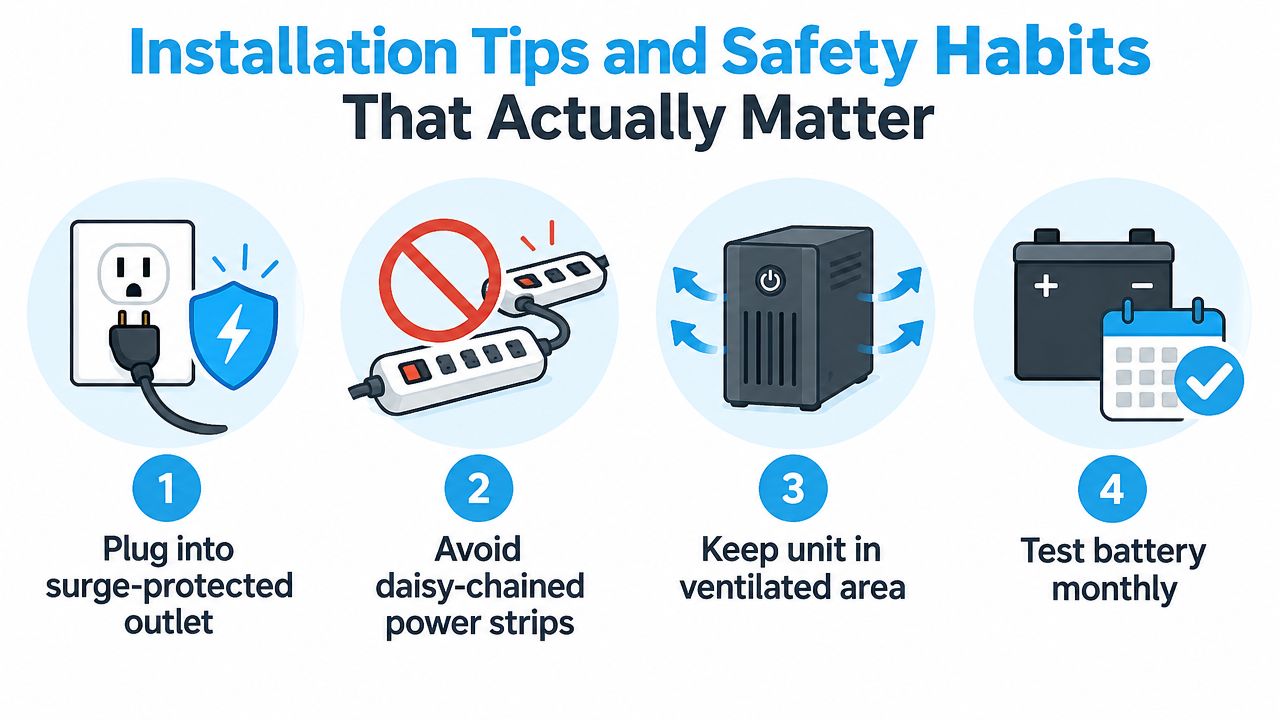
For DC systems, match the voltage, polarity, and barrel-jack size exactly. A connector that fits physically can still deliver the wrong voltage or polarity. That's one of the most common reasons a modem backup installation fails immediately.
Keep air around the battery, especially in an RV where storage compartments can become hot. Don't cover ventilation openings with blankets, clothing, or paperwork. Follow the manufacturer's charging and storage instructions rather than treating every battery chemistry as interchangeable.
Schedule replacement and testing
Telecom support materials often describe new backup batteries as providing 8 to 24 hours of standby power, and some recommend replacement about every three years. Bell's battery information also makes clear that actual household runtime is much shorter for many modem-only setups.
A utility policy for fiber, fixed-wireless, or coaxial residential voice service stated that without backup power or an alternative such as a generator, customers couldn't make calls, including 911 calls, during an outage. It described an included battery lasting up to 8 hours on standby and about 4 to 6 hours of talk time. The California Public Utilities Commission decision outlines those voice-service expectations.
Test the installation by unplugging utility power. Confirm that the modem or ONT stays synchronized, the router continues broadcasting, and a device can reach the internet. Repeat the test periodically, because a battery can age while its indicator still appears normal.
Best Picks for Home, RV, and Rural Setups
The right modem backup battery depends on the shape of the outage and the way you use your connection. A home-office worker usually needs clean, automatic coverage. An RVer needs portability and efficient charging. A rural household needs enough stored energy to survive an outage that lasts longer than a typical desk UPS can handle.
Home office
My home-office pick is a 600VA/300W pure sine wave UPS connected to the modem or ONT, router, and essential voice equipment. CyberPower CP900AVR and APC Back-UPS Pro are examples of the product class to investigate, but the exact runtime depends on the measured load and battery condition.
Expect a 2 to 4 hour target for a compact networking setup only when the measured load and usable capacity support it. The main advantage is automatic transfer and voltage regulation. The weakness is limited energy storage. A UPS is not a substitute for a generator or large power station during a long storm.
Full-time RV
For a full-time RV, choose a 300Wh to 500Wh portable power station, preferably with a 12V DC output that matches the router. Jackery Explorer 300 and EcoFlow River 2 are examples of the form factor. A DC router can skip inverter losses and make the stored battery last longer than an AC-only arrangement.
Charge the station from shore power, solar, or the vehicle's charging system. The trade-off is that portable units occupy more space than a dedicated modem battery and still depend on the upstream connection. A campsite with no carrier signal won't become connected just because the router has power.
Rural fixed location
A rural home needs a more serious reserve. I'd look at a 1000Wh to 1500Wh power station or lithium UPS, paired with a small 100W solar panel where local conditions permit. Rural outages can last 12 to 48 hours, so a compact UPS may only delay the failure.
The benefit is a useful reserve for networking gear, phones, and a work laptop charger. The downside is cost, weight, charging time, and the need to manage energy deliberately. Sacrifice entertainment loads first, not the equipment that maintains communication.
| Use Case | Recommended Setup | Capacity | Powers | Runtime | Price Range | Main Trade-Off |
|---|---|---|---|---|---|---|
| Home office | Pure sine wave UPS | 600VA/300W | Modem or ONT, router, VoIP equipment | About 2 to 4 hours for a suitable networking load | Not specified | Limited long-outage capacity |
| Full-time RV | Portable power station with DC output | 300Wh to 500Wh | 12V router, modem or gateway, phones | Overnight coverage depends on load | Not specified | Space and upstream-signal dependence |
| Rural fixed location | Lithium UPS or power station with solar input | 1000Wh to 1500Wh | Network chain, phones, laptop charger | Extended outage coverage, load dependent | Not specified | Higher weight and management burden |
If your router is the only device you need to protect, this overview of a router backup battery can help narrow the setup. For a separate connectivity layer, SwiftNet Wifi offers 4G hotspot and 5G router plans that connect through major nationwide carriers, which can make it useful as a mobile or alternate internet option when your primary fixed service fails.
Beyond the Battery Planning for Real Outage Survival
A modem backup battery is one layer, not an outage plan. It can keep your ONT, modem, and router powered for the time supported by the battery and load. It can't restore a dark carrier node, repair a damaged fiber or coax line, or keep a full desktop workstation running indefinitely.
Build redundancy around the network equipment that matters most. A mobile hotspot or cellular failover router gives you another route to the internet when the fixed provider is unavailable. It won't solve every congestion or coverage problem, but it prevents one failed access network from stopping all communication.
Decide what deserves battery power
Keep the essential path lean:
- Keep the modem, ONT, and primary router powered. These devices maintain the connection.
- Power one necessary mesh node or switch. Unplug extras if the covered area is smaller during the outage.
- Protect a work laptop charger. A laptop is usually more valuable than a desktop tower and monitor during an extended failure.
- Consider a cordless phone base or security camera PoE injector. Include them only if communication or security requires it.
- Sacrifice smart TVs, game consoles, decorative lighting, and unused mesh nodes. They consume reserve without preserving connectivity.
A UPS alerting app, battery display, or smart plug can show whether the setup is still drawing power and how much runtime remains. Keep a written shutdown sequence beside the equipment. When capacity gets tight, you shouldn't have to guess which plug to remove.
The correct answer to “How long will my internet last?” has two parts. First, calculate the watt-hours needed for your equipment. Second, confirm whether the upstream provider network remains online. Household backup power solves only the first problem, so pair it with a cellular fallback when remote work, travel, safety calls, or rural access can't wait.
Choose your equipment by measuring the modem, ONT, router, and mesh load before buying a battery. For a primary or backup connection suited to rural homes, RV travel, and mobile work, visit SwiftNet Wifi to review 4G and 5G options and find a setup that matches your coverage needs.


