

You're parked on public land, the nearest town is a long drive away, and your laptop is showing one bar of cellular service. A client invoice needs to go out, a telehealth appointment starts soon, or the game you planned to stream is about to begin. The old backup plan, drive to a library or sit outside a coffee shop, doesn't fit full-time RV travel anymore.
RV portable internet has become part of trip planning, alongside water, fuel, weather, and battery capacity. A 2026 survey found that 73% of RVers and campers stay connected on the road, while 68% say internet availability affects where they camp. Yet 73% also report losing internet access entirely while traveling, which explains why a single connection rarely deserves your full trust. (SatelliteInternet's RV connectivity survey)
The right setup depends on what you do online. Casual browsing, work calls, large uploads, streaming, navigation, and emergency access place different demands on your connection. Hotspots, cellular routers, satellite internet, and campground Wi-Fi can all work, but each has a catch that marketing pages tend to bury.
Why RV Portable Internet Matters More Than Ever
An invoice upload is usually forgiving. A video call isn't. If the connection drops while you're sending a document, you can try again. If it disappears during a client presentation or medical appointment, the problem becomes personal and immediate.
That's why connected travel now means more than checking email at the next fuel stop. RV owners use internet access for safety and emergency communication, remote work, streaming, schooling, navigation, banking, and medical care. In the 2026 survey, 41% identified safety and emergency access as a top reason for internet, while 25% use it for remote work and 29% use it for video streaming. (SatelliteInternet's RV connectivity survey)
Road-tested rule: If missing a connection would cost you money, time, or access to care, don't build your setup around campground Wi-Fi alone.
The RV market also includes more travelers who stay out for extended periods, work from the road, or choose dispersed camping specifically to avoid crowded parks. An independent RV owner survey summarized by RV PRO found that 36.7% of respondents identified as full-time RVers, while 28.6% took several extended trips per year. The same survey recorded video streaming, remote work, and email as leading internet uses. (RV PRO's survey summary)
That combination changes the buying question. You're not asking, “How fast is this device?” You're asking whether it can hold a video call when the campground tower is busy, keep several devices online, protect work traffic, and conserve power when you're away from hookups.
The rest comes down to matching the connection to the job. A pocket hotspot may be perfect for a weekend traveler. A cellular router with external antennas makes more sense for a working household. Satellite fills the genuine dead zones, while campground Wi-Fi remains useful as a free supplement.
The Main Ways to Get Portable Internet in an RV
Most RV internet setups fall into four categories. Learn what each category is designed to do before comparing brands or plans.
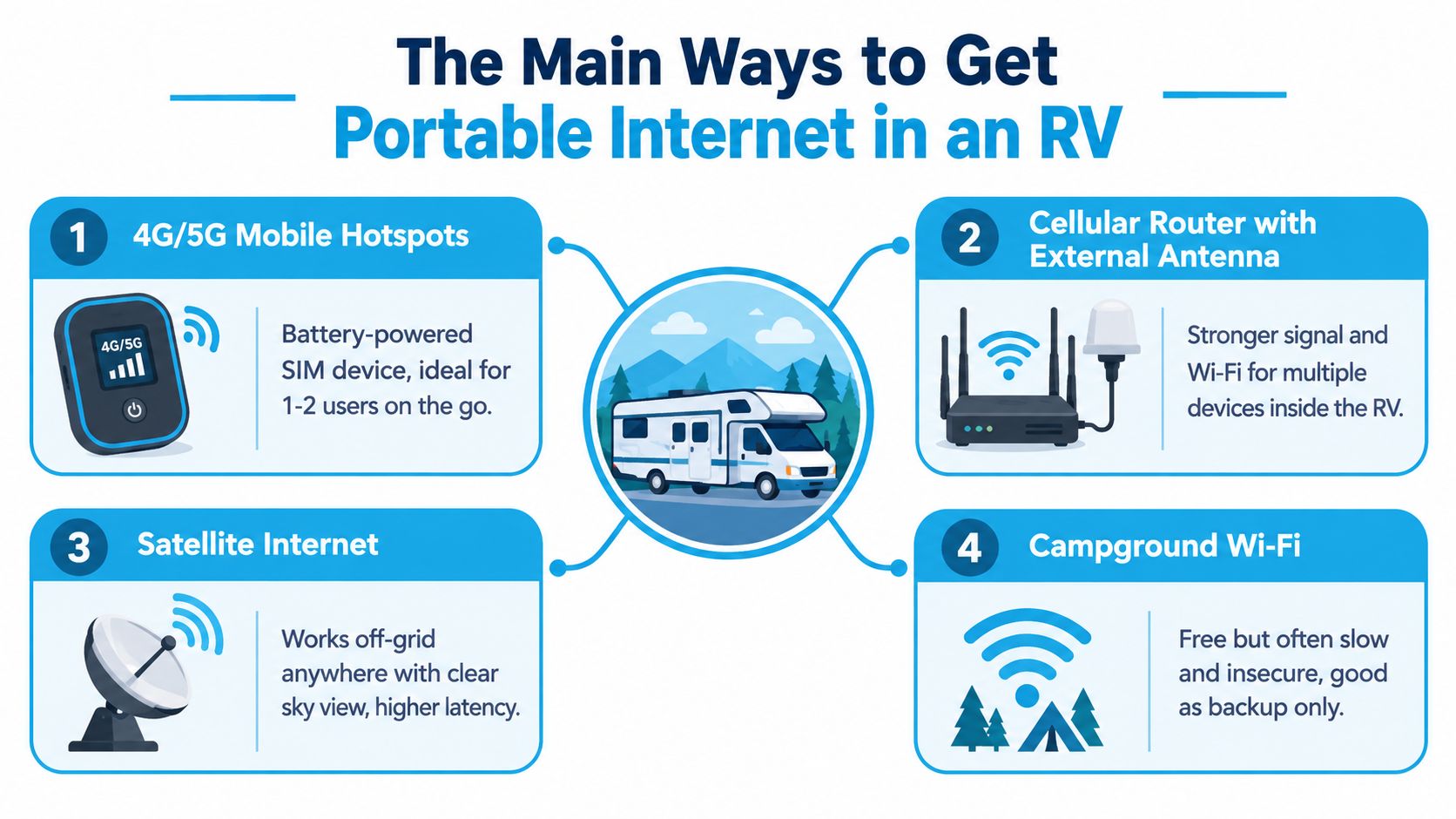
4G and 5G mobile hotspots
A mobile hotspot is a small battery-powered device with a SIM or eSIM connection. It creates a local Wi-Fi network for a laptop, phone, tablet, or television.
This is the easiest starting point for one or two users who browse, send email, join occasional calls, and stream selectively. It takes almost no installation, fits in a drawer, and can travel outside the RV. The downside is heat, battery drain, small internal antennas, and plan restrictions. A hotspot that works well beside a city tower may struggle at a remote campsite.
The subscription is usually a dedicated data-only line or a hotspot allowance attached to a phone plan. Read the tethering language carefully. “Unlimited” on the phone doesn't necessarily mean unlimited high-speed hotspot data.
Cellular routers with external antenna ports
A cellular router is the workhorse for serious RV use. It usually accepts a SIM, runs from 12V or an AC adapter, and distributes Wi-Fi to the entire coach. Better models include Ethernet ports, external antenna connectors, carrier aggregation, and management tools such as band selection.
The hardware occupies more space than a pocket hotspot and normally stays installed or stored in one cabinet. In return, it can handle more devices, maintain a steadier connection, and pair with a roof or pole-mounted MIMO antenna. This is the sensible primary connection for remote workers, families, and anyone who depends on uploads or video meetings.
Plans vary from ordinary carrier data-only services to specialized mobile-router offerings. Some routers can also support more than one network, which matters when a single carrier has a dead zone along your route.
Satellite internet
Low-Earth-orbit satellite services, including Starlink, can provide broadband far beyond cellular coverage when the dish has a clear view of the sky. The hardware includes a dish, router or integrated Wi-Fi equipment, cables, and a power supply.
Satellite is the strongest answer for off-grid reach, not the most convenient answer for every campsite. Trees, canyon walls, nearby structures, and bad placement can interrupt service. The equipment also consumes meaningful power, so battery-only travelers need to include it in their energy plan. Roaming service adds flexibility, but availability and performance still depend on the location and sky view.
Use satellite as a primary connection only if you regularly camp where cellular networks disappear. Otherwise, it often makes more sense as a backup.
Campground and public Wi-Fi
Campground Wi-Fi costs nothing extra and requires little hardware. A laptop or phone connects directly, or a Wi-Fi extender can capture a distant access point and rebroadcast it inside the RV.
The catch is shared capacity. Service can feel acceptable during the afternoon and collapse when everyone returns to the park and starts streaming. Public networks also deserve less trust than your own cellular connection, especially for work accounts and sensitive data. A VPN helps protect traffic, but it can't make an overloaded access point faster.
A quick fit check is simple. Choose a hotspot for light personal use, a cellular router for dependable daily work, satellite for cellular dead zones, and campground Wi-Fi only when failure is acceptable.
The video below shows the practical context behind these choices.
Comparing RV Internet Options Side by Side
Speed claims are easy to advertise and hard to generalize. A connection's actual performance changes with tower congestion, terrain, antenna placement, obstructions, power mode, and carrier priority. For that reason, the table below focuses on the decision rather than pretending that one speed figure applies to every campsite.
| Option | Typical Speeds | Monthly Cost | Best For | Key Catch |
|---|---|---|---|---|
| Mobile hotspot | Variable, from usable browsing to strong 4G/5G performance near a capable tower | Plan-dependent | Casual travel, email, navigation, short calls | Battery drain, heat, and hotspot-specific caps |
| Cellular router | More consistent whole-RV coverage when paired with a suitable antenna and signal | Plan and equipment dependent | Remote work, multiple devices, streaming | Needs installation, power, and a plan that permits router use |
| Satellite internet | Broadband where the dish has a clear sky view | Plan-dependent | Off-grid camping and cellular dead zones | Obstructions, power draw, and roaming limitations |
| Campground Wi-Fi | Highly variable, often acceptable only when the network is lightly used | Usually included with the campsite | Light browsing and backup access | Shared capacity, weak security, and evening congestion |
Match the connection to the activity
For casual browsing, a phone hotspot or campground network usually works. You don't need an installed router just to check weather, download a map, or answer a few messages.
Streaming requires more consistency. It also consumes data quickly, so the plan matters as much as the radio. If several people stream at once, a cellular router or satellite connection makes the experience less frustrating, provided the plan permits that workload.
Work calls are less tolerant of interruption than streaming. A video service can buffer. A meeting cannot. A router with external antenna support is the more practical choice when you need dependable uploads, VPN access, and several connected devices.
The marketing trap: “Unlimited” describes the plan label, not necessarily the experience you'll receive through a hotspot or router.
One neutral RV internet resource notes that many smartphone and tablet unlimited plans cap high-speed hotspot use, after which speeds may be heavily reduced or disabled. Heavy users can also face throttling or termination when usage exceeds carrier expectations. (Habitatista's RV internet guidance)
Dedicated data plans show the same issue in a more obvious form. A plan directory lists AT&T postpaid data-only options for hotspots and routers at 50 GB for $55 per month and 100 GB for $90 per month, with prepaid hotspot, router, and tablet options also available up to 100 GB caps. (AT&T plan information summarized by Mitrade)
Before buying equipment, compare the number of users, expected streaming, upload needs, and route coverage. The portable RV Wi-Fi comparison from SwiftNet Wifi can help organize the hardware decision, but the plan's hotspot and roaming rules still deserve the final word.
Setting Up Portable Internet in Your RV
Don't wait until the first remote campsite to discover that your plan, router, or antenna doesn't work together. Set up the system at home, test it under normal workloads, and label everything before departure.
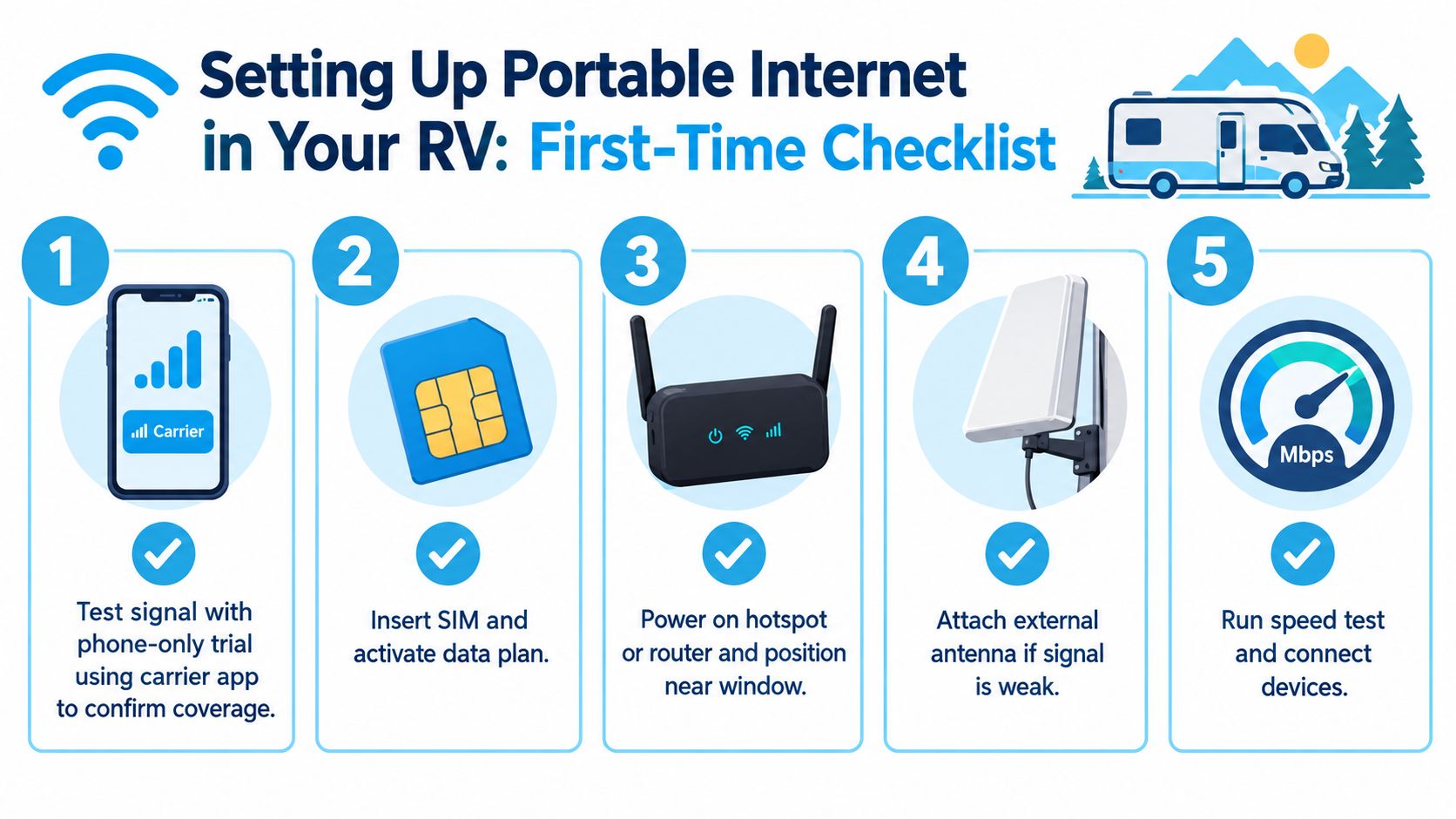
Start with a phone-only trial
Use your carrier's app and phone at the intended destination, or along a similar route, before purchasing dedicated hardware. A phone test doesn't reproduce every router's antenna advantage, but it gives you a useful first signal check.
Try the tasks that matter. Upload a file, open your VPN, join a short video call, and check whether the connection remains usable inside the RV rather than only outdoors. A strong signal indicator alone isn't enough.
Activate dedicated hardware
For regular travel, activate a fresh line in a dedicated hotspot or cellular router. Insert the SIM, confirm the device recognizes the carrier, and check the APN settings if the router doesn't connect automatically. Use the manufacturer's documentation for the correct values rather than copying settings from an unrelated carrier.
Change the administrator password immediately. Then create a clear Wi-Fi name and a strong Wi-Fi password. Keep the router where it can receive signal, usually near a window, but don't place it beside high-heat electronics or inside a metal cabinet.
Choose the antenna for your parking pattern
A window-mounted MIMO panel is sensible for short stays and renters. It can improve placement without drilling, and you can remove it quickly when you move.
If you stay in one location for weeks, a roof-mounted or pole-mounted exterior antenna is worth the installation effort. Keep the coaxial run as short and clean as practical because cable loss can undermine the gain you expected. Supported routers may also allow band locking, which can stop the device from wandering onto a weaker band.
Before leaving, run a speed test in the actual work area, test a video call, and measure upload performance. Label both ends of every cable. Future setup should be a repeatable routine, not a search through an equipment bin.
If satellite is part of your emergency plan, follow a dedicated installation guide such as SwiftNet Wifi's Starlink installation walkthrough and test the dish before relying on it.
Real-World Speeds, Data Caps, and Costs
The number on a box doesn't tell you what your laptop will experience behind an RV wall. Cellular performance changes with tower distance, terrain, network load, antenna placement, and whether the router is operating in a reduced-power mode.
A plan that handles email can still fail at sustained video calls or large uploads. Streaming also turns “light use” into a serious data requirement quickly. Before you choose a service, list the actual monthly tasks, including operating-system updates, cloud backups, television streaming, meetings, and security-camera traffic.
| Setup Type | Typical Download | Data Behavior | Monthly Cost |
|---|---|---|---|
| Phone tethering | Variable cellular performance, dependent on the phone and carrier | Usually governed by a hotspot allowance or throttling policy | Plan-dependent |
| Dedicated hotspot | Variable 4G/5G performance, generally better suited to travel than a phone held under load | Dedicated hotspot allowance, deprioritization, or high-speed threshold may apply | Plan-dependent |
| Cellular router with antenna | Can provide stronger and steadier service when the site and carrier support it | Depends on router plan, carrier policy, and network congestion | Plan-dependent |
| Satellite | Broadband access where sky visibility is adequate | Roaming and service terms apply, with performance affected by obstructions and congestion | Plan-dependent |
| Campground Wi-Fi | Unpredictable, shared performance | Usually no separate data allowance, but access quality varies by park | Often included with the site |
A 2026 survey found that RV travelers who pay for dedicated travel internet spend about $70 per month on average, showing that portable connectivity is a recurring travel expense rather than a rare accessory. (SatelliteInternet's RV connectivity survey)
The best budget isn't the lowest monthly price. It's the lowest cost that supports your actual failure tolerance. A casual traveler can accept a dead zone and use a library later. A remote worker may need a second carrier or satellite backup because a missed call has consequences.
Check the difference between phone data and hotspot data before signing up. SwiftNet Wifi's guide to estimating RV data needs is useful for building that estimate, especially if multiple people share the connection.
Hidden Rules and Common Pitfalls
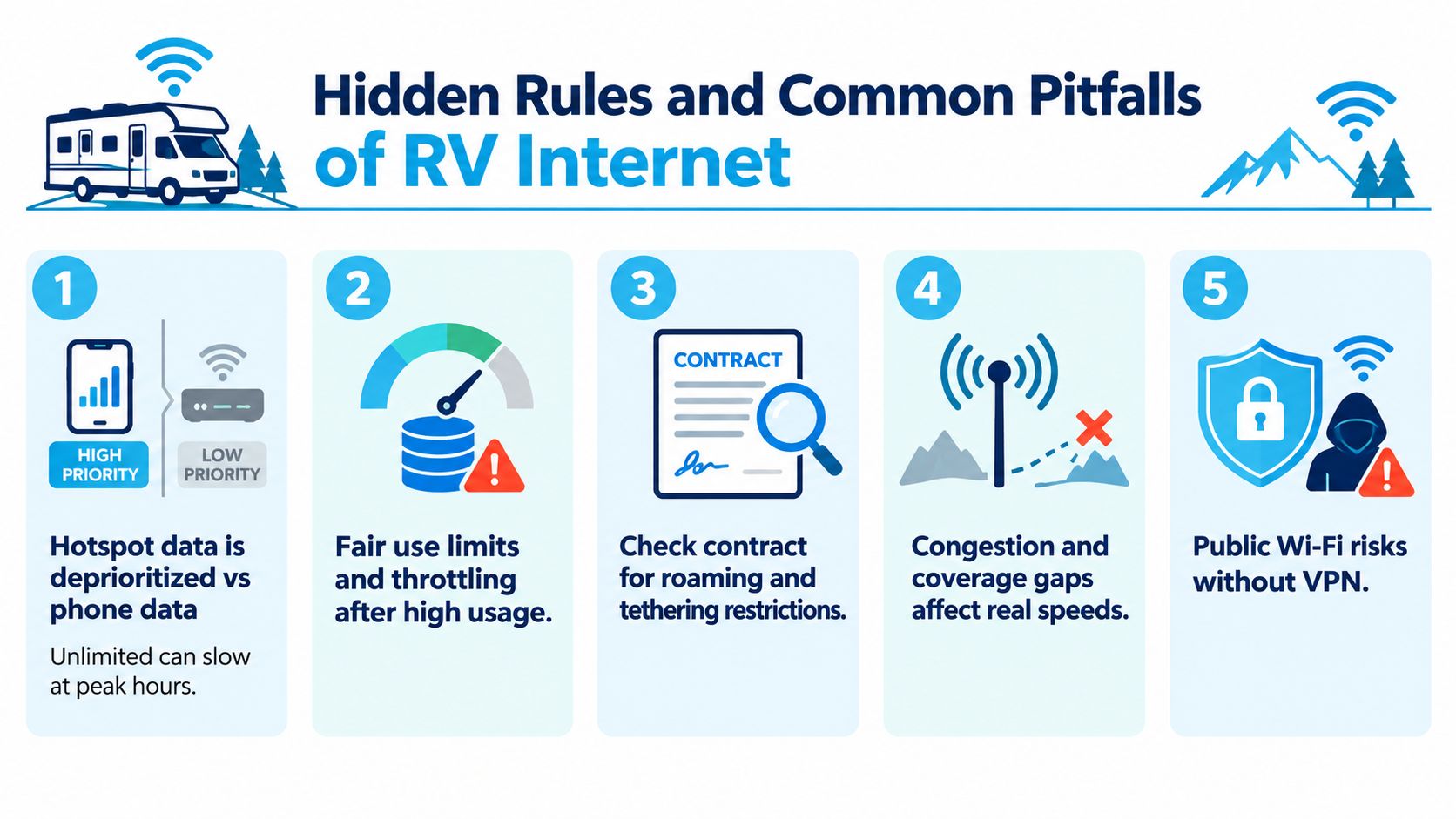
The first hidden rule is that hotspot data isn't always treated like on-device data. A phone can appear fast while the laptop tethered to it crawls because the carrier applies a separate allowance, priority level, or throttling rule. Read the hotspot section of the plan terms, not just the headline “unlimited” label.
The second is that a booster isn't a universal internet amplifier. A cellular booster works on supported cellular bands. It cannot improve a campground's Wi-Fi signal, and it won't fix a plan that has run out of high-speed hotspot data. In the United States, consumer cellular boosters are limited to parts of Bands 2, 4, 5, 12, 13, and 25, covering 700 MHz, 850 MHz, 1700 MHz, 1900 MHz, and 2100 MHz. (MyRoadNews' RV Wi-Fi booster guide)
Before buying a booster: Confirm that its supported bands match the networks and frequencies you expect to use.
Thermals and power create another quiet performance penalty. Mobile routers and hotspots may reduce or disable features such as 6 GHz Wi-Fi, wider channels, higher transmit power, or simultaneous radios when running on battery or when heat builds up. In an RV, enclosed cabinets and direct sun make that problem worse. (HighSpeedInternet's RV internet guidance)
Six-gigahertz Wi-Fi also has shorter range and penetrates RV walls less effectively than 5 GHz. Stable 5 GHz coverage usually matters more inside a metal coach than a Wi-Fi 7 label on the packaging.
Finally, public Wi-Fi should remain a fallback. Use your own cellular connection for sensitive work whenever possible, and protect public-network traffic with a reputable VPN.
Choosing the Right Setup for Your Travel Style
Start with your routine, not the hardware catalog.
Weekend travelers who mostly browse, explore, and stream occasionally should use a phone hotspot or compact dedicated hotspot as the primary connection. Campground Wi-Fi can handle low-risk tasks, but keep cellular available for privacy and predictable access.
Full-time nomads who work online need a cellular router with external antenna support and, ideally, access to more than one carrier. Add satellite when the route includes regular cellular dead zones. If you use an eSIM for travel or a temporary backup, spend time selecting the best eSIM plan based on hotspot rules, coverage, and expiration terms rather than the advertised data amount alone.
Off-grid explorers should make satellite the primary connection when clear sky view is realistic, with cellular as the backup. If trees or canyon walls commonly surround your campsites, satellite may not be dependable enough by itself.
| Travel Style | Primary Connection | Backup Option | Monthly Budget (2026) |
|---|---|---|---|
| Weekend warrior | Phone hotspot or dedicated hotspot | Campground Wi-Fi | Plan-dependent |
| Full-time remote worker | Multi-carrier cellular router with external antenna | Satellite or second cellular network | Plan-dependent |
| Off-grid explorer | Satellite internet | Cellular hotspot or router | Plan-dependent |
Ask four questions before ordering: Will I work from places with weak cell coverage? How many devices will connect? How much streaming and uploading will happen? Can I tolerate a dead zone? Those answers determine whether you need simplicity, antenna performance, network redundancy, or satellite reach.
SwiftNet Wifi offers 4G hotspot and 5G router plans for RV travelers, using virtual SIM technology to connect with major nationwide carrier networks, with plans starting at $49.99 per month, no contracts, and a 7-day risk-free trial. Visit SwiftNet Wifi to compare a travel-ready setup with your work, streaming, and backup needs before your next departure.
#rv #rvlife #rvliving #rvlifestyle #rvrenovation #rvremodel #rvtravel #rvcamping #rvadventures #ruralwifi #5gwifi #5ginternet


