

You're parked at an RV site or standing in a rural home where your phone shows a strong 5G connection near the window. Move a few steps inside, and the video call starts buffering. The router hasn't necessarily failed. You may be seeing the difference between cellular range from the tower to the router and Wi-Fi range from the router to your devices.
That distinction makes “5G router range” much easier to understand. A tower can reach your property, while the signal your router receives may still be weakened by terrain, trees, walls, or the specific 5G band in use. Then the router has its own local Wi-Fi coverage limits, especially if your laptop or smart TV connects over 5 GHz Wi-Fi.
What 5G Router Range Really Means for Everyday Use
An RV may show strong 5G beside the window, while a rural home reports coverage on the carrier's map yet struggles indoors. The router has not necessarily failed. “5G router range” describes two separate links, and each has its own limits.
The first link runs from the cellular tower to the router. Its performance depends on the carrier's spectrum, tower location, antenna quality, elevation, terrain, and obstructions such as trees or walls. The second link runs from the router to your devices through Wi-Fi. A laptop in another room, a smart TV across an RV, or a camera in a workshop may experience a different connection from the router itself.
Two links, two different limits
A router can receive strong cellular service beside a window and still provide weak Wi-Fi at the opposite end of a metal-sided building. The reverse can also happen. Wi-Fi may cover a small space while the router's cellular connection remains unstable because the tower signal is marginal.
Wi-Fi range is affected by the band in use, construction materials, interference, router placement, and the receiving device. 5 GHz Wi-Fi generally provides higher local speeds but reaches less reliably through walls than lower-frequency Wi-Fi. Metal siding, insulation, appliances, and the compact layout of an RV can turn a short indoor distance into a practical dead zone. For general Wi-Fi range guidance, see EPB's Wi-Fi range guidance and Dong Knows Tech's range guide.
Practical rule: Treat the router's location as part of the internet connection. A poor placement can waste a good tower signal.
Carrier maps create another source of confusion. They usually represent predicted outdoor or general service availability, not the signal strength inside your bedroom, RV, basement, barn, or office. Coverage in the 3.4 to 3.8 GHz band reaches 74.8% of households in the cited European coverage reporting, lower than overall 5G coverage. That difference helps explain why a map can look positive while indoor service remains unreliable. See the Digital Decade 2026 5G Observatory Report.
A practical mental model is:
Usable range equals band, environment, antenna, placement, and device behavior.
So, test the actual setup at your location. Check service beside likely mounting spots, then walk through the areas where you need Wi-Fi. Also check which cellular band the router is using, when its software provides that information. The 5G label alone cannot tell you whether the connection uses a far-reaching low band, a faster mid-band, or mmWave that needs a clearer path.
How 5G Frequency Bands Shape Coverage and Speed
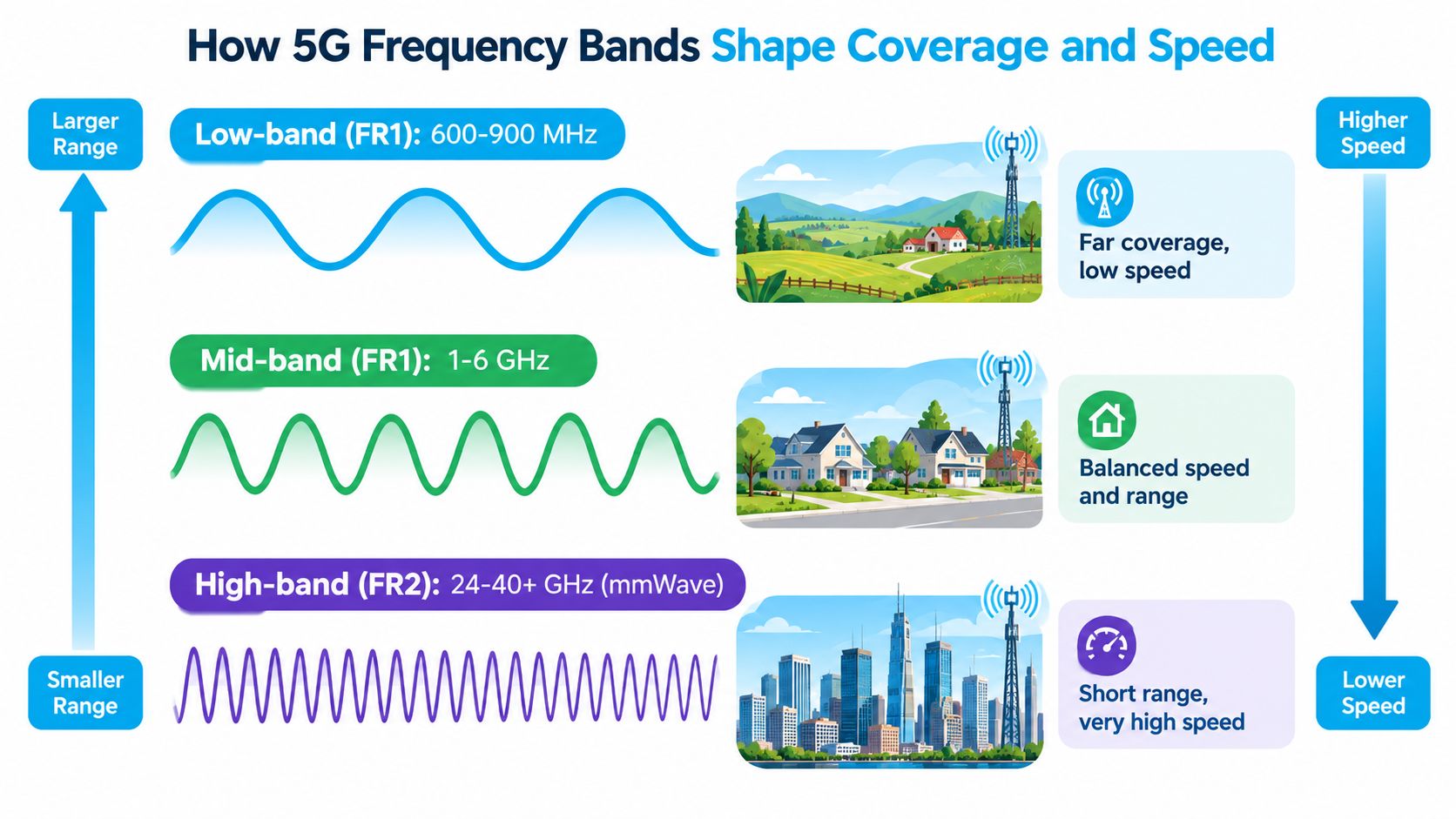
A router beside a rural window may hold a 5G connection, while the same signal weakens inside an RV or behind thick walls. The reason is often the frequency band, not a single range number. Lower frequencies generally travel farther and enter buildings more effectively. Higher frequencies can carry more capacity, yet their usable indoor coverage often falls sooner.
3GPP's Release 15 divided 5G New Radio into two broad ranges. FR1 runs from 450 MHz to 6,000 MHz, while FR2 runs from 24,250 MHz to 52,600 MHz, according to the 3GPP Release 14 to 16 overview.
Lower frequencies bend around ordinary obstacles and cover open land. Higher frequencies act more like an express route with high capacity but stricter line-of-sight needs. A tower can therefore appear to serve your location on a coverage map while the band reaching your router struggles through a metal RV roof, exterior siding, or dense foliage.
Why channel width matters
FR1 supports channels of up to 100 MHz per carrier, while FR2 supports channels of up to 400 MHz per carrier, based on the same 3GPP overview. Wider channels provide more room for data, similar to adding lanes to a road, but they do not make the signal travel farther.
For a home or rural router, the useful question is not which band has the largest speed claim. Ask which band can reach the installation point and remain stable inside the building. Low-band and mid-band 5G often suit that job better than mmWave because they offer a more practical balance of reach, penetration, and capacity.
Release 15 was standardized in 2018, and its first 5G NR Release 15 publication was dated July 2018. Those specifications established part of the technical foundation for today's commercial 5G router ecosystem. They also reflect the difference between broad-coverage deployments and shorter links designed for high capacity.
Some routers combine multiple cellular carriers or bands to improve capacity and continuity. This guide to carrier aggregation explains the technique. It can help a compatible router use available spectrum more effectively, but it cannot remove a wall, hill, or missing band from the signal path. Check the band shown in the router's software, then test that connection at the actual mounting location.
Low Band Mid Band and mmWave Range Compared
A router can appear covered on a carrier map yet struggle inside an RV or rural home. The reason is that “5G range” describes different bands with different indoor usefulness. Low band favors reach, mid band balances reach and capacity, while mmWave provides high capacity across short, easily blocked links.
| Spectrum Type | Typical Outdoor Range | Indoor Penetration and Best Use |
|---|---|---|
| Low band | About 3 to 10 miles | Best penetration and broad-area coverage. Useful for rural homes, travelers, and locations far from dense tower networks. |
| Mid band | About 1 to 3 miles | A practical balance of speed, range, and indoor usability. Often suitable for suburban homes and RV sites with reasonable tower proximity. |
| mmWave | About 500 to 1,500 feet | Very high capacity over short, mostly clear paths. Better suited to dense urban deployments or fixed links with careful alignment. |
These outdoor estimates come from 5G Store's band range overview. Treat them as starting points rather than promises for a router placed indoors. The band available at the tower, the router's location, and the building itself determine whether coverage becomes usable service.
Low band explains why a rural household can remain connected several miles from a tower, even without the highest available 5G throughput. In an RV parked near the edge of a service area, low-band fallback may keep email, navigation, and basic browsing working after a faster band fades indoors. Lower frequencies cover more ground and generally handle ordinary obstructions better.
Mid band is the compromise many households want. It can provide more capacity than low band while still serving a home, RV, or small rural property. A router behind multiple walls, low-emissivity windows, metal siding, or heavy foliage may still lose that connection quickly. Check the active band in the router's software instead of assuming the map shows what the router is using.
Where mmWave fits
mmWave is a specialist option. Industry demonstrations have reported mmWave links ranging from less than 1 mile, or 1.6 kilometers, to 3.8 kilometers in one case, and more than 5 kilometers in another. Antennas, line of sight, and deployment design can change the result. The Network World coverage of extended mmWave trials also notes that low and mid bands are less affected by rain, humidity, and oxygen absorption than millimeter waves.
For an RVer, mmWave may produce an impressive speed test near a compatible access point, but it should not be treated as broad campground coverage. For a rural homeowner, dependable low-band fallback may matter more than a headline mmWave result. Ask which bands the router supports at the address, then test the actual connection at the intended mounting location.
Why Walls Distance and Terrain Shrink Your Usable Range
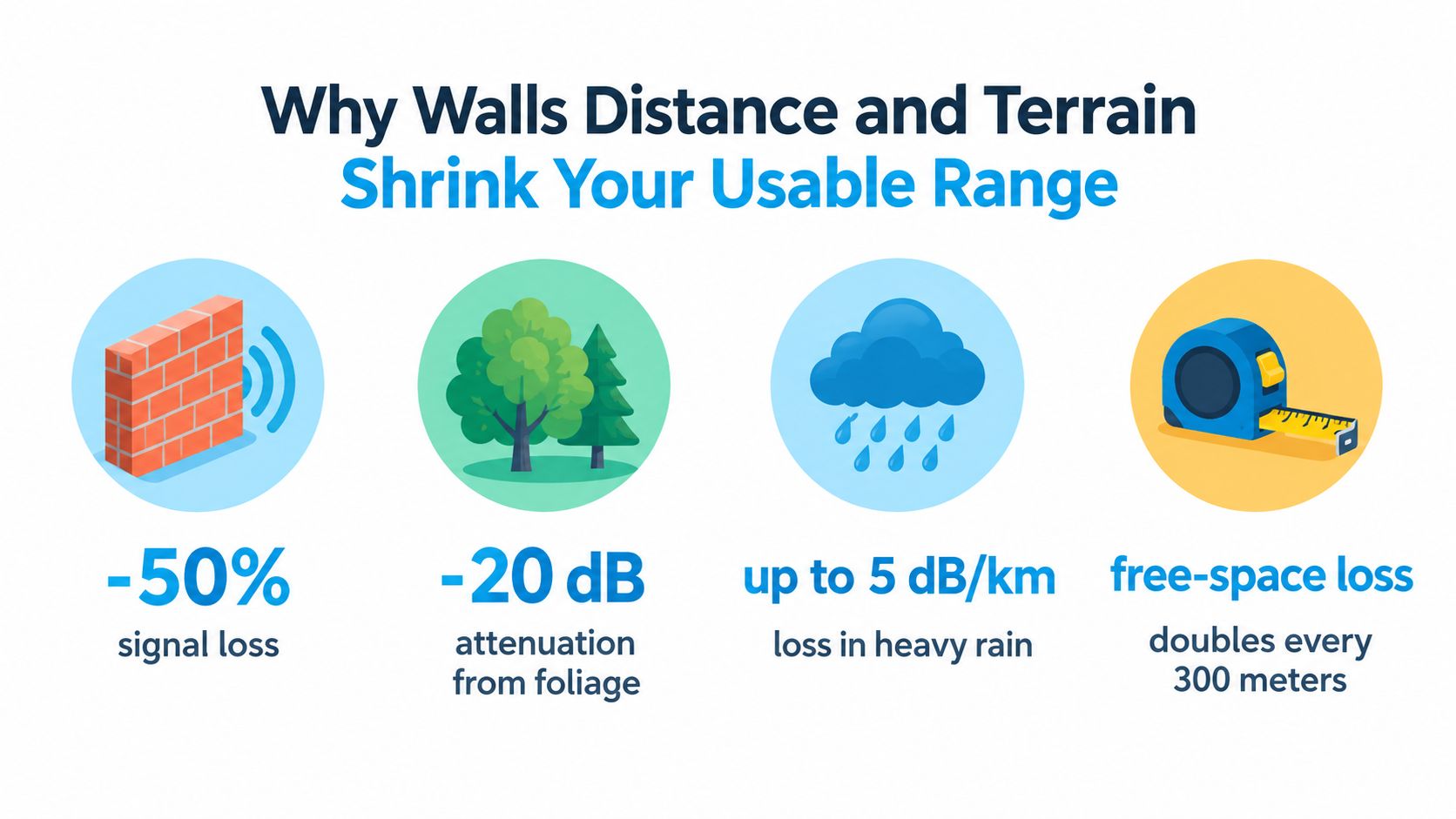
Spectrum sets the starting point, but the environment decides how much of that signal survives. Distance weakens every wireless link. Hills block the path, trees scatter energy, and construction materials absorb or reflect radio waves before the signal reaches your router.
Building materials can create a particularly sharp difference between outdoor and indoor results. At 5 GHz Wi-Fi, a concrete wall can cause about 15 dB of loss, compared with about 10 dB at 2.4 GHz, according to the Wi-Fi distance and attenuation reference. That's why a router beside a window may work well while the same router struggles behind concrete, steel, or foil-backed insulation.
The mmWave problem is blockage
mmWave links face a more demanding path. Qualcomm's operator guide describes typical urban mmWave small-cell separation of about 200 to 400 meters, while fixed wireless links can work over 1 kilometer or more, depending on the deployment. The same Qualcomm mmWave operator guide reports roughly 21 dB higher line-of-sight loss at 28 GHz and 24 dB higher loss at 39 GHz than at 2.6 GHz.
Those figures explain why a person, vehicle, branch, or wall can disrupt a high-frequency connection. mmWave isn't a weaker version of low-band 5G. It follows a different coverage pattern and often needs carefully positioned access points, outdoor equipment, or direct alignment.
Rural terrain creates a different challenge. A tower may be geographically close, but a ridge or valley can hide it from the router. A tall tree line can reduce signal quality even when the property looks close to the coverage boundary. Low-band signals usually handle these conditions better than mmWave, but no band can guarantee stable service through every obstruction.
Field diagnosis: Test the router outdoors or beside the highest usable window before blaming Wi-Fi. If performance improves there, the building or placement is probably limiting the cellular link.
Weather can also influence higher-frequency performance, although the cited reporting identifies low and mid bands as less affected by rain, humidity, and oxygen absorption. For everyday planning, focus first on band, elevation, clear paths, and construction materials. Those factors usually give you the most useful explanation for an RV or rural dead zone.
Realistic 5G Router Range Expectations at Home in an RV and Off Grid
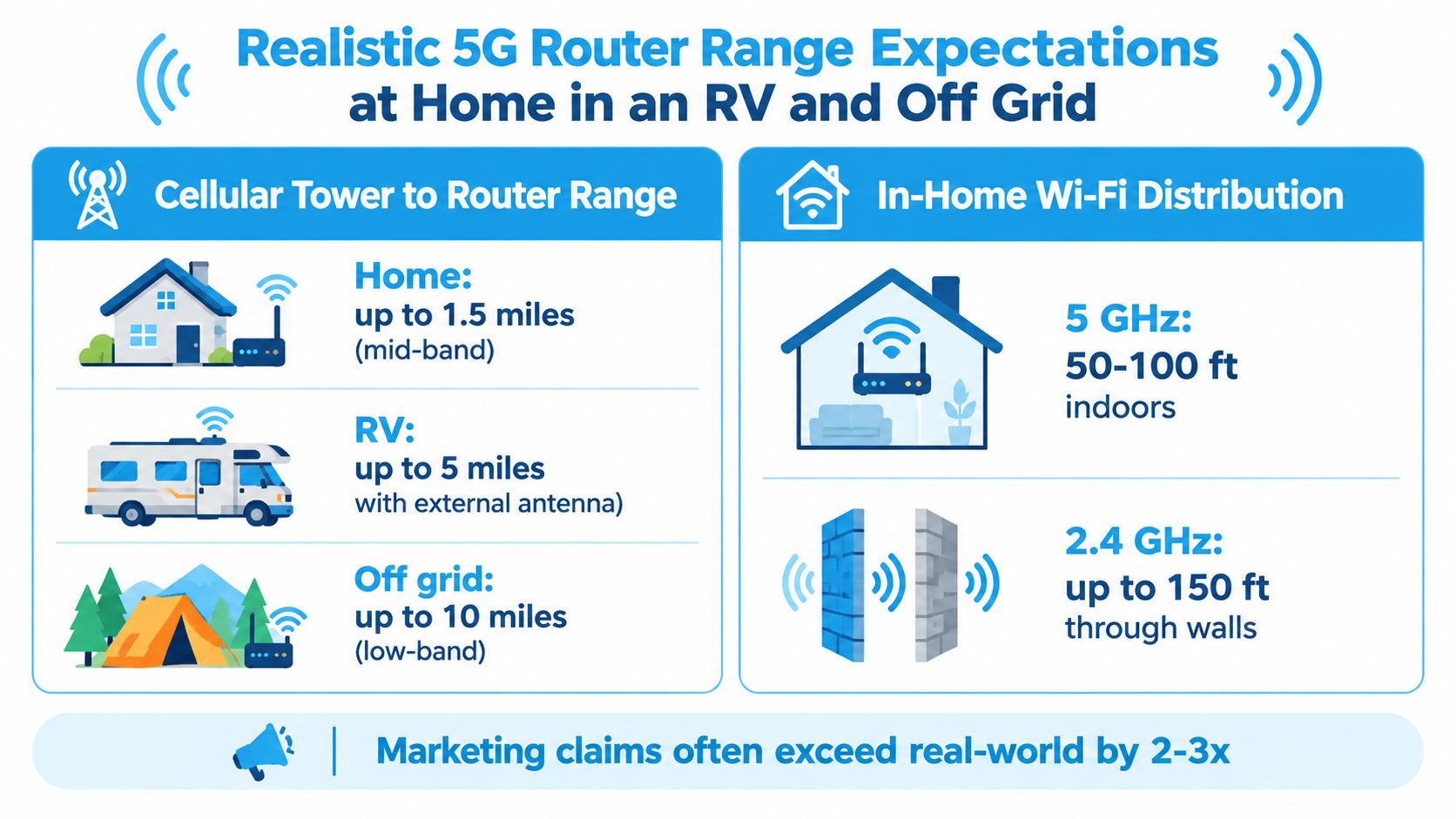
A map can show 5G coverage while the router struggles inside your building. The useful question is not one universal distance. It is which 5G band reaches your actual room, RV, or workspace, and whether the local Wi-Fi can carry that connection to your devices.
Separate the path into two links. The cellular link runs from the tower to the router and determines whether internet service is available. The Wi-Fi link runs from the router to your phone, laptop, camera, or streaming device. A strong outdoor signal can still produce a poor indoor experience if walls, metal, or the router's position weaken either link.
Three living situations
A stationary rural home should be assessed room by room. Test the router near an upper window or exterior-facing wall, then compare that result with its intended location. If a lower-frequency band reaches the building but a faster mid-band signal does not, a stable connection may depend on choosing the usable band rather than chasing the highest displayed speed. Place the router where the cellular link works, then plan Wi-Fi coverage around that position.
An RV behaves like a compact metal enclosure. Vehicle walls, tinted windows, appliances, and cabinets can block or reshape the signal, while changing campsites can alter the tower path. Test the router high and beside different windows before deciding that the service is unavailable. If the modem improves near the exterior, an antenna location with a clearer path may be more useful than moving the phone around inside.
An off-grid workspace needs a location check before equipment decisions. Tower distance, elevation, terrain, and the bands deployed nearby all affect whether coverage shown on a map becomes usable service indoors. Low-band 5G generally offers the better chance of reaching a remote structure, while mid-band may provide more speed only where the signal remains strong. Use the rural 5G coverage guide from SwiftNet Wifi as a location-focused reference, then verify the active band at the property.
The practical test is simple: check the router outdoors, beside a window, and in its planned indoor position. Record the active band and compare stability, upload performance, and latency. That reveals whether your limitation is tower access, indoor penetration, or local Wi-Fi.
How to Maximize Your 5G Router Coverage and Stability
Improving range usually requires a system rather than one magic setting. Start by helping the router receive the cellular signal, then make the local Wi-Fi network serve your devices from a sensible position.
- Choose the right antenna design. External antenna ports give you more placement options. An omnidirectional antenna suits a moving RV because it doesn't require constant aiming. A directional antenna can make more sense at a fixed rural site where you can identify the tower direction.
- Move the router before buying accessories. Test a high shelf, upper window, or exterior-facing room. Keep the unit away from large metal objects, electrical panels, and enclosed cabinets. A short move can change the path through the building.
- Check the live band, not only the bars. Router status pages and diagnostic tools may show the active band, signal readings, and whether the device is aggregating carriers. Test the same spot at different times and compare stability, upload performance, and latency, not just download speed.
- Use an external antenna when the placement test proves the point. If the signal improves outdoors or near a window, an antenna mounted higher or outside may help the modem receive a cleaner path. Cable length and connector compatibility matter, so match the antenna to the router rather than choosing by appearance. The external antenna guide for cellular routers covers the main installation considerations.
- Keep a fallback path. A router that can move from a marginal mid-band connection to a stronger low-band 5G or LTE connection may keep work and navigation online when peak speeds disappear. Stability at the edge of coverage is often more valuable than a brief speed-test record.
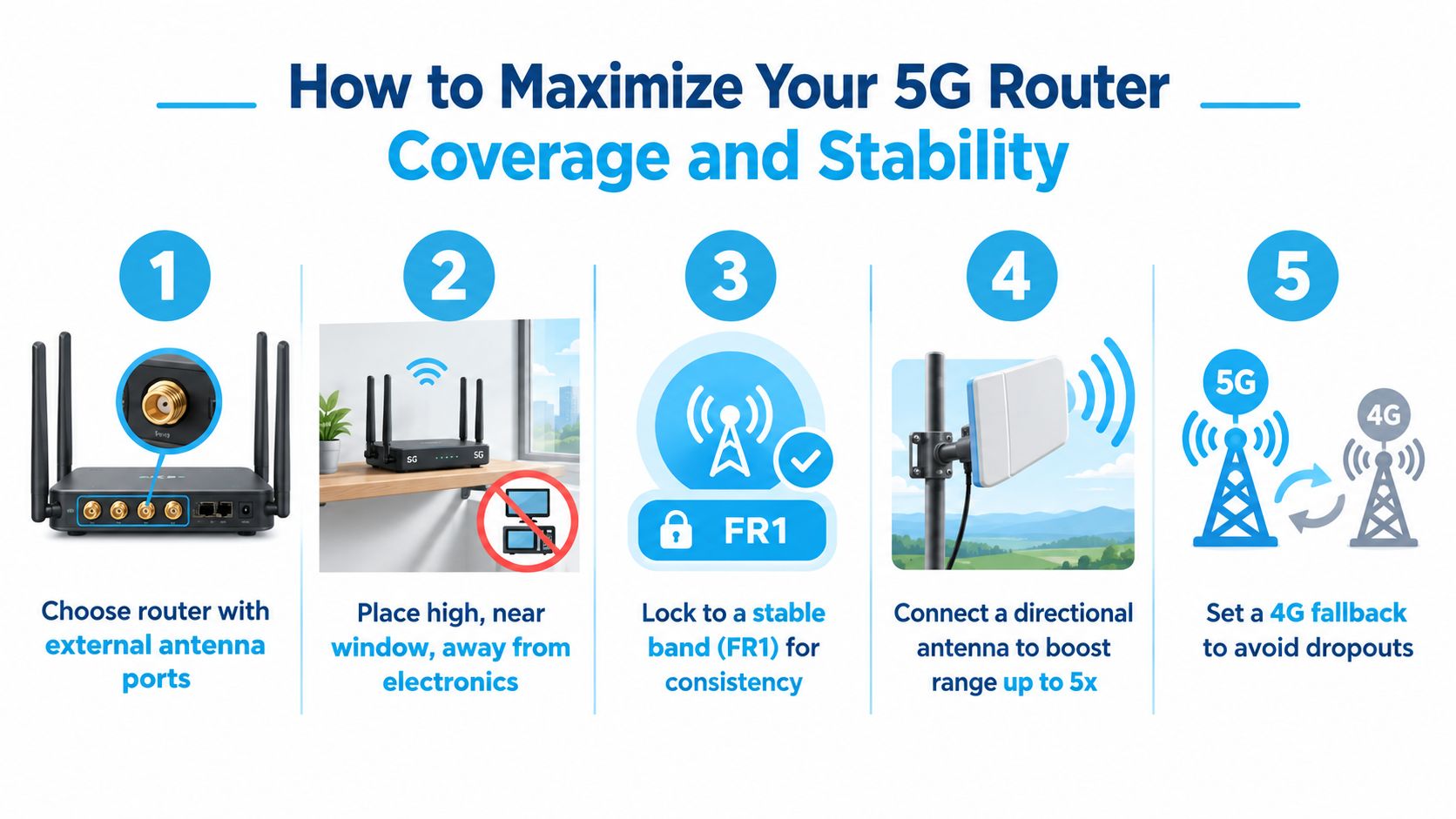
A simple test sequence works well for RVers and rural households. Record the router's band and performance inside, move it near a window, test again, then connect an external antenna if the equipment supports one. Keep the configuration that delivers the most consistent connection for calls, uploads, and work sessions.
Choosing the Right 5G Router Setup for How You Live and Travel
Choose the setup around your actual pattern of use, not the maximum distance printed on a product page.
For primary internet in a rural home, prioritize supported low and mid bands, external antenna capability, Ethernet options, and a clear return or trial policy. For RV travel, look for flexible carrier access, compact power requirements, external antenna support, and behavior that remains dependable when the vehicle moves between coverage areas. For a backup connection, prioritize simple activation, automatic fallback, and enough local Wi-Fi reach for the devices that matter during an outage.
A virtual SIM arrangement can be useful for travelers who need access across AT&T, Verizon, and T-Mobile, but compatibility and availability still depend on the plan, router, and location. SwiftNet Wifi offers 4G and 5G home and mobile internet plans built around virtual SIM technology, including a 5G Diamond Router option for RV and rural use. Verify the exact service terms, supported equipment, and coverage at your installation address before committing.
A practical verification checklist
- Test the installation point: Try the router near a window or higher position, then compare it with the intended permanent location.
- Identify the active band: Confirm whether the router uses low band, mid band, or a fallback connection.
- Check upload stability: Remote work, video calls, and cloud backups need consistent uplink performance, not only strong downloads.
- Observe fallback behavior: Learn whether the router stays connected when the preferred 5G band weakens.
- Plan local Wi-Fi separately: Add mesh equipment, wired connections, or a second access point if the building is larger than the router's practical Wi-Fi reach.
Before sharing this guide on connected social accounts, include the required hashtags:
#rv #rvlife #rvliving #rvlifestyle #rvrenovation #rvremodel
#rvtravel #rvcamping #rvadventures #ruralwifi #5gwifi
#5ginternet
If you're comparing 5G router range for a rural home, RV, or remote workspace, SwiftNet Wifi offers 4G and 5G connectivity options designed for home and mobile use, with virtual SIM access across major nationwide carriers. Visit SwiftNet Wifi to check the available setup for your location and choose a plan that matches how you live, work, and travel.


