

You're parked beyond the reach of fiber, your laptop is connected, and the workday starts normally. Then a video call freezes while the other person's voice turns robotic. A streaming service buffers that evening, even though the cellular plan promises unlimited data and the router's box advertises 5G. In an RV or rural home, the failure usually isn't caused by one missing feature. It comes from a mismatch between the cellular signal, local Wi-Fi network, latency, antenna setup, and available power.
A useful equipment guide starts with a less exciting question than “How fast is it?” Ask instead: What happens if this connection fails during the task that pays the bills? Email and browsing tolerate modest equipment. A VPN session, cloud desktop, video meeting, or live upload demands a more stable system.
Why Your Hardware Matters More Than Your Data Plan
A premium data plan can only deliver what the surrounding hardware can receive, process, distribute, and keep powered. The tower may be congested, the gateway may be trapped inside a metal cabinet, or a laptop may sit at the far end of a weak interior Wi-Fi signal. The plan remains active, but the experience is poor.
That's why a router isn't just a box that shares a connection. It determines how cellular bands are used, whether external antennas can be connected, how many devices can share the link, and whether traffic reaches your work area reliably. A hotspot can be perfectly adequate for one traveler checking email, while the same device becomes frustrating when it supports a laptop, phone, television, camera, and video call at once.

The connection has several failure points
Mobile internet has at least two separate networks to troubleshoot:
- The cellular side runs from the tower to the modem. Signal strength, obstruction, carrier availability, tower loading, and backhaul affect it.
- The local side runs from the modem or router to your laptop, phone, television, cameras, and other devices. Placement, Wi-Fi congestion, walls, metal construction, and client capability affect it.
A strong cellular result at the gateway doesn't guarantee a strong result at the desk. Conversely, excellent Wi-Fi can't create capacity that the cellular link doesn't have. That distinction prevents a common waste of money, upgrading the local router when the tower is the actual bottleneck, or buying a powerful modem when a poor placement is the underlying problem.
I treat hardware as part of the internet service. The router's effect on internet speed becomes obvious when you compare a wired test at the gateway with a wireless test from the work area. A large difference points toward the local network, not necessarily the carrier.
Practical rule: Buy equipment for the worst important task you perform, not the fastest test result you see on a quiet afternoon.
Build for the consequence of failure
For ordinary browsing, a single cellular device may be enough. If dropped sessions threaten a client deadline or a day's wages, reliability matters more than a peak download number. That can mean a better-placed gateway, an external antenna, a second carrier, or a separate backup connection.
The broader equipment lesson is simple. Data is only one component of connectivity. The hardware has to translate an unpredictable outside signal into a stable, usable network inside the RV or home.
Choosing Between Hotspots and 5G Routers
The choice between a 4G Bronze hotspot and a 5G Diamond router should follow your workload, mobility, and tolerance for failure. A hotspot makes sense when portability and simplicity matter most. A dedicated router earns its place when several devices need service continuously, when you need better local coverage, or when work depends on a stable wired connection.
The FCC raised its national fixed-broadband benchmark in March 2024 to 100 Mbps download and 20 Mbps upload, and established 35/3 Mbps as the minimum speed criterion for 5G New Radio, as summarized by Deloitte's connectivity analysis. Those figures don't turn into a promise for every campsite. They do reinforce an important buying principle: upload capacity matters directly for video calls, cloud backups, livestreaming, and remote work.
Match the device to the risk
A casual traveler who checks messages, browses, and occasionally streams can often live comfortably with a portable hotspot. It uses fewer components, moves easily between vehicles and temporary workspaces, and avoids installing a permanent network.
A remote worker with scheduled meetings has different needs. A dedicated router can serve multiple clients, provide Ethernet, support external antennas where compatible, and offer more deliberate placement than a phone-sized hotspot. The router still can't overcome a congested tower, but it gives you more control over the local network and installation.
| User Profile | Recommended Hardware | Best For |
|---|---|---|
| Occasional traveler | 4G Bronze hotspot | Email, browsing, light streaming, and one primary device |
| Mobile worker with moderate needs | 4G Bronze hotspot with careful placement | Flexible work from changing locations where failure has limited consequences |
| Full-time remote worker | 5G Diamond router | Video meetings, VPN sessions, cloud applications, and several connected devices |
| RV household with cameras and entertainment devices | 5G Diamond router | Simultaneous users, wider local coverage, and a more permanent installation |
| Worker whose income depends on uptime | Dedicated router plus a planned backup | Primary connectivity with a separate failure path |
The FCC's broadband speed guide lists minimum estimates ranging from 1 Mbps for general browsing and email to 25 Mbps for 4K video, with 1 Mbps for a standard personal video call, 1.5 Mbps for an HD personal video call, and 6 Mbps for HD video teleconferencing. Those figures describe one activity at a time, not a busy household. A meeting, operating-system update, security camera upload, and streaming television can compete for the same connection.
If you're comparing rural options beyond cellular, this practical overview of how rural buyers get internet helps frame the alternatives. The key decision remains work-criticality. Don't pay for a dedicated installation if your use is occasional, but don't make a tiny hotspot the only connection for a job that depends on uninterrupted calls.
For installation and feature differences, SwiftNet's guide on moving from a hotspot to a router is useful when your device count or work demands have outgrown a portable setup.
Upgrading Your Local Network with Wi-Fi 6 and Antennas
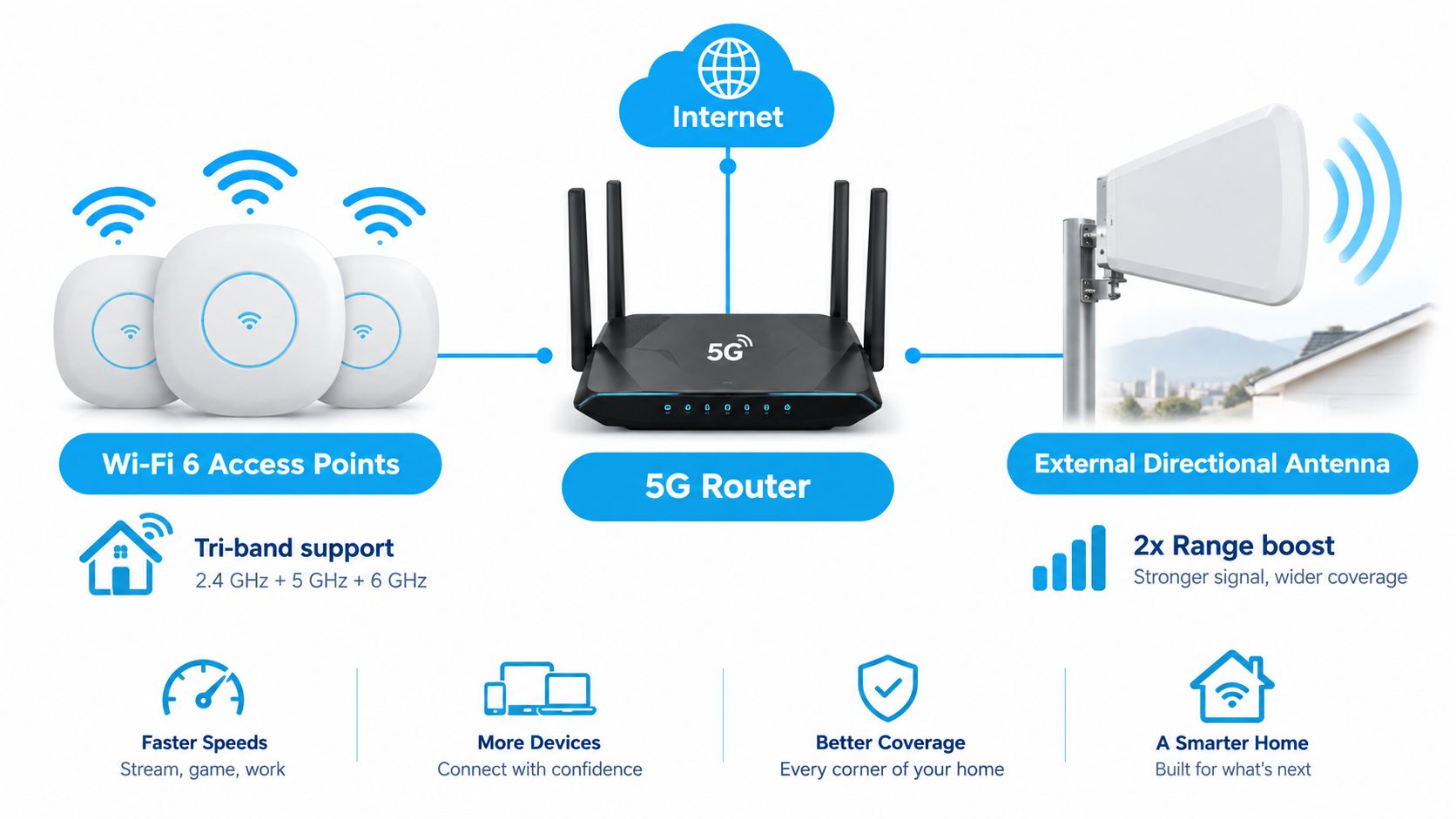
A cellular modem can receive a usable connection and still deliver a poor experience inside the RV. The local Wi-Fi network has to schedule traffic among laptops, phones, televisions, cameras, and smart-home devices, often in a compact space with reflective metal surfaces and limited placement options.
Wi-Fi 6 helps in device-heavy environments because it adds OFDMA and MU-MIMO. OFDMA divides a channel into resource units so the access point can schedule several clients more efficiently. MU-MIMO supports simultaneous spatial streams. Together, these mechanisms target lower contention and better efficiency when many devices transmit small amounts of data at the same time, as described in this technical discussion of Wi-Fi 6 networking.
Separate the WAN problem from the Wi-Fi problem
Wi-Fi 6 won't add cellular capacity. If the modem's connection to the tower is congested, a newer access point can't create more bandwidth. It can, however, reduce local waiting when several compatible devices share the connection.
I test this in three positions:
- One client over Ethernet, connected directly to the gateway.
- One client near the access point, using Wi-Fi.
- One client at the farthest intended work location, using Wi-Fi.
Run the tests while the network is idle and while another device generates traffic. Compare median throughput, latency, and packet loss. If Ethernet performs well but the distant wireless client struggles, focus on access-point placement, mesh expansion, wired backhaul, or interference before replacing the cellular modem.
For fixed RV installations or rural buildings, a wired run to an access point can be more dependable than trying to push every device from one central box. This guide to data cabling offers useful background when you're planning cable routes, terminations, and a cleaner network layout.
Know when an antenna earns its place
An external antenna helps when the gateway receives a marginal or obstructed cellular signal and the installation can place the antenna in a better position. It isn't automatically an upgrade. A directional model may require careful orientation, and a poorly routed cable or unsuitable connector can offset the benefit.
Use an antenna when repeated tests show that moving the gateway near a window or elevating it improves the result, but the required work location can't accommodate that placement. Skip it when the gateway already performs well and the bottleneck appears only between the router and the client.
Check the modem's supported bands, antenna ports, connector types, cable length, and whether the antenna is appropriate for the frequencies used in your area. SwiftNet's router with antenna guide provides practical installation context before you start drilling, routing cable, or mounting hardware.
Optimizing Router Placement and Testing Latency
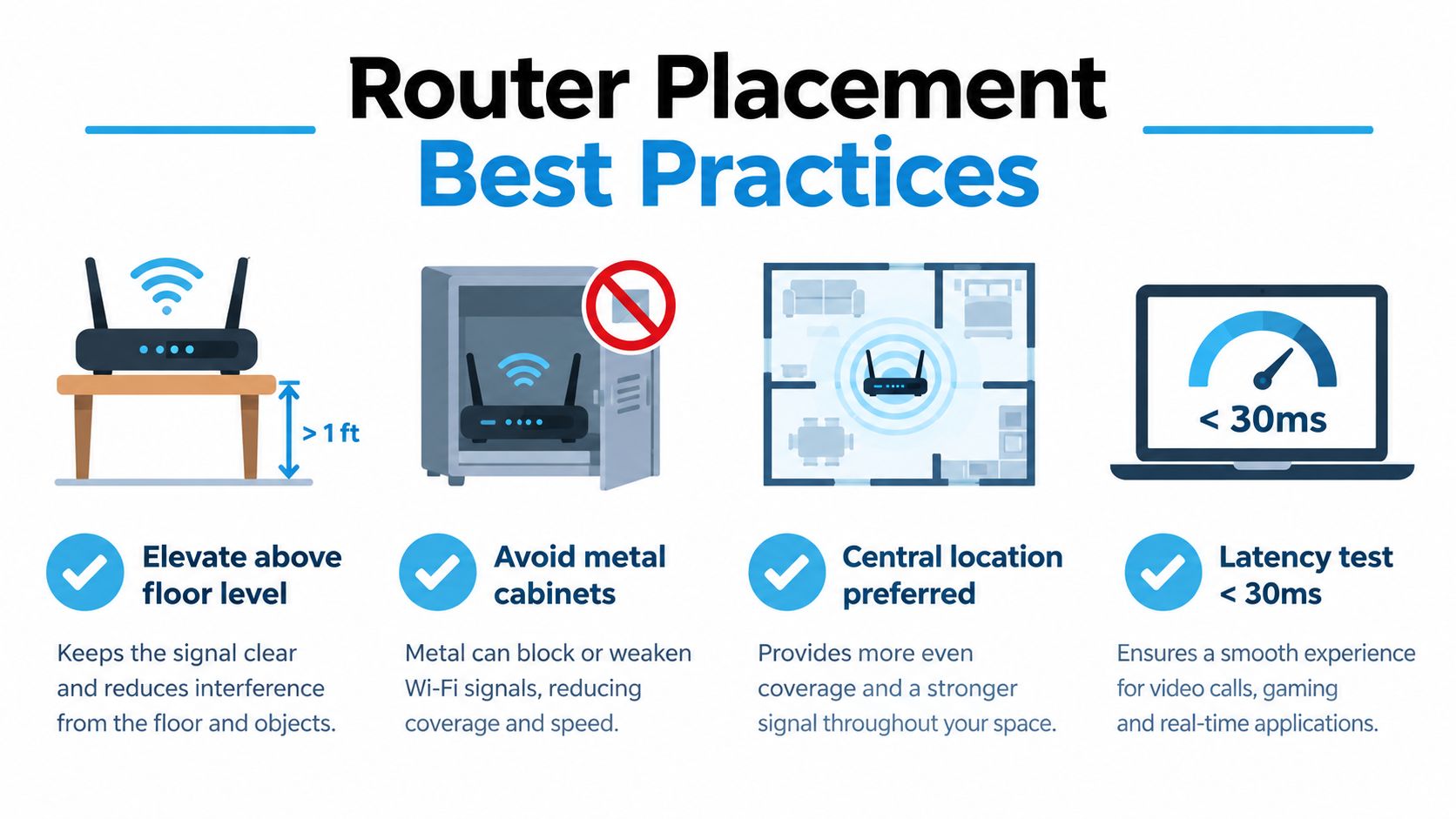
Router placement is one of the cheapest performance changes available, and it's often ignored. A gateway buried in a metal cabinet, pressed against an appliance, or placed low behind furniture may receive a weaker cellular signal and create poor Wi-Fi coverage at the same time.
Start with placement before purchasing accessories. Move the router to a higher position near a window or an interior location with less obstruction. Keep it away from metal cabinetry and large appliances. In an RV, remember that the chassis, tanks, cabinetry, and exterior storage compartments can all alter signal behavior.
Use a repeatable test
A single speed test can flatter a setup. I prefer repeated tests at the times when the connection matters, because cellular-sector loading changes throughout the day.
- Test from Ethernet first. Connect a laptop directly to the router. This removes most local Wi-Fi variables.
- Test near the gateway. Compare Wi-Fi with the wired result. A large gap suggests a local wireless issue.
- Test at the work location. Use the exact desk, chair, or dinette where calls happen.
- Add load. Run a sustained transfer or stream while checking latency. A connection that looks fine while idle may respond poorly under traffic.
- Check the application. Join a video meeting, connect to the VPN, open the cloud desktop, and observe stability.
The FCC and USAC performance framework treats 100 ms round-trip latency as a key broadband threshold, with measurements taken between the subscriber premises and a remote internet-exchange test server, as explained in the rural broadband accountability framework. The practical point is more important than the threshold alone: stable latency matters more to an interactive call than an attractive burst of download speed.
Testing insight: If Ethernet is stable but Wi-Fi is erratic, don't blame the tower until you've fixed the local network.
A large gap between wired and wireless results can indicate weak signal at the client, channel congestion, distance, or router placement. If both wired and wireless tests deteriorate together during busy periods, the cellular link or tower loading deserves attention.
Keep a simple log with location, time, wired result, wireless result, latency behavior, and the application you tested. In an RV, repeat the process at representative campsites while stationary. A strong signal reading alone doesn't prove that the tower has usable capacity.
Managing Power Consumption for Off-Grid Setups
Power changes the equipment decision when the router runs from batteries or solar. A device that works well at a campsite with shore power may be a poor fit for a boondocking routine if it runs continuously, drives an external amplifier, or keeps unused radios active overnight.
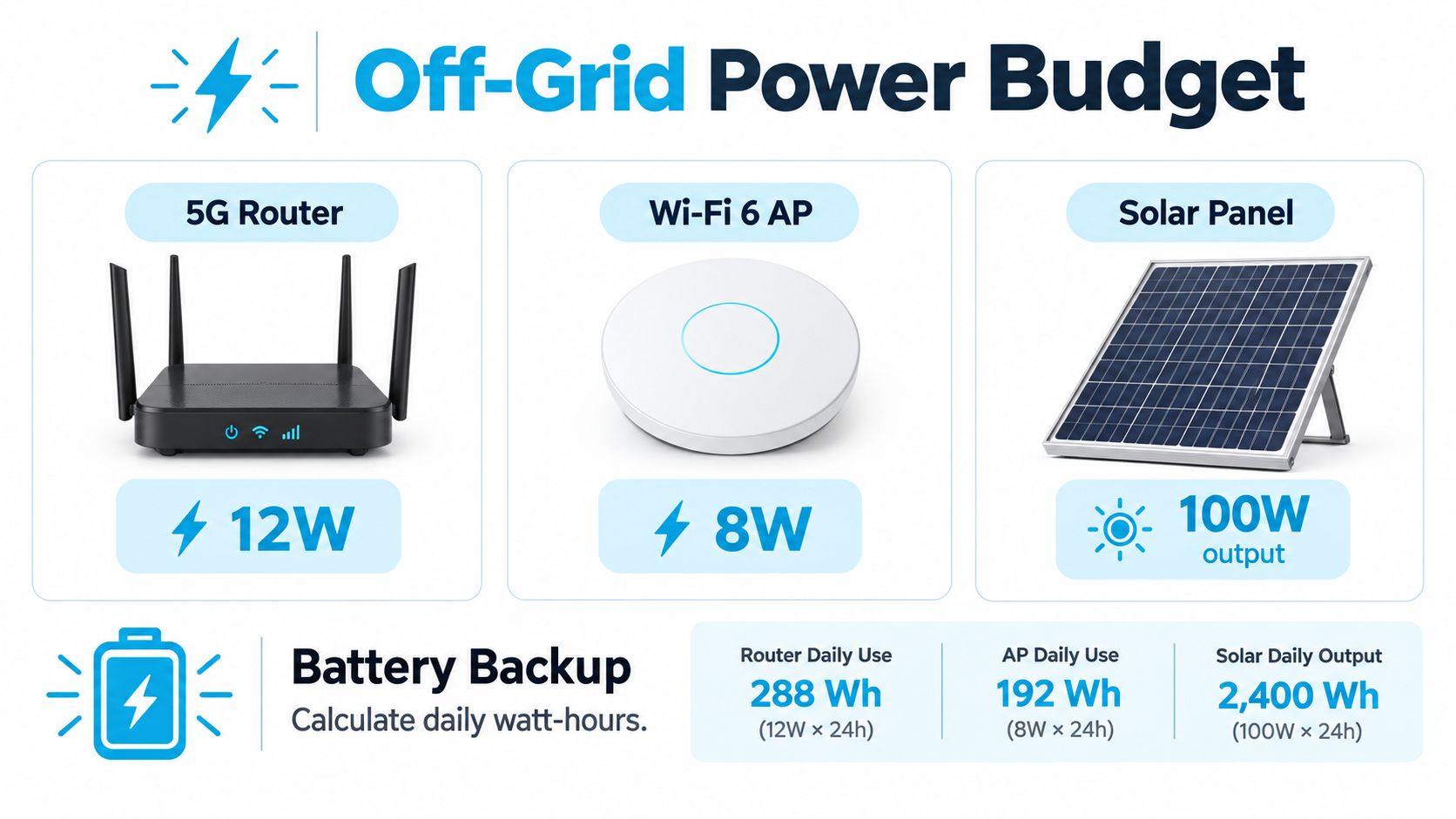
Don't begin with a manufacturer's maximum figure and treat it as the daily budget. Measure idle, active, and peak draw at the actual voltage supplied to the equipment. Then record how long each state lasts.
Convert watts into a usable budget
For a 12-volt system, the basic planning relationship is:
amp-hours = watts × operating hours ÷ 12
That calculation is an estimate, not a guarantee. Conversion losses, battery limits, inverter overhead, temperature, and other RV loads affect actual runtime. A DC-native router can avoid some inverter losses, but only if its input requirements and wiring are suitable.
Create separate entries for:
- Gateway draw, while idle and during active work.
- Wi-Fi access-point draw, especially if you use a second node.
- External antenna accessories, including any powered amplifier.
- Conversion losses, if the equipment runs from an inverter.
- Overnight behavior, including whether radios can be scheduled or disabled.
The European Telecommunications Standards Institute defines a measurement method for customer-premises-equipment energy consumption. Industry sustainability analysis also indicates that Wi-Fi radios can represent about 37.5% of a gateway's active-mode energy consumption, which is why radio configuration and sleep behavior deserve attention in an off-grid plan. The figure and measurement context are documented in the ETSI equipment energy standard.
Reduce waste without sacrificing the workday
Disable bands you don't use, schedule downtime when nobody needs internet, and avoid powering a second access point if the primary router already covers the workspace. Don't disable features blindly. A lower draw is worthless if it forces the laptop into a weak, unstable connection that causes repeated uploads and reconnections.
Power planning should also include installation safety. RV low-voltage direct-current equipment rated at 60 volts nominal or less falls under an ANSI/RVIA standard, while National Electrical Code Article 551 addresses RV 120/240-volt electrical systems, according to RV Industry Association standards information. Treat battery circuits and shore-power equipment as separate systems, with suitable protection and wiring.
The same caution applies to generators. A Cummins RV generator manual warns that backfeeding shore power can cause electrocution and equipment damage. It requires an approved switching device to prevent the generator from connecting to shore power or another electrical source simultaneously, as set out in the Cummins RV generator manual.
For context on other 12-volt loads competing for battery capacity, a practical 12V water pump guide can help you think about DC equipment as part of one shared electrical budget rather than isolated purchases.
Building a Resilient Setup Based on Risk and Geography
The most expensive 5G device isn't automatically the most dependable choice. A fast modem parked behind trees, inside a metal enclosure, or under a heavily loaded tower can lose to a simpler device placed well and paired with a backup plan.
The FCC's mobile-broadband coverage-map standards use performance thresholds rather than coverage labels alone. One standard requires at least 7 Mbps download and 1 Mbps upload, while another requires at least 35 Mbps download and 3 Mbps upload. Both specify a minimum 90% cell-edge coverage probability and at least 50% cell loading, as detailed in the FCC mobile broadband coverage-map requirements. These benchmarks show why an advertised 5G capability doesn't establish what you'll receive at the edge of service or under network load.
Use a risk-versus-equipment matrix
| Situation | Sensible starting point | Escalate when |
|---|---|---|
| Email, browsing, and occasional streaming | Single cellular hotspot or router | The device count grows or coverage becomes inconsistent |
| One remote worker with moderate consequences | Dedicated router in a tested location | Calls drop, upload work fails, or VPN sessions become unstable |
| Marginal rural signal or obstructed campsite | Better placement first, then an external antenna | Repeated tests show the gateway improves when moved outside the normal work area |
| Several household users and connected devices | Router with capable local Wi-Fi and wired options | Local tests show congestion or poor far-end coverage |
| Income depends on uninterrupted access | Primary cellular setup with documented failover | A single carrier outage or tower failure creates unacceptable downtime |
| Remote travel across changing regions | Carrier diversity or a second connection | Geography regularly places one carrier outside usable service |
The order matters. Start with placement and measurement. Then address the local Wi-Fi network. Add an antenna when the evidence points to reception or obstruction. Consider dual-carrier or cellular-plus-satellite redundancy when the cost of a failed session exceeds the cost and complexity of a second path.
A strong signal bar isn't enough. A campsite can have good radio conditions but poor capacity because many users share the tower. A rural home can have excellent download performance while upload latency spikes during a meeting. Test sustained traffic, application behavior, and latency at different times instead of accepting a single peak result.
For RV travelers, geography also includes mobility and power. A permanent external antenna may make sense for a regular rural site but be awkward for frequent moves. A satellite backup may solve a coverage gap but impose a different installation and energy burden. The right equipment guide doesn't crown one technology. It assigns equipment to the consequence of failure.
SwiftNet Wifi offers 4G Bronze hotspot and 5G Diamond router options that use virtual SIM technology to connect with major nationwide carriers, making them relevant for RV travelers, rural households, remote workers, and backup planning. Review the available equipment and connectivity options at SwiftNet Wifi, then choose the setup that matches your work-criticality, geography, and off-grid power budget.


