

You're looking at a fiber line near your property, but the provider still says your address can't be connected. Or you're parked at a county campground where the only usable signal comes from a 5G hotspot beside the driver's seat. In both situations, the question isn't which technology has the highest advertised ceiling. It's which connection can work where you are this week.
Fiber is usually the technical winner. Wireless is often the practical winner because it can reach homes, campsites, and rural properties that physical lines haven't reached. This guide compares wireless internet vs fiber by last-mile availability, stability under load, latency, installation reality, and the way you live online.
| Decision factor | Wireless internet | Fiber internet |
|---|---|---|
| Physical delivery | Cellular signal, fixed radio link, or satellite | Glass fiber cable to the premises |
| Availability | Often reaches places without wired service, but performance varies by signal and capacity | Excellent where installed, unavailable where the line doesn't reach the address |
| Upload performance | Can be less consistent, especially on mobile and fixed wireless networks | Typically symmetrical and highly stable |
| Latency | Cellular and fixed wireless can be suitable, satellite is more delayed | Usually the lowest-latency fixed-line option |
| Peak-hour behavior | Can change with tower congestion, signal conditions, and shared capacity | Generally remains consistent under household and neighborhood demand |
| Installation | Often self-installed or completed with an outdoor receiver | May require a site visit, cable placement, and an optical network terminal |
| Best fit | Rural homes without fiber, RVs, temporary locations, and backup service | Homes with demanding users, competitive gamers, remote workers, and large households |
Why the Wireless vs Fiber Question Hits Different in 2026
The gap between fiber nearby and fiber installed is where many wireless internet vs fiber decisions are made. A homeowner 800 feet from a backbone line may still face a trench, easement, or construction decision before service reaches the house. That is not a technology comparison yet. It is a choice between waiting for fiber and activating a connection this month.
The same reality applies at a campsite. An RVer may move from a county park to a boondocking site or private campground within days. Fiber serving a nearby town does nothing for a changing campsite. A cellular hotspot, external antenna, or low-Earth-orbit satellite terminal can provide service without a permanent line.
The market has changed because 5G home internet and low-Earth-orbit satellite services have made wireless more capable and more useful. Fixed wireless access can serve homes through a dedicated gateway or, in some locations, an outdoor receiver. Satellite reaches properties well beyond many wired networks, though capacity and latency still affect the experience. Fiber buildouts continue, but the final connection down a private road or across a low-density area remains difficult.
The coverage gap explains why wireless still matters. One U.S. policy brief estimated that fiber reached about 45% of U.S. households, while access reached roughly 24% of rural households, according to the Electronic Energy and Sustainability Institute's broadband access brief. The same brief reported that, in 2019, 25/3 Mbps broadband reached 98.8% of urban areas and 82.7% of rural areas, while 100/10 Mbps availability reached 97.8% of urban areas and 66.8% of rural areas.
Practical rule: Confirm service at the exact address, building, or campsite before buying the fastest plan available.
That rule sets the standard for this comparison. Fiber wins when a provider can install it and the household needs consistent capacity. Wireless wins when it is the connection you can activate, mount, or move now. Choose the service that works at your location this week, not the one with the highest theoretical ceiling.
What Wireless and Fiber Internet Actually Mean
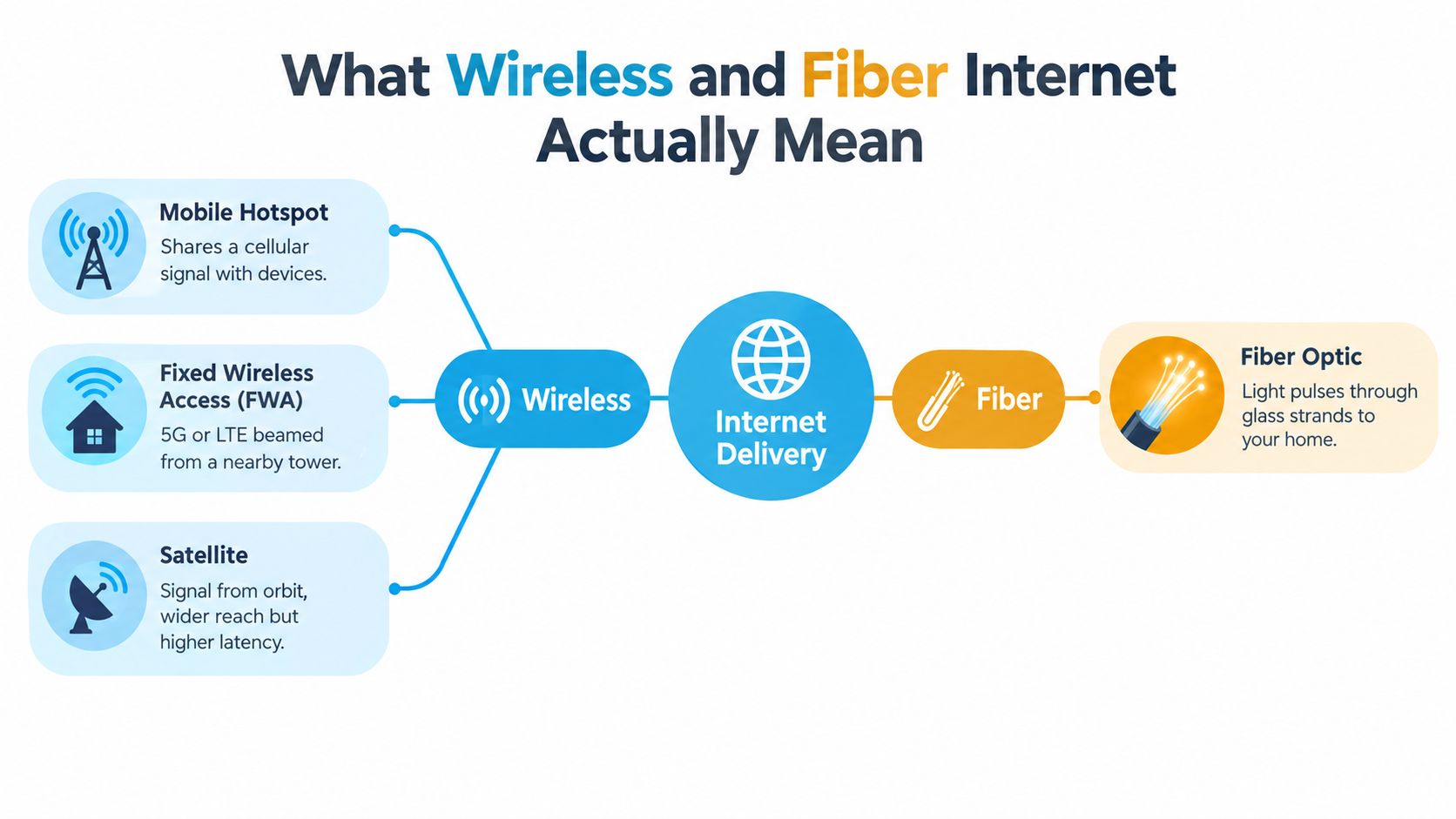
“Wireless internet” describes several different delivery methods. Treating them as one technology leads to bad buying decisions, because a phone hotspot and a satellite dish behave very differently.
Mobile hotspots share a cellular connection
A mobile hotspot uses a phone or dedicated hotspot device to connect to a cellular network, then shares that connection with laptops, televisions, and other devices. An RVer might park near a strong tower, place a hotspot by a window, and use it for email, browsing, and moderate streaming. A directional or MIMO antenna can improve the signal reaching compatible equipment, but it can't create capacity where the tower has none.
Cellular service is portable, which makes it useful for travelers, seasonal workers, and households that need a temporary connection. Its main weakness is that signal strength and network capacity can change from one location to the next.
Fixed wireless uses a stationary receiver
Fixed wireless access, or FWA, sends a radio signal from a nearby cellular tower or local wireless ISP to equipment at the property. A 5G home gateway may sit indoors, while a rural WISP may install an antenna on the roof and aim it toward a tower, grain elevator, or water tower.
The receiver stays at the home, so fixed wireless generally performs better than using a phone inside a building. It still depends on radio conditions, tower loading, spectrum capacity, and the provider's backhaul. The FCC's broadband assessment uses 100 Mbps download and 20 Mbps upload as the current fixed-broadband benchmark, a useful standard for testing whether a wireless service delivers more than a merely adequate connection.
Satellite reaches beyond terrestrial networks
Satellite internet sends data between a dish or terminal and satellites in orbit. Traditional geostationary satellite services cover broad areas but introduce substantial delay. Low-Earth-orbit systems such as Starlink reduce that distance and can serve rural properties, work sites, and mobile users where terrestrial options are absent.
Satellite solves an availability problem, not every performance problem. Weather, obstructions, capacity, and the service plan can affect the experience, so the terminal needs a clear view of the sky and careful placement.
Fiber carries data through glass
Fiber internet uses pulses of light traveling through glass strands to deliver service directly to the premises. The physical line doesn't depend on a radio path between your home and a tower, and fiber plans commonly provide symmetrical download and upload capacity. That makes fiber particularly strong for cloud backups, video meetings, large uploads, and homes with many simultaneous users.
A provider may advertise a high speed, but the delivered experience also depends on the gateway, Wi-Fi layout, Ethernet wiring, and the destination server. For a deeper look at the equipment inside a fiber installation, use this guide to a fiber optic router.
For travelers who need calling over available Wi-Fi rather than a cellular voice signal, a Wi-Fi calling app for international use can also be useful. It won't improve the internet connection, but it can help separate voice service from the strength of the mobile signal.
Head-to-Head Across the Criteria That Matter
The important distinction is not “wireless is fast” or “fiber is fast.” The useful question is whether the connection keeps working when the household, neighborhood, or campsite gets busy.
| Criterion | Wireless, 4G or 5G FWA, hotspot, satellite | Fiber |
|---|---|---|
| Speed tiers | Range from everyday broadband to high-speed service, depending on signal, spectrum, plan, and satellite capacity | Broad range with strong headroom and commonly symmetrical service |
| Typical latency | Cellular and fixed wireless can be responsive; satellite is materially slower | Usually the lowest latency among fixed broadband options |
| Jitter | Can rise with congestion, radio interference, and changing signal conditions | Usually low and predictable |
| Reliability in storms | Radio and satellite links can react to weather or obstructions | Physical fiber is generally less affected by weather and interference |
| Rural availability | Often the only immediately available option outside wired buildout | Excellent where the line reaches, but not universal |
| Monthly cost | Can be competitive, especially for portable or no-contract service | May offer strong long-term value, with installation or construction constraints |
| Installation effort | Hotspots can be immediate, gateways are often simple, outdoor receivers need placement | May require a technician, cable route, and premises equipment |
| Contract flexibility | Frequently flexible, especially for mobile service | Varies by provider and plan |
| Best decision | Choose when reach, portability, or speed of activation matters most | Choose when the address qualifies and consistency matters most |
Latency measures delay. Jitter measures how much that delay changes from packet to packet. A connection with a reasonable average ping can still produce broken voice, frozen video, or erratic game movement if the delay fluctuates sharply.
The FCC's fixed-broadband measurements recorded fiber idle latency in roughly the 7 to 14 ms range, compared with approximately 12 to 24 ms for cable and 20 to 61 ms for DSL, as reported in the FCC Measuring Broadband America report. Those measurements explain why fiber is generally preferred for gaming, video calls, and other interactive applications.
Installation is where wireless often wins decisively. A hotspot can work as soon as the device has service. A fixed wireless provider may need to test signal and mount an antenna, but the work still avoids a long cable construction project. Fiber installation can be straightforward in a served subdivision and difficult when the line ends at the road or nearby backbone.
Cost needs the same practical treatment. A cheaper plan that drops during your workday can cost more in missed meetings, repeated uploads, and backup data usage. If you're comparing wired options as well, this guide to fiber optic vs DSL business internet helps clarify why infrastructure quality matters beyond the advertised download figure.
Consistency Under Load and Real-World Latency
Fiber's advantage becomes obvious during busy periods. Wireless networks share radio capacity, and the available capacity can change as more subscribers connect, signal conditions shift, or a household moves farther from the best placement point.
Consider three ordinary windows. At 7 to 10 PM, several neighbors may stream at once. On Monday at 9 AM, nearby workers may fill the same sector with video meetings and cloud traffic. During a weekend evening gaming session, a household may be streaming, downloading a large game, and using voice chat simultaneously.
A fiber connection normally keeps its latency and upload behavior predictable through those windows. Fixed wireless may remain perfectly usable, but its results depend on the tower, the provider's engineering, and local demand. Satellite introduces a different constraint, with greater distance and more sensitivity to obstruction and weather.
| Connection type | Idle latency | Peak-hour latency | Jitter | Consistency rating |
|---|---|---|---|---|
| Fiber | Very low and predictable | Usually remains close to idle behavior | Low | Excellent |
| 5G mid-band FWA | Low to moderate when signal is strong | Can rise as the sector fills | Low to moderate | Good where capacity is healthy |
| 4G or local fixed wireless | Moderate and location-dependent | Can vary with tower and access-point demand | Moderate | Variable |
| Mobile hotspot | Depends heavily on signal and tower load | Often changes noticeably in busy periods | Moderate to high | Variable |
| Satellite | Higher than terrestrial connections | Can fluctuate with capacity and conditions | Moderate to high | Site-dependent |
Fiber-to-the-home is commonly described in independent FCC material as having roughly 1 to 5 ms latency, compared with about 10 to 50 ms for fixed wireless or 5G under normal conditions, as documented in this FCC broadband technology filing. The difference matters most during interactive work, gaming, voice calls, and cloud desktops.
The practical test is not the speed test at noon. It's whether the connection feels stable when everyone else is online.
A household with four simultaneous 4K streams, two video calls, and a large game download can expose weak upload capacity and poor queue management quickly. Fiber has the clearest margin. Mid-band 5G can handle ordinary evenings well when the tower has capacity, while heavily loaded fixed wireless or satellite may need traffic shaping, device prioritization, and sensible download scheduling.
For a plain-language explanation of why changing delay affects calls and games, see this guide to network latency. The key takeaway is direct: fiber wins consistency outright, but a well-placed 5G FWA gateway can be a strong practical substitute when fiber isn't installable.
Availability and Where Each Option Actually Reaches
A fiber line on the main road does not guarantee fiber at your house. The provider still has to reach your address, secure a pole route or easement, and justify the drop and construction work. For a rural household or an RVer choosing a campsite, the service you can install this week matters more than the maximum speed printed on a plan.
Coverage has changed since earlier estimates. Fiber availability reached about 57% of U.S. addresses in early 2026, while roughly 21 million Americans still lacked access to 100 Mbps broadband, according to InternetProviders.ai's broadband access report. Those figures describe addresses across the country, not your driveway, cabin, or current campsite.
Start with the FCC National Broadband Map, then confirm the result with the provider. Check Verizon 5G Home, T-Mobile Home Internet, AT&T Internet Air, and nearby WISPs directly. For satellite service, review the provider's availability page and confirm that your site has a clear view of the sky.
Check the installation, not just the map
Fixed wireless often fills the space between cellular service and fiber. A WISP may aim a directional antenna at raised infrastructure, but trees, hills, roof height, and tower capacity can determine whether the installation works. Two homes a mile apart may receive different answers because one falls inside a funded fiber build and the other sits beyond its boundary.
A rural address should be tested against every realistic option. The FCC's reported figures show why: fixed-wireline broadband at the 100/20 Mbps benchmark reached 93.9% of the evaluated U.S. population by June 2025, compared with 75.3% in rural areas, according to this FCC broadband availability report summary. Combined fixed-wireline and 5G coverage reached 98.0% in urban areas and 61.1% in rural areas in the same reporting.
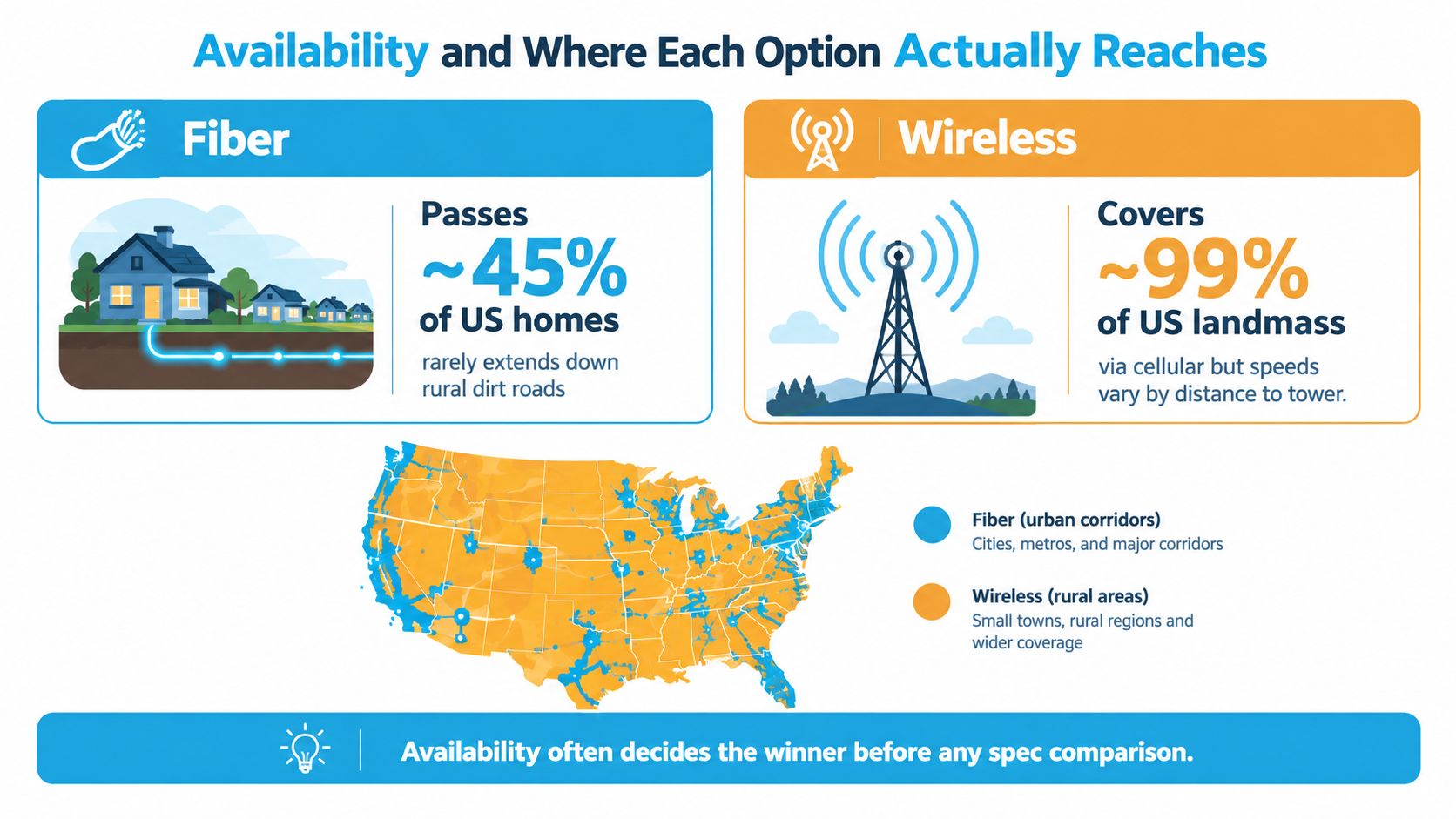
Rural residents and mobile users often begin with wireless because it reaches places wired networks do not. Fiber or cable can become available later, but a nearby backbone line remains irrelevant until the provider confirms an install date and route.
If you need service without a cable connection, this guide to home internet without cable provides another way to compare wireless choices by location and use case.
Matching the Connection to Streaming, Gaming, and Remote Work
The right connection depends on what fails first when conditions deteriorate. Streaming exposes sustained throughput problems. Gaming exposes latency and jitter. Remote work exposes upload instability, packet loss, and brief interruptions that a simple download test may miss.
| Workload | Fiber | 5G Home | Fixed Wireless | Satellite |
|---|---|---|---|---|
| Multiple 4K streams | Excellent | Good | Conditional | Limited |
| Competitive gaming | Excellent | Acceptable | Conditional | Poor |
| Casual online gaming | Excellent | Good | Good | Limited |
| Video meetings | Excellent | Good | Good with stable signal | Conditional |
| Large uploads | Excellent | Conditional | Conditional | Limited |
| VPN and cloud desktop | Excellent | Good | Conditional | Poor |
| Mobile travel | Irrelevant unless parked at a served site | Excellent | Limited | Good where permitted |
Streaming
Fiber handles multiple simultaneous streams with the least concern because it combines high capacity, strong peak-time consistency, and fast uploads for other household activity. Mid-band 5G home service can work well for one or two streams when the gateway has a strong signal and the local cell has room.
Fixed wireless can serve a household comfortably, but the provider's capacity policy matters more than the headline plan. Satellite can support streaming when the service has enough capacity and the household accepts buffering, plan limits, or scheduling large downloads outside busy periods.
Gaming
Fiber is the clear choice for competitive gaming. The FCC measurements cited earlier place fiber in a low-latency range, while fixed wireless and cellular service can vary as radio conditions and tower demand change. A 50 ms delay is not automatically unusable, but fluctuations around that delay can make fast competitive play feel inconsistent.
5G mid-band is suitable for casual online play when the signal is stable. Local fixed wireless can also work well if the provider has a clean radio path and good traffic management. Satellite is a poor fit for twitch-reflex gaming because the distance to orbit adds delay that no router setting can remove.
Remote work
Remote workers should prioritize stable uploads and low jitter over a dramatic download number. Fiber is the first choice for frequent video meetings, large file transfers, VPN use, and cloud applications. 5G home internet is a solid second choice when the gateway can hold a consistent signal outside the busiest periods.
Fixed wireless may need quality-of-service settings so a large download doesn't crowd out a video call. Satellite can support email and basic work, but sustained uploads, screen sharing, and interactive cloud desktops are more demanding.
Choose the connection that protects your workday, not the one that produces the biggest speed-test screenshot.
If fiber isn't available, use wired Ethernet from the wireless gateway to the work computer, place the gateway where signal quality is strongest, and keep a separate cellular connection as a fallback when meetings are business-critical.
Which Connection Is Right for Your Situation
The best choice becomes clear when you start with the address, then apply your lifestyle. Don't reverse that order. A perfect fiber plan that can't be installed is not an option, and a portable wireless plan that can't support your workday isn't a solution.
Rural homeowners
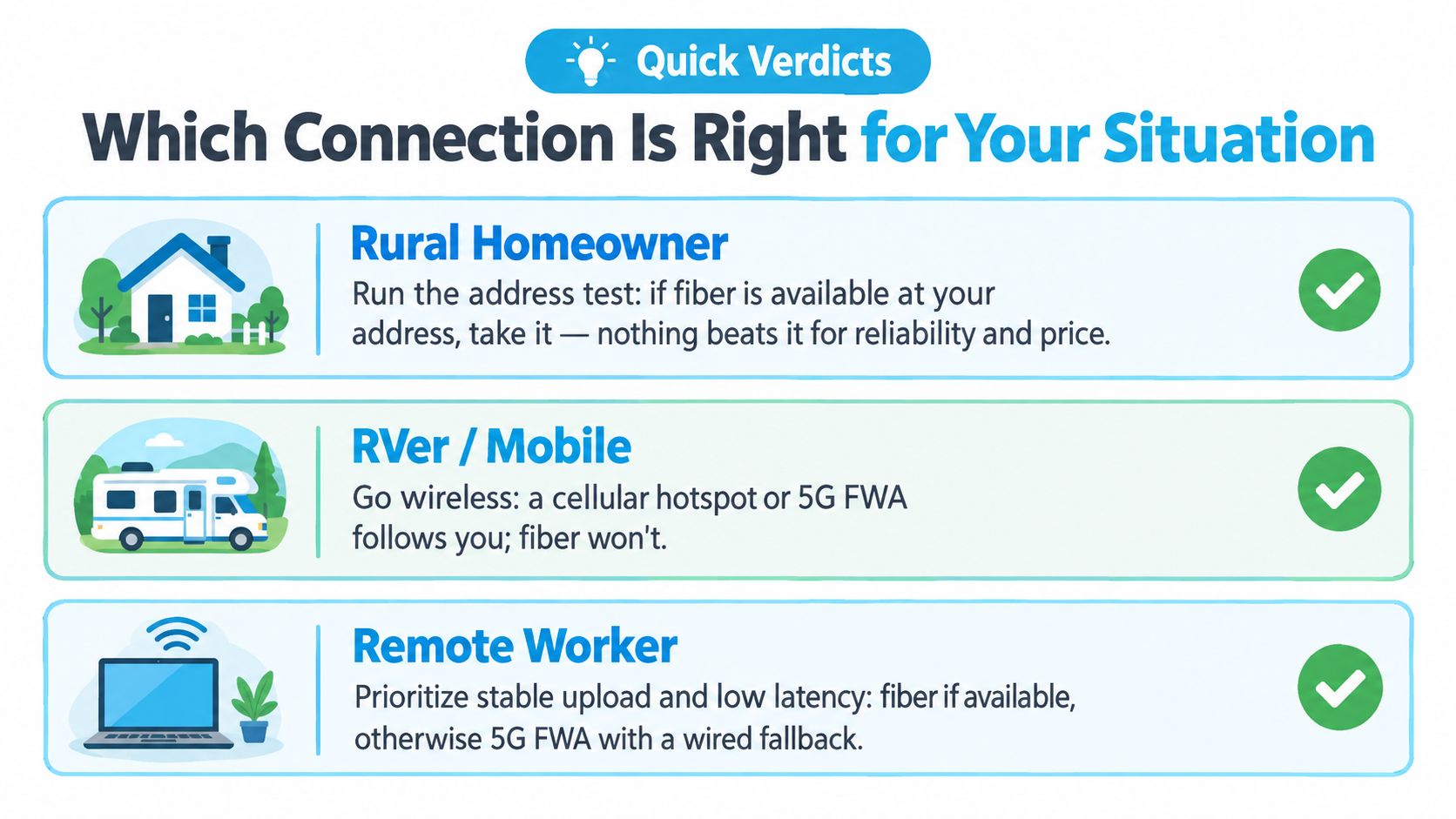
Run the address test first. If fiber is available at the property, choose it for predictable latency, symmetrical capacity, and long-term household flexibility. If the fiber line stops at the road, test fixed wireless and 5G home service before ordering satellite.
A roof-mounted receiver or outdoor cellular antenna can make the difference between marginal indoor service and a dependable home connection. Ask the provider whether the installation includes a signal survey, what happens during congestion, and whether the equipment supports an Ethernet connection for a work computer.
Clear pick: Fiber if the provider confirms installation at your address. Otherwise, choose the strongest fixed wireless option and keep satellite as the fallback for locations that fail the terrestrial signal test.
RVers and mobile users
Fiber is irrelevant unless you stay in one fiber-served park or campground for an extended period. Your practical wireless tiers are a phone hotspot for light use, a dedicated cellular router with a MIMO antenna for a more serious mobile setup, and Starlink Roam or another satellite option for locations where cellular coverage is weak.
Antenna placement matters. Keep cellular equipment away from metal obstructions where possible, test more than one carrier, and avoid assuming that a strong phone signal guarantees strong service for a full household. Satellite can be useful away from towers, but it needs a clear sky view and a stable place to operate.
Clear pick: Cellular wireless for most travel, with a second carrier or satellite system as the backup when your route takes you beyond dependable tower coverage.
Remote workers
Remote work changes the priority order. Start with the lowest-latency, most consistent upload service available. Fiber comes first, fixed wireless comes second, and cellular failover protects the workday when the primary connection drops.
A wired connection from the gateway to the work computer reduces one layer of Wi-Fi uncertainty. Use a separate hotspot or cellular router for failover, and test the backup before you need it for a client call.
Clear pick: Fiber when available. Otherwise, install fixed wireless or 5G home service with a cellular or alternate-network backup.
SwiftNet Wifi is one wireless option for households and RV travelers that need 4G or 5G service through a virtual SIM connected to major nationwide carrier networks, with no-contract plans starting at $49.99 per month and a 7-day risk-free trial, according to the publisher's service information. It fits the wireless-first profile, not a fiber replacement where fiber is already available and stable.
Quick Answers to Common Wireless vs Fiber Questions
What does wireless or fiber internet cost in 2026?
There isn't one reliable national price for either category. Wireless pricing varies by carrier, equipment, data policy, location, and whether the service is mobile or fixed. Fiber pricing varies by provider, construction requirements, speed tier, and promotional terms. Compare the full monthly charge, equipment fees, installation terms, and backup cost.
Which installs faster?
A hotspot can be active as soon as the device has service. A 5G gateway may be self-installed, while fixed wireless can require a site visit for an outdoor receiver. Fiber may be quick in a prepared neighborhood but can take substantially longer when construction, permits, or a new drop are required.
Should you wait for fiber?
Wait if the provider has confirmed a near-term installation date and your current service supports your work and household needs. Don't wait indefinitely for a line that only passes nearby. Install workable wireless now, then switch to fiber when the provider confirms the address is ready.
Does wireless make sense as a fiber backup?
Yes, especially for remote workers, rural households, and anyone who cannot afford a missed workday. A cellular hotspot or 5G gateway can provide independent access when a buried line, optical terminal, or local fiber node has a problem.
SwiftNet Wifi offers flexible 4G and 5G home and mobile internet for rural households, RV travelers, and remote workers who need a connection without waiting for fiber construction. Check your address and travel needs at SwiftNet Wifi, then choose wireless as your primary service, a temporary bridge, or a backup to fiber. #rv #rvlife #rvliving #rvlifestyle #rvrenovation #rvremodel #rvtravel #rvcamping #rvadventures #ruralwifi #5gwifi #5ginternet


