

Under 50 ms is the common benchmark for good gaming latency, while 20 ms or lower feels nearly instant for competitive play. Once latency reaches 100 ms or more, the delay becomes noticeable, especially in fast-paced games.
You line up a clean headshot, click, and still lose the duel. On your screen, the crosshair looked ready, but the server received your action after the opponent's shot had already registered. That frustrating moment is why the question “what is a good latency for gaming” needs more than one number. Your game genre, connection stability, device, and whether the game runs locally or streams from the cloud all change what feels playable.
For rural players, RV travelers, and anyone using mobile internet, the answer also depends on conditions you can't control with a simple fiber installation. A connection can post a respectable average ping and still feel poor if jitter causes repeated spikes. The useful goal isn't merely the lowest number on a speed test. It's a responsive, stable path between your device and the game server.
Why Gamers Care About Every Millisecond
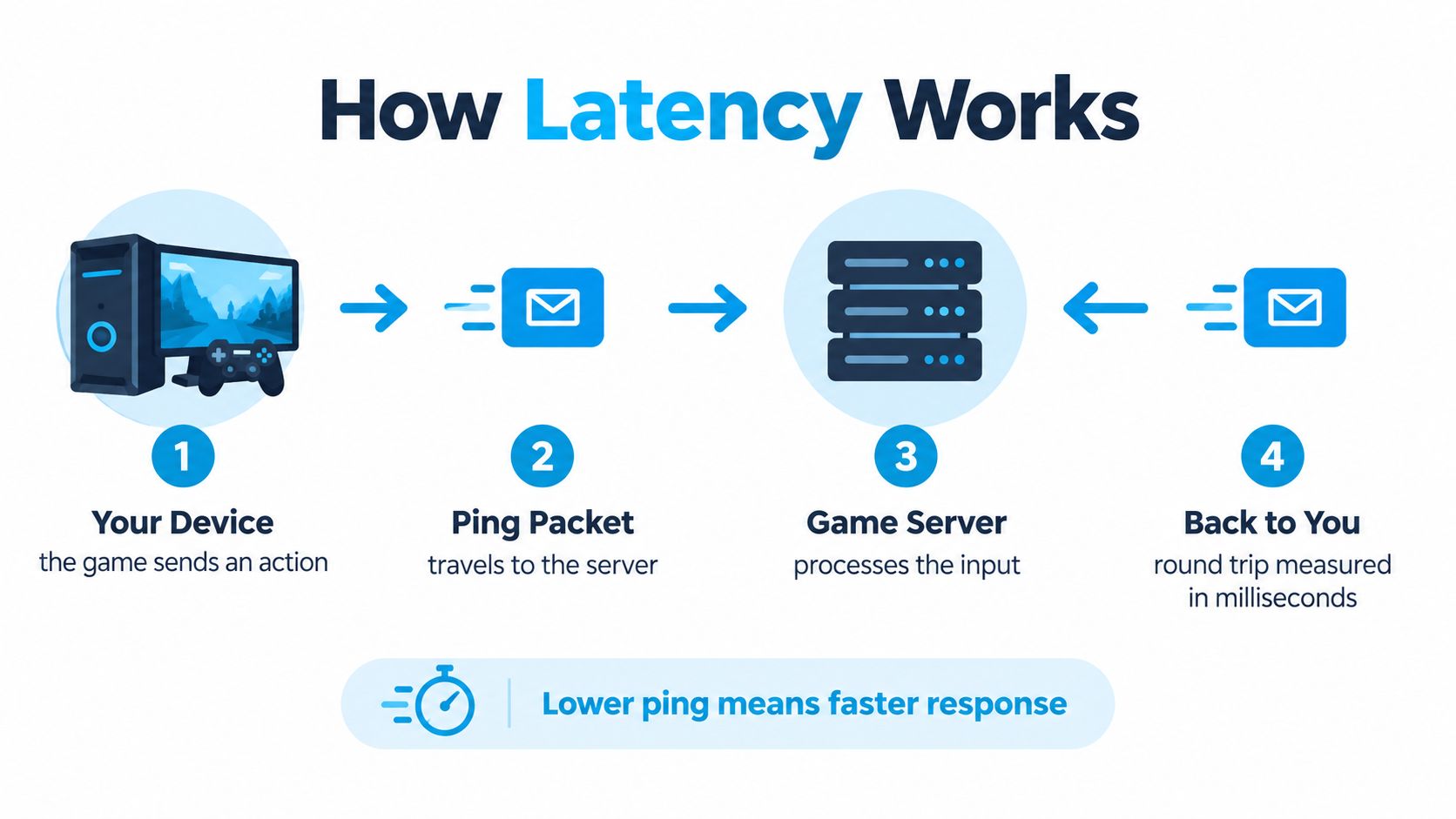
Latency is the waiting time between an action and the game's response. You press a key to strafe, move a thumbstick to aim, or tap a button to parry. Your device sends that input to the game server, the server processes it, and the result travels back to your screen.
That loop is short, but reaction-based games give you very little room for delay. A saved fraction of a second can affect a headshot, a dodge, a skill shot, or a fighting-game parry. The common practical benchmark is below 50 ms for low-latency gaming, while 20 ms or lower can feel nearly instant. Xfinity's gaming latency guidance describes the same broad range and notes that 100 ms or more produces noticeable delay.

Bandwidth isn't the same thing
A fast download plan can move large files quickly, but bandwidth doesn't determine how quickly a single action reaches the server. Think of bandwidth as the width of a road and latency as the travel time for one car. A wider road helps when many vehicles are moving, but it doesn't automatically shorten the route.
That distinction explains why a lower-speed connection with stable ping can feel more responsive than a faster connection with delay spikes. Game updates, video streams, and household traffic need bandwidth. Your trigger pull and movement command need a short, consistent round trip.
Practical rule: For online play, judge the connection by responsiveness and stability first, then consider bandwidth for downloads and shared household use.
Competitive shooters expose latency most clearly because players make rapid decisions under pressure. MOBAs, battle royales, fighting games, MMOs, and cloud gaming each impose different demands. The sections ahead place ping into practical tiers, compare game genres, explain jitter and packet loss, and show how to test a rural or mobile setup without relying on one flattering speed-test result.
Latency and Ping Explained Without the Jargon
Imagine mailing a note to a friend across town. You hand it over, the note travels through several stops, your friend reads it, writes a reply, and sends that reply back. The time you wait for the complete exchange is similar to a game's round-trip latency.
In networking, a small packet carries information from your device to the game server. The server responds, and the packet returns. Ping is the common measurement of that round-trip delay, expressed in milliseconds, while latency describes the delay itself. HP's explanation of ping and latency distinguishes the related terms and connects lower latency with faster in-game reactions.
Where the milliseconds go
A typical action follows a path like this:
- Your controller or keyboard creates an input that the game sends through the device's network connection.
- Your router or hotspot receives the packet and forwards it across the local network.
- Your ISP's access network carries the packet away from your home, RV, or mobile device.
- Backbone routes and exchanges move it toward the region hosting the game server.
- The game server processes the input and sends a response.
- The return route brings that response back through the network to your device and display.
Each step can add delay. Distance matters because a server located farther away needs a longer route. Congestion matters because packets may wait before moving onward. Wi-Fi interference and radio conditions can add variation even when the average route looks acceptable.
A plain-language guide to ping can help if you want to review the distinction separately. Fiber, cable, and 5G can all provide usable gaming connections, but they differ in route length, congestion, and consistency. The number shown in a test is therefore a snapshot of a path, not a permanent property of your console or PC.
The Latency Ladder From Excellent to Unplayable
A match can feel fine at 40 ms and frustrating at 140 ms. Latency works like the travel time of a message: the higher the ping, the longer your game waits for input and server responses. The broad ranges below place 0–20 ms in the excellent range, 20–50 ms as good, 50–100 ms as fair, and anything above 100 ms in increasingly problematic territory. Optimum's ping and latency guidance offers a wider comparison, while Kaspersky's gaming guidance describes 50–100 ms as very good to average and 150 ms or more as high ping.
| Tier | Ping Range | How It Feels | Best Suited For |
|---|---|---|---|
| Excellent | 0–20 ms | Inputs feel almost immediate, with little noticeable network delay | Competitive shooters, fighting games, esports |
| Good | 20–50 ms | Controls remain smooth and responsive in most online games | Competitive and casual multiplayer |
| Fair | 50–100 ms | Playable, though quick reactions and hit registration can feel slightly late | Casual shooters, MOBAs, MMOs, battle royale |
| Poor | 100–200 ms | Delayed abilities, rubber-banding, missed shots, and visible lag become common | Slow-paced play, if the connection stays active |
| Very poor | Above 200 ms | Real-time interaction becomes difficult and frustrating | Generally unsuitable for fast online games |
The same number does not feel identical in every title. A turn-based game can remain enjoyable with latency that would disrupt a fighting match. An open-world player may accept more delay than someone competing in ranked matches.
Server distance can change the result, too. A test may reach a nearby server while your game connects to a distant region. That makes the in-game ping more useful than the test's best reading. Check the route you play on, then judge the number alongside connection stability. A steady 70 ms connection may feel better than one that jumps between low and high readings.
Good Latency by Game Genre
A close-range duel in a competitive FPS can turn a tiny delay into a missed shot. In an MMO, the same delay may pass unnoticed while an ability finishes casting. The right target depends on how quickly the game asks you to react.
The figures below connect latency with the pace of each genre. Optimum's gaming latency reference describes under 20 ms as excellent, 20–40 ms as good, and latency above 100 ms as noticeably laggy. Treat these ranges as practical targets rather than guarantees. A stable connection near the upper end can feel better than a lower reading that keeps changing.
| Game Genre | Ideal Latency | Acceptable Pace | Why It Matters |
|---|---|---|---|
| Competitive FPS, including Valorant and Counter-Strike 2 | Under 20 ms | Around 50 ms | Aim, movement, and hit registration depend on quick exchanges |
| Casual and open-world shooters, including Borderlands and Destiny | Around 20–40 ms | About 60–80 ms | Exploration and cooperative play usually tolerate more delay |
| MOBAs, including League of Legends and Dota 2 | Under 40 ms | Around 40–60 ms | Ability timing matters, but the pace differs from a twitch shooter |
| Battle royale, including Apex Legends and Warzone | Under 20–30 ms | Around 50–80 ms | Gunfights and movement can decide an entire round |
| MMOs and turn-leaning RPGs | Around 40–60 ms | About 80–100 ms | Ability queues and slower encounters reduce the effect of delay |
| Cloud gaming | Under 30–40 ms | Depends heavily on the stream | Network delay combines with encoding, rendering, and display delay |
Cloud gaming adds another layer. The game runs on a remote computer, which sends a live video stream to your device. A 2025 study of mobile cloud gaming reported end-to-end interactive latency from 112 to 403 ms under good network conditions, while system changes reduced it by about 34% to below 100 ms. The study summary shows why a low ISP ping does not automatically make streamed play responsive.
Your hardware also affects the final experience. Players comparing portable devices can find gaming phones from Used Mobiles 4 U and check display response, thermal behavior, and rendering alongside network latency. If fiber is unavailable in a rural area or you play over mobile data, prioritize the lowest stable result your connection can maintain. Competitive players should seek the steadiest low-latency route available, while casual players may gain more from consistency than from chasing a perfect reading.
Jitter and Packet Loss the Hidden Latency Killers
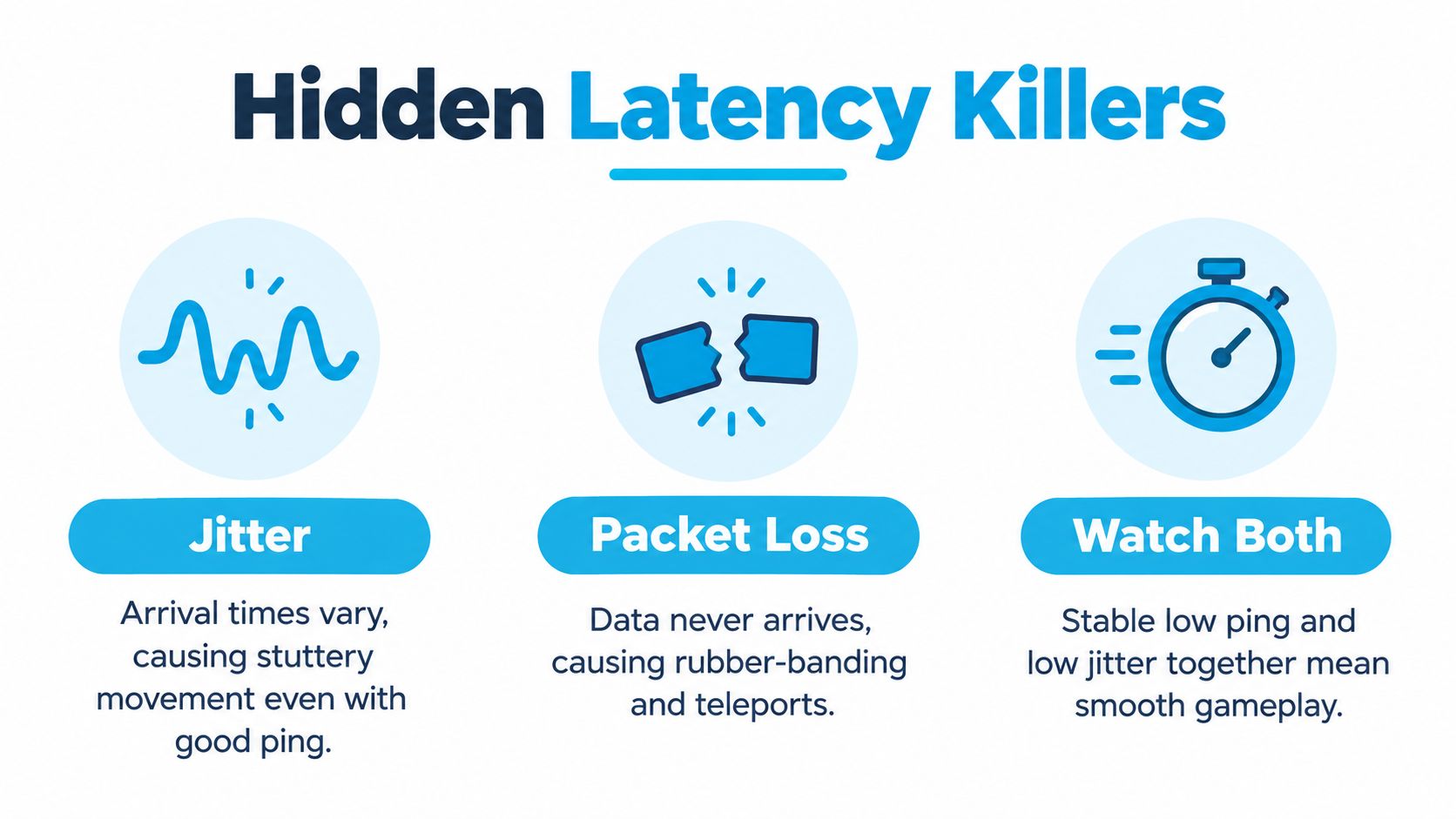
Two connections can report the same average ping and feel completely different. One may deliver every action in a steady stream. The other may arrive in clumps, pause, and then catch up.
Jitter is the variation in packet delay over time. A practical gaming reference places under 5 ms in the excellent range, 5–15 ms as good playability, and 30 ms or more as visibly poor performance. This explanation of jitter connects inconsistent arrival times with rubber-banding, missed shots, and desynchronization.
A stable 45 ms connection can feel better than a 25 ms connection that repeatedly jumps by 20 ms. The first behaves like a playlist that plays continuously. The second skips at the moments you need it most.
What packet loss looks like
Packet loss occurs when data never reaches its destination. Your character may teleport backward, an opponent may jump across the screen, or an ability may appear to pass through its target. Unlike jitter, packet loss isn't just late delivery. The game never receives some of the information it needs.
Common causes include crowded Wi-Fi channels, router problems, poor signal conditions, ISP congestion, and overloaded local networks. An unstable modem or hotspot can produce similar symptoms. These issues are often symptoms of a weak or congested path rather than a flaw in the game itself.
Open the in-game network graph during a match if the title provides one. Then run a longer ping test to the relevant server and look for spikes instead of focusing only on the average. A guide to network jitter can help you interpret the pattern.
A smooth 45 ms session usually beats an erratic 25 ms session. Stability wins the duel more often than a perfect-looking average.
Practical Ways to Reduce Gaming Latency
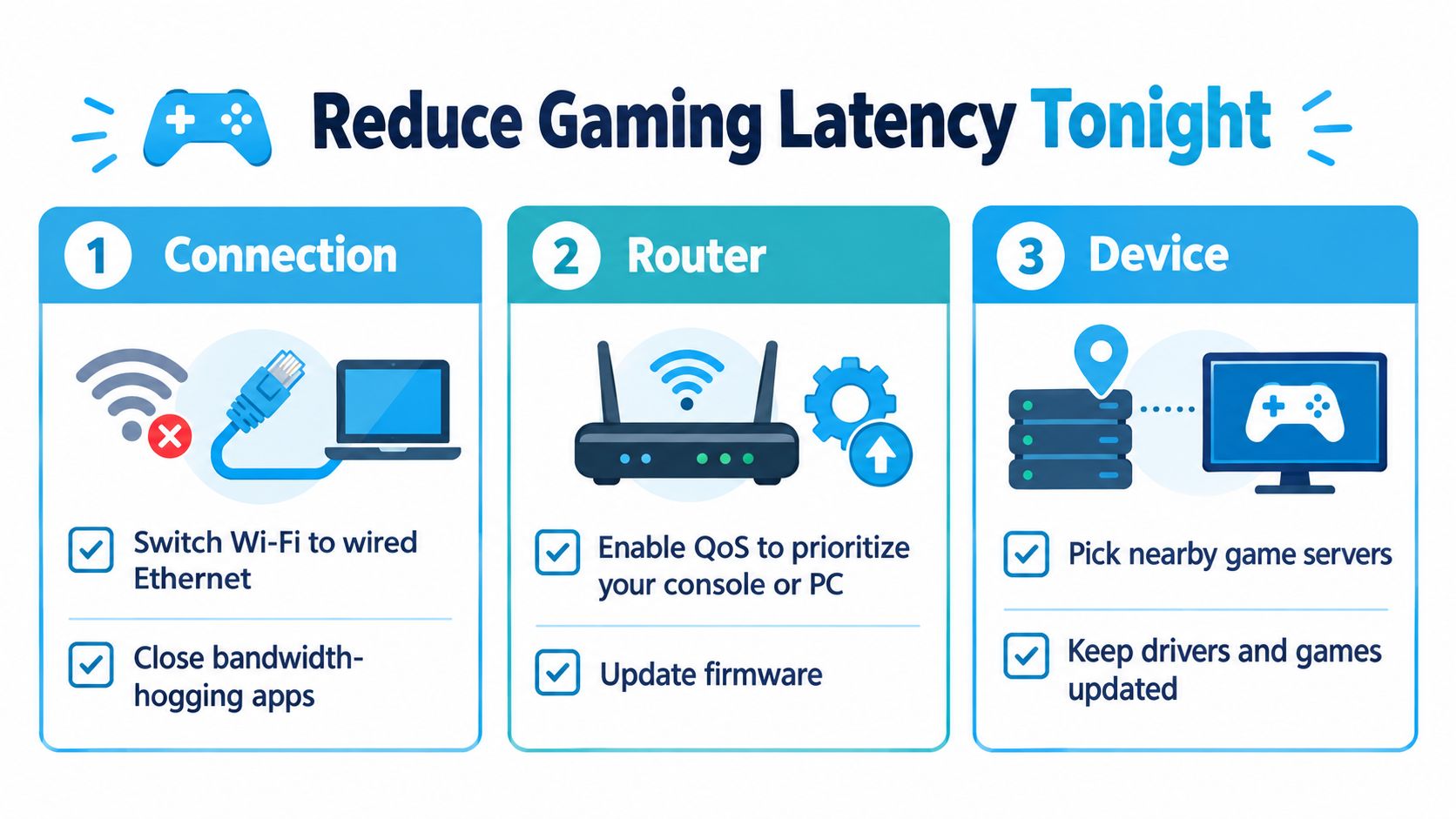
Start with the route between your device and the router. A wired connection removes much of the interference and contention associated with Wi-Fi, especially when other people are streaming or moving around the home.
Improve the connection path
- Use Ethernet where possible. Connect the console or PC directly to the router with a suitable cable, rather than adding a wireless hop.
- Choose a nearby game server. A closer region usually means a shorter network route.
- Avoid unnecessary VPN routing. A VPN can send traffic through an additional location, increasing distance and delay.
- Separate gaming from heavy traffic. Pause large downloads, video uploads, and other activities that compete for the same connection.
If wiring isn't practical in an RV or a rented home, place the device where the wireless signal is strongest. A 5 GHz or 6 GHz Wi-Fi band can help nearby devices, although walls, distance, and congestion still matter.
Tune the router and device
Enable Quality of Service, often called QoS, if your router supports it. QoS can prioritize the console or PC when the network is busy. Update router firmware, restart equipment when troubleshooting, and reduce unnecessary active devices during a test.
On the gaming device, close launchers and background downloads. Pause cloud synchronization while playing, and keep the operating system, network drivers, and game client current. Clearing the DNS cache or testing a reputable public resolver may improve how quickly services are located, but it won't repair a congested route once the game session is underway.
Test one change at a time with the same tool and the same server region. If the average ping barely changes but jitter and packet loss disappear, you've still made a meaningful improvement.
Latency on the Road and in Rural Areas
Players outside dense fiber coverage often face a longer route before traffic reaches a major exchange or game server. Rural backhaul, older last-mile infrastructure, and limited local peering can add distance or congestion. Mobile connections introduce a different constraint. The radio path may be short, but many users can share the same tower and available airtime.
That makes testing more important than judging a connection by its advertised download speed. Use the same benchmark for every option: competitive play generally favors under 20 ms, while under 50 ms remains the broad target for smooth online gaming. Mobile performance can vary by location, tower load, weather, building materials, and the number of devices using the connection.
| Connection Type | Typical Ping Range | Jitter Behavior | Best Use Case |
|---|---|---|---|
| Fiber | Often among the lowest available | Usually consistent when the local network is healthy | Competitive gaming and busy households |
| Cable | Can be responsive, with shared local capacity | May vary during congestion | General multiplayer and home gaming |
| 4G LTE | Depends on signal and tower conditions | Can change as radio conditions shift | Rural backup, travel, and casual multiplayer |
| 5G fixed wireless | Can offer a short radio path where coverage is strong | May vary with tower load and signal quality | Home, RV, and mobile gaming where wired service is limited |
| Satellite or hotspot setups | Highly dependent on technology and location | Can be more variable than wired paths | Remote access when terrestrial options are unavailable |
Readers planning connectivity away from cities can compare satellite and hotspot setups before choosing equipment. The key question isn't whether a service is labeled fiber, cable, or mobile. It's whether the service holds a usable route to your game's server during the hours you play.
SwiftNet Wifi is one mobile option for households, RV travelers, and rural users who need 4G or 5G connectivity through carrier networks. Evaluate it against your existing cable or fiber plan by recording ping to the game server, jitter during a 30-minute session, and packet loss under load. The broader meaning of latency is covered in this network latency guide, but your own in-game measurements remain the deciding evidence.
Putting It All Together and Testing Your Setup
Three numbers tell you more than a download-speed headline:
- Target ping for your genre. Competitive FPS players can aim toward 20 ms or below, while other genres may remain comfortable at a higher value.
- Jitter. Under 5 ms is excellent consistency, and 5–15 ms is generally good playability.
- Packet loss. Aim for zero during a stable session. Even small losses can create visible interruptions.
Run a short, repeatable test instead of trusting one speed-test result. Start an in-game network graph during a warm-up match and note ping spikes or warning indicators. Then test ping and jitter against the server region your game uses, followed by a packet-loss check while other household devices are active.
A simple testing routine
- Warm up in the game. Watch the network graph while moving, aiming, and taking part in a real match or practice session.
- Test the actual route. Use the game's server region rather than only a nearby generic test server.
- Load the connection carefully. Repeat the check while the household is using the network, then compare the result after pausing downloads and enabling QoS.
- Repeat after every change. Keep the same location, device, server, and test method so the comparison means something.
For an RV or rural setup, test at the time you normally play. A connection that performs well during a quiet period may behave differently when the local tower or household network is busy. Judge the result by the entire pattern, not the single lowest ping.
#rv #rvlife #rvliving #rvlifestyle #rvrenovation #rvremodel
#rvtravel #rvcamping #rvadventures #ruralwifi #5gwifi
#5ginternet
SwiftNet Wifi offers 4G and 5G home and mobile internet for rural households, RV travelers, and people who need a flexible connection for gaming and everyday work. Compare its performance with your current service by testing server ping, jitter, and packet loss during a real session, then visit SwiftNet Wifi to explore the available options.


