

The 5G signal is strong, your laptop says the connection is healthy, and yet your video call keeps breaking into tiny loops whenever someone streams in the background. In an RV, that's easy to blame on the cellular tower, weather, or a crowded campground. Sometimes the trouble is closer to you, on the Ethernet link between the router, switch, and the devices inside the coach.
Ethernet flow control is a link-layer mechanism that lets a congested device ask its directly connected neighbor to pause transmission. That can protect buffers from overflowing, but it can also turn a short queue problem into noticeable jitter for calls, gaming, and streaming. The right setting depends on the link, the equipment, and the traffic sharing it.
When Your RV Internet Stutters and What Might Be Causing It
You're parked for the evening, your laptop is connected to a 5G router, and a video call begins smoothly. Then someone starts a large download or opens a high-resolution stream. The cellular signal bars don't change, but your voice cuts out in short bursts while the other person's shared screen freezes and catches up.
That pattern doesn't automatically mean the mobile connection is weak. A switch or router on the local Ethernet path may be managing a full queue by asking its peer to stop sending temporarily. The pause happens before traffic reaches the cellular network, so a signal-strength check won't reveal it.

The local link can be the bottleneck
Flow control is designed to prevent a receiver's buffers from overflowing. Instead of immediately discarding incoming frames, the receiver sends a control message to the device beside it and requests a brief pause.
That sounds helpful, and in a carefully engineered wired network it can be. The problem appears when one paused link carries several unrelated conversations. Your call, a television stream, a printer connection, and a file transfer may all wait together even though only one traffic flow created the pressure.
Practical rule: A strong cellular signal doesn't prove that the wired segment inside your RV is handling congestion well.
The first useful question is therefore not “Why is 5G slow?” It's “Does the stutter appear only when several local devices are active?” If browsing remains responsive while voice and video break up, local queue behavior deserves attention alongside cellular latency.
How Ethernet Flow Control Works Through Pause Frames
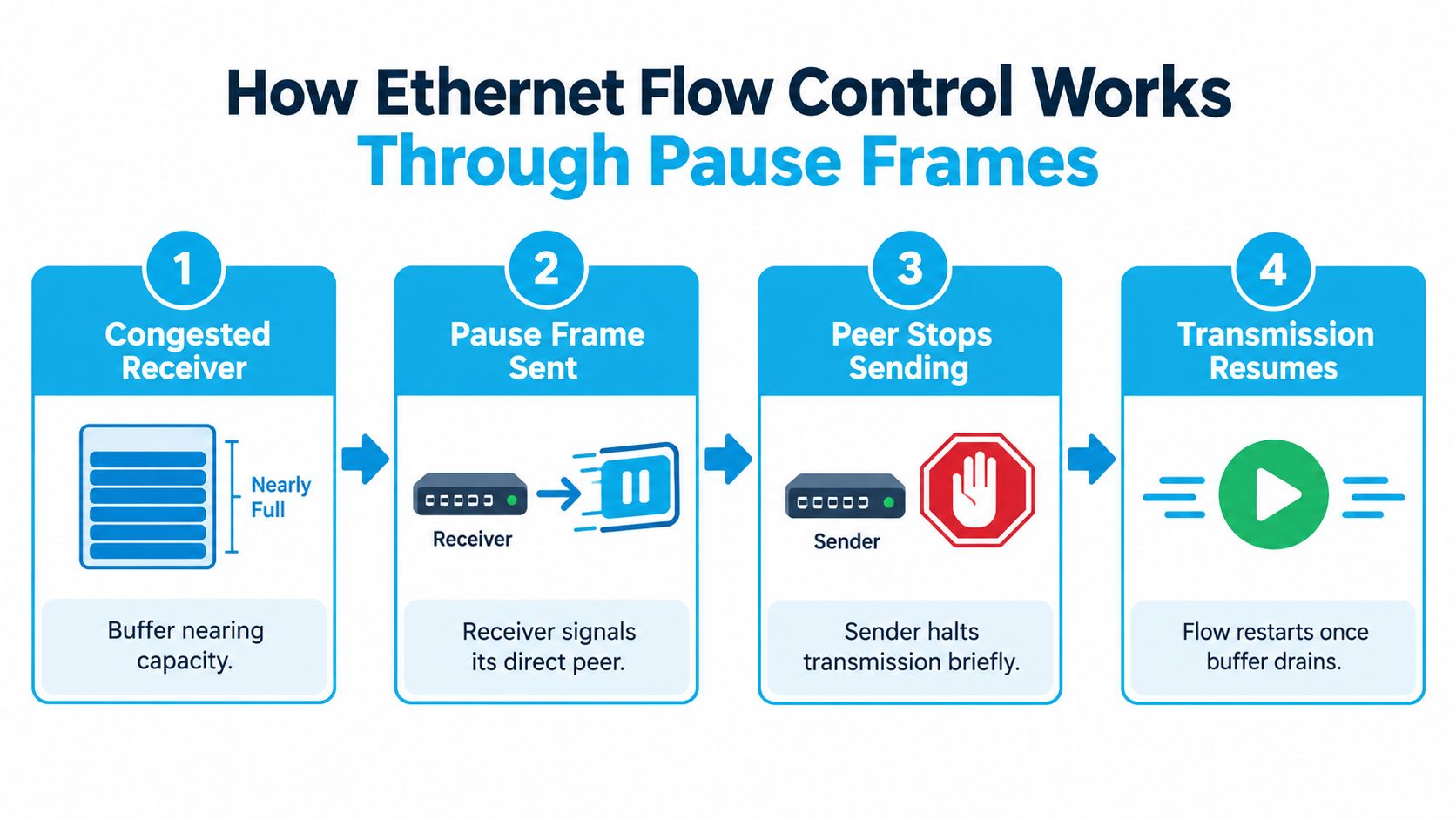
Two devices pass frames across a narrow Ethernet link. As the receiving device's buffer fills, it can ask its directly connected peer to pause briefly. The request applies to that link and sender, not to every device on the network.
Ethernet flow control follows this sequence:
- The receiver's buffer approaches capacity.
- It sends a pause frame to its directly connected peer.
- The peer stops transmitting for the requested interval.
- Transmission resumes when the interval expires or a later control message cancels it.
The frame has a specific job
Ethernet flow control was formalized through IEEE 802.3x in 1997, which introduced pause frames for full-duplex Ethernet links (technical background on Ethernet flow control). A congested receiver sends a MAC control frame with EtherType 0x8808 and opcode 0x0001. The frame asks the sender to stop for a specified period instead of immediately discarding frames.
The pause duration uses quanta. One quantum equals the time required to transmit 512 bits, giving the sender a defined interval rather than a vague instruction to slow down. That precision helps devices coordinate short bursts of local congestion.
Classic PAUSE remains local to the Ethernet relationship. A cellular router cannot use one pause frame to command a distant tower, and a laptop adapter does not directly control every Wi-Fi client. The message travels only across the immediate full-duplex link between the receiver and sender.
That boundary matters in an RV or rural home network. A router-to-switch Ethernet connection may pause while the wireless or cellular backhaul remains congested. Conversely, a 5G link can be busy while the wired handoff is clear. During a video call, game session, or stream, checking both segments helps identify which one is applying the pressure.
Why Flow Control Can Create Latency Spikes on Mixed Networks
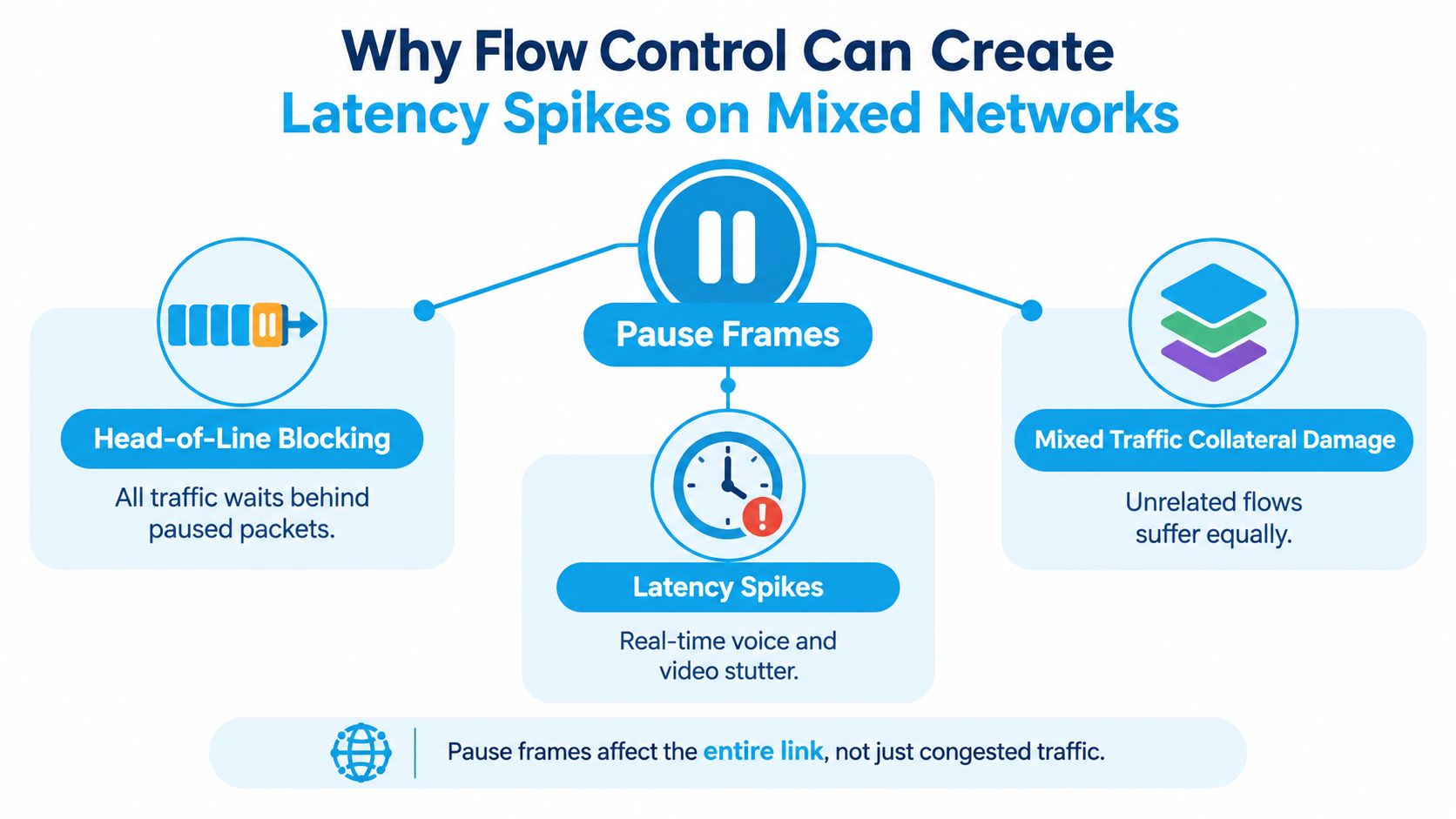
Classic Ethernet PAUSE is effective because it is blunt. When a sender receives the request, it stops traffic on that link, rather than stopping only the flow filling the receiver's queue (Cisco technical material on pause behavior).
That behavior creates head-of-line blocking. A highway shows the same effect: one stalled vehicle blocks every lane behind it, so cars in unaffected lanes still cannot reach their destinations. On an RV switch, a video call may wait behind a bulk transfer even when the call did not create the queue.
Stalls can feel worse than drops
A small amount of packet loss may trigger recovery without becoming obvious. A pause can delay several packets at once. Voice and video applications may show that delay as a broken syllable, frozen frame, or burst of catch-up traffic. Games respond poorly for the same reason. The connection stays active, but responsiveness falls.
IEEE congestion-management discussion material explains how pause frames can spread through a congestion tree, stalling traffic that did not cause the original problem (IEEE congestion-management discussion). Once a port is paused, traffic can slow toward the speed of the slowest link. Buffers also need capacity for data already in flight and for the sender's reaction time before the pause takes effect.
In a motorhome, the same pattern appears on a smaller network. A 5G router may feed a wired laptop, media device, and access point through one switch. If they share a paused path, unrelated traffic inherits the delay. A single queue event can therefore become video-call jitter, a gaming stall, and buffering on the same connection.
Full-duplex is a requirement
Flow control depends on a full-duplex Ethernet link. A mismatched or poorly negotiated link can produce similar symptoms, including retransmissions, uneven throughput, and unstable latency. Oversubscription matters too. PAUSE does not guarantee loss-free operation when competing traffic exceeds what the port can deliver.
The trade-off: Flow control can exchange visible packet loss for invisible queueing. That helps only when the added delay costs less than the drops it prevents.
When to Enable or Disable Flow Control on Your Equipment
There isn't a universal “on” setting for Ethernet flow control. Start with the physical link and the traffic pattern, then test the result under the same conditions that produce the problem.
A full-duplex connection between a switch and a wired computer or media server is a reasonable candidate for flow control when the devices have compatible buffering and the goal is to reduce drops during short bursts. A cellular router feeding several wireless clients is a different situation. The backhaul may be asymmetric, the router may be oversubscribed, and pausing the Ethernet side won't make the mobile network deliver packets faster.
| Setup | Enable Flow Control | Disable Flow Control |
|---|---|---|
| Full-duplex switch to wired workstation | Can reduce drops during temporary queue pressure when both devices support the behavior correctly. | May expose congestion as drops, but can preserve responsiveness if pauses create disruptive stalls. |
| Switch to media server or storage device | Can help protect burst-heavy transfers when buffer sizing and link negotiation are sound. | May be preferable when real-time traffic shares the same path and queueing is more harmful than loss. |
| Cellular router feeding mixed RV traffic | Can spread a local pause across unrelated traffic and amplify jitter when the port is oversubscribed. | Often gives a clearer congestion signal, but it won't fix a saturated wireless or cellular backhaul. |
Read the setting, then test the symptom
On Linux, ethtool can show whether a compatible interface advertises and receives flow control:
ethtool -a eth0
On supported hardware, changing the advertised behavior may look like this:
sudo ethtool -A eth0 rx on tx on
Use the interface name that carries traffic, and verify the result afterward with ethtool -a. A command succeeding doesn't prove that the switch, cable, and peer use the same behavior.
Windows usually exposes the setting under Device Manager, Network adapters, the adapter's Properties, and the Advanced tab. Look for a vendor-specific item such as Flow Control. Don't confuse it with Energy-Efficient Ethernet, which manages power behavior rather than pause-frame response.
Router interfaces vary widely. Some wired gateways place flow control under advanced Ethernet or switch settings. Others hide the control completely, ignore it on certain ports, or offer only QoS controls. If the option isn't present, don't assume the router supports configurable PAUSE.
Before changing anything: Record the current setting, reproduce the jitter, change one variable, and repeat the same test. Otherwise, you won't know whether flow control helped or whether the cellular network simply became quieter.
Priority Flow Control and Smarter Traffic Management
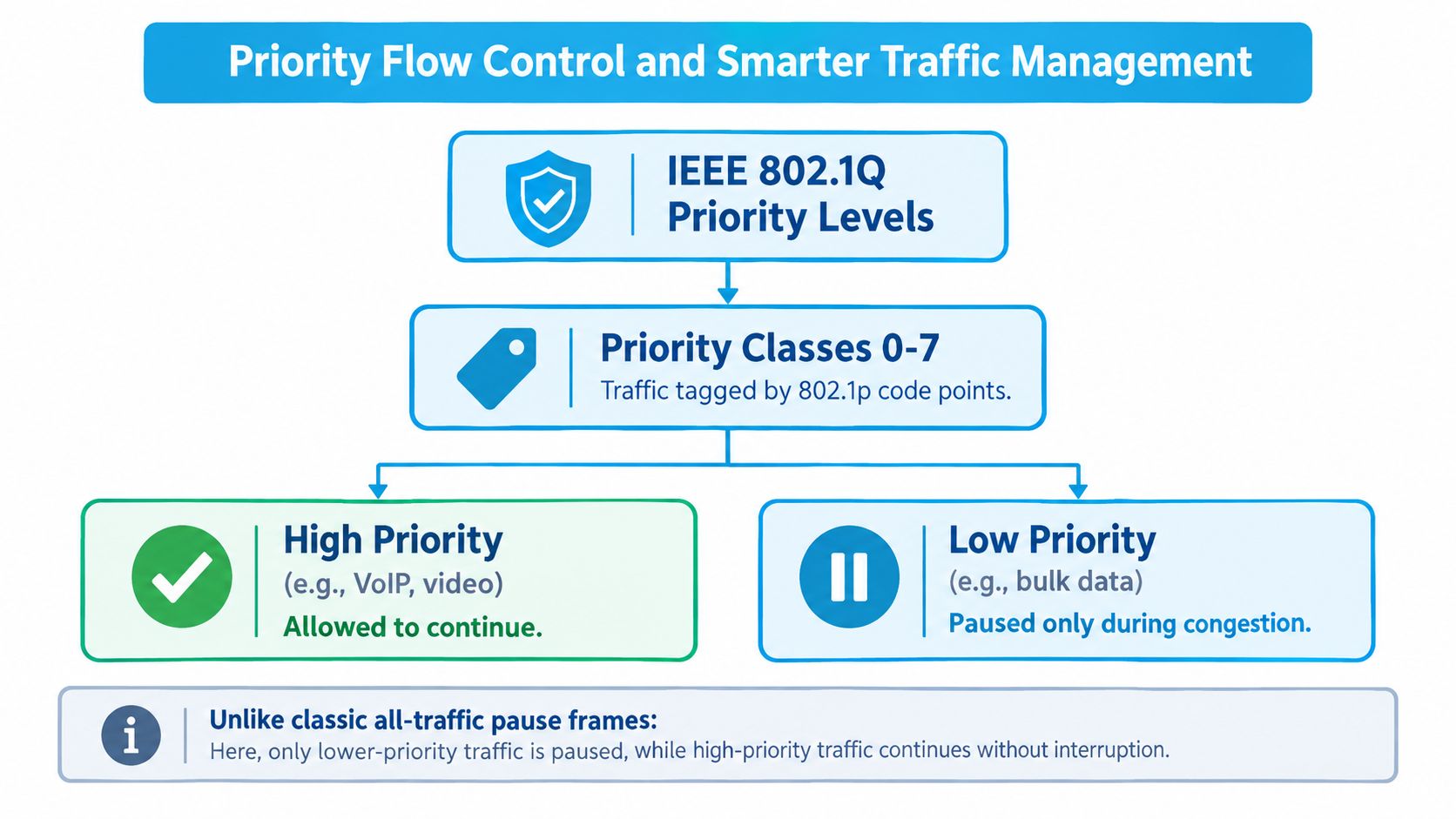
Classic PAUSE treats the link like one large queue. Priority Flow Control, standardized as IEEE 802.1Qbb, takes a more selective approach. It can pause chosen traffic priorities while allowing other priorities to continue on the same port (Broadcom overview of Priority Flow Control).
The classification comes from IEEE 802.1p code points carried in an IEEE 802.1Q VLAN tag. PFC supports up to eight independently controlled classes of service, so a device can pause one class without applying the same action to every other class (IEEE 802.1Q flow-control material).
For an RV office, the appeal is obvious. A bulk transfer could yield during congestion while a carefully marked voice or video class continues. That's more like a traffic light controlling selected lanes than a barrier dropping across the entire road.
PFC still isn't a magic setting. The router, switch, NIC, tagging scheme, and traffic policies must support compatible priorities. Many consumer gateways don't expose that level of control, and incorrect classification can protect the wrong traffic.
For capable equipment, a managed switch can provide the visibility and policy controls that an unmanaged unit lacks. A practical introduction to that hardware category is this guide to a managed network switch.
My default position is conservative. Keep ordinary flow control enabled on a properly negotiated full-duplex link when buffer protection matters and testing shows no harmful stalls. Avoid treating it as a universal optimizer on an asymmetric cellular setup, where pause behavior can hide the actual bottleneck and damage real-time responsiveness.
How to Configure Ethernet Flow Control on Common Platforms
Configuration starts with discovery. Identify the interface carrying the traffic, check its negotiated duplex state, and note whether the peer is a switch, router, dock, or cellular gateway. A setting on your laptop can't compensate for a peer that doesn't advertise or honor the same behavior.
Linux gives you the clearest view
On Linux, begin with:
ethtool -a eth0
This reports the interface's pause parameters when the driver exposes them. To request receive and transmit flow control, use:
sudo ethtool -A eth0 rx on tx on
To turn both directions off for a test:
sudo ethtool -A eth0 rx off tx off
Run the read command again after each change. Then reproduce the actual workload, such as a call while another device transfers data. A setting that looks correct at the NIC still needs to match the switch port.
Windows separates related controls
Open Device Manager, expand Network adapters, right-click the wired adapter, and select Properties. Under Advanced, locate the vendor's Flow Control entry and record whether it is enabled, disabled, or set to an automatic value.
Leave Energy-Efficient Ethernet as a separate troubleshooting variable. Changing both options at once makes the result difficult to interpret. Windows drivers also use different names, so the absence of a setting may indicate a driver limitation rather than a configuration mistake.
Router menus aren't consistent
Consumer and prosumer routers may place the control under an advanced LAN, Ethernet, switch, or QoS page. Cellular equipment often prioritizes simple operation and may not provide a PAUSE setting at all. If you're selecting hardware for a wired mobile installation, compare the router's Ethernet features before buying. A guide to a mobile hotspot with an Ethernet port can help frame that equipment choice.
Use this verification checklist:
- Confirm the port: Test the interface that carries the affected traffic.
- Check duplex: Make sure the link is full-duplex and negotiated consistently.
- Change one setting: Don't combine flow-control, QoS, and power changes in one test.
- Repeat the workload: Use the same call, stream, and transfer combination each time.
- Check the peer: A local NIC change has limited value if the switch port behaves differently.
When congestion is detected, the receiver sends a pause or PFC control frame to the directly connected peer. The sender then stops the affected transmission until the timer expires or another control frame removes the pause (Cisco explanation of pause operation).
Troubleshooting Network Jitter in RV and Rural Setups
Start with correlation, not assumptions. Note whether the stutter appears only during a call, only while another device transfers data, or even when the laptop is the sole active client. A strong cellular signal and a clean Ethernet link can still coexist with congestion elsewhere, so isolate each segment.
A practical isolation sequence
- Run the call alone. Disconnect or pause unnecessary clients, then repeat the conversation.
- Add one load at a time. Start a stream or transfer and watch whether jitter returns.
- Compare wired and wireless. If a wired device remains stable while Wi-Fi clients struggle, the wireless side deserves attention.
- Toggle flow control for a controlled test. If disabling it removes stalls but exposes ordinary loss, you've identified a trade-off rather than a complete fix.
- Check negotiation. Look for full-duplex operation and avoid forcing one side to a mode the peer doesn't use.
The key distinction is location. Cellular scheduling can create variable delay even when the local Ethernet segment is idle. Ethernet pause behavior is more likely when the problem follows a busy wired path, disappears after reducing local traffic, or changes immediately when the relevant adapter setting changes.
A useful observation: If your call breaks only when the RV's wired switch is busy, investigate the local queue before moving the antenna.
Mixed-load environments deserve special care because modern congestion management includes more than the original PAUSE mechanism. Priority-based features can change which traffic waits, while virtualized or tagged networks may introduce classifications that aren't obvious from a consumer router's dashboard (Red Hat flow-control guidance).
For broader visibility into latency, loss, interfaces, and device behavior, use this practical resource to compare monitoring tools 2026. You don't need a full enterprise monitoring stack to learn something useful. Even a simple before-and-after record of latency during a call and a transfer can prevent guesswork. More background on the symptom itself is available in this guide to what network jitter means.
Quick Decisions for Smoother Remote Work and Travel Internet
Use this checklist before changing settings on a working RV network:
- Keep flow control enabled on a full-duplex Ethernet link when compatible devices show fewer drops without added delay.
- Test it disabled when a 5G or cellular router carries mixed traffic and pause events cause call stutter, gaming stalls, or buffering.
- Check duplex settings and cabling when symptoms continue with only one device active.
- Look beyond Ethernet when jitter remains on an idle wired segment. The wireless or cellular backhaul may be responsible.
- Use priority-based controls only when the hardware supports compatible classification and you can verify which traffic receives priority.
Ethernet flow control manages local congestion. It does not make mobile internet faster. Change one setting at a time, then test a call, a file transfer, streaming, and gaming with the devices inside your coach. That exposes whether a pause frame is helping or just making the queue harder to tolerate.
If evening calls still stutter after you test the wired segment, use the SwiftNet Wifi resource page to compare mobile and rural connectivity options and review RV-focused guidance.
#rv #rvlife #rvliving #rvlifestyle #rvrenovation #rvremodel
#rvtravel #rvcamping #rvadventures #ruralwifi #5gwifi
#5ginternet


