

You're parked beyond the last reliable bar of service. The phone shows a weak 4G signal, your laptop connects for a moment, and then a video call freezes while a file upload crawls. A standard smartphone hotspot may technically work, but that doesn't mean it can handle a rural home, an RV full of devices, or a full workday.
A dependable wifi hotspot for rural areas starts with a better question than “Which device is fastest?” You need to know which carrier bands reach your location, how far you are from the tower, whether the router accepts an external antenna, and how the connection behaves when the network gets busy. Rural internet is an infrastructure problem first and a device-shopping problem second.
The Rural Connectivity Challenge
Rural internet often forces an unpleasant choice. You may have an expensive fixed-line service that drops without warning, or a cellular connection that works near the road but fades inside the house. In an RV, the same issue appears when a campsite looks connected on a coverage map but sits behind trees, hills, or a distant tower.
Coverage maps are useful for identifying likely service, but they don't measure the signal inside your specific building or campsite. A map may show a broad service area while your actual connection suffers from tower distance, terrain, building materials, congestion, or a carrier band your device doesn't support well.
Why the address matters
Rural users also face fewer choices than urban subscribers. Fixed networks cost more to extend across long distances, and a single provider may serve an entire area. In the United States, 22.3% of people in rural areas lacked coverage from fixed terrestrial 25/3 Mbps broadband, compared with 1.5% in urban areas, according to a rural broadband options and obstacles report.
That gap explains why cellular hotspots are valuable, but it doesn't make every hotspot suitable. A phone placed on a kitchen counter may see less signal than a router positioned beside an upstairs window. A pocket hotspot may lack antenna ports, limit the number of connected devices, or struggle to maintain performance under sustained use.
Practical rule: Treat the hotspot, carrier, antenna, and placement as one system. Replacing only the device may not solve the weak link.
The right strategy is to test the networks available at your property, choose hardware that can work with those networks, and position it where radio conditions are strongest. For RV travel, that strategy should also include carrier flexibility, because the network that works at one campground may be poor at the next.
Understanding Rural Broadband Gaps
The phrase “5G coverage” hides a significant difference between urban and rural availability. In 2024, 67% of people in urban areas had access to 5G, compared with 29% of people in rural areas worldwide, according to the Digital Decade 2026 5G Observatory report. A rural router may therefore spend much of its time using LTE or lower-band 5G rather than the fastest capacity layers advertised in city markets.
That doesn't make rural cellular internet unusable. It changes what you should optimize for. A stable LTE connection with good signal quality can be more useful than a brief burst of faster 5G that collapses when the router moves between bands or the tower becomes congested.
Signal strength isn't the whole story
Two customers on the same carrier plan can have very different experiences. Terrain affects the path to the tower, while trees, metal siding, low-e glass, and interior walls weaken the signal before it reaches your device. Tower distance also influences the radio conditions available to the router, especially at properties surrounded by hills or dense vegetation.
Independent mobile broadband measurements found that throughput and latency were substantially worse in rural and tribal locations than in urban measurements, with rural median throughput recorded at 0.98 Mbps versus 1.51 Mbps in congested urban measurements in the cited study, and rural and tribal locations showing throughput and latency degradation of 11 times and 3 times, respectively. These figures come from the mobile broadband measurement study, and they illustrate why a plan label alone can't predict your experience.
A rural connection must also survive the specific tasks you perform. Web browsing can tolerate interruptions that a video meeting, cloud desktop, security camera, or large upload can't. Before buying, separate coverage from usability: ask whether the connection remains consistent at the location where the router will operate.
For a broader explanation of the technologies involved, this guide to internet access for rural areas is a useful starting point.
Comparing Hotspot and Router Types
The best option depends on whether you need mobility, sustained capacity, low latency, or service where cellular coverage is absent. A phone hotspot is convenient, but it usually isn't designed to act as a home's primary router. A dedicated cellular router can run continuously, distribute WiFi to more devices, and connect to an external antenna.
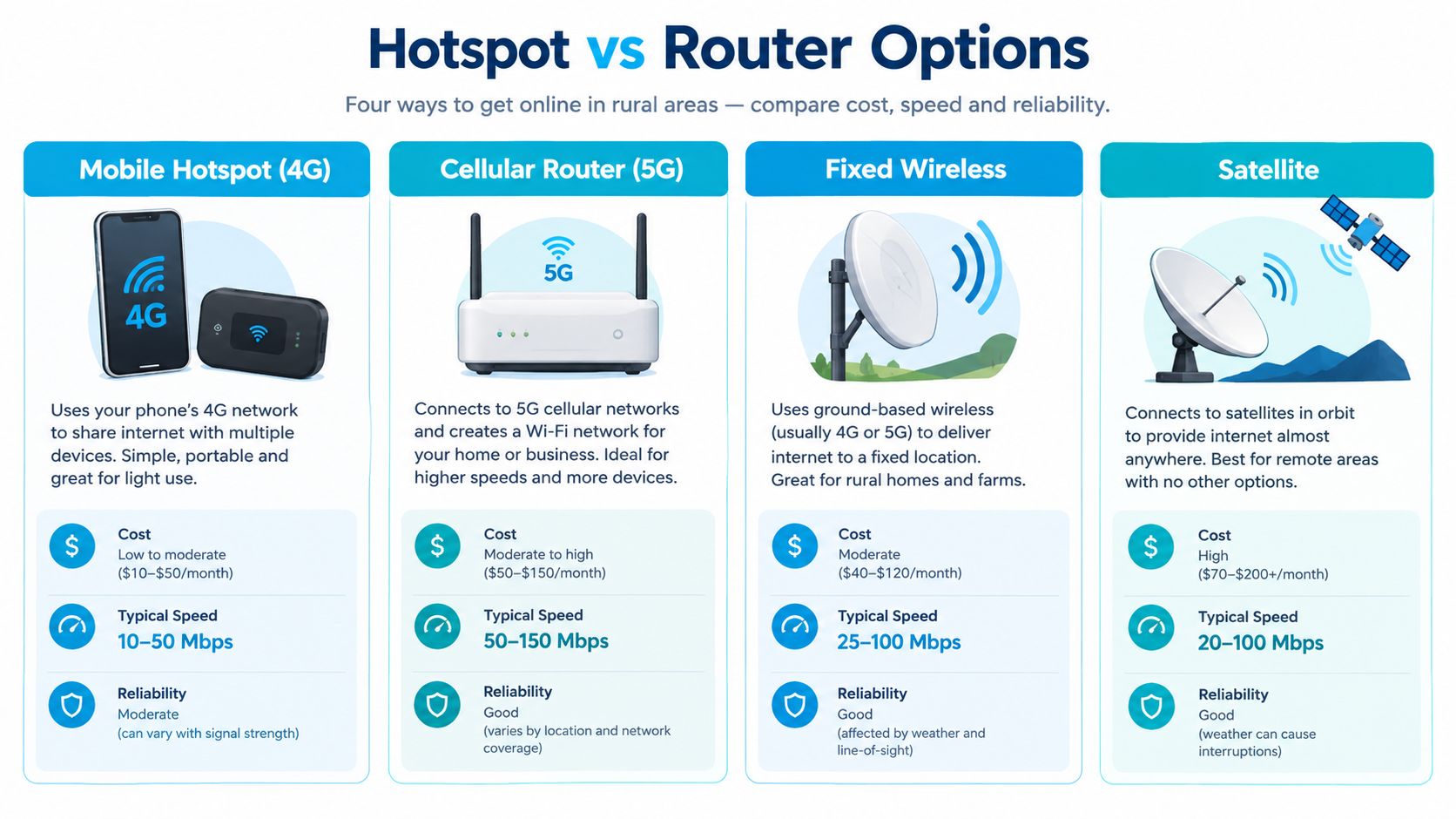
| Option | Best For | Speed/Latency | Data Caps |
|---|---|---|---|
| Mobile hotspot, 4G | Light travel use, one or a few devices, backup access | Variable cellular speed, moderate latency | Often plan-dependent |
| Cellular router, 5G | Rural homes, RVs, remote work, multiple devices | Potentially stronger sustained performance, moderate latency | Plan-dependent |
| Fixed wireless | Stationary properties with a suitable local provider and signal path | Often steadier than mobile, lower latency than satellite | Provider-dependent |
| Satellite | Locations without usable terrestrial or cellular service | Broad availability, higher latency than local wireless options | Provider-dependent |
Mobile hotspot, 4G
A dedicated 4G hotspot is compact and easy to move between campsites. It can make sense when your needs are email, browsing, navigation, and occasional streaming. Its weaknesses appear during long sessions, heavy uploads, or multi-device use. Many compact units also provide limited placement options and no meaningful way to connect a rooftop antenna.
Cellular router, 5G
A 5G cellular router costs more and needs a more deliberate installation, but it's the strongest fit for a rural property or RV used as a mobile office. Look for carrier-band support, Ethernet ports, WiFi capacity, and external antenna connectors. It may use 5G where available and fall back to LTE, giving you more flexibility than a device built around a single network layer.
Fixed wireless and satellite
Fixed wireless can be excellent at a stationary address when the provider has a clear path to the property. It isn't a portable solution, and hills or trees can make installation difficult. Satellite reaches places that cellular and fixed wireless can't, but its signal path introduces higher latency, which can affect interactive applications such as gaming and some video calls.
Your billing choice matters as much as the radio technology. If you manage several lines, devices, or usage rules, a complete guide to hotspot billing from Centipid Technologies Ltd. can help clarify how hotspot service is tracked and administered.
Choosing Hardware for Weak Signals
Weak rural signals reward hardware that gives you options. Before comparing screen size, battery life, or WiFi branding, check whether the device supports the bands used by the carriers near your property. A router that can't communicate effectively with the available bands won't become capable just because you add a stronger antenna.
Start with the radio path
Ask local users which carriers work at the exact address, not merely in the nearest town. Then check the carrier's supported LTE and 5G bands against the specifications for the router you're considering. Multi-carrier compatibility matters for RVers because a device that performs well in one region may need a different network farther along your route.
External antenna ports are the next major distinction. They let you connect directional or omnidirectional antennas mounted near a window, on an RV roof, or on a mast. The antenna doesn't create service where no carrier signal exists, but it can move the radio outside a metal vehicle or away from the construction materials that weaken indoor reception.
Antenna placement can matter more than another feature on the box. Put the receiving hardware where it has the clearest practical path to the tower.
Choose for the property, not the brochure
For a fixed rural home, a router with external antenna connectors, Ethernet, and stable continuous operation is usually more useful than a battery-powered pocket unit. For an RV, prioritize a compact installation, low power draw, detachable antennas, and the ability to change networks without replacing the entire setup.
The infrastructure gap remains material. A 2026 report estimates that about 19 million Americans still lack broadband meeting the FCC's 100/20 Mbps benchmark, while rural areas average 1.4 wired providers per address compared with 4.1 in urban areas, according to the 2026 digital divide map report. With fewer wired alternatives, selecting cellular hardware that can adapt to weak or changing conditions becomes more important.
For a deeper look at antenna choices and installation considerations, see this guide to internet antennas for rural areas. Test the router first near the strongest window or highest practical point, then compare performance with and without the external antenna. Record signal quality and real task performance, not just the icon on the screen.
Use Cases for RVs and Remote Work
An RV setup has to solve two problems at once. It needs to work where you park today, and it needs to remain useful when the next campsite sits in a different carrier footprint. That makes a multi-carrier approach more practical than relying on one phone plan.
For light travel, a phone hotspot may be enough. Once you connect a laptop, tablet, streaming device, and smart television, a dedicated router is easier to manage. Mounting an external antenna on the RV can also reduce the penalty imposed by the vehicle's metal body and give you more freedom to place the router where it serves the cabin best.
Remote work needs consistency
Remote workers should test latency and stability during the hours they normally work. A connection can load a webpage quickly and still produce freezes during a video meeting. Cloud applications, virtual desktops, voice calls, and large uploads expose brief interruptions more clearly than casual browsing.
The usability gap affects more than download speed. GSMA Intelligence reports that rural populations are 28% less likely to use mobile internet and 30% less likely to regularly engage in online services such as messaging, banking, and education, as summarized in the Connectivity Survey 2026. Access that exists on paper may still feel impractical if performance is inconsistent or the service is difficult to maintain.
A sensible RV test includes a video call, a cloud upload, and ordinary browsing while other devices remain connected. At a rural home, test at the intended router location during both quiet and busy periods. If work is critical, keep a second carrier or connection available rather than assuming one signal will remain reliable everywhere.
Use the media below as a reminder that a workable mobile office depends on the whole setup, not just the word “5G” on the plan.
SwiftNet's Virtual SIM Solution
A virtual SIM can reduce the friction of changing networks when one carrier performs poorly at a rural address or campsite. SwiftNet uses virtual SIM technology with access to major nationwide carriers, including AT&T, Verizon, and T-Mobile, through its 4G Bronze hotspot and 5G Diamond router plans. The practical benefit is carrier flexibility within a setup designed for rural homes and mobile use.
That approach doesn't eliminate tower distance, terrain, congestion, or weak indoor reception. It does address one common failure point: being locked into a single network when another available carrier has a better path from the same location. The router and antenna still need to support the relevant bands, and placement still determines much of the result.
Matching the plan to the job
The 4G Bronze option is positioned for hotspot use, while 5G Diamond is built around router use. A traveler who needs a portable connection may prefer the smaller hotspot format. A rural household or full-time remote worker may benefit more from a router that supports a permanent installation and external antennas.
SwiftNet's published offer includes plans starting at $49.99 per month, a 7-day risk-free trial, a best price guarantee, no contracts, and no hidden fees. These are product terms, so confirm the current details before ordering. The service also advertises phone and chat assistance for setup and troubleshooting.
For a rural customer, the key question isn't whether multi-carrier access sounds convenient. It's whether the available hardware, antenna connections, and carrier switching fit the location and the work being done there. A trial period can make that evaluation less speculative, provided you test the service at the actual property or travel route.
Setup and Optimization Tips
Start with placement, not passwords. Put the router near a high window or another location with fewer obstructions, then test it in the spot where you plan to use it. If the device has antenna ports, connect an external antenna and compare sustained performance during a real task, such as a call or file upload.
Use a simple routine:
- Test the carrier: Check each available network at the property or campsite before committing to one.
- Watch the signal: Record signal quality and connection stability, not only the number of bars.
- Manage devices: Disconnect automatic backups and unwanted streaming devices when data is limited.
- Protect the setup: Keep the router ventilated and secure, especially in an RV exposed to heat, dust, or movement.
- Plan a fallback: Keep another carrier or connection available if your income depends on access.
If you're moving between a phone hotspot and a dedicated unit, this guide on converting a hotspot to a router explains the practical difference in setup.
FAQ
Will a rural hotspot always deliver 5G? No. It may use LTE or lower-band 5G depending on local availability, tower distance, device support, and signal conditions.
Should I choose 4G or 5G? Choose the hardware that supports the carriers and bands available where you use it. A well-placed 4G device can be more useful than a poorly placed 5G unit.
Is satellite automatically better? No. Satellite can serve locations without usable cellular service, but higher latency may make interactive work less comfortable.
SwiftNet Wifi offers 4G hotspot and 5G router plans with virtual SIM access to AT&T, Verizon, and T-Mobile for rural homes, RV travel, and backup connectivity. If you need a flexible wifi hotspot for rural areas and want to test your setup against real tower conditions, visit SwiftNet Wifi and review the current plan and trial terms.


