

You're at the kitchen table with a failed DSL installation, three provider tabs open, and coverage maps that overlap just enough to be confusing. One company promises fast 5G, another advertises rural fixed wireless, and a satellite provider says it can reach almost anywhere. None of the brochures explain what happens when trees block the signal, the local cell becomes congested in the evening, or your upload speed collapses during a video call.
That's the problem with shopping for wireless internet options for home. Providers lead with download speed, but your decision depends more on your exact location, upload workload, network capacity, and lifestyle. The right connection for a rural house may be a poor choice for an RV, while a service that works for streaming may frustrate someone who backs up large work files every day.
Why Choosing Wireless Internet for Home Feels Harder Than It Should
A household can appear fully covered on a provider's website and still have unusable service at the actual house. Hills, dense trees, building materials, tower distance, and local congestion can turn a promising map pin into an unstable connection. This is the coverage-map gap, and it's one of the most expensive mistakes buyers make.
The second blind spot is the upload gap. Wireless plans often offer attractive download performance, but upload capacity is usually much lower than on fiber. That difference matters when a household runs video meetings, sends large files, synchronizes cloud storage, streams live video, or uses several work devices at once. A connection can feel fast while downloading and still struggle with the work that leaves your home.
Practical rule: Never choose a wireless plan from its maximum download number alone. Ask what the connection can upload, how it behaves at busy times, and whether it works at your exact address.
The market is no longer experimental. Ericsson's fixed wireless access outlook says 83% of service providers had adopted FWA by April 2026, with 71% of those using 5G and 57% offering speed-based plans. Ericsson projects 330 million global FWA connections by 2029, generating about USD 75 billion in communications service provider revenue. Wireless home internet has moved well beyond a niche solution, but scale doesn't eliminate local limitations.
That's why I evaluate wireless service in this order: address, workload, consistency, upload performance, and then download speed. The guides below translate marketing language into practical tests you can apply before buying equipment or committing to a plan. For a useful alternative perspective on getting connected without traditional cable, see this guide to home internet without cable.
The Main Types of Wireless Internet Available Today
“Wireless internet” describes several different technologies, not one standardized product. The equipment, signal path, performance pattern, and ideal use case change significantly from one category to another.
| Type | How It Works | Typical Equipment | Best Fit Setting |
|---|---|---|---|
| Fixed wireless | A radio link connects an outdoor antenna to a nearby tower or access point | Mounted antenna, indoor radio or router | Rural homes with tower access and a workable signal path |
| 4G LTE and 5G home internet | A cellular modem receives service from a carrier network | Indoor gateway, SIM or virtual SIM, optional external antenna | Suburban and rural homes inside a strong cellular coverage area |
| Satellite internet | A dish communicates with satellites in orbit | Outdoor dish, power supply, indoor router | Remote locations without usable terrestrial or cellular service |
| Mobile hotspot or tethering | A phone or dedicated hotspot shares cellular data with connected devices | Smartphone or portable hotspot | Travel, temporary service, RV use, and backup connectivity |
Fixed wireless access, often supplied by a wireless internet service provider, uses a mounted antenna aimed toward a local tower. A rural broadband technology guide describes the basic model accurately: the antenna receives a radio connection from a nearby tower, and line of sight can support reliable, low-latency service. This option is strongest where a local WISP has engineered coverage, even if wired providers haven't built to the property.
4G LTE and 5G home internet use the cellular network. You usually receive a gateway that combines the modem and Wi-Fi router, and the provider activates it for a specific service address or plan. T-Mobile and Verizon are major examples, while Starry also appears in comparisons of 5G home service. This category is convenient because installation is often simpler than a tower-mounted radio link, but performance depends on spectrum, tower distance, signal quality, and congestion.
Satellite internet reaches places that terrestrial networks miss. Low-Earth-orbit services such as Starlink generally offer a more responsive experience than older geostationary satellite systems, while legacy services such as HughesNet and Viasat remain relevant in some locations. The trade-off is equipment placement, weather exposure, capacity variation, and a greater need to verify the service policy before using it as a primary connection.
A mobile hotspot is the travel-first option. It can be excellent in an RV or as a temporary backup, but household plans, device limits, roaming rules, and data policies can make it awkward as permanent home broadband. DSL, cable, and fiber sit outside this comparison because they deliver service through physical lines, even though your devices still connect to their routers over Wi-Fi.
Speed, Latency, and Upload Performance Compared
Download speed answers only one question: how quickly data reaches your home under the tested conditions. You also need to understand upload speed, latency, jitter, and the provider's data policy.
The upload issue deserves particular attention. Independent industry reporting notes that U.S. 5G home internet median uploads are often around 20 to 35 Mbps, far below symmetrical fiber tiers, as summarized by BroadbandSearch's 5G home internet statistics. The same source cites Parks Associates' estimate that 12% of U.S. internet households used 5G or LTE home internet in Q3 2025, compared with 8% in 2023, and reports that fixed wireless subscribers grew 18% in the first half of 2025, compared with 3% for fiber. These figures describe adoption and upload limitations, not a guarantee for your address.
Verizon's own network-performance information shows why the word “5G” isn't enough. Its 5G Home plan lists 25 to 85 Mbps download, 5 to 10 Mbps upload, and 50 to 70 ms latency on mid-band 5G Ultra Wideband. The 5G Home Plus tier lists 50 to 100 Mbps down, 10 to 15 Mbps up, and 40 to 60 ms latency on mid-band, while a high-band or mmWave plan reaches 85 to 300 Mbps down with 35 to 55 ms latency, as documented in Verizon's published performance data. The serving spectrum matters more than the label on the gateway.
Ookla-based reporting gives a useful snapshot of how carrier performance can differ. In Q2 2026, T-Mobile led U.S. 5G home internet with a 222.7 Mbps median download speed and 18.1 Mbps median upload speed, while Verizon 5G Home Internet measured 126.5 Mbps down. The same fixed wireless access performance report recorded quarter-over-quarter download declines of 7.0% for T-Mobile and 11.9% for Verizon from Q1 to Q2 2026. Those results show that 5G home service can exceed the FCC's 100/20 Mbps benchmark in many markets, but capacity and congestion can change the experience.
| Service | Typical Download | Typical Upload | Median Latency | Data Policy |
|---|---|---|---|---|
| Fixed WISP | Depends on the local network and installation | Depends on the local network | Depends on tower path and network design | Review provider-specific caps and prioritization |
| T-Mobile 5G Home | 222.7 Mbps median in Q2 2026 | 18.1 Mbps median in Q2 2026 | Varies by location | Check plan terms and congestion handling |
| Verizon 5G Home | 126.5 Mbps median download in Q2 2026 | Varies by plan and location | Verizon lists 40 to 70 ms on mid-band tiers | Check plan terms and congestion handling |
| LEO satellite | Varies with satellite visibility and network load | Usually below wired symmetrical service | More responsive than legacy GEO satellite | Review priority and usage policies |
| GEO satellite | Varies by plan and location | Usually limited | High delay affects interactive work | Older plans may impose hard limits |
For video calls and cloud work, upload stability often matters before raw download capacity. For gaming, latency and jitter matter more than a large peak-speed figure. For a busy streaming household, the data policy can become the deciding factor, particularly if the provider slows traffic after a threshold.
For a plain-language explanation of why delay changes the feel of a connection, read what network latency means.
Checking Real Coverage Where You Actually Live
A ZIP code is not a service test. Before ordering, verify the connection at the exact street address, then test the physical property.
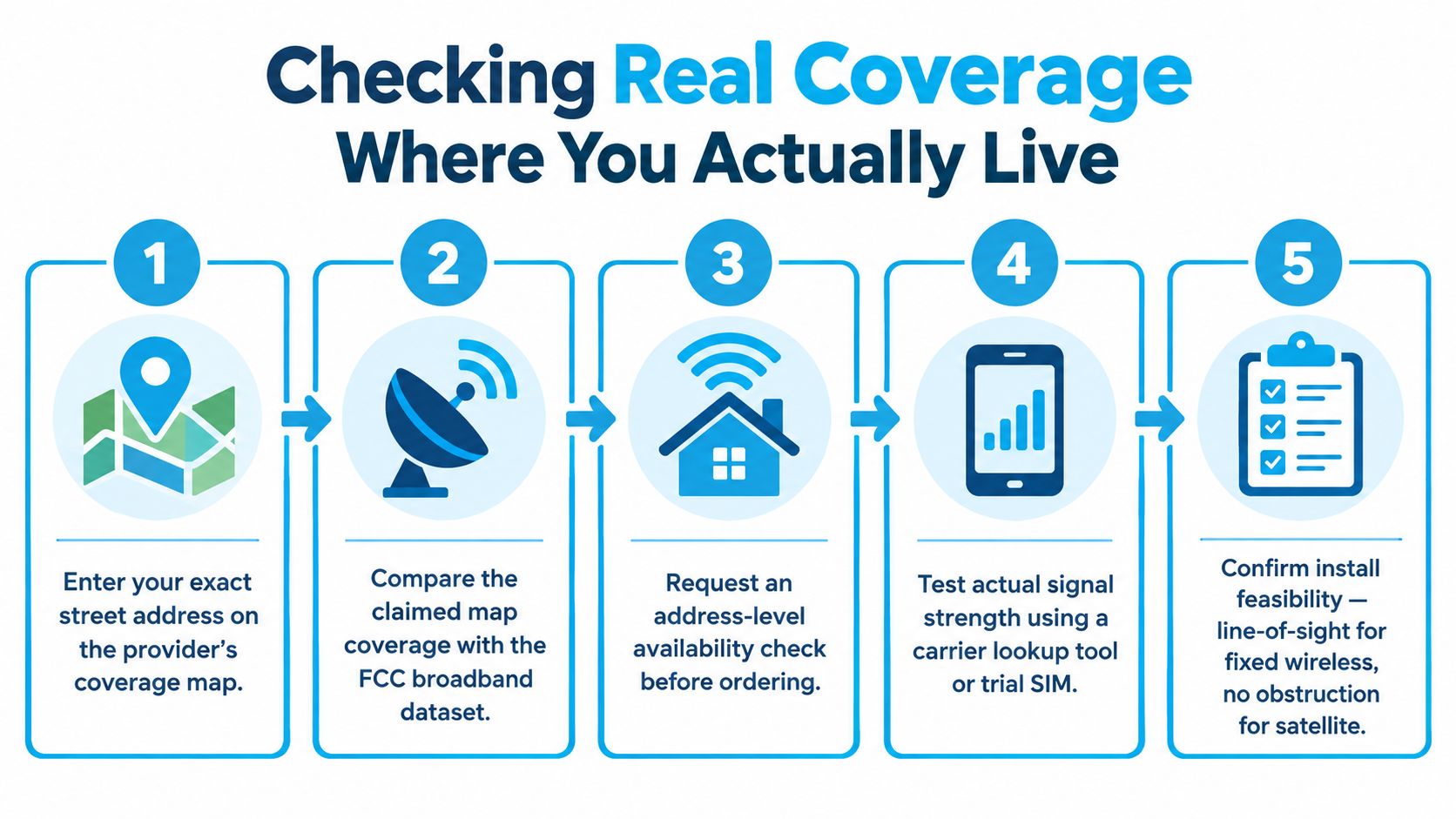
Start with the provider's address checker, but treat the result as an invitation to investigate rather than proof that service will work. Rural reporting continues to identify inaccurate maps and overstated footprints as obstacles for households deciding whether fixed wireless will function at their property. This rural broadband report also cites Connected Nation's finding that nearly one-third of surveyed rural households experienced an internet gap during the previous year, with 30.6% classified as internet insecure.
Five checks that prevent expensive mistakes
- Enter the complete address. Ask whether the result means service is orderable, service is merely nearby, or service still requires an installation survey.
- Ask for a site survey. For fixed wireless, the installer should assess tower direction, elevation, trees, terrain, roof mounting, cable routing, and power. Don't accept “the area is covered” as a substitute.
- Test cellular service at the home. Use a temporary hotspot, trial SIM, or carrier lookup tool at the proposed gateway location. Test indoors and near an exterior wall, because the best phone signal in the driveway may not represent gateway performance inside the house.
- Inspect satellite visibility. Trees, rooflines, nearby structures, and terrain can interrupt the dish's view. A clear installation location matters more than a general claim that satellite reaches the region.
- Ask about busy-hour behavior. Find out whether the local tower or access point has capacity limits, whether home traffic is deprioritized, and what support does when evening performance drops.
The cellular coverage map guide can help you interpret carrier maps, but a live test at the property remains more valuable than a colored map polygon.
Real-World Use Cases for Rural Homes, RVs, and Remote Work
The same wireless technology can be excellent in one setting and frustrating in another. I judge the connection against the way the household moves, works, and uses data.
A rural homeowner twenty miles from town usually needs a permanent installation rather than a phone-based workaround. If a local WISP can establish a clean line of sight, fixed wireless is often the practical first choice because the antenna and tower relationship remains stable. If no WISP reaches the property, Starlink or another LEO service may solve the availability problem, provided the property has a clear installation site. Cellular plans can look attractive until data limits, weak indoor signal, or tower congestion make everyday use unpredictable.
An RV traveler has a different problem. The connection must move, adapt to changing carriers, and fit into a compact power and antenna setup. A multi-carrier 5G hotspot with an external antenna can outperform satellite for latency and setup flexibility, but it won't create coverage in a forested campground or a remote valley where the carrier signal doesn't reach. An RV needs a backup plan, not just a fast modem.
For a remote worker, upload performance and consistency come first. A service that downloads quickly but produces unstable uploads can interrupt Zoom, Microsoft Teams, VPN sessions, and cloud backups. Fiber remains the strongest option where it's available, while a well-performing 5G home plan or fiber-backed fixed wireless connection can be a workable substitute when the address supports it. People who work while traveling can also consult this practical resource on internet for remote workers abroad, especially when they need connectivity outside a permanent home setup.
| Use Case | Best Wireless Option | Key Reason | Watch Out For |
|---|---|---|---|
| Rural home with a tower path | Fixed WISP | Stable dedicated installation and predictable local signal path | Trees, terrain, installation limits, and provider caps |
| Rural home without terrestrial coverage | LEO satellite | Reaches locations missed by wired and local wireless networks | Obstructions, weather exposure, and policy restrictions |
| RV traveler | Multi-carrier 5G hotspot with external antenna | Portable and responsive where cellular coverage exists | Forests, valleys, roaming rules, and data limits |
| Daily remote work | 5G home or engineered fixed wireless | Better fit than a hotspot for a permanent home | Upload variation, jitter, and evening congestion |
| Cabin or backup connection | LTE or 5G gateway | Quick deployment and flexible placement | Weak signal and changing tower capacity |
The important distinction is not “rural versus urban.” It's fixed address versus moving address, plus the amount of data leaving the home.
Matching Wireless Internet to Your Household Priorities
Start with the task that would cause the most damage if the connection failed. A family that streams every evening has a different priority from a consultant who uploads project files, and both differ from a gamer who notices every latency spike.
| Household Priority | Strongest Wireless Match | Weak Match | Must-Have Feature |
|---|---|---|---|
| Streaming-heavy household | 5G home or robust fixed wireless | Cellular hotspot with restrictive data policy | Unlimited or generous data with clear congestion terms |
| Work-from-home video calls | Stable 5G home or engineered fixed wireless | High-delay GEO satellite | Consistent upload, low jitter, and trial or return option |
| Gaming and low latency | Strong 5G or well-designed fixed wireless | GEO satellite, and variable LEO satellite for competitive play | Low latency, stable routing, and no peak-hour collapse |
| Light browsing | LTE gateway or affordable fixed wireless | Premium satellite equipment if alternatives exist | Simple pricing and no unnecessary equipment cost |
| Budget-first buyer | Address-verified fixed wireless or carrier home plan | Services with unclear fees and mandatory equipment purchases | Total monthly price, no surprise fees, and flexible terms |
A streaming household should prioritize data policy and evening consistency, not the highest advertised peak. A work-from-home household should ask for typical upload performance and test a real meeting during the trial period. Gamers should choose the service with the most stable latency, even if another option advertises a larger download number.
Public IP availability can matter for some remote-access, security, and self-hosting setups, but many cellular and satellite services use carrier-grade network arrangements. Ask before ordering if you need inbound access. Equipment buyout terms also deserve attention, especially when a provider requires a proprietary gateway or dish.
For RV owners, portability and carrier choice outweigh maximum home speed. For large families, the service must handle simultaneous devices without a restrictive data policy. The priority tells you what to test first, and that test should determine which providers remain on your shortlist.
Evaluating Providers and Plans Before You Commit
A good plan can fail at a bad address, and a good signal can be undermined by poor terms. Use this checklist before paying for equipment or signing a contract.
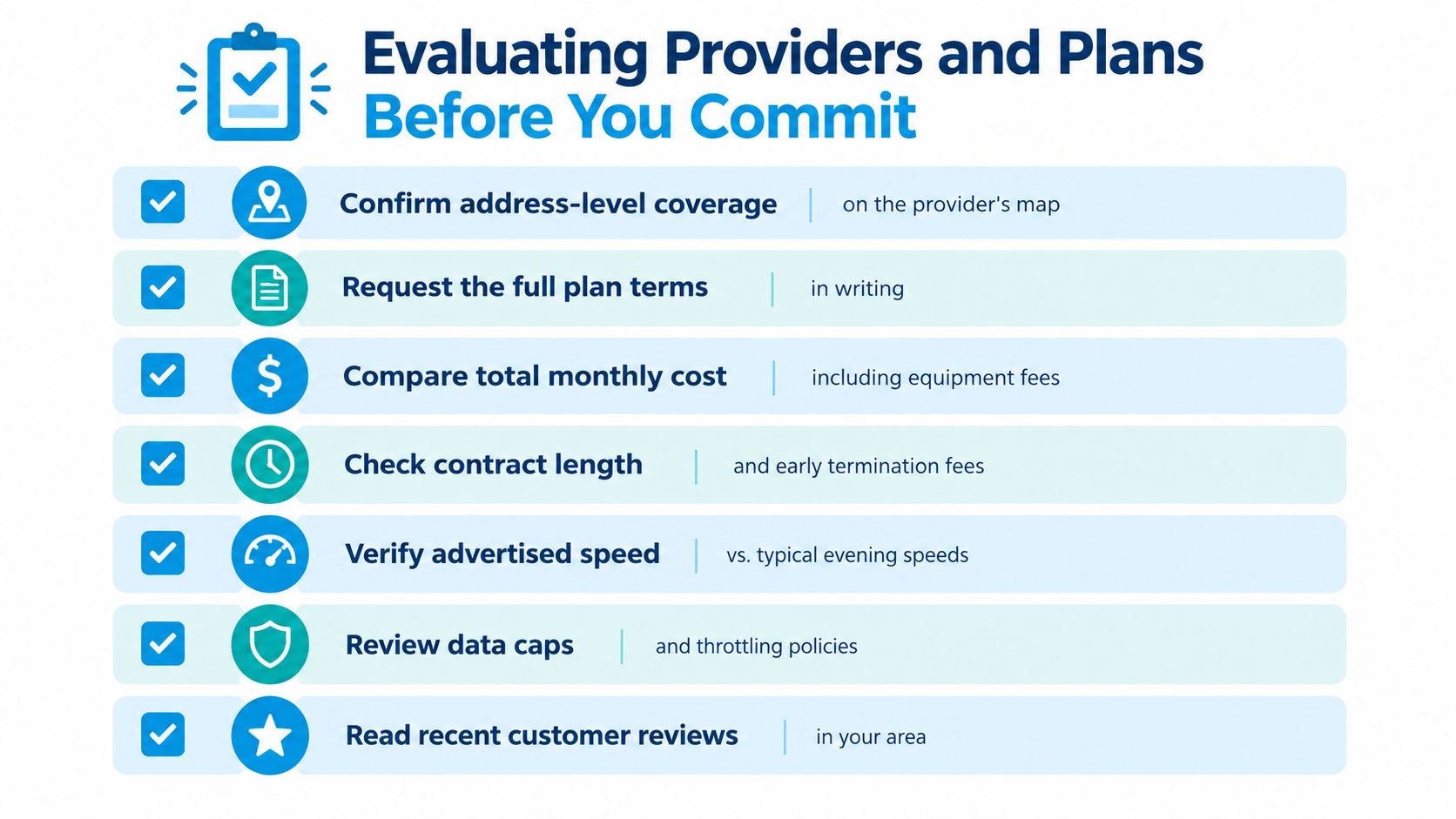
Verify the network before comparing prices
- Confirm the address: Get an address-level result from the provider, not just regional coverage.
- Request the terms: Ask for speed ranges, upload expectations, data rules, equipment charges, contract length, and early termination conditions in writing.
- Ask about the installation: For fixed wireless, confirm antenna placement, line of sight, cable route, and what happens if the installer can't achieve the expected signal.
- Clarify congestion handling: Ask whether the plan is deprioritized, whether traffic slows after a threshold, and what “unlimited” means in practice.
- Check support escalation: Find out who handles recurring evening slowdowns and whether support can review tower or gateway performance.
- Ask about weather: Satellite can be affected by obstructions and weather conditions, while fixed wireless installations can also experience signal issues depending on network design and local conditions.
- Read local reviews: Look for customers near your address, because a provider's national reputation won't reveal the capacity of your serving tower.
Don't compare only the first-month bill. Include equipment, installation, taxes, fees, required add-ons, and the cost of replacing a service that fails practical testing.
After installation, run three speed tests at different times of day. Test a Zoom or Teams session, upload a representative work file, connect through your VPN, and walk through the rooms where you need coverage. Record download, upload, latency, and any interruptions before the trial or cooling-off period ends.
Which Wireless Internet Option Should You Pick
My recommendations are straightforward because the trade-offs are straightforward.
| User Profile | Recommended Option | Why It Wins |
|---|---|---|
| Rural homeowner with tower line of sight | Fixed wireless WISP | A properly installed antenna can provide a stable permanent link |
| RV traveler prioritizing portability | 5G hotspot with external antenna | It travels easily and can use cellular coverage without satellite setup |
| Remote worker needing dependable uploads | Fiber where available, otherwise unmetered 5G home internet | Upload consistency and data freedom matter more than peak download |
| Home in a coverage dead zone | Starlink or another LEO satellite service | It can reach locations without usable wired, cellular, or local tower service |
Choose fixed wireless for a rural home when a local provider can verify the signal path. The upgrade that would change my recommendation is a reliable fiber installation, because fiber removes the wireless capacity and weather variables.
Choose a multi-carrier 5G hotspot with an external antenna for an RV when portability matters most. The recommendation changes if the route regularly passes through forested or mountainous coverage gaps, where satellite or a second carrier becomes necessary.
Choose fiber for a remote worker whenever the address has it. If it doesn't, choose an unmetered 5G home plan only after testing upload performance and peak-hour stability. Choose LEO satellite when availability is the overriding problem, accepting that visibility, latency variation, and capacity still matter.
Your guiding principle is simple: match the wireless type to your location first, your upload needs second, and download speed last.
SwiftNet Wifi offers 4G and 5G home and mobile internet for households, rural properties, RV travelers, and backup use, with carrier connectivity through AT&T, Verizon, and T-Mobile. Review the available plans, trial terms, and address fit at SwiftNet Wifi before choosing the setup that matches where you live and how you work.
#rv #rvlife #rvliving #rvlifestyle #rvrenovation #rvremodel #rvtravel #rvcamping #rvadventures #ruralwifi #5gwifi #5ginternet


