

You're parked at a rural campsite, your laptop is connected, and the video call keeps freezing while someone else tries to stream a show. It's tempting to blame the carrier or assume a bigger router will fix everything. But the difference between a hotspot and a router is about more than the box: it's about where your internet comes from, how many devices need it, and how steadily they need to stay online.
| Criterion | Mobile hotspot | Router, cellular or home |
|---|---|---|
| Main job | Receives cellular internet and shares it | Organizes traffic across a local network |
| Internet source | Cellular network | Fiber, cable, DSL, Ethernet, or a cellular modem |
| Best fit | Portable, temporary access | Persistent household or multi-device network |
| Power and placement | Often battery-powered and carried nearby | Usually stays in one place and runs continuously |
| Watch-out | Data limits, heat, battery, and cellular conditions | Cannot improve a poor upstream connection by itself |
The right choice depends on your workload and environment, not the product label. A phone hotspot, dedicated hotspot, cellular router, and Wi-Fi-only travel router solve different problems. Mixing them up can leave you with a device that creates Wi-Fi but still has no internet source.
Why This Choice Matters for RVers and Rural Households
A rural cabin can have a strong Wi-Fi signal inside and still have unreliable internet because the connection feeding that Wi-Fi is weak. At an RV site, the laptop may stay connected to a hotspot while video calls buffer, streams stall, and the signal drops in parts of the vehicle. Those symptoms feel like one problem, but they can come from different places: cellular reception, plan limits, device heat, network congestion, or the local Wi-Fi setup.
The difference between a hotspot and a router matters because the device category alone doesn't tell you what will work. A hotspot brings in cellular internet and shares it. A router manages a local network, but it needs an upstream connection, such as cable, fiber, DSL, or cellular service. Some devices combine those jobs; others only perform one.
That distinction is especially useful if you're weighing fixed internet against a mobile setup. For a broader look at connection options in places without wired service, see this guide to internet access for rural areas.
Match the equipment to the day
A traveler checking email and joining an occasional call has different needs from a household with multiple laptops, televisions, cameras, and work calls running throughout the day. A phone hotspot may be enough for the first situation. It can become a frustrating bottleneck in the second.
The same rule applies to RV travel. A Wi-Fi-only travel router can help organize devices around an existing campground or hotel connection, but it doesn't supply cellular service on its own. A cellular router can use mobile service as its internet source and distribute that connection across the RV.
The practical question isn't “Which box is better?” It's what connection do you have, where will you use it, and what needs to stay online? Those answers point toward a device that fits your real workload, instead of a purchase based on a marketing label.
What a Hotspot Actually Does
A mobile hotspot receives internet service through a cellular network and shares it with nearby devices. It might be a feature on your smartphone or a separate, battery-powered device. In either case, the basic job is the same: a cellular modem connects to mobile service, then the hotspot creates a small Wi-Fi network for a laptop, tablet, or other device.
The Federal Communications Commission describes using a cellular phone as a mobile hotspot as a way to connect non-cellular devices, such as a laptop, to cellular service. In a typical hotspot, a SIM or virtual SIM authenticates the device with the mobile network. The hotspot then sends traffic between that cellular connection and the devices on its local Wi-Fi network.
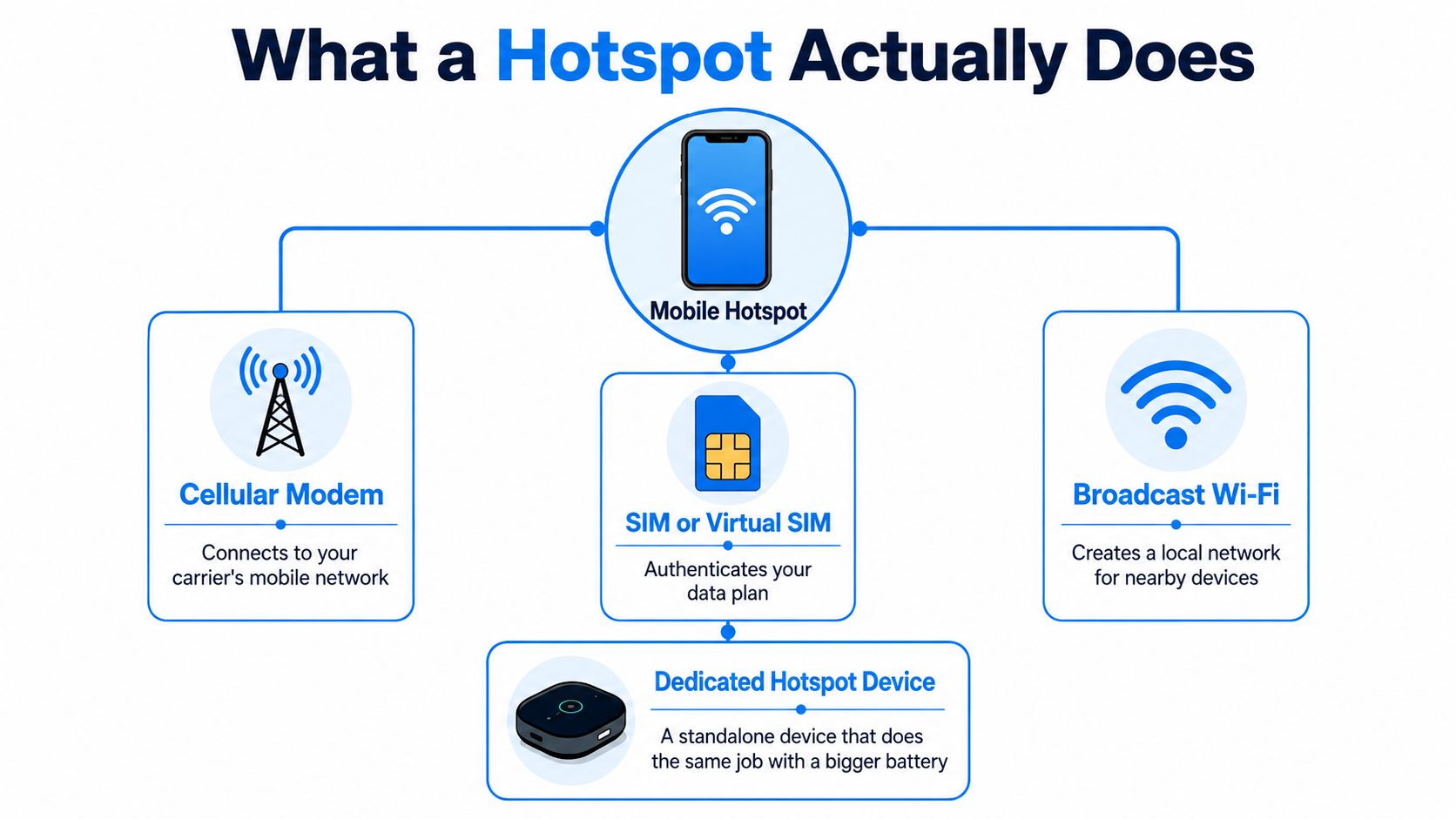
Phone feature or dedicated device
A phone hotspot is convenient because the equipment is already in your pocket. Turn it on, connect a laptop, and get online where your phone has cellular service. The drawback is that your phone is handling its regular tasks as well as the cellular and Wi-Fi work, so long sessions can bring battery drain and heat.
A dedicated hotspot is built to share cellular service. It keeps hotspot traffic off your phone and may be easier to leave in a useful spot, such as near a window. But it still depends on cellular reception, and its data plan may have a separate hotspot allowance. Check the plan terms rather than assuming that general phone data and hotspot data are treated identically.
Where hotspots reach their limit
A hotspot's Wi-Fi footprint is designed for nearby devices, not whole-home coverage. Its capacity also depends on the hardware and the connected workload. As more devices use the connection at once, they share the available cellular service and local wireless network. Heat, battery limits, and carrier congestion can all make a long session less dependable.
That doesn't make hotspots a bad choice. They're a strong fit for travel, temporary access, and backup connectivity. They're not a permanent whole-home network by default. If you need multiple people and devices online all day, evaluate a cellular router rather than expecting a pocket-sized hotspot to behave like fixed household equipment.
What a Router Actually Does
A wireless router manages traffic across a local network. It connects devices such as laptops, phones, televisions, and printers to one another and, when an upstream internet source is available, routes their traffic out to the internet. A conventional home router doesn't create an internet connection on its own. It needs service from fiber, cable, DSL, Ethernet, or a separate cellular modem.
A router also gives you tools for running the network. It broadcasts a service-set identifier, or SSID, so devices can find the Wi-Fi network; it can use wireless encryption and help control which devices connect. Many routers also provide Ethernet ports for wired equipment and settings for managing the local network. For an accessible overview of how network equipment fits together, consult this resource on vendor-neutral networking expertise.
The router's job is local control
Routers are designed for an ongoing network, not just a short connection shared from a phone. Their wired ports, placement options, and network controls can make them a better fit for a home, stationary RV, or workspace with several connected devices. But those features affect how the local network is organized; they don't guarantee that the internet coming into it will be fast.
Wi-Fi performance also depends on how the network is configured and where devices sit. The FCC says 5 GHz Wi-Fi is faster than 2.4 GHz but covers a shorter distance, and notes that several devices sharing one wireless network can produce slower responses or lag. In a home, that can mean a device far from the router performs differently from one nearby, even when both use the same internet service.
Two portable routers, two different jobs
A cellular router includes a cellular modem and can use a mobile network as its internet source. A Wi-Fi-only travel router needs an existing connection, such as hotel Wi-Fi, campground Wi-Fi, Ethernet, or a phone hotspot, and rebroadcasts or manages it for your devices.
That distinction changes the recommendation. A cellular router can serve as a fixed or mobile internet hub where cellular coverage exists. A Wi-Fi-only travel router can make an available connection more convenient, but it can't replace cellular access when there's no upstream network to join.
Side-by-Side Comparison Across Real Decision Criteria
Use the device's job as your starting point, then check how it fits the way you'll use the connection. A phone hotspot prioritizes easy sharing while you're on the move. A router prioritizes network control and ongoing use. The details below help separate devices that otherwise look similar on a product page.
Judge the setup by the workload
Portability and power: A phone hotspot is always with you, while a dedicated hotspot is a separate portable unit. Home and cellular routers usually make more sense when they can stay in a set location and run from continuous power.
Devices and coverage: Hotspots are convenient for nearby clients. A router-based setup is usually the more practical choice when a household needs a managed local network across multiple rooms or connected equipment. Neither label guarantees a particular coverage area; placement and the hardware matter.
Ethernet and antennas: Check the actual ports and antenna options. If a wired device needs a connection, don't assume a hotspot or travel router has Ethernet. If you're in a rural or mobile location, confirm whether the device supports external antenna connections and whether that will help with your installation.
Security and control: A hotspot can provide a password-protected Wi-Fi network for connected devices. A router typically offers more tools for administering that network, including encryption and device access controls. Choose controls you will use, and set them up before relying on the network.
Data plan and failure point: A hotspot uses cellular service, and its plan may impose hotspot-specific limits. A home router depends on its upstream provider. A cellular router still depends on mobile coverage, congestion, and the plan, while a Wi-Fi-only travel router fails as an internet source if there's no existing connection to rebroadcast.
| Criterion | Mobile hotspot | Router, cellular or home |
|---|---|---|
| Portability | Designed to travel with the user | Usually stationary, though cellular models can be moved |
| Power | Often battery-powered | Typically intended for continuous power |
| Client load | Suits nearby devices and lighter use | Better for managing an ongoing local network |
| Coverage | Small, local Wi-Fi footprint | Can be positioned for a household or vehicle network |
| Security controls | Basic network access controls | Often offers more network-management options |
| Ethernet and antennas | Depends on the model | Check ports and antenna support before buying |
| Internet source | Cellular service | Wired broadband or cellular, depending on the router |
| Common failure | Battery, heat, plan limit, or cellular conditions | Weak upstream service or poor placement |
The distinction that matters: A hotspot shares a connection. A router organizes a network.
The Four Devices People Actually Confuse
The word “router” gets applied to devices that don't do the same thing. Before buying, identify whether the unit has a cellular modem, joins existing Wi-Fi, or shares your phone's service. That one question prevents the common mistake of buying a portable router that has no way to get online where you plan to use it.
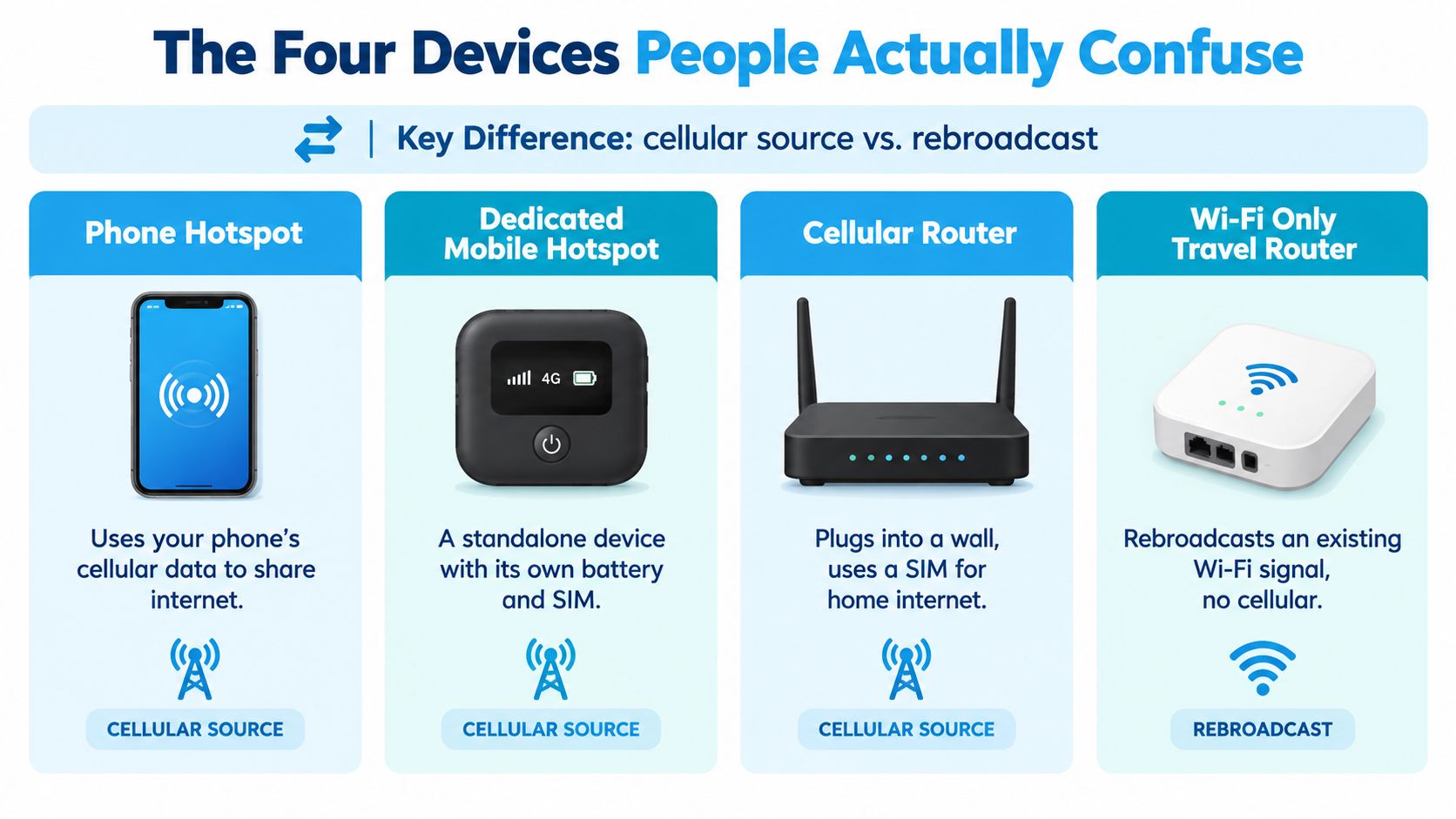
Four tiers, four use cases
Phone hotspot: A weekend camper uses a phone to get a laptop online for maps, messages, and occasional work. It's the simplest option, but less attractive if the phone needs to stay cool, charged, and available for calls while several devices use data.
Dedicated mobile hotspot: A traveler who wants portable cellular service without leaning on a smartphone can carry a standalone hotspot. It has its own cellular connection and shares service over Wi-Fi, but the buyer still needs to check the plan, coverage, and device limits.
Cellular router: A full-time RV worker or rural household can use a cellular router as the internet source and network manager. It's the more appropriate choice when the equipment will stay powered, several devices need to connect, or the installation benefits from router features. It still can't fix poor tower coverage or an unsuitable data plan.
Wi-Fi-only travel router: A hotel guest or camper with an existing Wi-Fi connection can use this device to create a separate local network for their equipment. It's a non-starter as the sole internet source off-grid because it doesn't contain cellular service. It can manage or rebroadcast a connection, not create one.
The FCC explains that a hotspot shares telecommunications service with connected users, while a router manages the local network. A cellular router combines those functions. A Wi-Fi-only travel router doesn't add a cellular source.
If you're standing in a store or comparing product listings, follow this short decision path: Need cellular internet from the device? Choose a phone hotspot, dedicated hotspot, or cellular router. Already have campground, hotel, or wired internet? A Wi-Fi-only travel router may be useful. Need a persistent network for several users? Lean toward a router, and verify the upstream service separately.
Three Real-World Setups and What Wins for Each
A weekend camper pulling into a site for a short trip doesn't need the same installation as someone working from an RV every day. The useful comparison is not a device's advertised maximum. It's whether the connection holds up during the tasks that matter, and whether the equipment fits the way the user travels.
The weekend camper
For a couple of nights of email, browsing, and occasional laptop use, a phone hotspot is often the sensible starting point. It avoids another device and can be switched on where cellular service is available. The friction is familiar: the phone may need to stay plugged in, and hotspot data may be governed by plan limits that differ from ordinary phone use.
The full-time RV remote worker
For a worker who relies on calls, file transfers, and other sustained tasks, a cellular router or dedicated hotspot is a better starting point than treating a phone as a permanent internet hub. Test the setup where you'll park and during your working hours. A strong advertised peak doesn't promise the same result when the network is congested or the cellular signal is weak.
If you're deciding whether to move from portable sharing to a more managed local network, this guide to moving from a hotspot to a router covers that transition.
The rural homeowner
A homeowner replacing slow DSL should consider a cellular router if mobile service is available at the property and the plan supports the household's use. Put the equipment where it can receive the best practical signal, then check performance across the rooms and devices that matter. A router can improve local network management, but it won't make a weak cellular connection behave like fast wired service.
Where the Performance Difference Comes From
A video call that stalls in your RV needs a diagnosis before a hardware upgrade. Check both parts of the connection: the service reaching your equipment and the local network reaching your laptop. A router can improve placement, sustained power, and network controls, but those improvements only help when they address the bottleneck.
For cellular setups, the radio, signal quality, congestion, spectrum, antenna design, and plan limits all affect performance. Device categories alone tell you little about how a connection will handle sustained work.
The FCC notes that mobile wireless broadband is typically slower than wired or fixed-wireless alternatives, with performance varying by technology and service level. A cellular router still depends on that upstream mobile connection. A Wi-Fi-only travel router depends on an existing connection, such as campground Wi-Fi, rather than supplying cellular service itself.
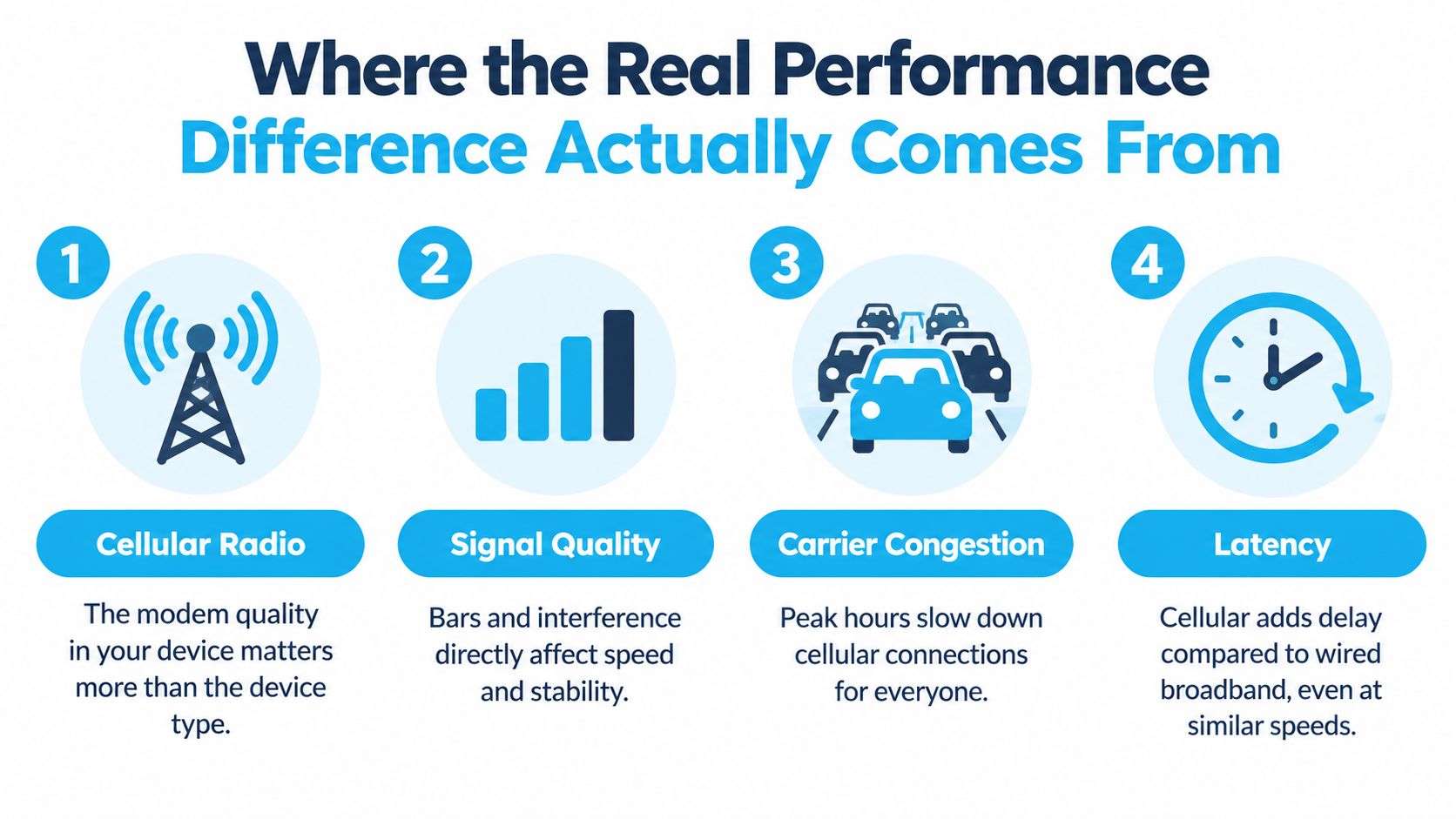
Test the connection under real working conditions
Test sustained downloads, uploads, and latency during your working or streaming hours. A quiet-time speed test can hide evening congestion. Run the workload you need to support, then repeat it after changing equipment placement. Keep the workload consistent so the comparison is useful.
Placement deserves a test of its own.
Put a cellular router where it receives a useful signal, rather than hiding it in a cabinet. Try a window location when practical, while keeping ventilation in mind. With a hotspot, check for heat and battery trouble during prolonged use. Confirm hotspot-specific plan limits before relying on it as the household connection.
Use this guide to whether routers affect internet speed to separate equipment limitations from upstream service limitations.
| Your situation | Practical starting point |
|---|---|
| Occasional laptop access while traveling | Phone hotspot |
| Portable cellular internet for several devices | Dedicated mobile hotspot |
| Ongoing household or RV network over cellular | Cellular router |
| Hotel or campground Wi-Fi is already available | Wi-Fi-only travel router |
| Weak cellular service | Test carrier and placement before upgrading hardware |
Which Setup Should You Actually Pick
Pick the device that matches the source of your internet and the workload it must support. A phone hotspot is the straightforward choice for occasional access. A dedicated hotspot suits portable cellular use. A cellular router makes more sense for a continuing home or RV network. A Wi-Fi-only travel router is for managing a connection that already exists.
For rural households without fiber, test cellular service at the property before choosing a cellular router as primary internet. Full-time RV owners should prioritize a plan and setup that can handle their actual work and travel routines. Remote workers who depend on video calls should test sustained connection quality during working hours, not shop by peak speed alone.
SwiftNet Wifi offers separate 4G hotspot and 5G router plans, including a virtual-SIM router option that uses major nationwide carriers. Compare the plan terms and equipment with your location and workload before deciding.
Choose a hotspot when you need to carry and share cellular internet. Choose a router when you need to manage a persistent network, and confirm what supplies its internet.
#rv #rvlife #rvliving #rvlifestyle #rvrenovation #rvremodel #rvtravel #rvcamping #rvadventures #ruralwifi #5gwifi #5ginternet
SwiftNet Wifi offers hotspot and router options for mobile users, RV travelers, and households considering cellular internet. Compare the setup with your coverage and workload, then visit SwiftNet Wifi to review the available plans and equipment.


