

You're halfway through a client call when the video freezes, your VPN disconnects, and the router's status light turns red. At home, the outage may mean waiting for a provider technician. In an RV, the nearest alternative could be miles away. For a remote worker, a connection failure can interrupt authentication, cloud files, phone service, and the workday at once.
A reliable backup connection isn't defined by its advertised download speed. It's defined by how quickly it recovers, whether it uses an independent network, whether your router and devices stay powered, and whether essential applications continue working. The right backup options vary by location, mobility, budget, and the tasks you can't afford to lose.
Why Most Single-Connection Setups Are Already Failing You
A single fixed connection looks dependable when coverage maps show service at your address. Those maps can hide the difference between nominal availability and usable reliability, especially outside major population centers. A line can technically meet a benchmark while suffering from congestion, weather-related faults, unstable last-mile equipment, or poor upload performance.
The geographic gap remains clear. A Government Accountability Office review of FCC broadband data found that fixed broadband meeting the 25 Mbps download and 3 Mbps upload benchmark reached 94.4% of the overall U.S. population in 2018, compared with 81.2% in 2012. Rural availability improved from 45.7% in 2012 to 77.7% in 2018, but approximately 22.3% of the rural population still lacked qualifying fixed broadband in 2018, compared with about 1.5% of the urban population. Tribal communities faced an even larger shortfall, with approximately 27.7% lacking access at that benchmark.
Those figures describe availability, not whether households could afford or successfully adopt service. An NTIA analysis based on an October 2010 Current Population Survey of approximately 54,300 U.S. households found broadband adoption at home among roughly 70% of urban households, compared with 57% of rural households. Even after accounting for socioeconomic and demographic factors, rural households still trailed urban households by 5 percentage points in adoption, according to the NTIA broadband adoption analysis.
Reliability is more than a coverage label
A fixed provider may be unavailable at your address, unaffordable for the household, or unsuitable for the work you do. The same problem appears on the road. A campsite can have a strong signal on one carrier and unusable service on another, while a truck stop may offer excellent performance early in the day and heavy congestion later.
That makes a secondary connection practical infrastructure for rural residents, RV travelers, truck drivers, and remote workers, not an indulgence. It gives you another path when the primary line fails, but only if the second path avoids the same failure.
Practical rule: Judge a backup by measured user-visible downtime and application recovery, not by the fastest number on the plan page.
The decision framework is straightforward. First, identify which failure you're trying to survive, such as a local cable cut, provider outage, power loss, weak rural infrastructure, or travel between coverage areas. Then compare independence, activation time, latency, power requirements, data limits, VPN behavior, and task compatibility. Advertised speed belongs in the evaluation, but it shouldn't lead it.
Comparing Cellular, Satellite, and Secondary ISP Backup Options
There are four practical backup paths for most households and mobile workers: cellular service, satellite internet, a secondary wired or fixed-wireless ISP, and a portable hotspot used as an emergency fallback. Each solves a different failure pattern.
Cellular usually provides the best balance for people who move. A dedicated 4G or 5G router, including one using virtual SIM technology, can be placed in an RV or rural home and connected to a stronger external antenna where appropriate. Its weakness is variability. Carrier coverage, terrain, indoor signal loss, tower congestion, traffic prioritization, and data policies can change the experience from one location to the next.
Satellite provides stronger geographic separation when the primary connection depends on local terrestrial infrastructure. It can work well in remote areas with a clear view of the sky, but installation, power consumption, weather exposure, and latency can make it less convenient for real-time work. Video calls and VPN sessions may work, but the experience depends on the service and the conditions at the dish.
A secondary wired ISP can feel familiar and stable, especially in a home office. The problem is shared infrastructure. Two providers may rely on the same pole, local conduit, backhaul, power network, or regional carrier. If they share the same failure domain, the second bill may buy little resilience.
| Option | Monthly Cost Range | Typical Latency | Best For |
|---|---|---|---|
| Cellular backup | $50 to $150 | Variable, often moderate | RVs, rural homes, travel, quick deployment |
| Satellite backup | $100 to $300 | Higher and variable | Remote locations with clear sky visibility |
| Secondary ISP | $80 to $200 | Usually lower and stable | Homes and offices with genuinely separate infrastructure |
| Portable hotspot | Varies by plan | Variable | Short outages, travel, and low-bandwidth essentials |
The cost figures and setup categories represented in the comparison chart below are editorial planning ranges for evaluating these options, not universal pricing guarantees.
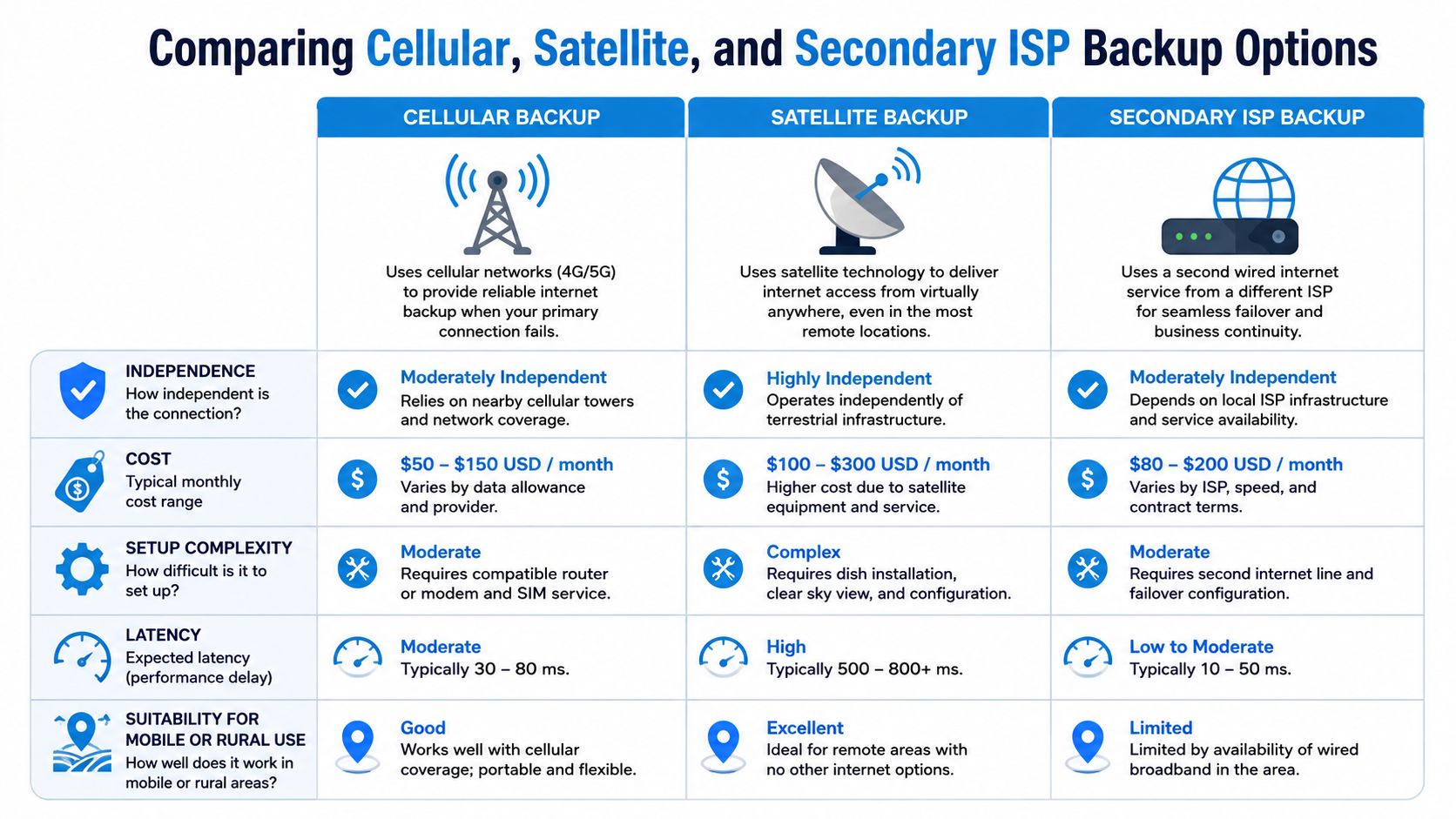
Match the path to the failure
For a stationary rural home, cellular backup often works best when it uses a different carrier and a dedicated router. For an RV, cellular is more flexible, while satellite becomes valuable when travel takes you beyond practical tower coverage. For a small office, a secondary ISP can be excellent if the providers enter through different routes and use different upstream networks.
A hotspot remains useful because it's simple. It can keep email, messaging, authentication, and basic cloud work available while you diagnose a larger failure. It may not support every device in the home or maintain a demanding video workflow, so treat it as a task-specific fallback rather than assuming it replaces a router-based backup.
Before choosing between fixed wireless and satellite, compare antenna placement, mobility, latency, installation requirements, and actual service conditions in your location. This fixed wireless versus satellite internet comparison can help frame that decision without reducing it to download speed alone.
How to Configure Failover Routers for Measured Recovery
A failover router should make a deliberate decision when the primary connection stops working. Having two WAN ports or two modems connected doesn't guarantee that traffic will move correctly, DNS will resolve, or active applications will recover.
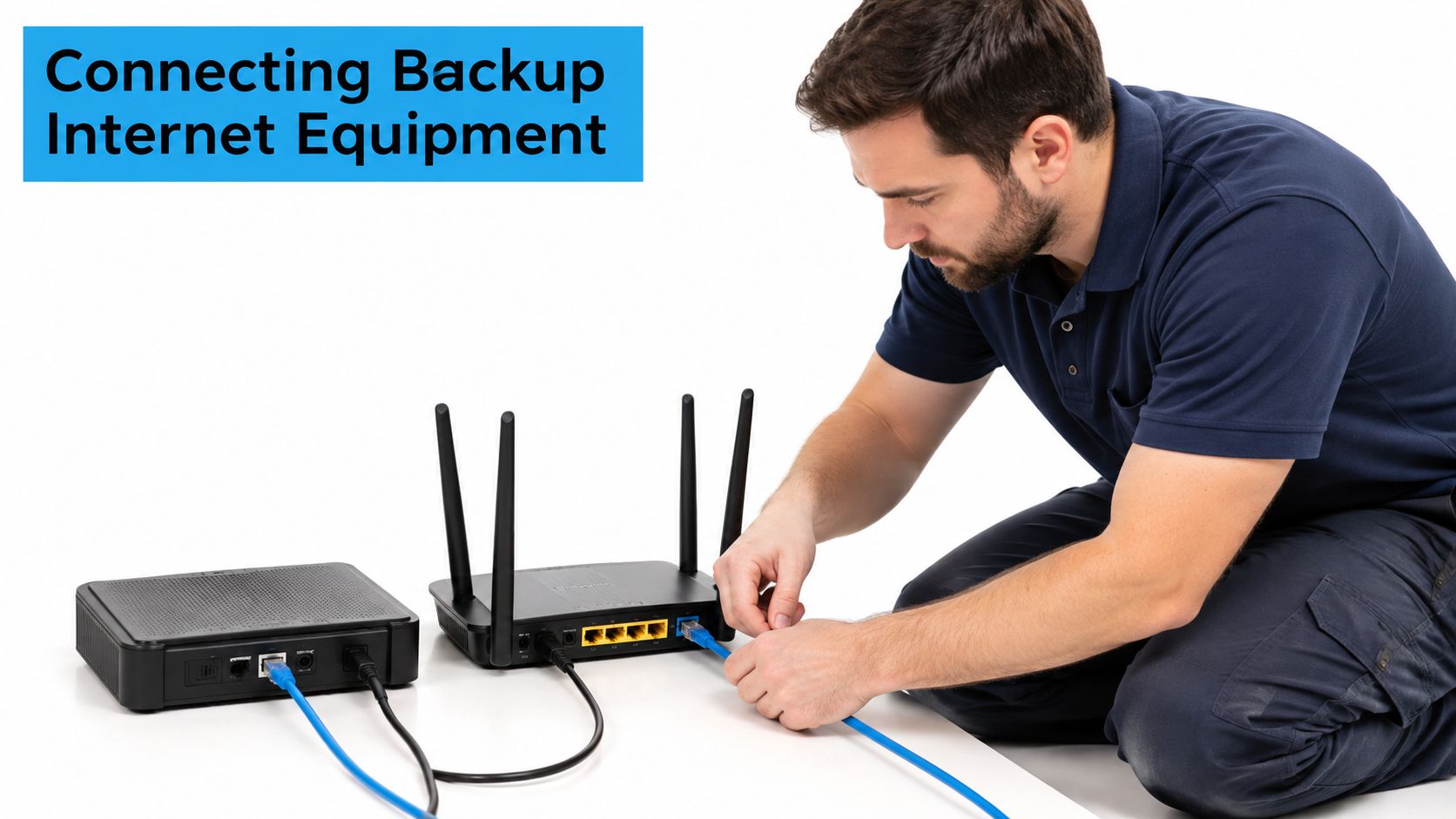
Start by defining what “working” means. A router that can ping a public host may still fail to support your VPN, cloud storage, voice application, or video call. Configure health checks that test more than link status, then log the time to detect failure, time to activate the alternate path, recovery time objective, request failures during transition, and throughput before and after failover.
A practical small-office or remote-work target is automated recovery within 30 seconds, with no more than 0.1% request failures during the switchover. These are operational targets, not universal standards, so validate them against the applications you protect using the failover testing checklist from RadView.
Configure the hidden dependencies
Public IP changes can interrupt sessions and inbound access. Carrier-grade NAT may prevent inbound VPN connections even when outbound browsing works. Some routers also retain stale DNS, fail to renew DHCP correctly, or leave a modem locked in a state that looks connected but passes no useful traffic.
Use at least two DNS resolvers from unrelated operators, and test name resolution separately from general connectivity. Keep the backup router on a tested UPS at home or a reliable vehicle power supply on the road. A battery that works during a brief bench test may not support the router and modem for the full interruption you're trying to cover.
Run the test sequence below after installation and whenever you change carriers, firmware, router settings, or power equipment:
- Disconnect the primary path and record detection time.
- Confirm that the router selects the backup WAN.
- Test DNS resolution, DHCP renewal, and ordinary browsing.
- Start a video call, VPN session, cloud synchronization task, and voice application.
- Check whether active TCP sessions survive or reconnect.
- Restore the primary path and confirm that traffic returns cleanly.
A successful ping is only the first checkpoint. The SwiftNet internet failover guide covers the broader operational pattern, including the difference between a live link and a usable connection.
After the initial configuration, repeat the exercise under weaker signal and congested conditions. Record packet loss, latency, upload performance, and the behavior of each important application. This video can provide an additional visual reference for router setup:
Recommended Backup Configurations for Homes, RVs, and Rural Users
The best configuration depends on what must stay online and how often the location changes. A home office, a motorhome, and a truck cab don't need the same hardware or recovery behavior.
Rural home with marginal fixed service
Use the existing fixed line as primary and a dedicated cellular router as backup. Choose the cellular provider based on independent coverage at the property, not on the strongest nationwide marketing claim. Put the router and modem on a tested UPS, configure automatic failover, and keep the hotspot credentials documented somewhere accessible.
This arrangement can support email, cloud applications, authentication, ordinary browsing, voice tools, and many video calls when the cellular signal is adequate. It may struggle during tower congestion or with applications that require inbound access. If your work depends on a persistent VPN or hosted service, test the carrier-grade NAT and public IP behavior before treating the setup as production-ready.
The problem is particularly serious in rural areas because measured service quality may be far below the nominal plan description. A 2022 to 2025 University of Illinois Extension survey of more than 11,700 rural households found that nearly four in five respondents with fixed broadband had speeds classified as unserved or underserved under FCC benchmarks. More than half were dissatisfied with speed and reliability, and nearly 60% were dissatisfied with affordability, according to the University of Illinois Extension rural broadband analysis.
RV traveler who works from the road
Use a multi-carrier cellular router as the everyday connection, with a separate hotspot for immediate fallback. Satellite can add geographic independence for remote boondocking, but it requires a suitable sky view, careful mounting, additional power planning, and acceptance of higher latency. Test both systems at actual stops rather than assuming a coverage map predicts performance inside a metal vehicle.
For video meetings and cloud work, cellular usually offers the more convenient workflow when coverage is strong. Satellite becomes more useful when there's no practical tower path, provided your critical applications tolerate its latency and the campsite has appropriate conditions.
Truck driver or traveling digital nomad
Keep the kit lightweight. A phone hotspot or compact cellular router can handle authentication, email, messaging, and emergency work, while a second carrier provides fallback where the first network is congested or absent. Preconfigure devices before departure so switching doesn't depend on finding a manual, remembering a password, or changing several network settings in a parking lot.
Resilience depends on a tested procedure, reliable power, and prioritized tasks, not simply on buying a second subscription.
People choosing travel bases can also use resources such as top cities for remote workers to evaluate broader livability, but connectivity should still be tested at the exact building, campsite, or parking location where work will happen.
Building a Backup Readiness Protocol You Can Actually Trust
A backup becomes dependable when you can activate it without improvising. Resilience research emphasizes measuring outages, including events where broadband is offline for at least 30 seconds, while international guidance treats outage frequency and packet loss as meaningful reliability measures rather than relying only on advertised speed. The OECD communication-network resilience guidance supports that broader view of service continuity.
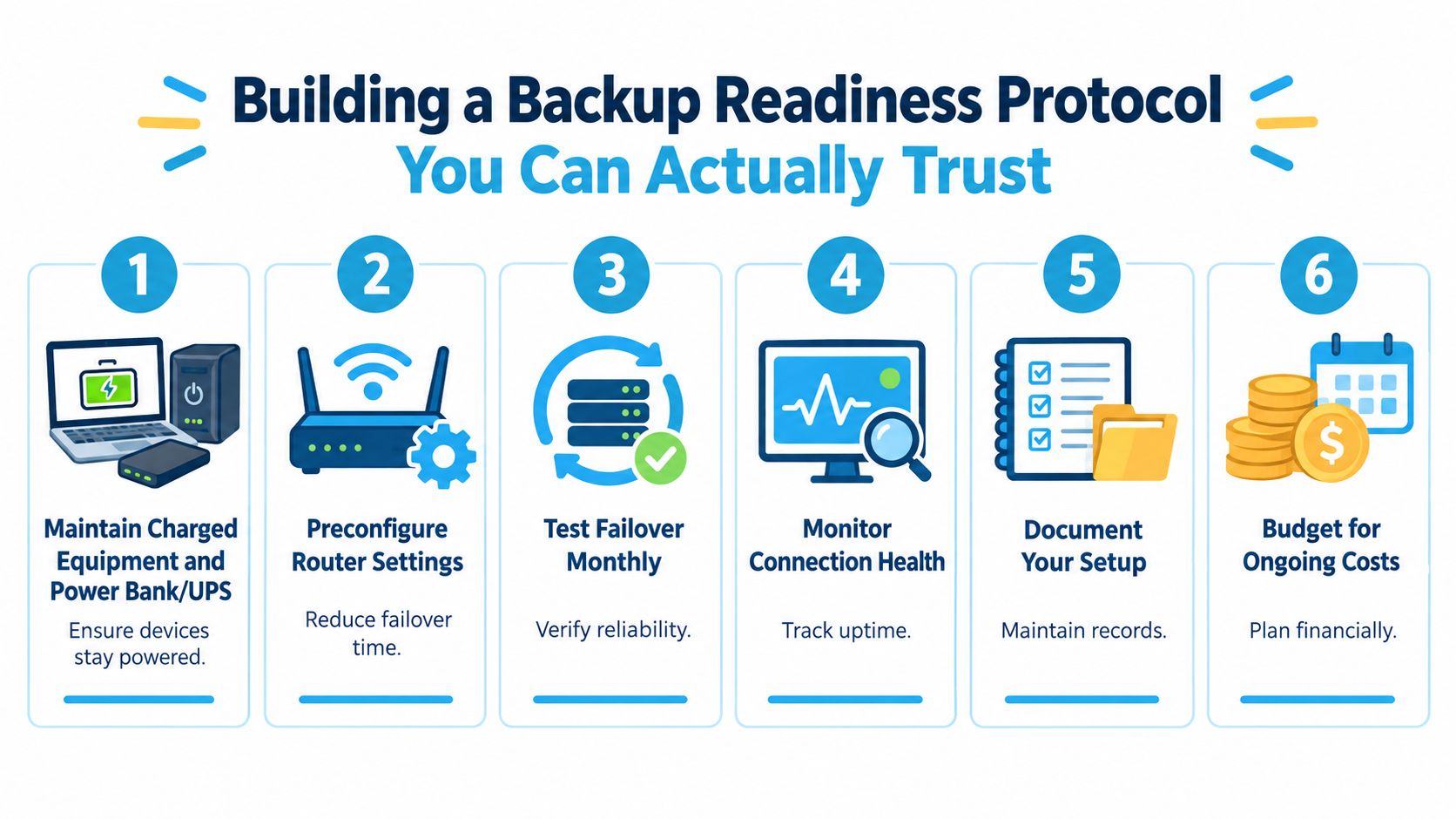
Use this readiness checklist:
- Maintain charged equipment. Keep the router, hotspot, power bank, and UPS ready for use. At home, review your power arrangement alongside electrical safety guidance, including this practical generator interlock versus transfer switch guide.
- Preconfigure the network. Save the WAN priority, failover rules, Wi-Fi credentials, and device settings before an outage occurs.
- Test monthly. Disconnect the primary line and run real work tasks. Confirm the router switches automatically and that users know what they should see.
- Measure health. Record latency, upload speed, packet loss, and video-call stability. A speed test alone won't reveal intermittent loss or poor upstream performance.
- Document recovery. Write down carrier details, account access, power connections, router restart steps, and the tasks the backup supports.
- Prioritize essential work. Maintain a low-bandwidth fallback for email, messaging, authentication, and urgent file access when the full backup cannot support every application.
For households that want the modem and router to remain powered during a short interruption, a tested uninterruptible power supply for modem and router can remove one common point of failure. Test the actual runtime with your equipment connected, rather than assuming the UPS label predicts your result.
RV owners and truck drivers need a moving version of the same protocol. Test at multiple stops, check performance during busy periods, and account for terrain, trees, building materials, and the vehicle body. Coverage maps are useful for planning, but they can't tell you whether the signal will reach the desk inside your rig or remain stable at the exact place you park.
When a Slower Independent Connection Beats a Faster Shared One
A faster backup isn't always a better backup. If your primary and secondary connections depend on the same local cable route, power system, upstream carrier, or DNS provider, one incident can disable both.
Cloudflare's outage documentation separates incidents by location, affected autonomous system, scope, cause, and start and end time. That distinction matters because a local access failure requires a different backup from a regional routing event or a provider-wide infrastructure problem. The Cloudflare outage investigation documentation also highlights why DNS deserves separate attention. A single resolver can fail while other internet paths remain available.
A slower cellular connection from an unrelated carrier may therefore preserve work better than a faster secondary wired plan that shares local infrastructure with the primary. The independent path can handle authentication, email, messaging, VPN reconnection, cloud documents, and essential calls even if it doesn't reproduce the primary connection's peak throughput.
Use this decision lens:
- Identify the shared failure domain. Ask whether both services use the same local route, tower, power source, upstream network, or resolver.
- Protect the essential tasks first. Prioritize the applications that keep income, safety, communication, and authentication moving.
- Test the weaker path under pressure. Measure it during congestion and at the actual home, campsite, or work stop.
- Separate power and DNS dependencies. A network backup won't help if both routers lose power or both devices rely on one failing resolver.
The practical conclusion is simple. Operational independence beats theoretical speed when the primary connection is down. Choose a backup that can recover, remain powered, resolve names, and support the work that matters.
SwiftNet Wifi offers 4G and 5G hotspot and router plans using virtual SIM access to major nationwide carriers, including AT&T, Verizon, and T-Mobile, which can provide a flexible secondary path for rural homes, RVs, and remote workers. Visit SwiftNet Wifi to compare a travel-ready or home backup connection and evaluate it against your own failover, power, and application requirements.


