

You're staring at a spinning buffering wheel again, or maybe you're in an RV with three bars on your phone and a video call that still drops the moment someone else starts streaming. For a lot of people, mobile hotspot home internet isn't a backup plan anymore, it's the only realistic way to get a usable connection where they live, work, or travel.
That's why the right question isn't “Is hotspot internet good?” The key question is, will it work in your specific place, for your specific use, at the times you need it?
When the Cable Truck Never Shows Up
A family at a remote lakeside cabin can have the TV on, the laptops open, and still watch the same stream buffer forever. A full-time RVer can park at a state park, check the map, and find every wired option already ruled out before they even unroll the awning. In both cases, the problem isn't effort. It's infrastructure.

Mobile hotspot home internet is the umbrella term for a few things people often treat as separate categories. Your phone's personal hotspot, a dedicated battery-powered hotspot puck, and a 5G cellular router that sits on a desk all use the same basic idea, they turn mobile carrier signal into Wi-Fi for your devices.
One idea, three forms
A phone hotspot works when you need something quick and temporary. A dedicated hotspot gives you a separate device with its own battery and a cleaner work setup. A cellular router is the more house-like version, better suited to a fixed space where multiple people need to connect at once.
That's why the box matters less than the signal, the workload, and the amount of moving you do. A traveler who changes locations weekly needs a different setup than a rural household that plans to leave the unit plugged in by the window. The best choice is the one that matches the way you live, not the one with the slickest marketing label.
Practical rule: if the connection has to move with you, think portable hotspot first. If the connection stays in one room, think router first.
What Mobile Hotspot Home Internet Actually Is
A cellular network is easiest to understand as a shared pipe. Every nearby phone, hotspot, and router draws from that same pipe at the same time, and the pipe gets more crowded when more people use it. That's why two homes on the same carrier can have very different experiences even if both see a strong signal.
A SIM card is the key that tells the network who you are and what plan you're on. The radio generation, whether LTE or 5G, affects how much data can move and how quickly the network responds. But none of that works in isolation, because the tower still has a wired connection behind it, and that backhaul can become the true ceiling on performance.
Bandwidth and delay are not the same thing
People often focus on speed and ignore latency. That's a mistake. A connection can move plenty of data yet still feel sluggish if the delay is high, especially for video calls, remote desktops, and gaming.
That's why mobile hotspot home internet is really a service model, not one product. A phone hotspot, a dedicated mobile hotspot, and a cellular router are three form factors built on the same underlying service. Each one makes sense in a different setting, depending on whether the user values portability, battery life, or a more stable home-style layout.
The mental model helps before you shop. If the tower is busy, the backhaul is weak, or the device itself is cramped for power and Wi-Fi range, the plan won't feel fast no matter what the ad says. If those pieces line up, a cellular connection can be a practical internet source rather than a compromise.
How It Stacks Up Against Cable, Fiber, and Fixed Wireless
Cable and fiber provide the steadiest service where they are available. Fixed wireless also uses a local wireless link, so terrain, congestion, and installation conditions can affect results. Mobile hotspot home internet offers a different advantage: you can adapt its location and coverage source for cabins, trailers, rural homes, or backup use.
| Criteria | Mobile Hotspot Home Internet | Cable | Fiber | Fixed Wireless |
|---|---|---|---|---|
| Peak speed | Varies with signal and tower load | Usually steadier | Usually steadier | Varies by tower and line of sight |
| Sustained performance | Can swing during busy periods | More stable | Most stable where installed | Can vary with congestion |
| Latency and jitter | Can be workable, but location matters | Generally reliable | Usually the best | Often better than mobile hotspot, but still variable |
| Uptime | Depends on coverage and power | Strong once installed | Strong once installed | Depends on wireless conditions |
| Data limits | Plan-dependent | Often high or none | Often high or none | Plan-dependent |
| Install effort | Low to moderate | Moderate | Higher | Moderate |
| Mobility | High | None | None | Low |
The table shows the trade-off, but your address adds details that a plan description cannot. A cable or fiber connection usually stays consistent inside one home. A hotspot can improve or weaken after you move it a few feet, change rooms, or face a different direction. See our detailed comparison of mobile hotspot vs. home internet for speed and latency trade-offs.
Run an indoor trial before treating coverage as settled. Place the hotspot near a window, test it from the rooms where people work or stream, and repeat the checks during busy evening hours. If your address fails the FCC National Broadband Map for cable or fiber, test a hotspot for three evenings before committing to fixed wireless installation.
Gamers and remote workers should judge responsiveness under load, not peak speed alone. Families should check whether several devices can stay usable while one person downloads a large file. Choose fixed service for consistent performance at one address. Choose mobile hotspot home internet when access must follow the coverage available at the location.
Who Really Depends on It and Why
A rural homeowner twenty miles past the nearest cable node doesn't need a theoretical internet solution. They need something that can carry telehealth calls, bill pay, schoolwork, and streaming without waiting for a provider to extend a line that may never arrive. In that setting, cellular access is less of a gadget and more of a replacement for an absent utility.
A full-time RVer has a different problem. Campground Wi-Fi may work in the morning and collapse at night, right when the work call begins. A private hotspot gives that traveler control over the connection path, even though actual performance still depends on the place they parked.
When a hotspot is primary and when it is backup
A suburban household with fiber may use a hotspot only when storms knock the main line out. That same setup can keep the family online long enough to work, school, or message clients while the outage lasts. A remote-work traveler may use one connection at a time but move it between a campsite, a motel, and a parked vehicle.
The key difference is not lifestyle branding. It's what problem the connection solves. If the issue is lack of infrastructure, a hotspot can be the primary link. If the issue is resilience, it can be the fallback. If the issue is mobility, it can be the only link that follows you.
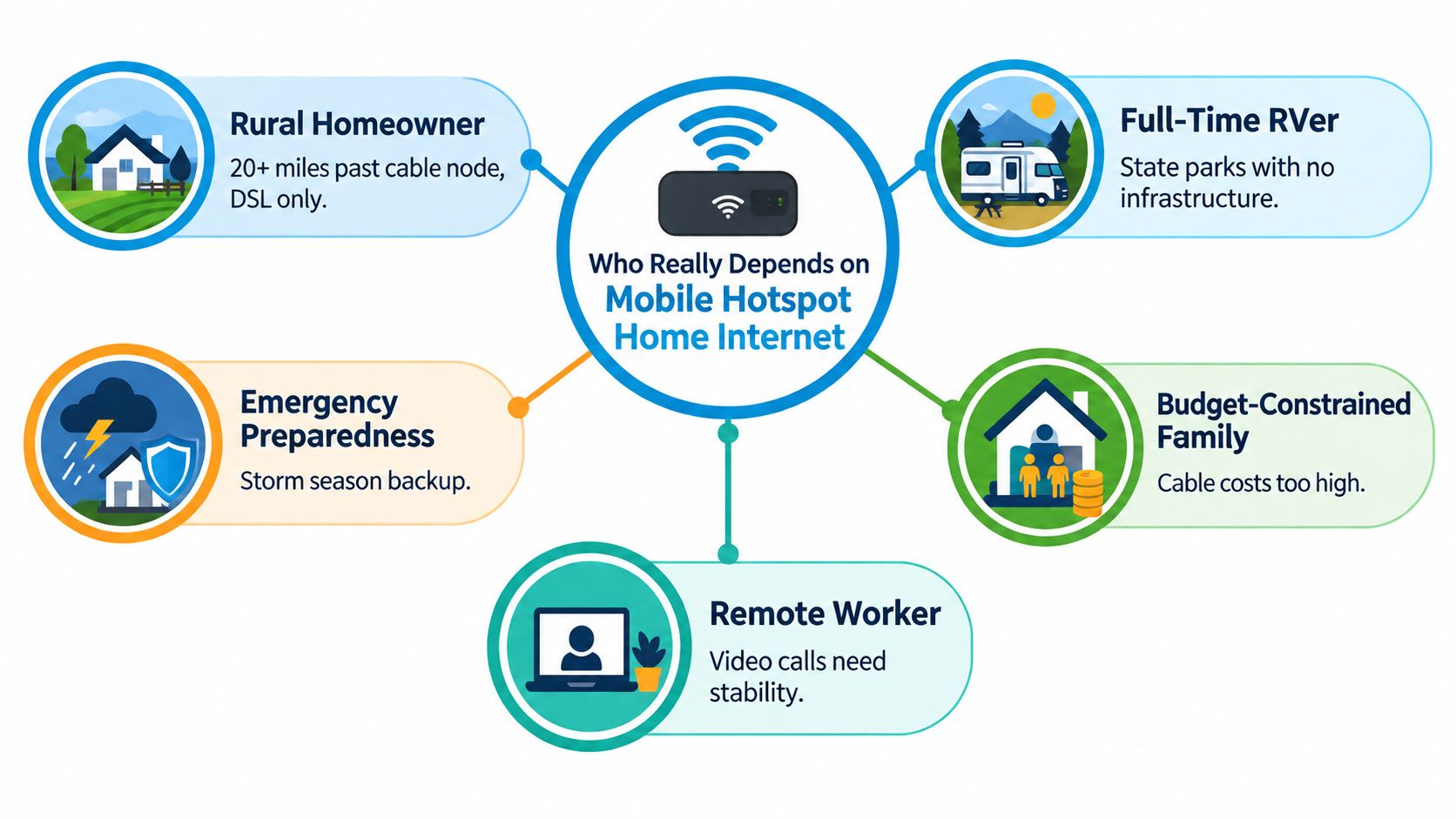
That's why this category keeps expanding beyond “travel internet.” It serves the household outside the wired footprint, the worker who needs a dependable connection on the road, and the family that wants a second line when the first one fails.
Coverage Maps Are a Starting Point, Not a Promise
A carrier map may mark your address as “covered,” yet the signal can fail inside a basement, metal-sided cabin, or RV behind trees. The FCC notes that its mobile broadband map reflects service outdoors or in moving vehicles, so it cannot guarantee indoor performance. Learn how to read a cellular coverage map and why indoor testing matters.
Mobile hotspot home internet is a coverage-adaptable access method, not one fixed product. The useful question is how a specific device and plan perform at the location where you will use them. Building materials, foliage, tower congestion, and backhaul limits can all change the result.
A repeatable indoor trial
Use the same three-step process before committing:
- Place the device where it will stay. Put the router in its intended permanent location, such as a window, shelf, basement corner, or RV bay. Do not test beside an open door if that is not where the equipment will operate.
- Test at consistent times for two days. Run speed and latency tests at 8 a.m., 12 p.m., and 8 p.m. on both days. Record download speed, upload speed, idle and loaded latency, packet loss, and jitter. During at least one test, make a call or perform a realistic upload.
- Log and compare the results. Look for busy-hour degradation, especially the change from midday to evening. Decide whether the slowest period still supports your calls, streaming, work, backups, or other regular tasks.
| Metric | What It Tells You |
|---|---|
| Download speed | How quickly files and streams can start |
| Upload speed | How well calls, backups, and file sends work |
| Latency | How quickly the connection responds |
| Packet loss | Whether data drops under strain |
| Jitter | How stable delay remains over time |
A plan with deprioritization may stay connected while slowing during tower congestion. A strong noon result therefore says little about evening capacity.
Test in the actual living space, behind the actual walls, with ordinary devices connected. Two days of logged results can reveal limits that a coverage layer cannot.
Setting Up and Optimizing for Real-World Performance
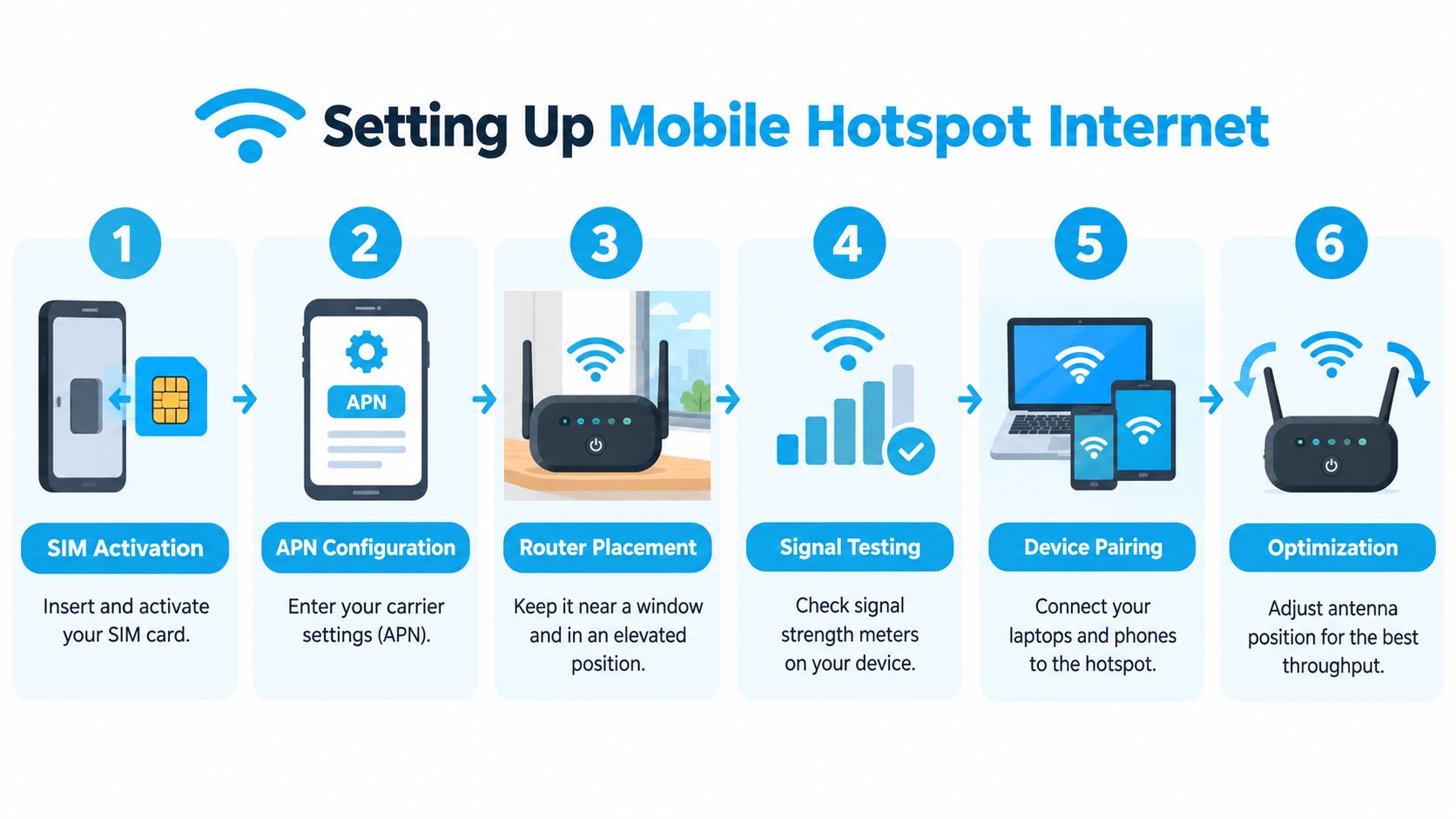
A cellular setup works best when you treat it like a system, not a single gadget. Start with SIM activation and the carrier settings the device needs, then place the router where the signal is strongest, usually higher up and near the window facing the tower. Keep it away from metal, dense concrete, and anything else that blocks radio waves.
If the signal is weak indoors, external antennas can help, especially in rural areas or in vehicles where the router can't find a clean path outside. MIMO panels and directional antennas make the most sense when you know where the tower is and you're trying to pull a stronger, cleaner signal from one direction. They're less useful if your signal problem is mostly congestion rather than radio strength.
Tuning the local network
Wi-Fi still matters even after the cellular side is working. A router can have a decent cellular link and still feel clumsy if the Wi-Fi side is crowded with too many devices, mixed legacy hardware, or poor channel choices. Ethernet is still worth using for a desktop, a voice-over-IP phone, a gaming console, or any machine where delay variation is annoying.
Keep the cellular side as clean as possible, then simplify the Wi-Fi side so the router isn't fighting itself.
If your equipment supports it, separate older devices from newer ones and use the band that fits the room layout. Small changes in placement often matter more than people expect. One solid hour of testing near the intended installation spot usually tells you more than a day of reading spec sheets.
Choosing a Plan Without Getting Burned by the Fine Print
The word unlimited can describe a connection that continues working, not one that stays equally fast. A carrier may reduce your priority after a threshold, especially when the tower is busy. Another plan may separate phone data from hotspot data, so the allowance shown in the headline does not all apply to your home connection. Compare current wifi hotspot plans and hotspot allowances before you buy.
Carrier examples summarized by Reviews.org's plan overview show why the details matter. AT&T's Value 2.0 and Extra 2.0 plans include 5 GB and 100 GB of high-speed data, respectively, followed by possible deprioritization. Those plans also list 3 GB and 50 GB of hotspot data. The phone allowance and hotspot allowance function like separate fuel tanks. A large tank for general mobile use does not guarantee much fuel for a router.
Match the plan to the workload
Start with the activities that will use the connection. A household streaming, joining video meetings, and syncing cloud backups creates a different load from a solo traveler checking email. Two hours of HD video daily uses about 3 GB per day, so a 50 GB hotspot bucket lasts about 16 days at that pace. Choose a plan with explicit hotspot data rather than relying on a broad promise of priority data.
| Plan Type | Typical Data Policy | Deprioritization Risk | Hotspot Allowance | Best Fit |
|---|---|---|---|---|
| Postpaid consumer plan | Mix of priority and capped high-speed data | Common after threshold | Sometimes separate | Households and light home use |
| Prepaid bucket | Fixed allotment | Usually clearer, but can still slow | Often limited | Travelers who want tight control |
| Dedicated hotspot line | Built for hotspot use | Depends on plan | Usually explicit | RVs and portable setups |
| Unlimited-style plan | May continue, then slow during congestion | Often present | May be separate | Users who can tolerate variable busy-hour speed |
| 50 GB hotspot example | About 16 days at 3 GB per day | Depends on the carrier's rules | 50 GB explicit | Moderate streaming and occasional meetings |
List calls, streaming, uploads, updates, and backups separately. Compare that monthly pattern with the plan's hotspot rules, threshold, and post-threshold behavior before purchasing.
A Simple Way to Decide If It Fits Your Life
If the signal works where you plan to place the device, the plan covers your real data needs, and the connection stays acceptable for your core tasks, you're close. If any one of those fails, keep looking. A backup connection also matters, because even a good cellular setup can be disrupted by a tower issue, weather, or congestion.
The next few years will keep reshaping this category. 5G coverage reached 51% of the world's population by 2024 according to the ITU, and that wider footprint helps explain why hotspots and cellular routers are showing up in more homes and vehicles (ITU mobile-broadband data). Fixed wireless access is also pushing into the same space, and low Earth orbit satellite services are giving rural households another path when terrestrial coverage is weak.
A fast decision check
- Location Test Passed: signal stays usable where the device will live.
- Data Budget Covered: the plan matches your real monthly habits.
- Latency Acceptable: video calls, remote work, and gaming feel steady enough.
- Backup Plan in Place: you won't be stranded if the tower or plan fails.
- Equipment Budget Realistic: the router, antenna, and wiring fit your setup.
- Indoor Trial Confirmed: performance holds inside, not just on the map.
- Mobility Requirement Clear: you know whether the connection needs to move with you.
The core idea stays simple. Adaptability is what makes mobile hotspot home internet work, not a headline speed number. Test it where you'll use it, budget it for what you do, and treat it as one tool in a broader connectivity toolkit.
If you want a cellular setup that's built around rural homes, RV travel, and practical hotspot use, SwiftNet Wifi offers 4G and 5G internet plans that connect through major carrier networks and are designed for portable or home-style use. Visit SwiftNet Wifi to see whether a hotspot or router plan fits the way you live and work.


