

You pull into a beautiful campsite, level the rig, make coffee, and open your laptop for a video call. The carrier map shows strong 5G. Inside the RV, the call freezes, the upload collapses, and streaming a movie becomes a test of patience. That experience is common because coverage isn't the same as usable throughput.
Good RV wireless internet service depends on more than choosing a plan labeled 4G or 5G. Your result changes with the exact parking spot, the RV's construction, antenna placement, tower congestion, terrain, and how many people are online. I've used enough mobile setups across rural America to know that the plan brochure is only the starting point.
The practical question is simple: can your connection handle the work, entertainment, navigation, and communication you need at the places you visit? The answer requires a repeatable test, realistic data planning, and equipment that matches your travel style. For a broader look at designing life around mobility, this guide to nomadic living offers useful context.
Staying Connected on the Road: What Actually Happens at the Campsite
You can pull into a quiet, good-looking campsite, see solid bars on your phone, and still lose half the workday trying to hold a video call together. I've had that happen with a carrier map that looked great before arrival. The problem was not the plan. It was the spot, the RV, the tower load, and whether the connection could keep upload speed and latency steady once other campers got online.
That distinction matters because plenty of RVers are not using their rigs only for weekends anymore. The RV Industry Association reported that 22% of RVers had someone in their household working remotely, and 54% of those remote workers had worked from an RV (RV Industry Association media resources). If your connection fails at the wrong time, you are not just missing a movie. You are missing meetings, uploads, directions, payment confirmations, and the basic ability to work from where you parked.
Practical rule: Treat every new campsite as a new internet installation.
Do that every time, and you will make better decisions than people who buy a hotspot from a “best RV internet” list and hope for the best. Start with a quick repeatable test. Check service outside the rig first, then inside where you work. Test download speed, upload speed, and latency. Run the same checks again later, especially in the evening when tower congestion shows up. If the outdoor result is decent and the indoor result falls apart, your RV construction or device placement is part of the problem. If both results are weak, the area or the tower is the issue.
I've seen campground Wi-Fi work fine at sunrise and become nearly useless by dinner. I've also seen a phone report a respectable signal while hotspot uploads crawled. That is why coverage isn't the same as usable throughput. Bars tell you very little about whether the connection will stay stable under real use.
The RV market is large, and RVers are spending more time on the road. That means more people are finding out the hard way that advertised coverage and actual performance are not the same thing. If you are building your setup around remote work or long trips, start with three questions:
- Can a network reach the area?
- Can the signal reach your equipment inside the RV?
- Can the connection hold usable upload speed, latency, and consistency during busy hours?
Answer those first. Then choose the gear and plan. For broader context on building work and travel around mobility, this guide to nomadic living is a useful companion.
What RV Wireless Internet Service Actually Means
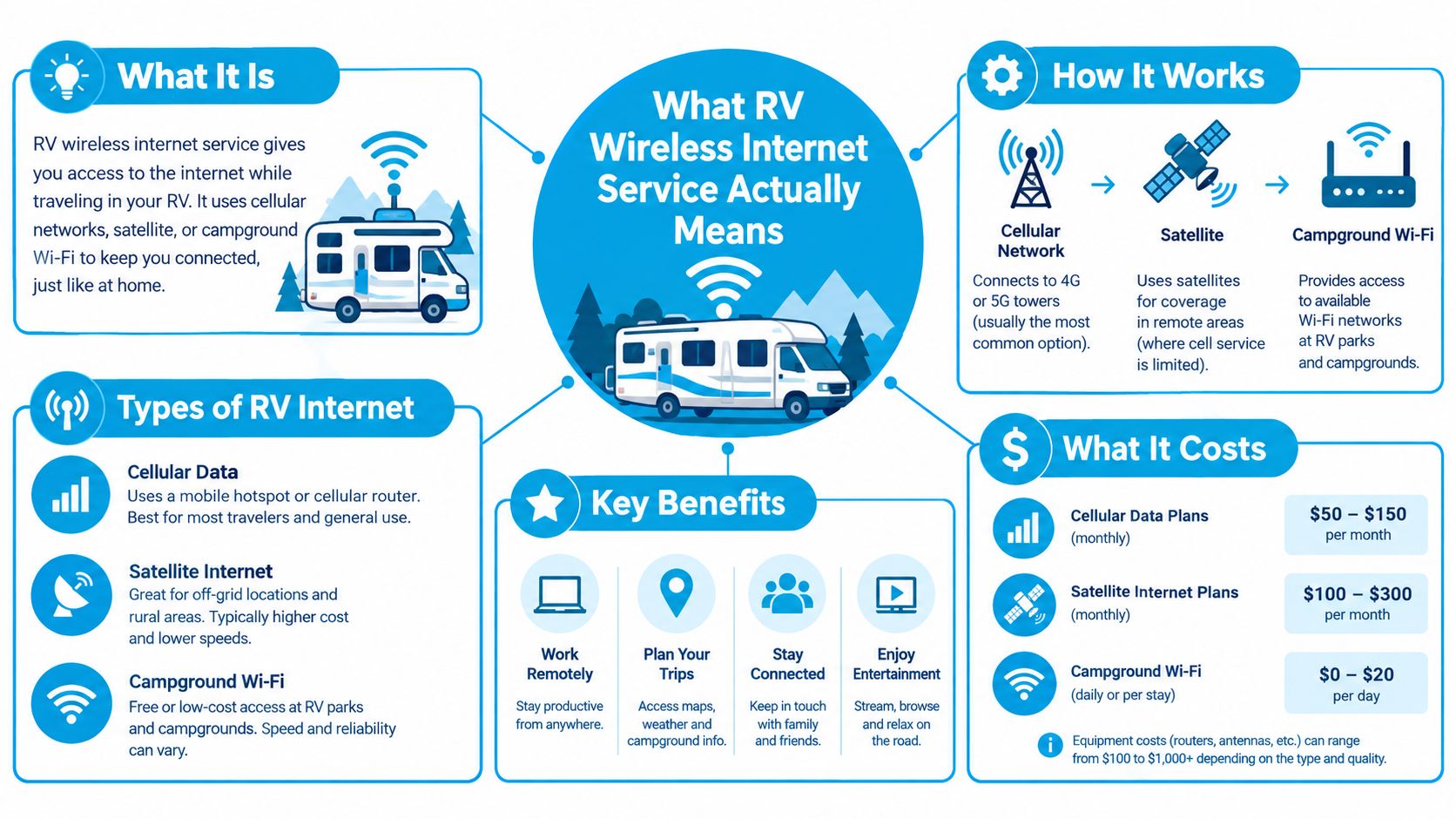
RV wireless internet service is the mix of plan, modem, router, and antenna you use to get a workable connection while moving from place to place. The key word is workable. In an RV, internet quality changes with tower distance, terrain, campground crowding, and even how much your rig blocks the signal.
A house gets internet from a fixed line tied to one address. An RV depends on a cellular modem that connects to a nearby network through a SIM or virtual SIM, then passes that connection to a hotspot or router that creates your private Wi-Fi network inside the rig. Move twenty miles, park behind trees, or pull into a full campground, and the connection can behave like a different service entirely.
The equipment has different jobs
A phone hotspot is the fast, cheap starting point. It uses the phone you already carry, which is fine for email, maps, light browsing, and short trips. I would not build a work setup around it. Hotspot allotments are often tighter than on-device data, the phone battery takes a beating, and performance drops fast when several devices pile on.
A dedicated hotspot gives you a separate data connection and dedicated hardware. That makes it cleaner than tethering through your phone, especially if two people need to connect at once. It still has limits. Small hotspot units usually offer fewer antenna options, less control, and less staying power than a full router setup.
A cellular router is the setup I recommend for frequent travel, remote work, streaming, or a family with multiple devices. It can stay powered on in the RV, manage several connections at once, and often supports external antennas. That matters because the goal is not just to catch a signal. It is to turn that signal into stable indoor Wi-Fi you can use for real work.
A roof-mounted antenna helps with reception, not miracles. It places the radio hardware outside the shell of the RV, where metal, insulation, and window coatings are less likely to interfere. If the tower is overloaded or the area has no usable service, an antenna will not save you.
Campground Wi-Fi is a separate category. You are sharing somebody else's network, backhaul, and access points with everyone else on the property. It can be fine for low-stakes browsing or downloads. I do not trust it as my only connection for work, calls, or anything time-sensitive.
Satellite internet has a place too. It can cover stops where cellular service is missing, but it needs a clear view of the sky, uses power, and can feel less comfortable on live calls because of latency. For many RVers, cellular is the everyday tool and satellite is the backup for remote ground.
That matters because rural connectivity still has real gaps. The FCC reported that 83.1% of rural Americans had access to fixed broadband at 25/3 Mbps, compared with 72% at 100/20 Mbps, and estimated that about 45 million Americans lacked access to both fixed and mobile broadband services at the end of 2022 (FCC Section 706 report summary). RV internet does not erase those limits. It gives you a mobile way to work around them.
Comparing the Main Ways RVers Get Online
The right connection depends on what you need to do, how often you move, and how much failure you can tolerate. I don't rank options by theoretical speed. I rank them by whether they keep working when the RV is occupied, the campground is busy, and the next stop is far from a town.
| Option | Mobility | Setup Effort | Best For |
|---|---|---|---|
| Campground Wi-Fi | Limited to the property | Low | Casual browsing, updates, and low-risk downloads |
| Phone hotspot | Excellent | Very low | Short trips, navigation, email, and emergency backup |
| Dedicated cellular router | Excellent | Moderate | Remote work, streaming, families, and frequent travel |
| Satellite internet | High, but site-dependent | Moderate to high | Remote locations with poor or absent cellular service |
Campground Wi-Fi
Campground Wi-Fi is attractive because it appears to be included. In practice, it behaves like a shared public network. It may handle email, route planning, and ordinary browsing, but it can slow sharply when many guests connect. I also avoid using it for confidential work unless I have an appropriate security setup.
Use it as a supplement, not a foundation. Downloading large files during a quiet period can make sense. Depending on it for a scheduled client call is a gamble.
Phone hotspots
A phone hotspot wins on simplicity. You already own the hardware, and there's nothing extra to mount or power. That makes it ideal for a weekend at a state park or as a backup when your router loses service.
The weaknesses appear under sustained use. Hotspot allowances may be smaller than the plan's headline data amount, the phone can heat up, and battery drain becomes a nuisance. A phone also isn't a good substitute for a household router when several people need access.
Dedicated cellular routers
This is my default recommendation for full-time RVers and anyone who works online. A router creates a stable local network, supports more devices, and can work with an external antenna. It also keeps your phone available for calls and navigation instead of turning it into the only internet gateway.
A router still depends on the carrier and the tower. Better equipment improves reception and distribution, but it won't manufacture capacity. If you travel across multiple regions, network diversity becomes more valuable than a single impressive result at home.
Satellite
Satellite is the fallback for places where cellular options fail. It can open up remote campsites, but the setup is less casual. Obstructions, power requirements, weather, and latency all matter. I'd choose it for a specific off-grid pattern, not automatically as the primary connection for every RV.
A mixed approach usually works best: dedicated cellular service for normal travel, campground Wi-Fi for non-sensitive tasks, phone hotspot backup, and satellite only where the route justifies it.
Why Coverage Maps Quietly Mislead You
A coverage map answers one narrow question: whether a provider models service in an area. It doesn't promise that your laptop will maintain a usable connection from the passenger-side dinette at 7 p.m.
The FCC's mobile maps model outdoor or in-vehicle coverage, not guaranteed indoor performance inside an RV. Its models include 4G LTE at 5 Mbps download and 1 Mbps upload, plus 5G-NR thresholds of 7/1 Mbps and 35/3 Mbps, with assumptions about cell-edge coverage probability (FCC mobile broadband map guidance). Terrain, hardware, and cell-site capacity can change the actual result.
A nationwide academic analysis found that about 30.9% of U.S. land area had Fast 5G, defined as at least 35 Mbps download and 3 Mbps upload. The same analysis linked greater cellular infrastructure density with a 56% increase in median download speed, a 66% increase in median upload speed, and a 20% reduction in latency (academic analysis using FCC map data). That explains why service can be excellent near one town and unreliable a short drive away.
Use a three-part pre-trip test
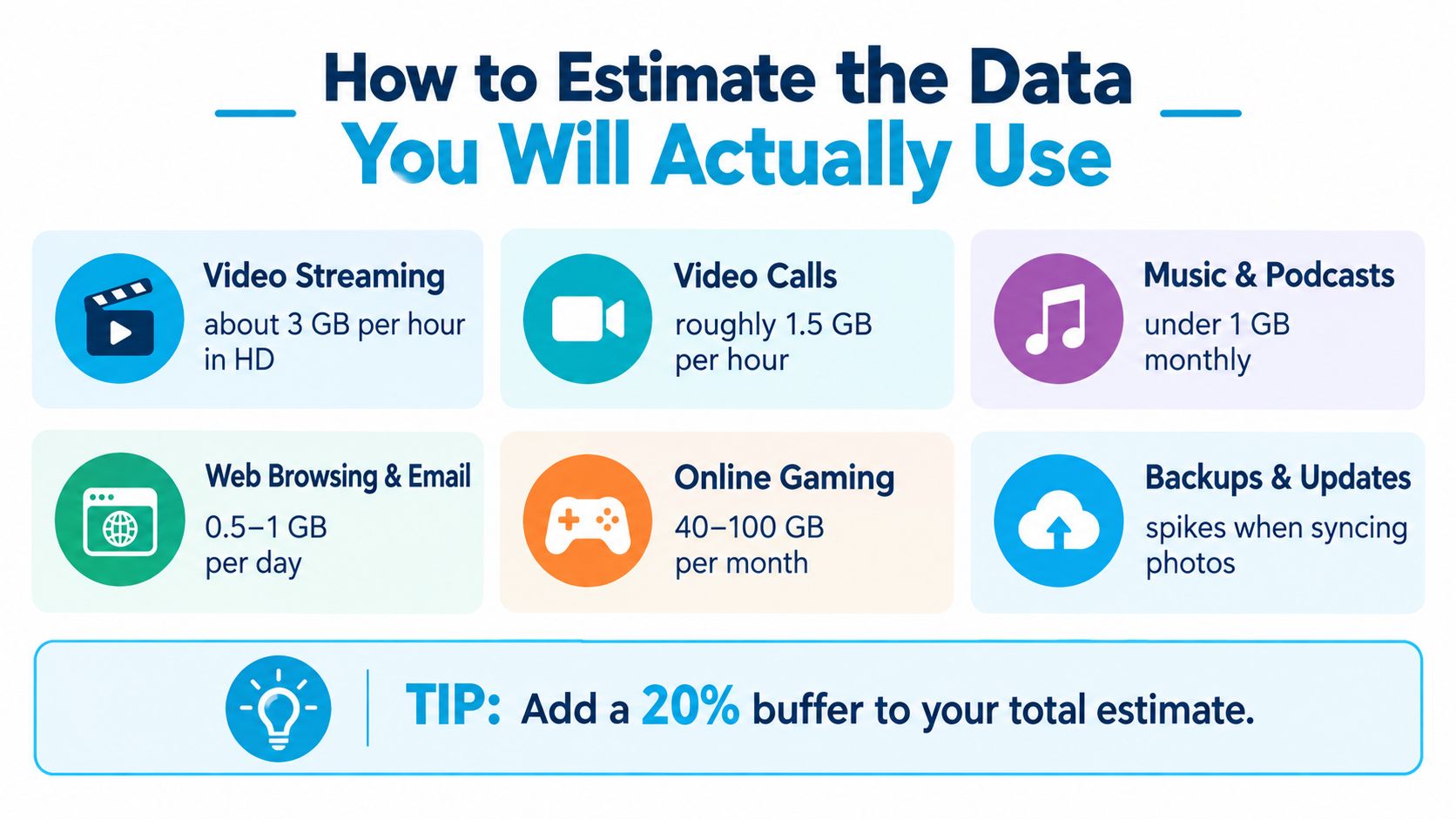
- Check the exact destination. Use the cellular coverage map guide to compare carrier layers at the campground, not just the nearest town. Check the route as well, especially if you need to work during travel days.
- Validate the parking position. A map pin may represent a broad area. Test where the RV will sit, then compare the router near a window with the router connected to an exterior antenna. A metal body, insulation, cabinetry, and trees can change the indoor result.
- Test at different times. Run a download, upload, latency, and video-call test in the morning and evening. If the signal bars stay steady while performance drops, congestion is probably the issue. Changing equipment won't solve a saturated tower.
Coverage is a planning input, not a performance guarantee.
Repositioning the RV can help. Raising an antenna can help. Moving a router away from dense interior obstructions can help. None of those fixes an absent backhaul connection or a cell site that can't serve the demand. For remote work, I care more about consistent upload and latency than one impressive download reading.
How to Build a Realistic RV Data Budget
“Unlimited” means very little until you read the fine print. What matters is the high-speed allotment, hotspot limits, network management policy, and what the connection turns into after you cross that threshold. I never pick a plan until I know how ugly it gets after the premium data runs out.
Build your estimate around behavior. Coverage gets you online. Usable throughput determines whether your workday, movie night, or backup sync holds together. An RVer who checks email and pulls maps needs one kind of plan. A couple working full time, taking video calls, backing up photos, streaming every night, and downloading game updates needs a very different data budget.
Build a usage estimate
Start with a normal week, not your best-case week.
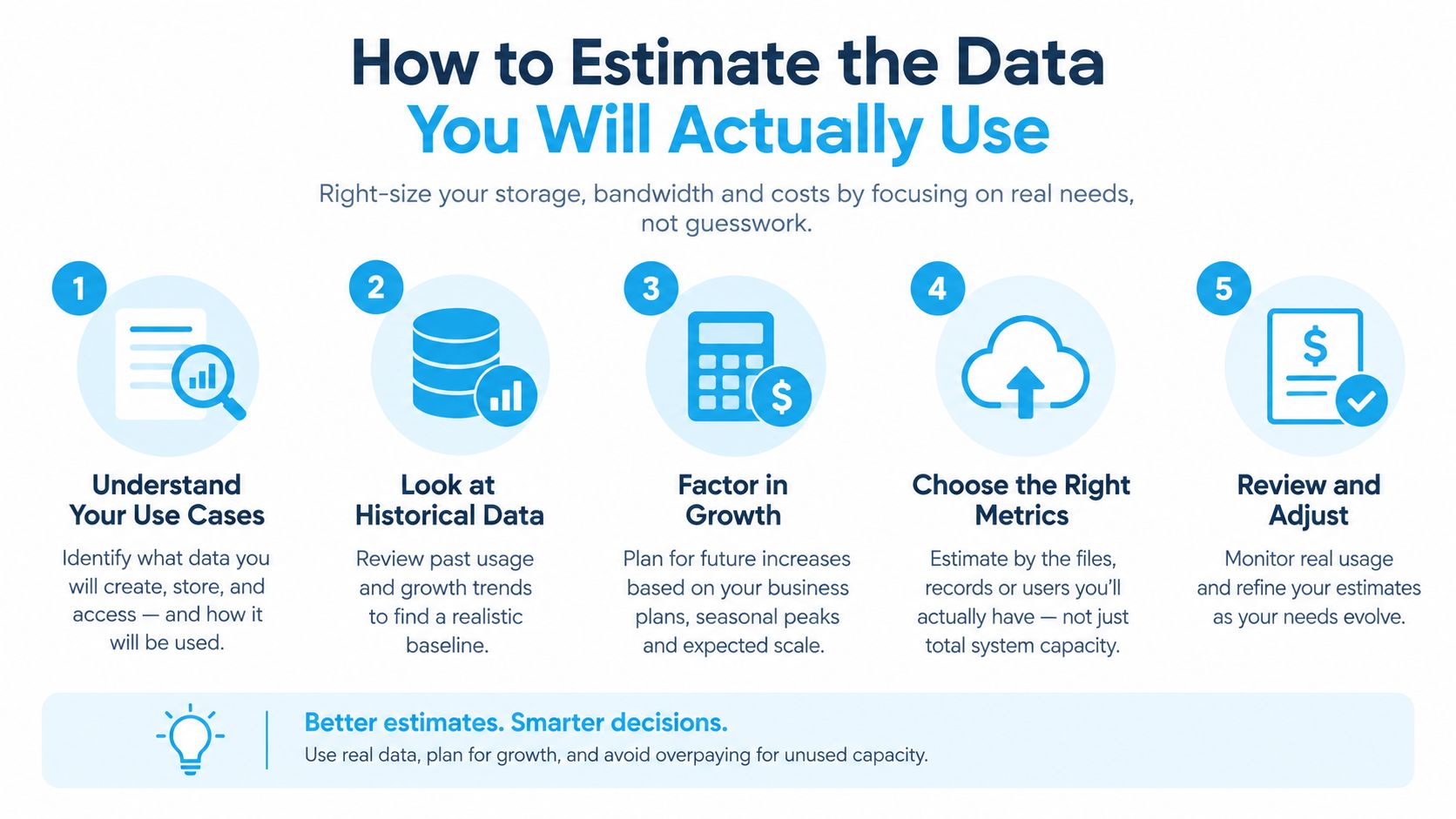
- Streaming: Count the hours, then factor in video quality. If you can download shows on campground Wi-Fi before the evening rush, save your cellular data for work and other tasks that cannot wait.
- Video calls: Total the meeting hours for every person in the RV. Calls rely on upload as much as download, so a plan that looks generous on paper can still fall apart during back-to-back meetings.
- Cloud backups: Photo libraries, phone backups, and laptop updates hit in bursts. Put those jobs on a stable connection instead of letting multiple devices sync in the middle of a workday.
- Browsing and navigation: These are usually lighter uses, but background app refresh, map downloads, and automatic updates add up faster than people expect.
- Gaming: Day-to-day play may use modest bandwidth. Full game downloads and large updates consume far more data, so budget for them separately.
The RV data usage guide is a useful worksheet for turning those habits into a realistic monthly target. I also keep offline maps, downloaded entertainment, and a backup place to work ready. Preventing overages is easier than trying to work through a throttled connection.
A 2025 camping report found that 78% of outdoor travelers expect high-speed Wi-Fi, and that Wi-Fi access can add up to nine camping nights per year. That matters because connectivity now shapes where people stay and how long they stay there.
Before you sign up, ask five direct questions:
- Does hotspot or router usage count separately?
- What happens after the high-speed threshold?
- Are video calls and VPN traffic supported?
- Can the plan pause, change, or travel without a contract?
- Is support available when you are parked far from a store?
Why Multi-Carrier Access Changes the Equation
A single carrier can work brilliantly along one route and fail at the next stop. Cross-country travelers face a better question than “Which network is fastest?” They should ask, “Which available network works at this exact location right now?”
A virtual SIM approach can let one compatible device use more than one underlying network instead of forcing the traveler to carry separate hardware for every option. SwiftNet Wifi offers a 4G Bronze hotspot plan and a 5G Diamond router plan as examples of that model. Bronze fits travelers who want a portable connection for browsing and casual streaming, while Diamond is aimed at higher-capacity use such as streaming, remote work, and gaming.
The multi-carrier SIM card explanation is useful for understanding the basic idea. A device can select among participating nationwide networks, including AT&T, Verizon, and T-Mobile, when the plan and hardware support that access.
The advantage is probability, not magic. Multiple networks improve the odds that one carrier has a workable signal at a stop, but they can't create service in a canyon where every network is weak. They also don't eliminate congestion. You still need to test the actual parking position, check upload stability, and understand the plan's limits.
I prefer multi-carrier access for travelers who move frequently and can't afford to plan every route around one provider. A single-carrier setup can remain perfectly sensible for someone who stays near a strong home tower or travels a familiar regional loop. Redundancy only helps when the device, plan terms, and network selection process work together.
Choosing Wisely and Getting Set Up on the Road
Choose equipment around your worst realistic stop, not your best result in town. Before committing, look for a risk-free trial, clear pricing, no hidden fees, no contract pressure, responsive support, and a best-price guarantee. Those terms matter because RV performance can't be judged from a showroom or a coverage map.
Then confirm the practical details:
- Compatibility: Verify that the SIM, hotspot, or router works with your intended RV power setup and supports the required cellular bands.
- Placement: Start near a window, then test an exterior roof-mounted antenna if the router supports one.
- Validation: Run the three-part test at the first stop, including the actual parking spot and busy periods.
- Backup: Keep a phone hotspot, campground Wi-Fi option, or another network available for important calls and deadlines.
The buying decision is really a planning decision. Coverage tells you where service may exist. Usable throughput tells you whether your work call, upload, stream, or shared household connection will survive the stop. Treat those as separate measurements, and RV wireless internet service becomes far more predictable.
SwiftNet Wifi offers portable 4G hotspot and 5G router options using virtual SIM technology with access to major nationwide networks, making it a practical option to compare for mobile RV connectivity. Visit SwiftNet Wifi to review the available hardware, plans, trial terms, and support before your next route.


