

Your phone shows two bars. The carrier's coverage map is solid green at your address. Then the first video call of the morning freezes mid-sentence, and the backup you started last night is still sitting at 40%.
That gap between what a map promises and what a device delivers is the whole story of 4G WiFi broadband. It's a genuine broadband substitute for millions of households, and it's also the most misjudged one, because your experience depends far less on the colour of the map than on the radio conditions at your exact spot at the hour you need them.
Here's the picture built in order: what the technology does, which device suits which job, the speeds 4G reaches and the ones it can't, the plan terms that limit you, and the tests that tell you the truth before you commit.
What 4G WiFi Broadband Is and How It Connects
A couple pulls their RV into a rural campsite with no cable pedestal and no fiber at the gate. Both of them have a 9 a.m. video call, and the campground's Wi-Fi is a single access point in the office serving half the site. Out comes a small battery-powered hotspot, and within a minute both laptops are on a network of their own.
Four things happen in sequence, and each one is a place where the chain can break.
- The tower transmits. A nearby LTE cell site broadcasts a radio signal. Nothing on the ground connects you to it, which is exactly why this works where no wire reaches.
- The antenna receives. The hotspot's internal antenna catches that signal. A weak catch here caps everything downstream, no matter how good the rest of the hardware is.
- The modem decodes. A radio chip inside the device turns the LTE transmission back into ordinary internet traffic.
- The device rebroadcasts. It shares that connection as its own Wi-Fi network, and laptops, phones and a TV join exactly as they would at home.
Think of the hotspot as a translator standing between two languages. The tower speaks LTE, your laptop speaks Wi-Fi, and the translator takes in one and speaks out the other. It doesn't create internet. It converts what it receives, which is why a full Wi-Fi icon on your laptop tells you nothing about whether the tower is delivering anything.
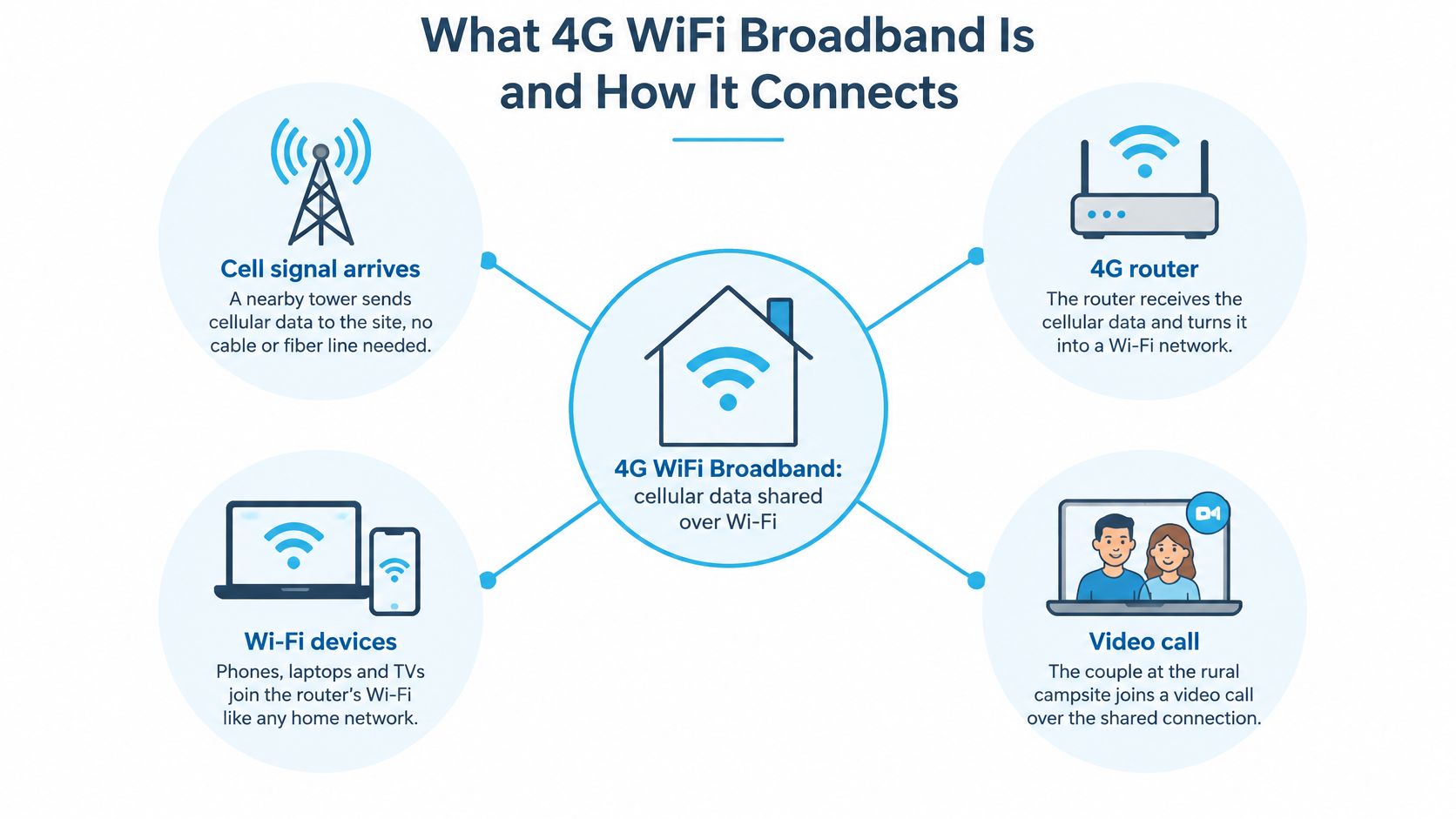
4G WiFi broadband is internet access delivered over a cellular LTE connection and shared with your own devices over a local Wi-Fi network. The tower handles the long haul. The router or hotspot handles the last few metres.
The reason this works nearly anywhere is scale. Ericsson's November 2024 Mobility Report estimated roughly 5.2 billion LTE subscriptions in 2024, about 60% of all mobile subscriptions worldwide, even as the total fell by some 25 million in a single quarter as users migrated to 5G.
That matters for one practical reason. The device in your rig runs on the same radio-access infrastructure as the phone in your pocket. Campground Wi-Fi is different. It usually arrives over the owner's wired line, so its quality depends on their connection and how many people share it. Your hotspot depends on the tower and on where you place the antenna relative to it. 5G is spreading, but 4G LTE remains the foundation for most hotspot and router service, which makes a 4G device a sensible buy rather than a compromise.
Hotspots, Cellular Routers and Phone Tethering Compared
The decision comes down to one line. If the device moves most days, buy a hotspot. If it sits in one place for weeks, buy a cellular router. If you need a connection once a month, tether your phone and accept the limits.
4G WiFi device options compared
| Option | Best for | Typical device count | Power | Antenna |
|---|---|---|---|---|
| Mobile hotspot | Solo travellers, short trips, a phone and a laptop | Usually 5 to 10 | Battery with USB charging | Built-in, no external port |
| Cellular router | Fixed RV pitch, rural home, daily remote work | Often 20 or more | Mains or 12V | External antenna ports |
| Phone tethering | Emergencies and one-off use | Usually 3 to 5 | Drains your phone battery | Phone's own antenna |
| Cellular modem with your own Wi-Fi system | Large homes that need mesh coverage | Set by your Wi-Fi system | Mains | External antenna ports |
Device count is the column people underestimate. A household where one person streams a film, another runs a video call and a third downloads a game patch is asking a lot of a single radio. A hotspot handles a handful of sessions comfortably and starts to stumble beyond that. A router designed for a fixed install usually carries a much heavier load without complaint.
Power decides more than the spec sheet suggests. A hotspot lives on a battery and charges over USB, which suits a boondocking pitch with no hookups at all. A router wants mains or a 12V feed, so it belongs where the rig is parked and plugged in for the season.
Why the antenna column matters most
An external antenna port is the single biggest upgrade available to a weak-signal site. A port lets you mount a MIMO antenna outdoors, higher up, aimed back at the tower, and that physical move can change a marginal connection into a workable one. A built-in antenna is stuck wherever the plastic shell happens to sit, which may be the worst place in the vehicle for radio reception.
In a long trailer or a large farmhouse, the bottleneck is sometimes the Wi-Fi reach rather than the cellular side. A cellular modem feeding your own mesh nodes separates the two jobs: the modem worries about the tower, the mesh worries about getting the signal to the far bedroom. If you're still unsure whether a hotspot is the right shape of device for your setup, this explanation of what a mobile hotspot is and how it works covers the basics.
Rule of thumb: time in place is the tiebreaker. Count how many nights the device will sit still before you buy.
Speed, Latency and Why Real-World 4G Results Vary
The headline numbers are real, and they're measured in conditions you'll rarely encounter.
The clip below shows what the gap looks like in a working setup.
3GPP's LTE reference material specifies Category 4 equipment at up to 150 Mbps downlink and 50 Mbps uplink using channel bandwidths of up to 20 MHz. Higher categories with carrier aggregation reach roughly 300 Mbps down. Those are radio-layer peaks, not promises about your kitchen counter.

LTE speed reference values
| Category or condition | Peak download | Peak upload | Notes |
|---|---|---|---|
| Category 4 LTE | 150 Mbps | 50 Mbps | 20 MHz channel bandwidth |
| Higher categories with carrier aggregation | Roughly 300 Mbps | No single standard figure; uplink peaks differ by category pairing | Needs a compatible router and multiple carriers |
Latency sits outside this table because it measures something different: delay, not throughput. Radio-interface latency in LTE is typically specified under 10 ms on a lightly loaded network.
Five things pull you below the ceiling, and you only control two of them. Cell loading rises when everyone in the valley gets home at six. Signal quality depends on distance, terrain and interference. Backhaul capacity is the tower's own link to the internet, and a rural site can be limited there even with a perfect signal at your end. Device category caps what your hardware can negotiate. Spectrum configuration decides how wide a channel the carrier can give you.
Latency and upload decide whether it feels usable
Under 10 ms of radio latency is responsive enough for video conferencing, cloud apps and ordinary gaming. End-to-end latency is always higher because it also includes routing, carrier-core processing and the destination server. A 20 ms radio link can feel like 60 ms by the time a game server answers.
Upload matters more than buyers expect. Video calls are symmetrical, cloud backups run for hours in the background, and file sync punishes a slow uplink all day long. A connection with fast downloads and a starved upload will feel broken on a Teams call even while a speed test looks impressive.
Signal bars deserve the least trust of anything on the spec sheet. A bar count tells you a signal reaches your device; it says nothing about how many people share that cell or how much capacity sits behind the tower. The same spot that flies at midday can crawl at eight in the evening, so treat any single reading as a sample, not a verdict.
Data Caps, Throttling and Plan Terms to Confirm
Picture a two-person rig. One streams HD for four hours most evenings. The other works a full day of video calls with cloud sync running in the background. Build the monthly budget from the hourly figures and the answer arrives fast.
Approximate data use per hour by activity
| Activity | Approximate data per hour | What changes it |
|---|---|---|
| Standard definition streaming | About 1 GB | Resolution and platform settings |
| HD streaming | About 3 GB | Bitrate chosen by the app |
| 4K streaming | About 7 GB | Bitrate and HDR |
Four hours of HD a night is roughly 12 GB, which is about 360 GB across a month of evenings before a single work call is counted. Resolution is the first lever you control. Dropping the television from 4K to HD more than halves the biggest line in the budget, and the difference is hard to spot on a 32-inch screen from ten feet away.
If you want to know what a single gigabyte covers in practice, this guide to how long 1 gig of data lasts breaks it down activity by activity.
The frustration is measurable. A 2025 broadband satisfaction survey reported that 31% of respondents were frustrated by data caps, and 68% of those users linked throttled periods to reduced streaming quality or buffering. The same survey reported that 29% of U.S. employees worked remotely at least three days a week in the first quarter of 2025, which puts uploads, VPN sessions and software updates in direct competition with entertainment for the same allowance.
The terms to get in writing
"Unlimited" describes a billing arrangement, not a speed guarantee. Ask these questions before you cancel a wired line.
- Is the limit hard or soft? A hard cap cuts you off. A soft threshold deprioritises you behind other traffic once you pass it.
- Where does throttling start, and what speed follows? Get the threshold in gigabytes and the reduced speed in Mbps, not the phrase "may be reduced".
- Is hotspot traffic treated differently from on-device traffic? Many plans count them under separate allowances.
- What happens at peak hours? Congestion can slow you well under your limit, so a cap is not the only thing that shapes your evening.
- What's the exit? Confirm trial length, what happens to the hardware on return, and whether a contract or credit check is involved.
For a concrete example of terms written plainly, our 4G Bronze hotspot comes with 100GB, 200GB or unlimited data, and the unlimited option carries no caps or throttling. It requires no contract and no credit check. If you return the hotspot inside the 7-day guarantee, we refund the full month with no restocking fee, no partial credit and no deduction for shipping.
Policies change, so confirm the current terms with the provider directly rather than relying on a page you read last year.
How to Test a Site Before You Rely on It
A signal bar is a manufacturer's rendering of a raw radio measurement, and it tells you nothing about whether your applications will work. Two bars can hide a perfectly usable link, and four can hide a congested cell with a starved backhaul.
The size of that gap is not hypothetical. Independent research into rural and tribal LTE sites found throughput up to 11 times worse and latency up to 3 times worse than in comparable areas, on identical carrier subscriptions, because of sparse deployment, weaker backhaul and chronic under-provisioning rather than any missing signal.
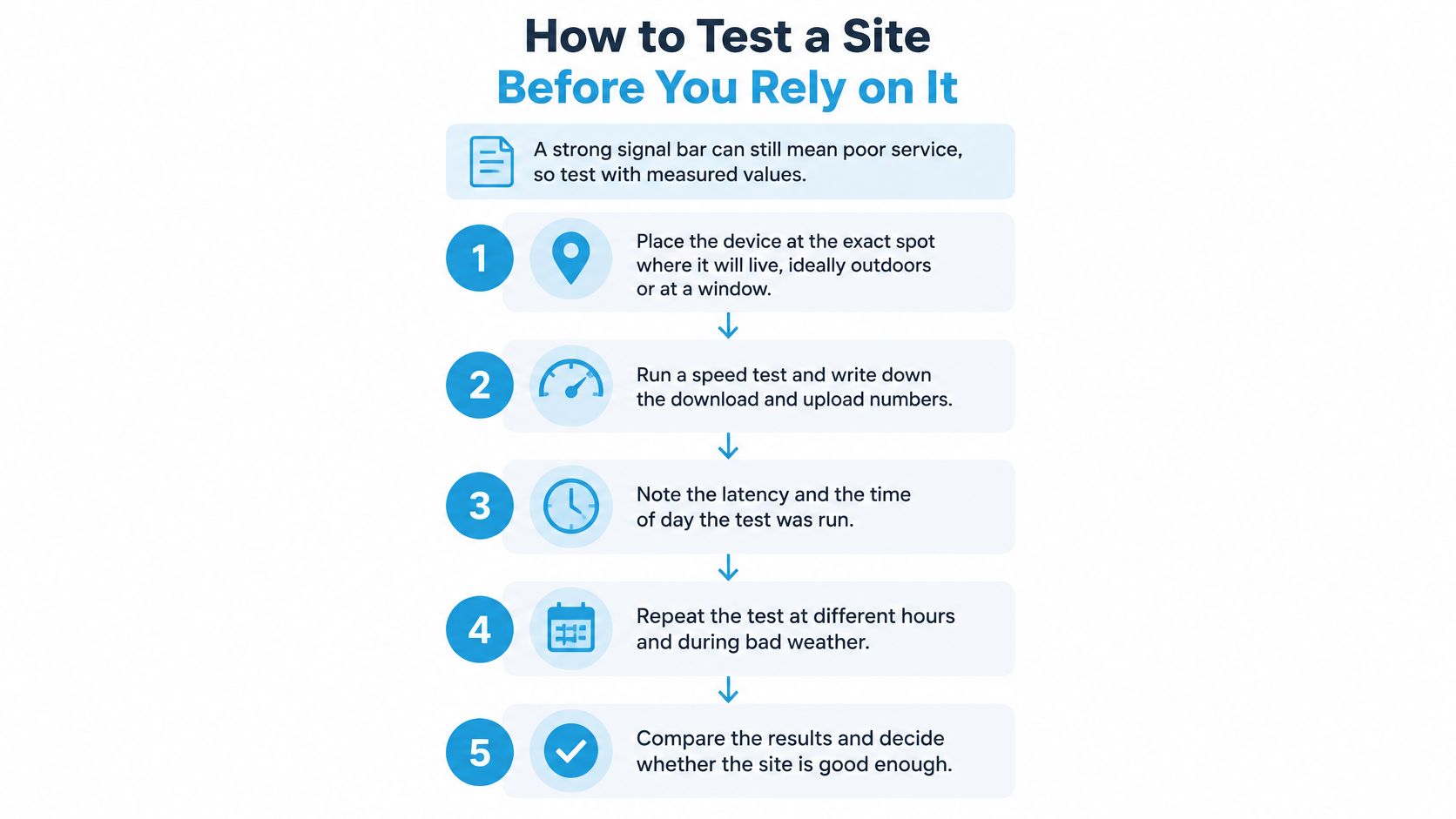
Here's the sequence to run before you commit to a site.
- Put the device where it will live. Outdoors or at a window, not on the table where it looks tidy. Read RSRP and SINR from the router's admin page, because those two numbers describe signal strength and signal quality separately and you need both.
- Run a speed test five times over ten minutes. Record download, upload and latency each time. One test is a snapshot. Five show you whether the link is stable or lurching.
- Repeat the whole set between 7 and 10 p.m. This is when the cell is busiest, and it's when your streaming and calls happen. A site that passes at noon and fails at eight has failed.
- Hold a 15-minute video call and a VPN session. Watch for freeze, packet loss and jitter rather than averages. Real-time traffic exposes problems that a speed test averages away.
- Move the antenna or device one to three metres, or raise it. A few feet and a bit of height routinely change results more than any setting, because LTE is sensitive to obstruction and ground reflection.
- Compare carriers if the device supports more than one. A multi-network approach lowers your outage risk when one carrier's local signal is absent or congested. It doesn't guarantee simultaneous use of several networks or automatically higher speed, which is worth knowing before you pay for it.
- Write the results down and decide. If evening upload and latency hold steady across the runs, keep the site. If they wobble, plan a fallback before the first deadline lands.
Signal thresholds to check at your spot
| Metric | Good sign | Next action |
|---|---|---|
| RSRP | Above -100 dBm | Move the antenna or device and retest |
| SINR | Above 10 dB | Compare results on each carrier before deciding |
Values below about -110 dBm suggest a weak signal where an external antenna stops being optional. Ofcom's mobile measurements in England also found that rural connections tend to have lower average download speeds than urban ones, which is why the hour you test matters as much as the postcode (Ofcom Connected Nations 2024).
Coverage maps estimate whether a signal exists. These tests tell you what you'll experience. If you're weighing several networks for the same address, this cellular coverage comparison explains how to read the differences between them.
Who Gets the Most From 4G WiFi Broadband
Coverage numbers hide the reason 4G matters. The International Telecommunication Union's assessment, reported in Ericsson's mobility key figures, put 4G availability at 93% of the world's population, but the split is the interesting part: 99% of urban areas against 84% of rural areas, and roughly 56% of the population in low-income countries. If you live in that rural remainder, cellular is often the only broadband on offer at any price.
These readers get the most from it.
- Rural households with no fiber or cable passing the gate. A router plus an outdoor antenna can be a primary connection rather than a stopgap, provided the site tests clean in the evening.
- RV travellers who change campsites weekly. Portability is the whole value, and a hotspot with a battery handles a night off hookups without drama.
- Truck drivers on long routes. A dependable connection at a rest stop turns a break into productive time, and a multi-carrier setup reduces the odds of a dead spot.
- Remote workers who can't afford an outage. A 4G link as a second path keeps calls alive when the wired line drops.
- Renters who can't install a fixed line. No drilling, no technician visit, no landlord conversation.
Where it's the wrong answer
Skip 4G as your primary connection if fiber already reaches the house and you only want occasional backup, or if several people stream 4K on separate screens at once without a data plan built for that load. Skip it too if you're parked somewhere the tests above came back poor and the device has no antenna port to rescue the signal. No amount of plan shopping fixes a weak cell.
Verdict: 4G WiFi broadband is a strong primary connection when the site tests well, a practical backup when it doesn't, and a poor primary choice when a location has weak LTE and no antenna option.
More practical guides for rural and mobile setups live at the SwiftNet Wifi blog.
#rv #rvlife #rvliving #rvlifestyle #rvrenovation #rvremodel #rvtravel #rvcamping #rvadventures #ruralwifi #5gwifi #5ginternet
A 4G connection is only as good as the carrier that reaches your spot, which is why our 4G Bronze hotspot ships with a pre-installed multi-carrier virtual SIM that works across AT&T, Verizon and T-Mobile LTE instead of tying you to one network. Check coverage at your exact address, choose the data tier that matches your household budget, and run the evening tests before the 7-day trial ends. Visit SwiftNet Wifi to see the 4G Bronze plans and confirm service where you park.


