

What happens to your work if your internet line dies this afternoon? Backup internet is a secondary connection that keeps you online when your main connection fails, becomes congested or is unavailable. It earns that name only under two conditions: it runs on a separate network path, and it has been tested at the exact spot where you sit. Many U.S. addresses still have no second wired provider, which is why the difference between a spare line and a real backup matters.
Speed is usually the first thing people ask about. The sharper question is narrower: if your main line died right now, would the second one still be standing?
What Backup Internet Means in Plain Terms
Think about the water main running into a house. One pipe, one route under one street. Cut that pipe and every tap runs dry, and the fault isn't in the faucets. A second line arriving from a different street keeps the taps running, even at lower pressure.
Networks follow the same logic, which is why the National Institute of Standards and Technology treats redundancy as ordinary practice rather than a luxury. Its contingency guidance states that redundant communications links are usually necessary when a network processes critical data, and recommends using multiple network service providers when near-100% connectivity is required. The same document gets specific about the physical side: redundant links should be physically separated and should not follow the same cable route, because one incident such as a cable cut can disable both.
That last detail separates a genuine backup from a second bill. Two services that enter through the same conduit, hang from the same pole and terminate on the same upstream equipment share a single point of failure, just with more paperwork.
Three situations make a second connection worth paying for.
- The primary fails. A storm takes down the pole, a backhoe finds the conduit, or the provider's equipment drops out for six hours.
- The primary congests. Evening traffic or a busy tower cuts throughput until a video call freezes, even though the line is technically up.
- The primary never existed at that spot. The address has no wired provider, or the campground you booked for the month has nothing usable.
One more part of the definition changes how you shop. NIST notes that a backup connection may provide reduced bandwidth, enough for critical transmissions during a contingency rather than full-capacity daily use. Capacity, not speed, is what you're buying.
Backup internet is a resilience measure, not a speed upgrade.
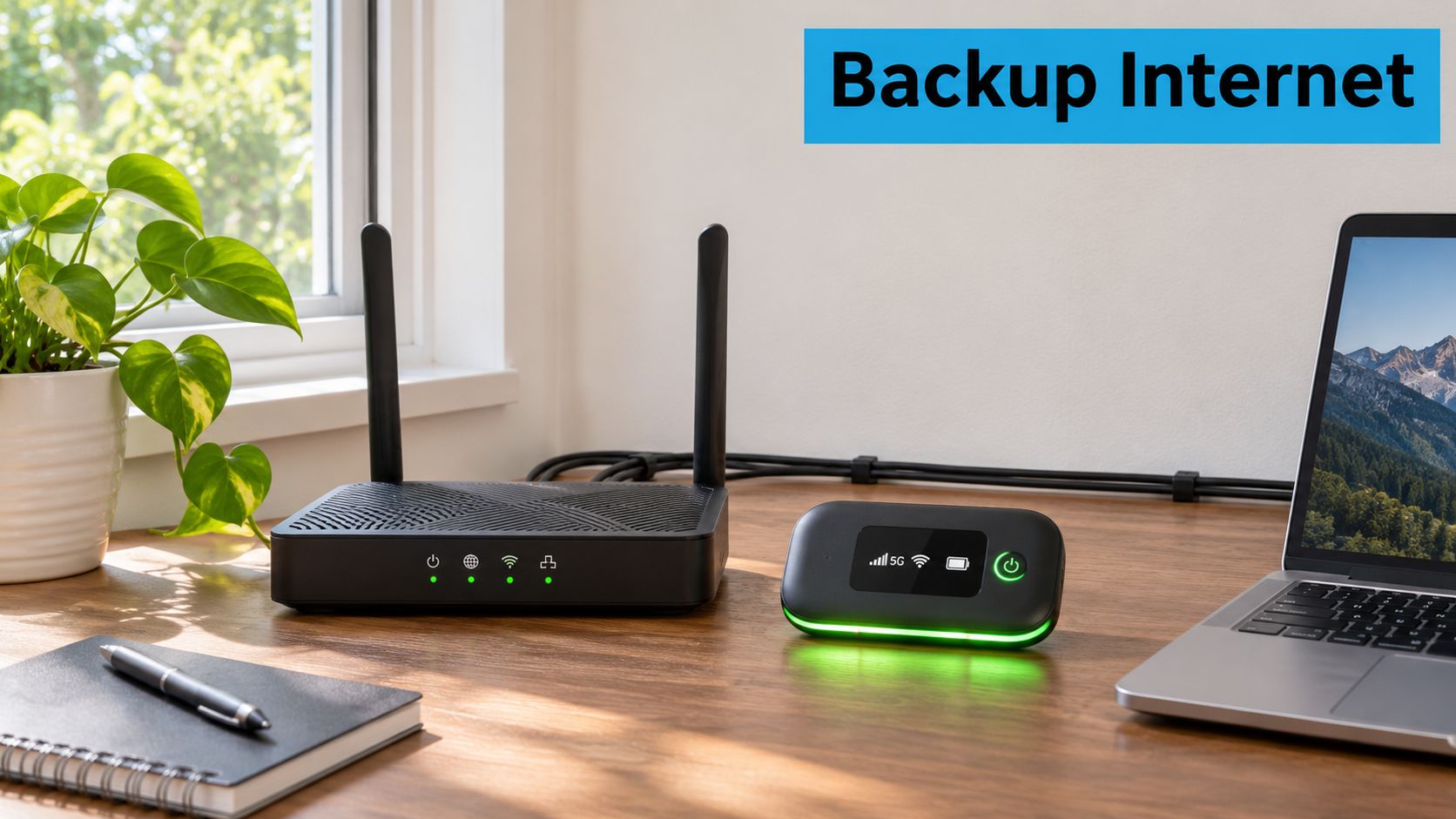
In a house, that looks like a primary router doing the everyday work, and a hotspot standing by on a different network.
If you're designing this for an office rather than a kitchen table, Accelerate IT Services on infrastructure resilience covers the layers above the cable, including power, routing and the recovery plan that follows the outage.
Before you shop, walk the outside of your building and count how many separate lines reach it. Then write down what would stop if the one you rely on went quiet for four hours. That list is your shopping list.
Who Actually Needs a Backup Connection
In its Seventh Broadband Progress Report, the Federal Communications Commission reported that, in an earlier national broadband assessment, approximately 26 million Americans, mostly rural residents across every region of the United States, lacked access to broadband capable of supporting jobs and economic opportunity. The commission's newer Internet Access Services data shows improvement with gaps remaining: as of June 2024, providers reported terrestrial fixed broadband service of at least 100 Mbps download and 20 Mbps upload at approximately 94% of broadband-serviceable locations, while about 3% of locations had no provider reporting terrestrial fixed broadband at even 25 Mbps download and 3 Mbps upload.
The household picture is just as uneven. The National Telecommunications and Information Administration's 2024 Internet Use Survey summary reports that approximately one in six U.S. households is not connected to the internet, with lower rates of access and adoption in rural communities, Tribal lands, communities of color and low-income neighborhoods.
Those figures measure what's available at an address, not what stays up. Availability and uptime are different promises, and only one of them keeps a shift running.
Say a rancher's cable line goes down in a spring storm the same week a loan application is due. The forms are online, the deadline is fixed, and a hotspot on a cellular network is the difference between submitting and explaining.
Or a couple full-timing in a fifth wheel books a month at a park that advertises Wi-Fi. Two remote jobs need more than a shared park router can carry, so they run their own connection and treat the park network as a bonus.
Then there's the freelancer whose upload stalls at 80% while a client waits. Same file, same laptop, a different path to the internet, and the deadline holds.
Four-hour test: write down what happens to your income, your safety or your schedule if the connection stops for four hours. If the answer is "nothing much," a backup is a nice-to-have. If the answer involves money, medication or a job, it's infrastructure.
How a Backup Connection Takes Over When Your Main Line Fails
Failover is the handoff itself. The sequence matters because a setup usually breaks at one specific step, not everywhere at once.
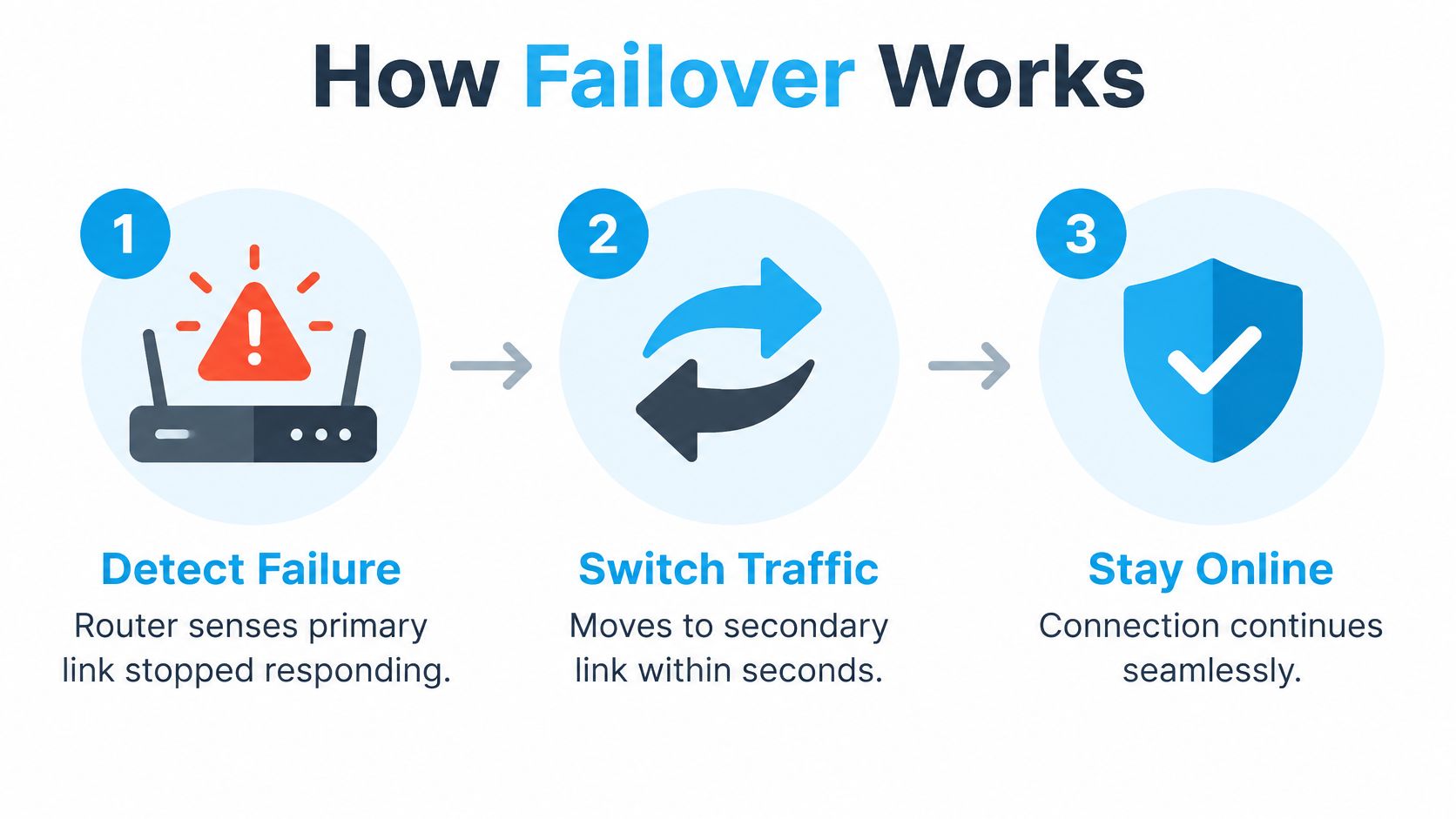
- Detection. The router or network manager watches the primary link and notices when it stops responding. Check that your router supports a dual WAN or backup mode at all, since a single-WAN box can't hand anything off.
- Switching. Traffic moves to the secondary link, often within seconds on an automatic setup. If the switch is manual, you are the failover mechanism, and you need to be awake and near the equipment.
- Continuity for devices. Phones and laptops reconnect to the same network names, so nobody has to hunt for new Wi-Fi credentials in the middle of a meeting.
- Reduced capacity. Throughput drops to whatever the backup carries. Streaming stops, while email, messaging and cloud documents keep moving.
- Return. When the primary comes back, traffic shifts back. Some routers do this on their own and others need a nudge.
The three stages below are the mechanism in miniature.
Physical separation decides whether the handoff is possible at all. CISA's emergency communications guidance recommends maintaining secondary and backup systems, diversifying network components and routing, geographically separating primary and alternate transmission paths, and providing backup power. It also recommends testing backup capabilities and keeping written procedures for switching to them, because a backup nobody has configured or tested may not be usable during an emergency.
If you'd rather watch the switch than read about it, this walkthrough shows failover in action.
A phone hotspot is the cheapest version of this, and what a mobile hotspot does explains the mechanics well enough to plan around.
Then run the drill during a quiet hour. Unplug the primary line at the router and watch what happens. Confirm that a video call connects or a file upload completes, note how long the switch took, then plug the primary back in and check that traffic returns.
Backup Connection Options Compared
Read the table across each row rather than down a column: how the connection reaches the building, what it suits, and the first place it breaks.
| Option | How it connects | Best for | Main limitation |
|---|---|---|---|
| Second wired broadband | Cable, DSL or fiber on a separate line from another provider | Homes where two wired providers are available | Often unavailable in rural areas; may share the same cable route |
| Cellular hotspot | Phone or dedicated hotspot on a 4G LTE network | Travelers and short outages | Data limits; signal varies by location |
| 5G cellular router | Router on a carrier network, with an external antenna option | Remote work and streaming at fixed sites | Needs coverage at the site; may share a tower with the primary |
| Satellite | Dish with a clear view of the sky | Remote areas with no cellular coverage | Higher latency; sensitive to weather and obstructions |
| Campground or public Wi-Fi | Shared access point at a park, library or cafe | Light browsing and messaging | Shared capacity; depends on the host's own connection |
Independence is the measure that matters. A second wired line adds real protection only when it arrives on a different access network and a different route. Two brands reselling the same fiber into the same building buy you very little.
For the wired side, Dollar Land Store's guide to internet access in rural areas is useful background on what's realistically buildable at a rural address.
Cellular depends on the tower serving your exact address or campsite, so a carrier's coverage map is a starting point rather than a verdict. Satellite needs an unobstructed view of the sky and brings higher latency and weather sensitivity along with it, which our guide to how satellite internet works covers in more detail. Campground and cafe networks share one access point among everyone on site and depend on the host's own line staying up.
Selection rule: choose the option whose failure is least likely where you sit, then add a second independent option if work or safety depends on the connection.
Ask two questions of every option on the list. Does this location have coverage today, at the hour you need it? And does this option share a tower, a line or a utility with my primary connection?
How the PACE Escalation Order Works
Switching at random during an outage burns the minutes that matter most. CISA's PACE planning guidance sets out a ladder instead: Primary, Alternate, Contingency and Emergency, four communication levels used when capabilities are disrupted or degraded.
| Level | Role | Backup internet example |
|---|---|---|
| Primary | Normal everyday connection | Home fiber or cable line |
| Alternate | Used when the primary fails | Cellular hotspot on a different carrier |
| Contingency | Used if both the primary and alternate fail | Satellite link or a 5G router with its own battery |
| Emergency | Final option when data is unavailable | Cellular voice call or radio, not dependent on internet access |
The rule that catches people out is that a backup has to match the failure. CISA warns that if network data is unavailable, voice over internet protocol is a poor backup because it depends on the same underlying internet access. A cellular voice call or a radio runs on a different system, and that difference is the whole point.
Here's how the ladder looks on a real evening.
- The home fiber fails at 7 p.m., mid-document.
- The phone hotspot becomes the alternate, and drafts and a shared spreadsheet keep moving.
- If the carrier's tower is also down, a satellite link or a second-carrier 5G router with its own battery takes over as the contingency.
- A plain cellular voice call to family, a neighbor or emergency services is the emergency level, and it doesn't need data at all.
Write the ladder down. Note which link fills each level, who switches it on, and what each link exists to carry. Then rehearse the switch on a normal Tuesday, because the guidance recommends practicing the plan so people can execute it under pressure rather than reading it for the first time in a blackout.
Limits of a Second Connection and How to Choose One
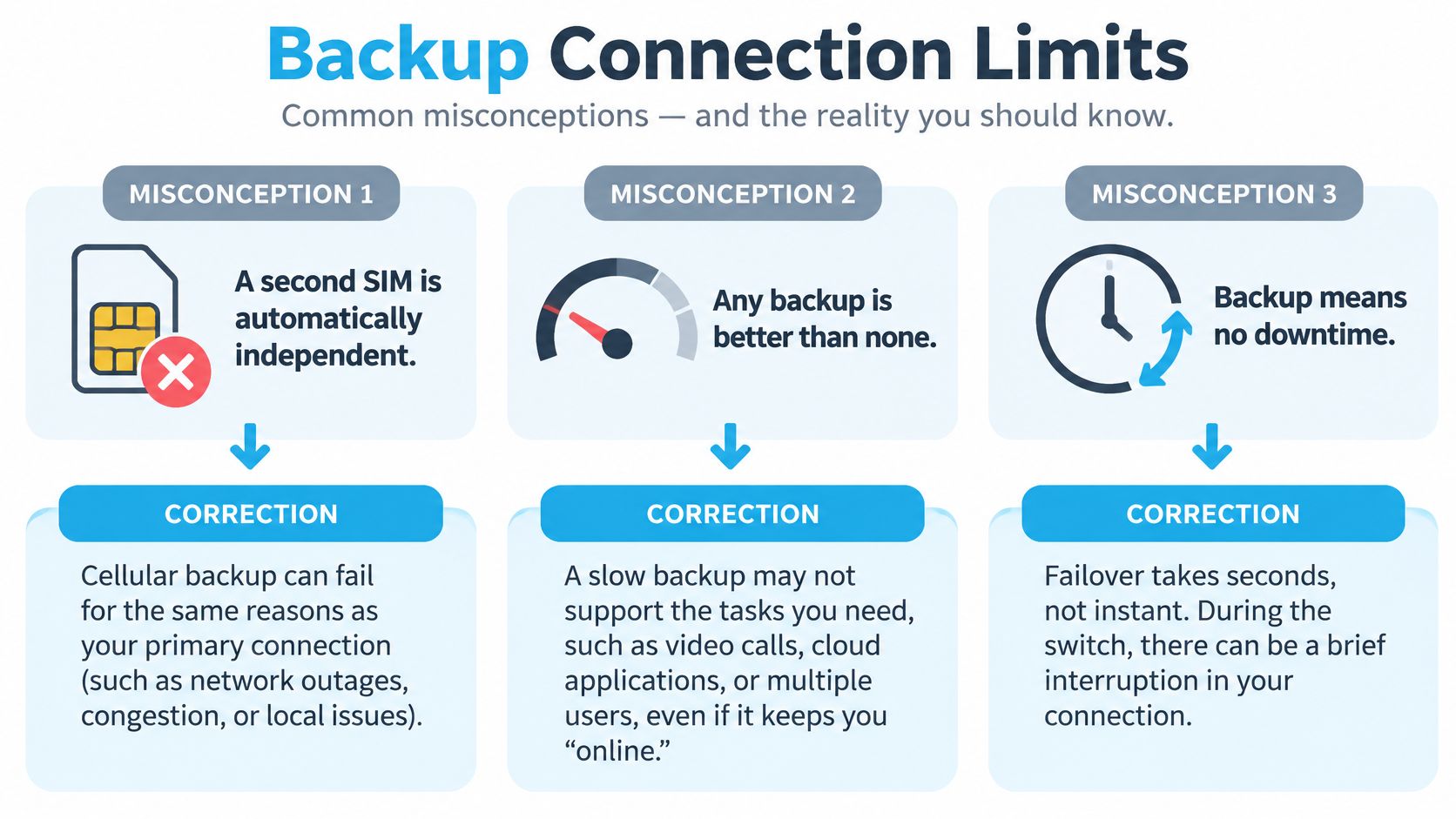
The uncomfortable part of the answer to what is backup internet is that a second connection is a claim, not a guarantee. It protects you only when it fails differently from the primary, sits somewhere it can get signal, and has been switched on under load at least once before the day you need it. Three common assumptions break that chain.
None of them are foolish. Each one is true often enough to feel safe, which is exactly what makes the failures expensive.
A Second SIM Isn't Automatically a Second Path
Different technology is not the same thing as an independent path. A cellular backup can fail for the same reasons as the primary connection: local tower congestion, a regional power outage, backhaul damage or an overloaded network. FCC coverage data for June 2025 put qualifying fixed broadband plus mobile 5G coverage at about 98% of urban residents, against 61.1% of rural residents and 69% of people on Tribal lands.
Those figures describe provider-reported availability, not indoor signal at your kitchen table or usable capacity at a specific campsite on a Saturday. A tower four miles away across a ridge may as well be on the moon.
Three corrections are worth keeping in view.
Where Capacity and Power Run Out First
The second assumption is that a backup keeps everything running. It keeps the essential things running. Bandwidth on the secondary link is commonly reduced, and hotspot plans carry data limits, so a backup day is a day for email, messaging, cloud documents and short calls. The 4 GB upload and the four-hour stream move to later.
The third assumption is that the gear survives a blackout. It doesn't, not by itself. CISA's value analysis guide for emergency communications recommends batteries, uninterruptible power supplies or backup generators to keep communications going through surges, outages and extended blackouts. Work out what the modem, router and hotspot each draw, then size a UPS or power bank to cover the hours you lose power. In an RV, that conversation includes the house battery and how long it can carry the router overnight.
Plan the restart as well. On our service, the connection and equipment may not function during a power failure, and you may need to restart or reconfigure the modem afterward. Put that step in your outage notes so nobody is guessing at 2 a.m.
A Six-Step Way to Choose and Test
- List what has to survive. Video calls, card payments, file uploads, a telehealth appointment, dispatch messages. Be specific, because the list sets your bandwidth floor.
- Check coverage where you sit. Our cellular coverage comparison shows how carrier coverage differs by region, but the answer that counts comes from a phone in the room, not a map.
- Choose a different access network and route. If the primary comes in on cable, look at cellular or satellite. If the primary is cellular, a second carrier matters more than a second plan on the same tower.
- Find out who does the switching. Confirm whether your router fails over automatically or needs a manual change, and whether it supports a second WAN at all.
- Add power for every device in the chain. Modem, router, hotspot, antenna. The chain is only as long as its shortest battery.
- Test at 8 p.m. on a weekday, then again with the primary unplugged. Record the result and the time it took. If either test fails, you've found the problem on a convenient day.
Testing before you commit is the reason to start without a contract. A prepaid hotspot such as our 4G Bronze plan lets you stand in the exact spot, make the call, and see the outcome, and our 7-day money-back guarantee refunds the full month if the router doesn't outperform what you already have. Data on the plan covers normal hotspot use, so a test week doesn't run you out of allowance.
A backup you have never switched on is a spare part, not a plan.
SwiftNet Wifi supplies the second path itself, with 4G and 5G internet for homes, RVs and rural addresses that runs over major nationwide carriers, so your backup isn't riding the same line as the cable or fiber connection that keeps failing. Plans start at $49.99 a month with no contracts, and the 7-day risk-free trial lets you test the router at your own site before you trust it with a workday. Visit SwiftNet Wifi to check coverage where you live or park and pick the plan that fits how you use the connection.
Backup internet is a secondary connection that keeps you online when your main connection fails, becomes congested or is unavailable. It earns that name only when it runs on a separate network path and has been tested at the exact spot where you sit, and roughly 6% of U.S. broadband-serviceable locations had no provider reporting 100 Mbps download and 20 Mbps upload service as of June 2024, which is why the difference between a spare line and a real backup matters.
Many readers asking what is backup internet expect an answer about speed. The sharper question is narrower. If your main line died this afternoon, would the second one still be standing?
What Backup Internet Means in Plain Terms
Think about the water main running into a house. One pipe, one route under one street. Cut that pipe and every tap runs dry, and the fault isn't in the faucets. A second line arriving from a different street keeps the taps running, even at lower pressure.
Networks follow the same logic, which is why the National Institute of Standards and Technology treats redundancy as ordinary practice rather than a luxury. Its contingency guidance states that redundant communications links are usually necessary when a network processes critical data, and recommends using multiple network service providers when near-100% connectivity is required. The same document gets specific about the physical side: redundant links should be physically separated and should not follow the same cable route, because one incident such as a cable cut can disable both.
That last detail separates a genuine backup from a second bill. Two services that enter through the same conduit, hang from the same pole and terminate on the same upstream equipment share a single point of failure, just with more paperwork.
Three situations make a second connection worth paying for.
- The primary fails. A storm takes down the pole, a backhoe finds the conduit, or the provider's equipment drops out for six hours.
- The primary congests. Evening traffic or a busy tower cuts throughput until a video call freezes, even though the line is technically up.
- The primary never existed at that spot. The address has no wired provider, or the campground you booked for the month has nothing usable.
One more part of the definition changes how you shop. NIST notes that a backup connection may provide reduced bandwidth, enough for critical transmissions during a contingency rather than full-capacity daily use. Capacity, not speed, is what you're buying.
Backup internet is a resilience measure, not a speed upgrade.
In a house, that means a primary router doing the everyday work, with a hotspot standing by on a different network.
If you're designing this for an office rather than a kitchen table, Accelerate IT Services on infrastructure resilience covers the layers above the cable, including power, routing and the recovery plan that follows the outage.
Before you shop, walk the outside of your building and count how many separate lines reach it. Then write down what would stop if the one you rely on went quiet for four hours. That list is your shopping list.
Who Actually Needs a Backup Connection
In its Seventh Broadband Progress Report, the Federal Communications Commission reported that, in an earlier national broadband assessment, approximately 26 million Americans, mostly rural residents across every region of the United States, lacked access to broadband capable of supporting jobs and economic opportunity. The commission's newer Internet Access Services data shows improvement with gaps remaining: as of June 2024, providers reported terrestrial fixed broadband service of at least 100 Mbps download and 20 Mbps upload at approximately 94% of broadband-serviceable locations, while about 3% of locations had no provider reporting terrestrial fixed broadband at even 25 Mbps download and 3 Mbps upload.
The household picture is just as uneven. The National Telecommunications and Information Administration's 2024 Internet Use Survey summary reports that approximately one in six U.S. households is not connected to the internet, with lower rates of access and adoption in rural communities, Tribal lands, communities of color and low-income neighborhoods.
Those figures measure what's available at an address, not what stays up. Availability and uptime are different promises, and only one of them keeps a shift running.
Say a rancher's cable line goes down in a spring storm the same week a loan application is due. The forms are online, the deadline is fixed, and a hotspot on a cellular network is the difference between submitting and explaining.
Or a couple full-timing in a fifth wheel books a month at a park that advertises Wi-Fi. Two remote jobs need more than a shared park router can carry, so they run their own connection and treat the park network as a bonus.
Then there's the freelancer whose upload stalls at 80% while a client waits. Same file, same laptop, a different path to the internet, and the deadline holds.
Four-hour test: write down what happens to your income, your safety or your schedule if the connection stops for four hours. If the answer is "nothing much," a backup is a nice-to-have. If the answer involves money, medication or a job, it's infrastructure.
How a Backup Connection Takes Over When Your Main Line Fails
Failover is the handoff itself. The sequence matters because a setup usually breaks at one specific step, not everywhere at once.
- Detection. The router or network manager watches the primary link and notices when it stops responding. Check that your router supports a dual WAN or backup mode at all, since a single-WAN box can't hand anything off.
- Switching. Traffic moves to the secondary link, often within seconds on an automatic setup. If the switch is manual, you are the failover mechanism, and you need to be awake and near the equipment.
- Continuity for devices. Phones and laptops reconnect to the same network names, so nobody has to hunt for new Wi-Fi credentials in the middle of a meeting.
- Reduced capacity. Throughput drops to whatever the backup carries. Streaming stops, while email, messaging and cloud documents keep moving.
- Return. When the primary comes back, traffic shifts back. Some routers do this on their own and others need a nudge.
The three stages below are the mechanism in miniature.
Physical separation decides whether the handoff is possible at all. CISA's emergency communications guidance recommends maintaining secondary and backup systems, diversifying network components and routing, geographically separating primary and alternate transmission paths, and providing backup power. It also recommends testing backup capabilities and keeping written procedures for switching to them, because a backup nobody has configured or tested may not be usable during an emergency.
If you'd rather watch the switch than read about it, this walkthrough shows failover in action.
A phone hotspot is the cheapest version of this, and what a mobile hotspot does explains the mechanics well enough to plan around.
Then run the drill during a quiet hour. Unplug the primary line at the router and watch what happens. Confirm that a video call connects or a file upload completes, note how long the switch took, then plug the primary back in and check that traffic returns.
Backup Connection Options Compared
Read the table across each row rather than down a column: how the connection reaches the building, what it suits, and the first place it breaks.
| Option | How it connects | Best for | Main limitation |
|---|---|---|---|
| Second wired broadband | Cable, DSL or fiber on a separate line from another provider | Homes where two wired providers are available | Often unavailable in rural areas; may share the same cable route |
| Cellular hotspot | Phone or dedicated hotspot on a 4G LTE network | Travelers and short outages | Data limits; signal varies by location |
| 5G cellular router | Router on a carrier network, with an external antenna option | Remote work and streaming at fixed sites | Needs coverage at the site; may share a tower with the primary |
| Satellite | Dish with a clear view of the sky | Remote areas with no cellular coverage | Higher latency; sensitive to weather and obstructions |
| Campground or public Wi-Fi | Shared access point at a park, library or cafe | Light browsing and messaging | Shared capacity; depends on the host's own connection |
Independence is the measure that matters. A second wired line adds real protection only when it arrives on a different access network and a different route. Two brands reselling the same fiber into the same building buy you very little.
For the wired side, Dollar Land Store's guide to internet access in rural areas is useful background on what's realistically buildable at a rural address.
Cellular depends on the tower serving your exact address or campsite, so a carrier's coverage map is a starting point rather than a verdict. Satellite needs an unobstructed view of the sky and brings higher latency and weather sensitivity along with it, which our guide to how satellite internet works covers in more detail. Campground and cafe networks share one access point among everyone on site and depend on the host's own line staying up.
Selection rule: choose the option whose failure is least likely where you sit, then add a second independent option if work or safety depends on the connection.
Ask two questions of every option on the list. Does this location have coverage today, at the hour you need it? And does this option share a tower, a line or a utility with my primary connection?
How the PACE Escalation Order Works
Switching at random during an outage burns the minutes that matter most. CISA's PACE planning guidance sets out a ladder instead: Primary, Alternate, Contingency and Emergency, four communication levels used when capabilities are disrupted or degraded.
| Level | Role | Backup internet example |
|---|---|---|
| Primary | Normal everyday connection | Home fiber or cable line |
| Alternate | Used when the primary fails | Cellular hotspot on a different carrier |
| Contingency | Used if both the primary and alternate fail | Satellite link or a 5G router with its own battery |
| Emergency | Final option when data is unavailable | Cellular voice call or radio, not dependent on internet access |
The rule that catches people out is that a backup has to match the failure. CISA warns that if network data is unavailable, voice over internet protocol is a poor backup because it depends on the same underlying internet access. A cellular voice call or a radio runs on a different system, and that difference is the whole point.
Here's how the ladder looks on a real evening.
- The home fiber fails at 7 p.m., mid-document.
- The phone hotspot becomes the alternate, and drafts and a shared spreadsheet keep moving.
- If the carrier's tower is also down, a satellite link or a second-carrier 5G router with its own battery takes over as the contingency.
- A plain cellular voice call to family, a neighbor or emergency services is the emergency level, and it doesn't need data at all.
Write the ladder down. Note which link fills each level, who switches it on, and what each link exists to carry. Then rehearse the switch on a normal Tuesday, because the guidance recommends practicing the plan so people can execute it under pressure rather than reading it for the first time in a blackout.
Limits of a Second Connection and How to Choose One
The uncomfortable part of the answer to what is backup internet is that a second connection is a claim, not a guarantee. It protects you only when it fails differently from the primary, sits somewhere it can get signal, and has been switched on under load at least once before the day you need it. Three common assumptions break that chain.
None of them are foolish. Each one is true often enough to feel safe, which is exactly what makes the failures expensive.
A Second SIM Isn't Automatically a Second Path
Different technology is not the same thing as an independent path. A cellular backup can fail for the same reasons as the primary connection: local tower congestion, a regional power outage, backhaul damage or an overloaded network. FCC coverage data for June 2025 put qualifying fixed broadband plus mobile 5G coverage at about 98% of urban residents, against 61.1% of rural residents and 69% of people on Tribal lands.
Those figures describe provider-reported availability, not indoor signal at your kitchen table or usable capacity at a specific campsite on a Saturday. A tower four miles away across a ridge may as well be on the moon.
Three corrections are worth keeping in view.
Where Capacity and Power Run Out First
The second assumption is that a backup keeps everything running. It keeps the essential things running. Bandwidth on the secondary link is commonly reduced, and hotspot plans carry data limits, so a backup day is a day for email, messaging, cloud documents and short calls. The 4 GB upload and the four-hour stream move to later.
The third assumption is that the gear survives a blackout. It doesn't, not by itself. CISA's value analysis guide for emergency communications recommends batteries, uninterruptible power supplies or backup generators to keep communications going through surges, outages and extended blackouts. Work out what the modem, router and hotspot each draw, then size a UPS or power bank to cover the hours you lose power. In an RV, that conversation includes the house battery and how long it can carry the router overnight.
Plan the restart as well. On our service, the connection and equipment may not function during a power failure, and you may need to restart or reconfigure the modem afterward. Put that step in your outage notes so nobody is guessing at 2 a.m.
A Six-Step Way to Choose and Test
- List what has to survive. Video calls, card payments, file uploads, a telehealth appointment, dispatch messages. Be specific, because the list sets your bandwidth floor.
- Check coverage where you sit. Our cellular coverage comparison shows how carrier coverage differs by region, but the answer that counts comes from a phone in the room, not a map.
- Choose a different access network and route. If the primary comes in on cable, look at cellular or satellite. If the primary is cellular, a second carrier matters more than a second plan on the same tower.
- Find out who does the switching. Confirm whether your router fails over automatically or needs a manual change, and whether it supports a second WAN at all.
- Add power for every device in the chain. Modem, router, hotspot, antenna. The chain is only as long as its shortest battery.
- Test at 8 p.m. on a weekday, then again with the primary unplugged. Record the result and the time it took. If either test fails, you've found the problem on a convenient day.
Testing before you commit is the reason to start without a contract. A prepaid hotspot such as our 4G Bronze plan lets you stand in the exact spot, make the call, and see the outcome, and our 7-day money-back guarantee refunds the full month if the router doesn't outperform what you already have. Data on the plan covers normal hotspot use, so a test week doesn't run you out of allowance.
A backup you have never switched on is a spare part, not a plan.
SwiftNet Wifi supplies the second path itself, with 4G and 5G internet for homes, RVs and rural addresses that runs over major nationwide carriers, so your backup isn't riding the same line as the cable or fiber connection that keeps failing. Plans start at $49.99 a month with no contracts, and the 7-day risk-free trial lets you test the router at your own site before you trust it with a workday. Visit SwiftNet Wifi to check coverage where you live or park and pick the plan that fits how you use the connection.
Backup internet is a secondary connection that keeps you online when your main connection fails, becomes congested or is unavailable. It earns that name only when it runs on a separate network path and has been tested at the exact spot where you sit, and roughly 6% of U.S. broadband-serviceable locations had no provider reporting 100 Mbps download and 20 Mbps upload service as of June 2024, which is why the difference between a spare line and a real backup matters.
People asking what is backup internet often expect an answer about speed. The sharper question is narrower. If your main line died this afternoon, would the second one still be standing?
What Backup Internet Means in Plain Terms
Think about the water main running into a house. One pipe, one route under one street. Cut that pipe and every tap runs dry, and the fault isn't in the faucets. A second line arriving from a different street keeps the taps running, even at lower pressure.
Networks follow the same logic, which is why the National Institute of Standards and Technology treats redundancy as ordinary practice rather than a luxury. Its contingency guidance states that redundant communications links are usually necessary when a network processes critical data, and recommends using multiple network service providers when near-100% connectivity is required. The same document gets specific about the physical side: redundant links should be physically separated and should not follow the same cable route, because one incident such as a cable cut can disable both.
That last detail separates a genuine backup from a second bill. Two services that enter through the same conduit, hang from the same pole and terminate on the same upstream equipment share a single point of failure, just with more paperwork.
Three situations make a second connection worth paying for.
- The primary fails. A storm takes down the pole, a backhoe finds the conduit, or the provider's equipment drops out for six hours.
- The primary congests. Evening traffic or a busy tower cuts throughput until a video call freezes, even though the line is technically up.
- The primary never existed at that spot. The address has no wired provider, or the campground you booked for the month has nothing usable.
One more part of the definition changes how you shop. NIST notes that a backup connection may provide reduced bandwidth, enough for critical transmissions during a contingency rather than full-capacity daily use. Capacity, not speed, is what you're buying.
Backup internet is a resilience measure, not a speed upgrade.
In a house, that looks like a primary router doing the everyday work, and a hotspot standing by on a different network.
If you're designing this for an office rather than a kitchen table, Accelerate IT Services on infrastructure resilience covers the layers above the cable, including power, routing and the recovery plan that follows the outage.
Before you shop, walk the outside of your building and count how many separate lines reach it. Then write down what would stop if the one you rely on went quiet for four hours. That list is your shopping list.
Who Actually Needs a Backup Connection
In its Seventh Broadband Progress Report, the Federal Communications Commission reported that, in an earlier national broadband assessment, approximately 26 million Americans, mostly rural residents across every region of the United States, lacked access to broadband capable of supporting jobs and economic opportunity. The commission's newer Internet Access Services data shows improvement with gaps remaining: as of June 2024, providers reported terrestrial fixed broadband service of at least 100 Mbps download and 20 Mbps upload at approximately 94% of broadband-serviceable locations, while about 3% of locations had no provider reporting terrestrial fixed broadband at even 25 Mbps download and 3 Mbps upload.
The household picture is just as uneven. The National Telecommunications and Information Administration's 2024 Internet Use Survey summary reports that approximately one in six U.S. households is not connected to the internet, with lower rates of access and adoption in rural communities, Tribal lands, communities of color and low-income neighborhoods.
Those figures measure what's available at an address, not what stays up. Availability and uptime are different promises, and only one of them keeps a shift running.
Say a rancher's cable line goes down in a spring storm the same week a loan application is due. The forms are online, the deadline is fixed, and a hotspot on a cellular network is the difference between submitting and explaining.
Or a couple full-timing in a fifth wheel books a month at a park that advertises Wi-Fi. Two remote jobs need more than a shared park router can carry, so they run their own connection and treat the park network as a bonus.
Then there's the freelancer whose upload stalls at 80% while a client waits. Same file, same laptop, a different path to the internet, and the deadline holds.
Four-hour test: write down what happens to your income, your safety or your schedule if the connection stops for four hours. If the answer is "nothing much," a backup is a nice-to-have. If the answer involves money, medication or a job, it's infrastructure.
How a Backup Connection Takes Over When Your Main Line Fails
Failover is the handoff itself. The sequence matters because a setup usually breaks at one specific step, not everywhere at once.
- Detection. The router or network manager watches the primary link and notices when it stops responding. Check that your router supports a dual WAN or backup mode at all, since a single-WAN box can't hand anything off.
- Switching. Traffic moves to the secondary link, often within seconds on an automatic setup. If the switch is manual, you are the failover mechanism, and you need to be awake and near the equipment.
- Continuity for devices. Phones and laptops reconnect to the same network names, so nobody has to hunt for new Wi-Fi credentials in the middle of a meeting.
- Reduced capacity. Throughput drops to whatever the backup carries. Streaming stops, while email, messaging and cloud documents keep moving.
- Return. When the primary comes back, traffic shifts back. Some routers do this on their own and others need a nudge.
The three stages below are the mechanism in miniature.
Physical separation decides whether the handoff is possible at all. CISA's emergency communications guidance recommends maintaining secondary and backup systems, diversifying network components and routing, geographically separating primary and alternate transmission paths, and providing backup power. It also recommends testing backup capabilities and keeping written procedures for switching to them, because a backup nobody has configured or tested may not be usable during an emergency.
If you'd rather watch the switch than read about it, this walkthrough shows failover in action.
A phone hotspot is the cheapest version of this, and what a mobile hotspot does explains the mechanics well enough to plan around.
Then run the drill during a quiet hour. Unplug the primary line at the router and watch what happens. Confirm that a video call connects or a file upload completes, note how long the switch took, then plug the primary back in and check that traffic returns.
Backup Connection Options Compared
Read the table across each row rather than down a column: how the connection reaches the building, what it suits, and the first place it breaks.
| Option | How it connects | Best for | Main limitation |
|---|---|---|---|
| Second wired broadband | Cable, DSL or fiber on a separate line from another provider | Homes where two wired providers are available | Often unavailable in rural areas; may share the same cable route |
| Cellular hotspot | Phone or dedicated hotspot on a 4G LTE network | Travelers and short outages | Data limits; signal varies by location |
| 5G cellular router | Router on a carrier network, with an external antenna option | Remote work and streaming at fixed sites | Needs coverage at the site; may share a tower with the primary |
| Satellite | Dish with a clear view of the sky | Remote areas with no cellular coverage | Higher latency; sensitive to weather and obstructions |
| Campground or public Wi-Fi | Shared access point at a park, library or cafe | Light browsing and messaging | Shared capacity; depends on the host's own connection |
Independence is the measure that matters. A second wired line adds real protection only when it arrives on a different access network and a different route. Two brands reselling the same fiber into the same building buy you very little.
For the wired side, Dollar Land Store's guide to internet access in rural areas is useful background on what's realistically buildable at a rural address.
Cellular depends on the tower serving your exact address or campsite, so a carrier's coverage map is a starting point rather than a verdict. Satellite needs an unobstructed view of the sky and brings higher latency and weather sensitivity along with it, which our guide to how satellite internet works covers in more detail. Campground and cafe networks share one access point among everyone on site and depend on the host's own line staying up.
Selection rule: choose the option whose failure is least likely where you sit, then add a second independent option if work or safety depends on the connection.
Ask two questions of every option on the list. Does this location have coverage today, at the hour you need it? And does this option share a tower, a line or a utility with my primary connection?
How the PACE Escalation Order Works
Switching at random during an outage burns the minutes that matter most. CISA's PACE planning guidance sets out a ladder instead: Primary, Alternate, Contingency and Emergency, four communication levels used when capabilities are disrupted or degraded.
| Level | Role | Backup internet example |
|---|---|---|
| Primary | Normal everyday connection | Home fiber or cable line |
| Alternate | Used when the primary fails | Cellular hotspot on a different carrier |
| Contingency | Used if both the primary and alternate fail | Satellite link or a 5G router with its own battery |
| Emergency | Final option when data is unavailable | Cellular voice call or radio, not dependent on internet access |
The rule that catches people out is that a backup has to match the failure. CISA warns that if network data is unavailable, voice over internet protocol is a poor backup because it depends on the same underlying internet access. A cellular voice call or a radio runs on a different system, and that difference is the whole point.
Here's how the ladder looks on a real evening.
- The home fiber fails at 7 p.m., mid-document.
- The phone hotspot becomes the alternate, and drafts and a shared spreadsheet keep moving.
- If the carrier's tower is also down, a satellite link or a second-carrier 5G router with its own battery takes over as the contingency.
- A plain cellular voice call to family, a neighbor or emergency services is the emergency level, and it doesn't need data at all.
Write the ladder down. Note which link fills each level, who switches it on, and what each link exists to carry. Then rehearse the switch on a normal Tuesday, because the guidance recommends practicing the plan so people can execute it under pressure rather than reading it for the first time in a blackout.
Limits of a Second Connection and How to Choose One
The uncomfortable part of the answer to what is backup internet is that a second connection is a claim, not a guarantee. It protects you only when it fails differently from the primary, sits somewhere it can get signal, and has been switched on under load at least once before the day you need it. Three common assumptions break that chain.
None of them are foolish. Each one is true often enough to feel safe, which is exactly what makes the failures expensive.
A Second SIM Isn't Automatically a Second Path
Different technology is not the same thing as an independent path. A cellular backup can fail for the same reasons as the primary connection: local tower congestion, a regional power outage, backhaul damage or an overloaded network. FCC coverage data for June 2025 put qualifying fixed broadband plus mobile 5G coverage at about 98% of urban residents, against 61.1% of rural residents and 69% of people on Tribal lands.
Those figures describe provider-reported availability, not indoor signal at your kitchen table or usable capacity at a specific campsite on a Saturday. A tower four miles away across a ridge may as well be on the moon.
Three corrections are worth keeping in view.
Where Capacity and Power Run Out First
The second assumption is that a backup keeps everything running. It keeps the essential things running. Bandwidth on the secondary link is commonly reduced, and hotspot plans carry data limits, so a backup day is a day for email, messaging, cloud documents and short calls. The 4 GB upload and the four-hour stream move to later.
The third assumption is that the gear survives a blackout. It doesn't, not by itself. CISA's value analysis guide for emergency communications recommends batteries, uninterruptible power supplies or backup generators to keep communications going through surges, outages and extended blackouts. Work out what the modem, router and hotspot each draw, then size a UPS or power bank to cover the hours you lose power. In an RV, that conversation includes the house battery and how long it can carry the router overnight.
Plan the restart as well. On our service, the connection and equipment may not function during a power failure, and you may need to restart or reconfigure the modem afterward. Put that step in your outage notes so nobody is guessing at 2 a.m.
A Six-Step Way to Choose and Test
- List what has to survive. Video calls, card payments, file uploads, a telehealth appointment, dispatch messages. Be specific, because the list sets your bandwidth floor.
- Check coverage where you sit. Our cellular coverage comparison shows how carrier coverage differs by region, but the answer that counts comes from a phone in the room, not a map.
- Choose a different access network and route. If the primary comes in on cable, look at cellular or satellite. If the primary is cellular, a second carrier matters more than a second plan on the same tower.
- Find out who does the switching. Confirm whether your router fails over automatically or needs a manual change, and whether it supports a second WAN at all.
- Add power for every device in the chain. Modem, router, hotspot, antenna. The chain is only as long as its shortest battery.
- Test at 8 p.m. on a weekday, then again with the primary unplugged. Record the result and the time it took. If either test fails, you've found the problem on a convenient day.
Testing before you commit is the reason to start without a contract. A prepaid hotspot such as our 4G Bronze plan lets you stand in the exact spot, make the call, and see the outcome, and our 7-day money-back guarantee refunds the full month if the router doesn't outperform what you already have. Data on the plan covers normal hotspot use, so a test week doesn't run you out of allowance.
A backup you have never switched on is a spare part, not a plan.
SwiftNet Wifi supplies the second path itself, with 4G and 5G internet for homes, RVs and rural addresses that runs over major nationwide carriers, so your backup isn't riding the same line as the cable or fiber connection that keeps failing. Plans start at $49.99 a month with no contracts, and the 7-day risk-free trial lets you test the router at your own site before you trust it with a workday. Visit SwiftNet Wifi to check coverage where you live or park and pick the plan that fits how you use the connection.


