

Global fixed networks reached a median upload speed of 38.32 Mbps in Q3 2023, up 28% from the previous year, according to Ookla's worldwide connectivity analysis. Yet that global improvement doesn't tell you whether your connection can keep a work call clear while someone else uploads files. When comparing internet plans with high upload speed, the useful question is what you can send consistently during your busiest hour, not what the advertisement says you might reach.
Why Upload Speed Now Defines a Good Plan
The federal broadband benchmark is 100 Mbps download and 20 Mbps upload, following the FCC's March 2024 update, as explained in Benton's history of the broadband standard. The earlier standard, established in 2015, was 25 Mbps down and 3 Mbps up, so upload represented only 12% of the download target. The change quadrupled the download benchmark while increasing the upload benchmark by approximately 567%.
That difference matters because household internet isn't just a delivery service anymore. Download speed describes how quickly you receive information, while upload speed describes how quickly you send it. Video meetings, cloud backups, livestreaming, telehealth, remote desktop access, and shared work files all depend on the sending side.
The historical comparison makes the imbalance easy to see.
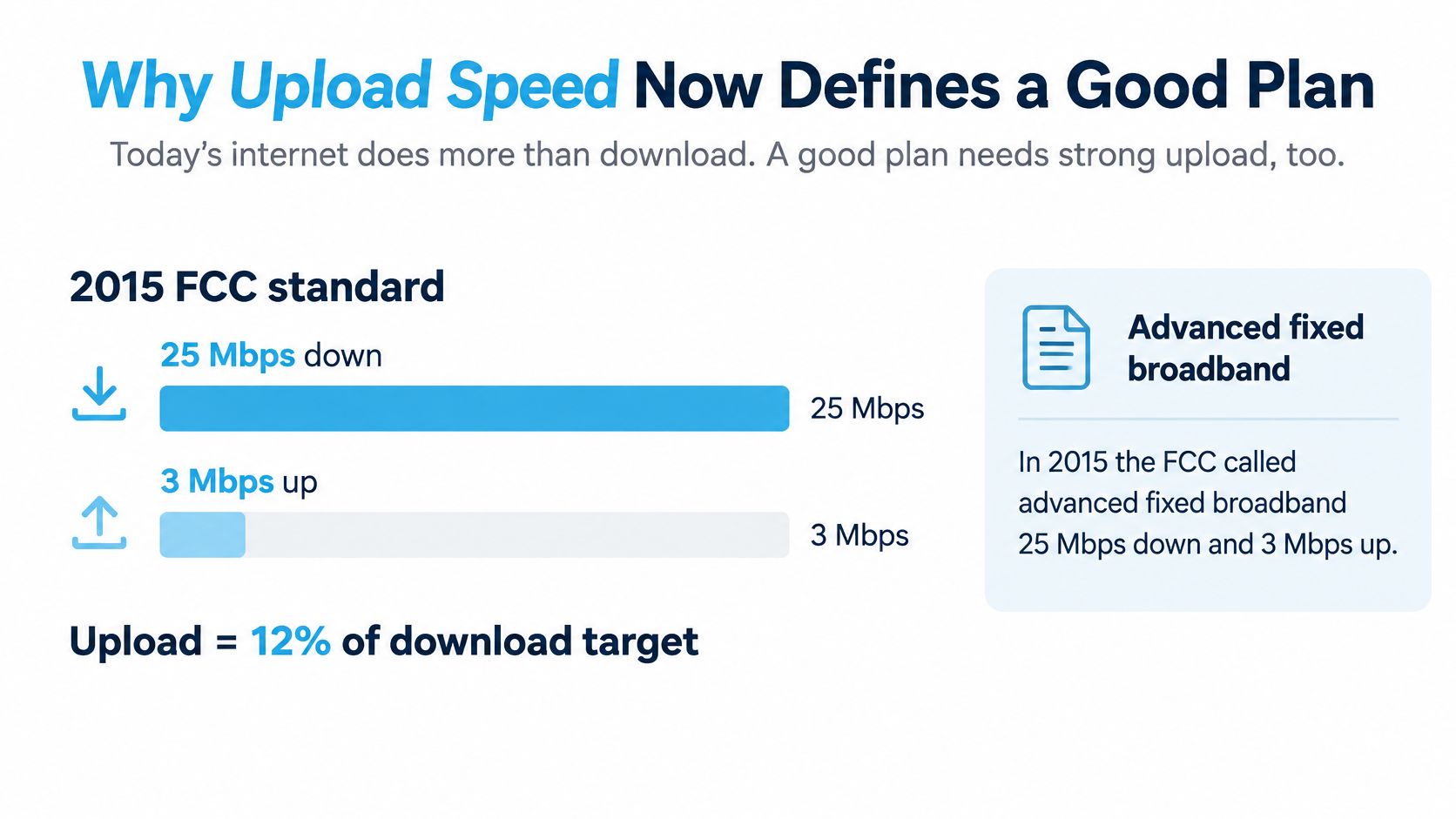
A benchmark isn't a household guarantee
The same federal framework sets a long-term goal of 1 Gbps download and 500 Mbps upload, a 2-to-1 ratio. The 100/20 threshold also helps identify underserved locations for broadband funding under the 2021 Infrastructure Investment and Jobs Act, according to Benton's account.
The long-term goal is a more balanced connection, with substantial capacity for sending information as well as receiving it.
A federal definition doesn't promise that every household can run every application comfortably. Your household might mainly receive entertainment, or it might send camera video, work documents, and security footage throughout the day. Those are different workloads, even if the same number of people live in each home.
Buy for what leaves the house
A large download tier can make software updates finish quickly without solving a crowded upstream connection. Say a remote worker joins a meeting while another person sends a recording to cloud storage. Both need access to the same upload capacity.
A lower advertised download rate can be the better purchase if its upload stays steadier during busy hours. Start with the activities that must work together, then identify the sustained upstream capacity they need. A provider ranking can't answer that question for your household.
Upload Targets for Work Calls and Uploads
Sustained upload targets by activity
| Activity | App upstream | Sustained target | What breaks first |
|---|---|---|---|
| One-to-one 720p video call | 1.2 Mbps | About 2 Mbps | Video may freeze when Wi-Fi or VPN traffic adds pressure |
| Group 720p video call | 2.6 Mbps | About 4 Mbps | Gallery view may stall |
| Single 1080p video call | 3.8 Mbps | About 5-6 Mbps | Camera quality may fall or the call may become audio-only |
| 1080p at 60 fps | Up to 12.8 Mbps | About 16-20 Mbps | Frame rate may collapse |
| Two simultaneous 1080p calls | About 7.6 Mbps | About 10-12 Mbps | Another caller may pixelate |
| Light cloud sync beside one call | Call rate plus sync | 25-50% over the sum | Backup traffic may interrupt the call |
| Multi-camera livestream or several workers | Well above a single call | Clearly above 20 Mbps | Stream or remote desktop may lag |
The application figures come from Zoom's bandwidth requirements: 1.2 Mbps upload for one-to-one 720p, 2.6 Mbps for group 720p, 3.8 Mbps for 1080p, and up to 12.8 Mbps for 1080p at 60 fps. The sustained targets are rounded planning estimates with 25-50% headroom, not additional Zoom requirements or promises that a particular symptom will occur.
Add simultaneous activities before adding headroom
Each active outgoing video stream needs capacity. A household doesn't get to reuse the same allowance for everyone who's on camera at the same time.
For a worked example, two simultaneous 1080p calls start with approximately 7.6 Mbps of application demand. Applying the planning margin produces a rounded target of about 10-12 Mbps sustained, before backups or other uploads. That's why a plan that just barely supports one meeting can struggle when a partner joins another.
Treat background activity as additional demand:
- Cloud synchronization: Include files actively uploading, not just the fact that a storage application is installed.
- Security cameras: Account for footage sent to an off-site service while you're working.
- VPN use: Allow for the work connection's overhead and test with the VPN enabled.
- Wi-Fi contention: Leave room for the difference between a clean router-side test and normal use at your desk.
Match the target to the job
A single worker on an ordinary video call needs much less upstream capacity than someone producing a live broadcast. For occasional calls, a connection delivering roughly 10-20 Mbps upstream can be a practical planning range. Multi-camera production, frequent media uploads, and several simultaneous workers deserve substantially more room.
Don't confuse watching content with publishing it. Watching Netflix mainly uses download capacity; sending a recording of your presentation uses upload capacity. A household can stream comfortably and still struggle to deliver a large work file before a deadline.
For a broader view of household work requirements, use our guide to internet speed for working from home. Then total the activities that overlap during your busiest hour, rather than adding every device you own. Carry that combined upload target into your plan comparison.
Fiber Cable Wireless and Cellular Upload Compared
Upload behavior by plan type
| Plan type | Typical upload pattern | Versus 20 Mbps up | Best read of the ad |
|---|---|---|---|
| Fiber | Often symmetrical; one 2025 fiber median was 296.52 Mbps | Usually far above | Check the address, not the national brand |
| Cable | Asymmetrical; upload is often a fraction of download | Many tiers support calls, fewer suit multi-uploader homes | Read the upload tier, not only the download |
| Fixed wireless | Q3 2025 major-provider medians were 15.49, 11.40, and 9.25 Mbps | Those medians were below the benchmark; rural 100/20 attainment was lower | Treat the headline as a ceiling |
| 4G or 5G cellular | A mobile median example was 12.61 Mbps; performance changes with tower and hour | Can support calls, but busy-hour capacity needs testing | Coverage maps aren't a speed test |
The fiber and mobile examples are U.S. provider-specific measurements, not promises for either technology. For fixed wireless, the cited NTCA broadband availability material reports Ookla's Q3 2025 upload medians of 15.49 Mbps for T-Mobile, 11.40 Mbps for Verizon, and 9.25 Mbps for AT&T. It also reports that 42% of T-Mobile urban fixed-wireless users achieved at least 100/20 Mbps, compared with 26.9% of rural users.
Use this visual to distinguish the connection types before comparing individual offers.
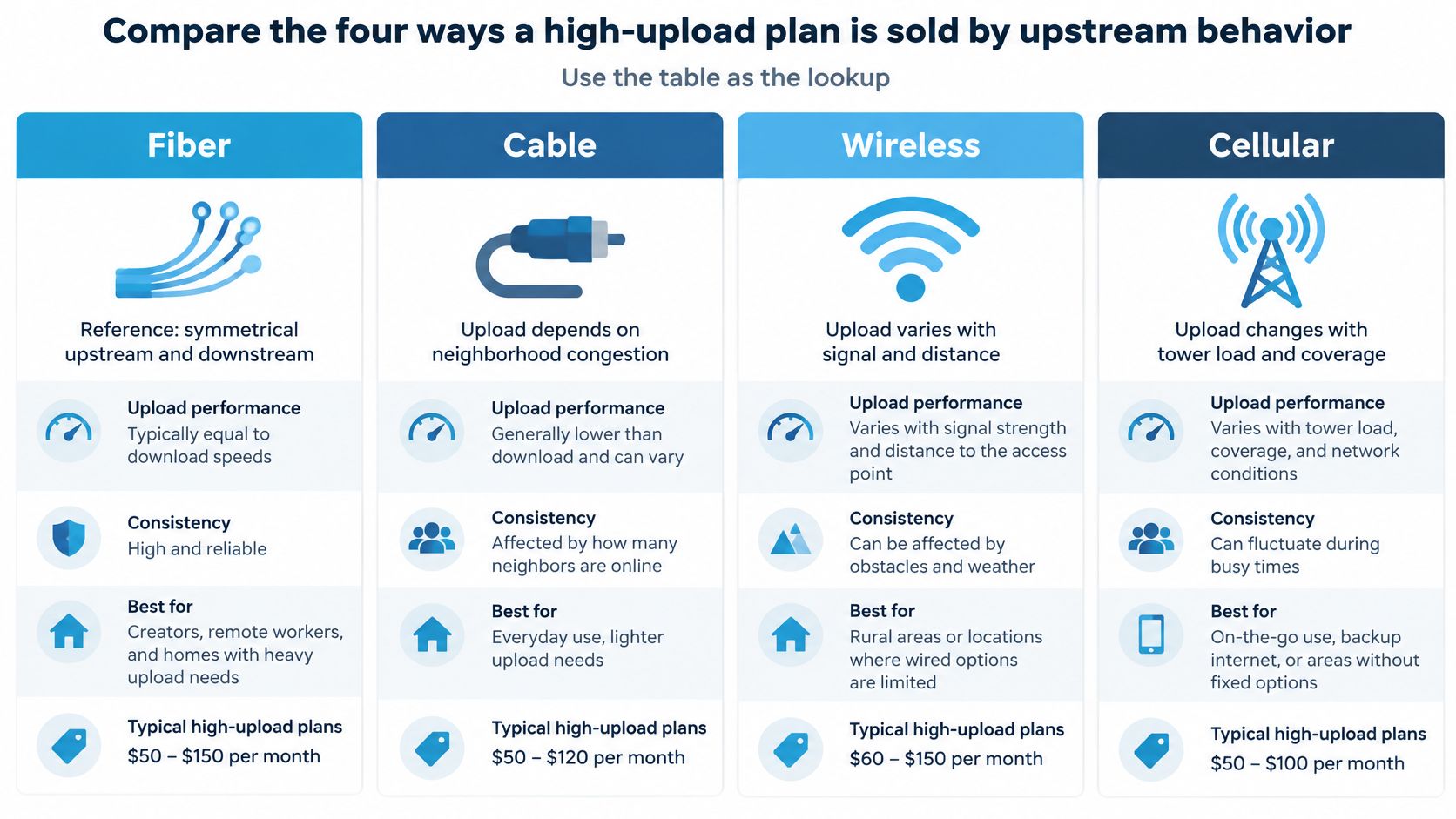
What the connection type tells you
Fiber is the reference option for upload-heavy households because symmetrical tiers commonly provide matching upstream and downstream capacity. Address-level availability comes first. A provider offering fiber elsewhere in your city doesn't mean your building has it, and symmetrical service still deserves a real-world test.
Cable can serve remote workers well when the purchased upload tier clears their workload. Its important limitation is that buying more download capacity doesn't necessarily increase upload capacity. Neighborhood conditions and the provisioned upstream tier both matter.
Fixed wireless can bridge the gap where wired infrastructure doesn't reach. Terrain, distance, signal conditions, and tower demand make local measurements especially important. For the broader differences in installation and performance, compare wireless internet versus fiber.
Cellular adds portability, but the network you reach changes as you travel. A usable signal indicator doesn't establish that a tower has spare upstream capacity. Madeira Remote's guide to remote internet is a useful companion when considering connectivity away from established wired service.
Compare the service you can repeat
The upload you can sustain during busy hours, not the maximum on the flyer, is what a Tuesday standup actually feels like.
A median describes the middle of a measured group, not the speed your address will receive. Likewise, an impressive result from an empty campground doesn't establish performance once neighboring travelers arrive.
This video provides another format for considering the connection options.
Keep a measured upstream column in your shortlist. A plan can win the download comparison and still lose the workday comparison.
Which Connection Fits Your Actual Week
Your weekly routine should decide how much portability you're willing to trade for upstream capacity. Start with where you work, what you send, and whether a missed connection costs you income.
The gap between mobile and wired performance can be substantial. In the first half of 2025, Ookla recorded a U.S. median mobile upload speed of 12.61 Mbps for T-Mobile, compared with 296.52 Mbps for AT&T Fiber, as described in Agriculture.com's broadband infrastructure coverage. Those measurements illustrate different service categories and user groups, not a head-to-head test at your home.
City apartments and suburban homes
For an apartment with available fiber, choose a symmetrical tier that fits the workload. Don't keep escalating download capacity just because a larger number appears in a promotion. Confirm that the building can be connected, then consider installation access, router location, and whether your work computer can use Ethernet.
An apartment's internal network can still cause trouble after an excellent connection reaches the building. If video works beside the router but not in the office, address local Wi-Fi coverage before replacing the internet service. Thick walls and crowded wireless channels won't disappear because you purchased a faster tier.
For a suburban cable household, buy meaningful upstream capacity rather than a download-only upgrade. When partners regularly join meetings together, compare the actual upload allocation of each available tier. If it doesn't change, the upgrade won't create more room for simultaneous outgoing video.
For a home office with shared storage, work devices, and guest access, network organization also matters. The We Fix PC Laptop networking guide offers useful context for planning a small-business-style network. Separating an internet-service problem from an internal network problem helps you spend on the right fix.
Rural houses without a wired option
Treat fixed wireless or multi-carrier cellular as a candidate primary connection, subject to local testing. Rural availability has long differed from urban availability: the FCC's 2015 Measuring Broadband America report found average actual upload speeds among participating providers increased from approximately 3 Mbps in March 2011 to 9 Mbps in September 2014. That historical improvement isn't a description of today's service at any particular rural address.
A rural household should assess the installation as carefully as the plan. A ridge between the property and tower, a metal roof, or a poorly positioned router can undermine an otherwise plausible coverage-map result. Test suitable windows and supported antenna arrangements before deciding the entire network is unusable.
If your income depends on remaining reachable, keep an independent backup path where practical. Another connection using the same congested infrastructure may not offer much protection. Ask what failure you're protecting against: household power, local equipment, tower congestion, or a carrier outage.
RV travelers and truck drivers
For frequent travel, prioritize usable coverage and carrier flexibility over stationary fiber-class performance. Your best work location may be an ordinary park with a dependable upstream connection rather than a scenic campsite surrounded by terrain. Choose stops with your meeting calendar in mind.
Don't treat yesterday's successful upload as a guarantee for tonight's destination. Moving counties can change the available carriers, tower demand, and signal conditions. Campground Wi-Fi can also become less useful when guests return and begin using it together.
Keep a practical work-location record:
- Work spots: Note which parking position and router placement supported normal calls.
- Upload windows: Record when large transfers completed without disrupting meetings.
- Fallback locations: Identify a realistic alternative before an important appointment.
- Plan restrictions: Check whether the service permits the travel pattern you intend to use.
Gamers, streamers, and households that publish
A gamer who mainly downloads games doesn't have the same upstream workload as a streamer broadcasting camera video. Interactive play still needs responsive, stable communication, but downloading a title and transmitting a live production are different jobs. Don't use a download completion time to judge livestream readiness.
Creators should also distinguish between a deadline and an interruption-sensitive task. A prerecorded video upload may tolerate waiting if it's scheduled overnight. A live broadcast can't wait for spare capacity without viewers noticing.
Decision rule: Stay wired when the location supports it and your work involves frequent large uploads or live production. Choose mobility when the work moves with you or the alternative is no practical service.
The worthwhile compromise isn't maximum speed versus failure. It's enough dependable capacity where you need to work, with an honest understanding of what must be scheduled, paused, or moved elsewhere.
How to Test Real Upload Where You Use It
Test a candidate plan during the return or trial window, with the equipment and applications you'll use day to day. Our guide to how to test internet speed can help you organize the measurements.
Use this checklist as a reminder to measure real working conditions.
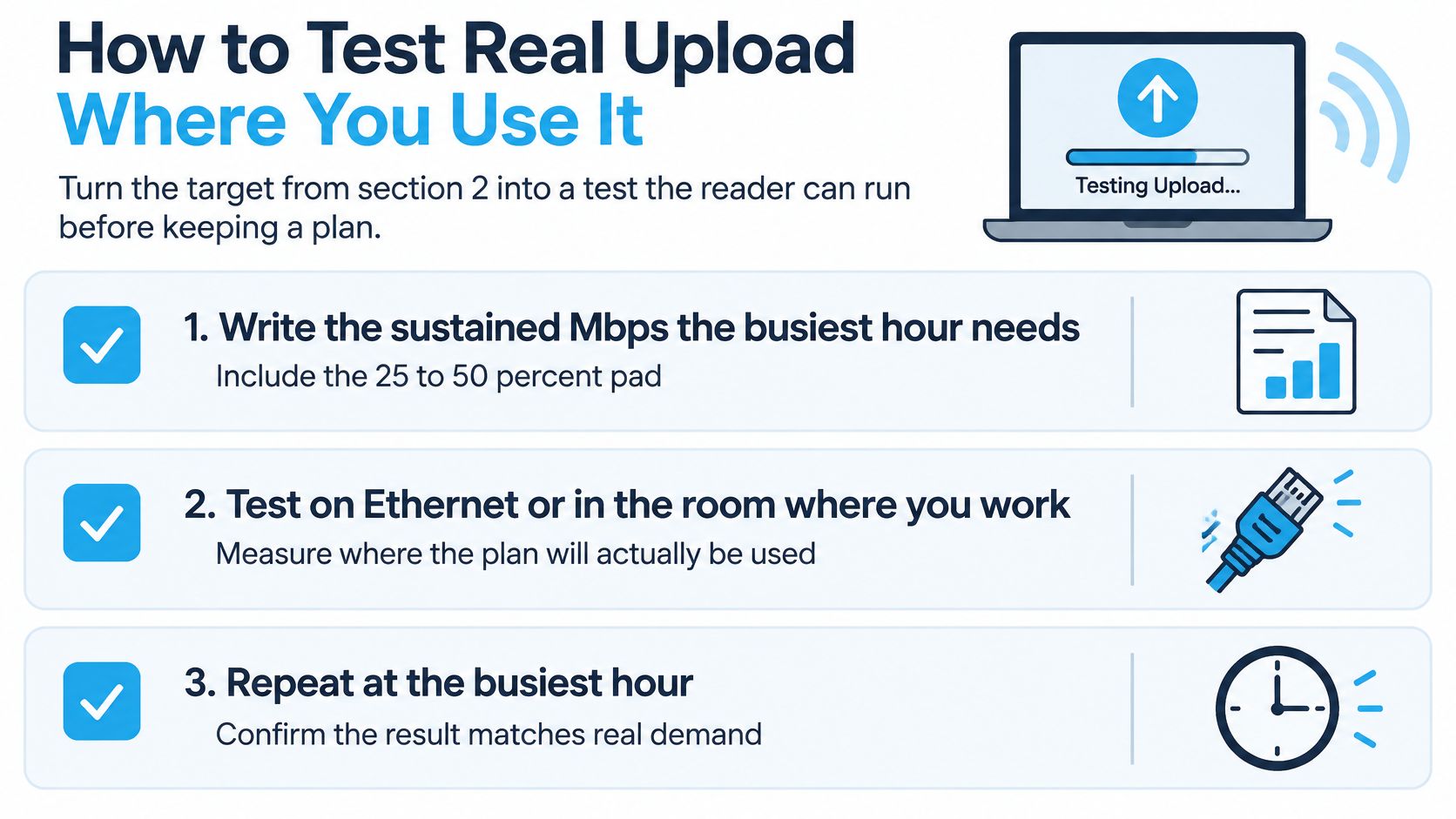
Run the test under working conditions
- Write down your target. Use your busiest concurrent workload, including the headroom allowance, rather than the provider's advertised maximum. Keep the target visible in your test log.
- Establish a clean baseline. Connect by Ethernet where possible, or test beside the router. Then repeat from the desk, sleeper cab, or RV dinette where you'll work.
- Choose relevant times. Run an upload-focused Speedtest or comparable test on a weekday morning and during the evening busy period. A quiet late-night result isn't enough.
- Record different kinds of results. Note the peak the test flashes, the result you can reproduce, and the low result when normal work traffic is active. When a call or cloud sync is running, remember that the test measures capacity alongside that competing traffic, not total connection capacity in isolation.
- Watch the call, not just the gauge. Record latency, jitter, packet loss when available, and whether audio breaks up. Try a normal meeting and a representative file transfer.
- Check traffic-management conditions. Establish whether the candidate service changes priority after a usage threshold or advertises a maximum. Our throughput speeds aren't guaranteed, so your decision still needs site-specific evidence.
- Change what failed and retest. Try a better router position, a supported antenna, another carrier path, or a different plan. Don't build a work schedule around an unexplained low result.
Read the results correctly
Peak is a brief maximum, including an advertised ceiling or a momentary test spike. Typical describes the performance you commonly observe across repeated measurements. Sustained is the capacity the connection continues delivering over a meaningful working interval.
Keep the equipment, test service, and work applications consistent when comparing results. Otherwise, you may mistake a changed test condition for an improved connection.
For wireless travel service, test the locations you intend to use. A successful result in a driveway doesn't validate an entire route, and a successful router-side test doesn't validate every room.
Keep the plan only after separate busy-hour checks repeatedly clear your written sustained target. If the result is marginal, resolve that uncertainty while you can still change the service.
Choose the Plan and Confirm the Upload
Choose by connection fit first. If your address can receive fiber, start with a symmetrical tier that meets your concurrent workload and confirm its upload performance after installation. If cable is the practical wired option, purchase the upstream tier that clears your target, not just the largest download package.
When neither wired option reaches the house or route, a multi-carrier cellular setup can serve as primary internet rather than a temporary substitute. The decision should reflect where you live and work, not an assumption that everyone can eventually obtain fiber.
A rural or travel option with clear limits
Our SwiftNet 5G Diamond is an unlimited, no-contract internet router and plan for RV and rural living, working with AT&T, Verizon, and T-Mobile 5G, priced at $69.99. It can be used as primary home or travel internet. The router supports speeds up to 300 Mbps on 5G and up to 100 Mbps on 4G.
Those are maximum speeds under optimal conditions, not promised upload rates. Actual performance may vary significantly with signal conditions and network load. We don't offer, disclose, or guarantee minimum speeds, and throughput speeds aren't guaranteed.
Make the trial a work test
Use the 7-day trial to evaluate the location that matters, not just the easiest place to get a strong signal. Put the router where it will stay, connect the devices you'll normally use, and run the applications your household depends on.
Before committing, make sure you can answer these questions:
- Capacity: Does busy-hour sustained upload clear your written workload target?
- Call quality: Can people hear and see you consistently during normal household activity?
- Location fit: Does the setup work at the home or travel stop where you need it?
Choose the service on those results. An internet plan earns its place by supporting your routine, not by displaying an impressive maximum.
SwiftNet Wifi offers home and mobile internet for rural households and travelers who need a practical connection beyond wired coverage. Visit SwiftNet Wifi #rv #rvlife #rvliving #rvlifestyle #rvrenovation #rvremodel #rvtravel #rvcamping #rvadventures #ruralwifi #5gwifi #5ginternet to review your options, then use the trial to confirm that sustained upload supports your real workday.


