

A reliable connection depends on where you park, not just how many days you travel. RV owners are spending more days on the road, making internet access more than a vacation convenience. When your RV is also your office, entertainment space, and connection to family, your plan needs to work at the campsite.
The best RV mobile internet plans support your devices where you park, have terms you understand, and leave you with a backup that does not depend on the same coverage. Coverage maps and speed rankings help narrow the choices. Testing at the actual campsite is what confirms whether a connection will work.
RV Internet Options Compared at a Glance
In 2025, 78% of U.S. outdoor travelers surveyed expected high-speed internet at campgrounds, according to Newbook's RV & Camping Consumer Insights Report, reported by Modern Campground. Expectations aren't service guarantees. Someone who works or streams should treat campground Wi-Fi as an option to test, not an included utility they can automatically trust.
There are five practical ways to connect. Choose the simplest one that supports your parking habits and workload.
RV internet options by best use, limit and setup effort
| Option | Best for | Main limit | Setup effort |
|---|---|---|---|
| Campground Wi-Fi | Light browsing and backup | Shared capacity, often slow at peak times | None |
| Phone hotspot | Short trips with one or two devices | Battery drain, few clients, weak antenna | Low |
| Dedicated 4G or 5G hotspot | Portable use and remote work on the move | Fewer clients than a router, requires signal at the spot | Low |
| Cellular router with external antenna | Remote work and several devices | Requires carrier signal and suitable antenna placement | Medium |
| Satellite internet | Remote sites with a clear sky view | Latency, weather, and obstructions can affect service | Medium to high |
Campground Wi-Fi is useful for checking reservations, browsing, and conserving cellular data. Before relying on it, ask whether service reaches individual sites or only shared buildings.
A phone hotspot is the easiest starting point for a short trip. It uses equipment you already carry, but keeping your everyday phone tethered throughout a working day is inconvenient.
When dedicated equipment makes sense
A dedicated hotspot separates internet access from your phone. It's portable enough to carry between the RV, a picnic table, and another work location, provided the plan permits that use.
A cellular router with an external antenna suits a more permanent installation. It gives you greater control over device connections and reception, but adds mounting, cabling, and power considerations.
The device controls how many clients connect and how much antenna help you get. The carrier controls how much signal you can actually use.
Satellite becomes attractive when your chosen sites lack usable cellular service. Check the sky view before committing to a shaded campsite, and verify whether the service and equipment permit operation while moving.
Start with where you park, how many devices connect, and whether anyone must hold video calls. Those answers narrow the equipment choice more effectively than a headline speed.
Hotspot, Router and Data Demand for Several Users
A phone hotspot draws from your phone's battery, generates heat, and usually offers less connection flexibility than dedicated equipment. Its built-in cellular antenna also gives you fewer placement options. A dedicated hotspot removes the phone from that job, while a suitable router adds Ethernet, external-antenna connections, and support for more simultaneous clients.
Check the actual model before buying. Not every router accepts external cellular antennas, and an Ethernet socket alone doesn't tell you anything about its cellular modem.
Hotspot and router comparison by clients, antenna and power
| Device | Clients | Antenna and ports | Power and heat | Best for |
|---|---|---|---|---|
| Phone hotspot | Few | Weak built-in antenna, usually no direct Ethernet | Draws phone battery and heats up | Short trips with one or two devices |
| Dedicated hotspot | Fewer than a router, generally | Built-in antenna; external connections are model-specific | Portable battery use | Portable use and remote work on the move |
| Cellular router | Most simultaneous clients in a suitable model | External antenna connections and Ethernet ports | Mains or vehicle power | Several devices and remote work at fixed stops |
Hardware can improve reception and local networking. It can't remove tower congestion or override a plan's data-priority rules.
Budget for simultaneous activity
Say a family is watching video while a laptop uploads files and a security camera sends footage. Those activities share the connection, even if the person on a work call thinks they're the only active user.
Remote work needs sustained upload capacity and steady latency. Streaming mainly stresses downloads. The FCC's mobile broadband measurement program tracks download speed, upload speed, latency, packet loss, and wireless connection characteristics, a better testing checklist than download speed alone.
Build your allowance around behavior rather than an unsupported monthly estimate:
- Light travel: Track email, navigation, reservations, and occasional browsing.
- Remote work: Include meetings, file transfers, VPN use, and background synchronization.
- Full-time living: Add entertainment, cameras, gaming downloads, and every occupant's devices.
Use your device's usage counter to measure a representative travel period. Our guide to how long a gigabyte of data lasts helps translate individual activities into a more useful budget.
Diagnose before upgrading
Keep a log rather than trusting an isolated speed test. The FCC's broadband reporting provides broader availability context, but it can't diagnose your particular router or campsite.
If performance drops mainly during busy hours, suspect congestion. If speeds stay poor throughout the day and reception is weak, investigate coverage and placement first; signal bars alone aren't a complete diagnosis.
Set video quality deliberately, pause cloud synchronization during meetings, and schedule large updates outside working hours. An unlimited allowance won't fix congestion, while a smaller plan may serve a traveler who controls background consumption.
Carrier Coverage and Speed Compared
T-Mobile led national median download performance in Ookla's U.S. H1 2025 testing, recording 245.48 Mbps against Verizon's 116.34 Mbps and AT&T's 115.09 Mbps, according to the Ookla U.S. connectivity report. Its median 5G download was 299.36 Mbps, compared with 214.58 Mbps for Verizon and 158.56 Mbps for AT&T.
These figures compare national median download speeds, not service at a particular campsite.
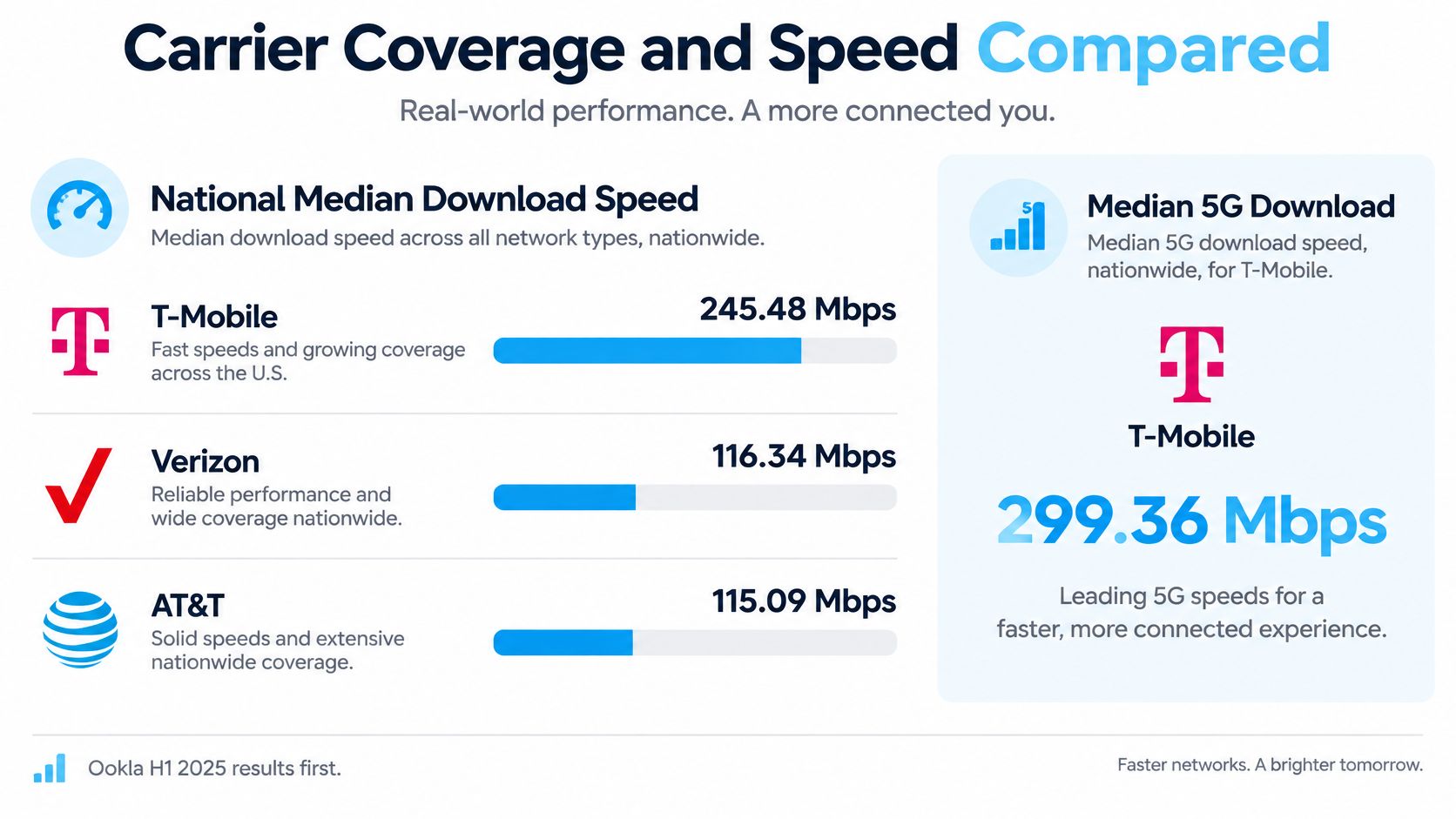
National median download speeds
| Carrier | Median download (Mbps) | Median 5G download (Mbps) |
|---|---|---|
| T-Mobile | 245.48 | 299.36 |
| Verizon | 116.34 | 214.58 |
| AT&T | 115.09 | 158.56 |
A national median describes the middle of a measured sample. It cannot predict reception behind a ridge, inside an RV, or at a campground served by a heavily loaded tower. Coverage maps and speed rankings help shortlist networks, but only a test at your parking spot can establish whether a connection works there.
For a route through sparsely populated areas, usable coverage can matter more than peak throughput. A slower connection that stays available may be more useful than a fast one that drops during a meeting. Use this cellular coverage comparison to organize your carrier shortlist around your route and recurring stops.
Buying rule: Choose for service at the places you visit, not a national ranking.
Redundancy matters more than a headline coverage percentage. If your setup supports multiple carriers, confirm how network selection works. Access to several networks does not necessarily mean simultaneous connections, uninterrupted active sessions, or unrestricted manual switching. Check whether changing carriers interrupts work and whether your chosen plan includes the networks you expect to use. Then test the available options at the stops that matter most.
How to Test Coverage at Each Campsite
The FCC mobile map represents outdoor or in-vehicle availability, not indoor reception, and relies on provider-reported availability and propagation modeling, as explained in the FCC Broadband Data resources. A predicted signal near your destination doesn't establish whether your connection will work inside a metal-bodied RV.
Use the map to shortlist networks, then verify them where you'll park.
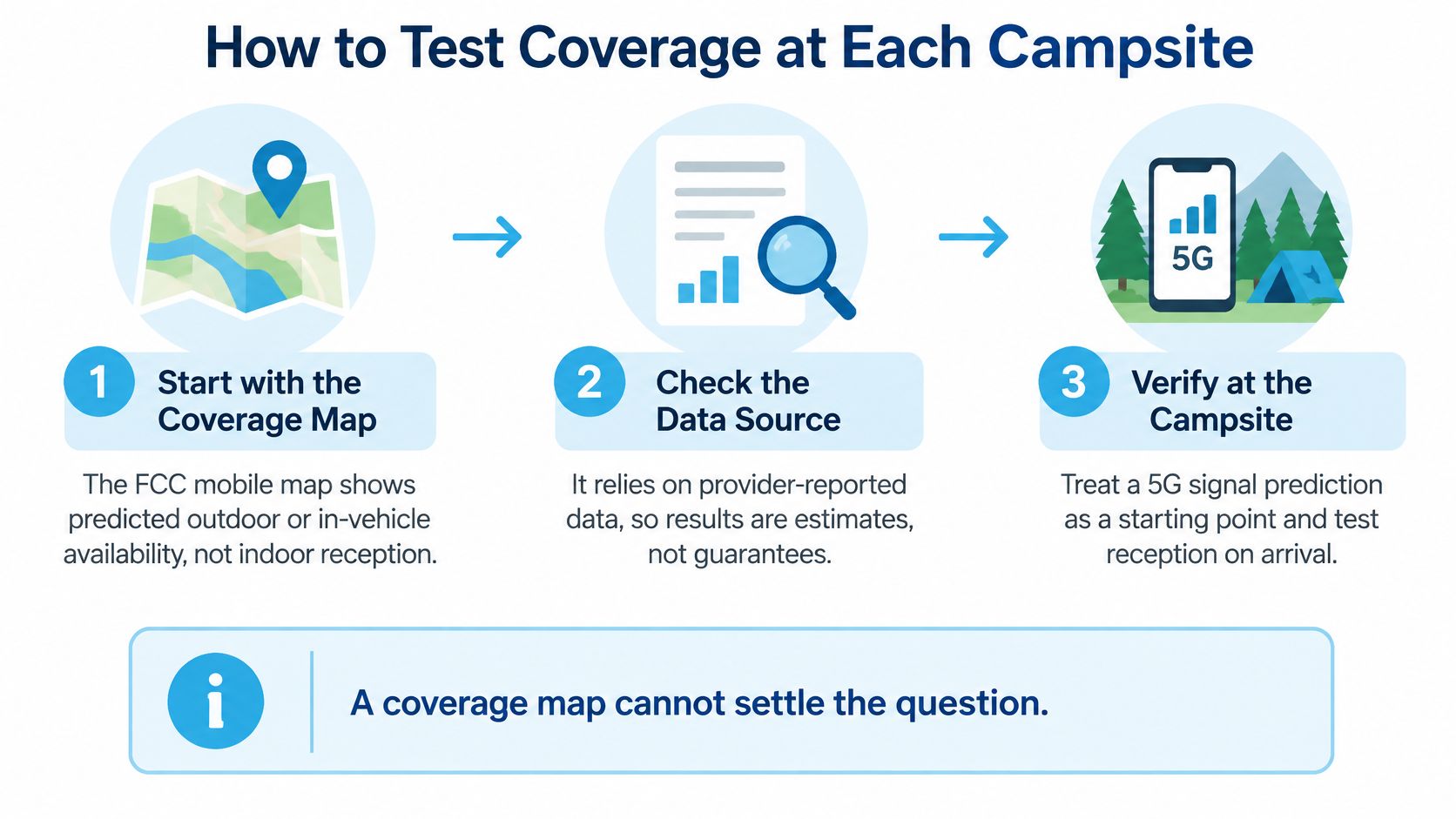
Run a repeatable arrival test
- Check the FCC mobile map for each planned stop. Read the coverage layer's conditions and distinguish outdoor or in-vehicle predictions from indoor usability. Don't interpret a colored area as a guarantee at your desk.
- Check each carrier at the campground address. Inspect the actual parking area rather than the nearest town. Hills, wooded sections, and low-lying sites deserve extra scrutiny.
- Test outdoors at the parking spot. Run a speed and latency test with a tool such as Speedtest, keeping the device stationary. Save the result with the carrier name and location.
- Repeat inside the RV. Put the hotspot or router where you intend to use it, then test again. A marked deterioration points toward placement or vehicle attenuation rather than a need for more data.
- Repeat in the evening. Other campers may be sharing the same serving tower. Compare results under the conditions when you'll stream or work, not just immediately after arrival.
- Record packet loss and latency alongside throughput. Use a test that reports these metrics, then make a real video call or connect to your work VPN. A high download result doesn't excuse frozen audio or repeated disconnects.
- Preserve a trial or return window. Read when the window starts, what equipment must be returned, and which charges are refundable. Leave enough time to complete the tests before that deadline.
Change one variable at a time
Keep the same test device and, where practical, the same test server. Pause other traffic while measuring the connection, then restore normal household activity to see how it handles the workload.
If indoor placement is the problem, consider antenna options before replacing the plan. Our guide to cellular signal boosters helps distinguish amplification from other reception improvements.
If two consecutive stops fail the same test, I would add a second network rather than simply buy a faster tier on the existing one.
That's a troubleshooting rule, not a coverage guarantee. The aim is to change the underlying connection when repeated failures show the current network isn't serving your route.
What RV Internet Plans Really Cost
Compare costs over the same period and workload. A low monthly rate can become expensive if the data tier falls short or you need another connection for work.
Equipment and recurring charges vary by setup. A phone hotspot may use a device you already own, while a dedicated hotspot or router can add a purchase or rental cost. Router installations may also require an antenna, cabling, and a mount. Satellite service adds equipment and power requirements.
Build a like-for-like worksheet
| Plan type | What drives recurring cost | Equipment to include | Other costs to record |
|---|---|---|---|
| Phone hotspot add-on | Phone plan, hotspot allowance, and any additional data | Existing phone or necessary upgrade | Backup service |
| Dedicated hotspot plan | Data tier, carrier choice, and device rental or purchase | Hotspot | Activation, extra data, backup network |
| Cellular router plan | Data tier, carrier choice, and plan structure | Router, antenna, cables, mount | Installation, activation, backup service |
| Satellite service | Subscription structure and service tier | Terminal, mount, power accessories | Shipping, activation, cellular backup |
SwiftNet's 5G Diamond plan costs $69.99 for the first month of data, with the router listed at $0 today. It is an unlimited, no-contract virtual SIM router plan for RV and rural living that works with AT&T, Verizon, and T-Mobile 5G. The 4G Bronze plan starts at $49.99 per month for data. Its portable 4G LTE hotspot works with AT&T, Verizon, and T-Mobile, and can be rented for $10 per month after the 7-day trial or purchased for $99 after the trial. It offers 100GB, 200GB, or unlimited data plans, with pricing depending on the tier and carrier arrangement.
Use this sequence when comparing quotes:
- Estimate your usage. Measure a representative period that includes normal work and entertainment, then allow room for busier travel days.
- Choose a data tier. Check when high-speed data ends and what happens to service afterward.
- Compare both totals. Separate first-month service and equipment spending from recurring service, rental, and backup charges.
- Price the exit. Record trial deadlines, return shipping, nonrefundable charges, and cancellation obligations.
Read the restrictions as carefully as the rate
Throttling is a configured speed restriction. Deprioritization changes how traffic is treated when a network is busy. Either can affect usability, but they are not interchangeable.
Compare the terms that apply to your expected use, not just the advertised data allowance. A plan that cannot support your work at regular destinations is poor value, even if its price per gigabyte looks low.
Which Setup Fits Your Travel Style
Treat these combinations as starting points, not rules. Your parking location, power arrangements, and tolerance for interruptions should decide the final installation.
Recommended setup by travel style
| Travel style | Primary setup | Backup |
|---|---|---|
| Weekend camper at established parks | Campground Wi-Fi with a phone hotspot | Phone data plan on a second carrier |
| Remote worker moving between stops | Cellular router with external antenna on a multi-carrier plan | Dedicated hotspot on another carrier |
| Full-time RVer in rural areas | Unlimited high-speed router plan with external antenna | Satellite where coverage gaps persist |
| Truck driver or cab-based worker | Dedicated hotspot or compact router | Phone hotspot |
| Family streaming at camp | Unlimited router plan | Campground Wi-Fi as overflow |
A weekend camper may not need a permanent installation. Verify the park's Wi-Fi before arrival and keep the phone hotspot ready for reservations or communication if the shared connection disappoints.
A remote worker needs a more deliberate arrangement. Give the router a stable power supply, secure the antenna cable, and keep the backup device charged and configured before an important meeting.
Match the installation to the parking pattern
For full-time rural living, favor an installation you won't need to rebuild each evening. A fixed external antenna can simplify arrival, while satellite is useful when favorite locations repeatedly lack cellular coverage.
A truck driver or cab-based worker should prioritize safe mounting, suitable supply voltage, and ventilation. Equipment that overheats in a parked cab or disconnects when accessory power shuts off won't make a dependable office connection.
Families should manage access as well as allowance. Use router controls, where available, to pause entertainment devices during work calls and prevent unattended downloads from consuming the connection.
Make the backup genuinely independent
Virtual-SIM hotspot and router plans can provide access to several carriers, which suits travelers crossing regions with different network strengths. Confirm which carriers are available under the specific plan, rather than assuming every tier includes every network.
A second device on the same carrier isn't a network-diverse backup. It may help if the primary hardware fails, but it can still share the same local outage or congestion problem.
Keep the backup's charger, login details, and connection instructions accessible. If switching requires a long account recovery process, it's not ready for a work-critical interruption.
Campground Wi-Fi can provide useful overflow for entertainment, but don't assume it will rescue a deadline. The campsite test decides whether any of these starting setups is adequate at a particular stop.
Pick a Plan and Test It Before You Commit
A plan's advertised coverage cannot confirm service at a particular campsite. Before paying, define what the connection must handle, then test it where you stay.
Make the purchase conditional on a useful result
- Match the device to the job. A portable hotspot suits travel and flexible setup; a router plan is designed for RV and rural living.
- Check your next stops. Review carrier coverage before departure, then test service at each campsite. A map can screen locations, but only an on-site test confirms whether the connection meets your needs.
- Read the data terms. Check the allowance and any throttling or priority rules. Confirm that the plan includes service for the supplied device.
- Compare the complete bill. Account for the device, recurring plan price, and any backup connection you need for work-critical days.
SwiftNet Wifi's 4G Bronze is a portable, no-contract hotspot for RV travel and remote work. It starts at $49.99 per month and works with AT&T, Verizon, and T-Mobile 4G LTE. Plans are available with 100GB, 200GB, or unlimited data; the unlimited plan has no caps or throttling. The monthly price depends on the data allowance and carrier-access option.
SwiftNet's 5G Diamond costs $69.99 for unlimited, no-contract router internet for RV and rural living, working with AT&T, Verizon, and T-Mobile 5G. The router is $0 today, with the first month of data charged at the plan price. A 7-day trial gives you a window to check whether the service works at your stops.
Use the video alongside your equipment comparison.
If campground Wi-Fi reliably meets your needs, a phone hotspot may be enough. Where cellular service is unavailable, satellite may be a better fit. In either case, test the connection at the campsite and keep a backup on a different network for work-critical days.
SwiftNet Wifi offers portable 4G hotspots and 5G router plans for RV travel, rural living, and remote work. Visit SwiftNet Wifi to compare equipment and plan terms, then test your choice at your first campsite.


