

Choosing the biggest unlimited allowance is popular advice for mobile internet. It's also incomplete. Mobile WiFi data plans should be judged by the work they can sustain at your actual parking spot or room, not just by advertised gigabytes or a speed test beside a tower.
A useful comparison separates hardware, data rules and connection quality. That approach can reveal why a modest allowance suits a weekend traveler, while an unlimited plan still disappoints someone whose evening video calls depend on stable uploads.
Hotspot or Router Compared at a Glance
A mobile hotspot prioritizes portability; a cellular router prioritizes a connection that stays installed. Both share cellular internet over WiFi, but their power arrangements, antenna options and installation requirements can lead to different results.
Hotspot versus cellular router by key factor
| Factor | Mobile hotspot | Cellular router |
|---|---|---|
| Form factor | Pocket-sized device or phone | Desktop or wall-mounted unit |
| Devices supported | Illustrative shopping range of 5 to 15, verify the model specification | Illustrative shopping range of 15 to 64, verify the model specification |
| External antenna | Rarely available, check for ports | Usually available through antenna ports, confirm before buying |
| Signal in weak areas | Limited by built-in antenna on models without ports | Can improve with a suitable external antenna |
| Power use | Battery, charged often | Mains or 12V on compatible models, runs continuously |
| Best setting | Travel, short stays, one or two active devices | Fixed RV or rural base with several users |
The device-count ranges are shopping examples, not guarantees of usable capacity. A hotspot accepting many connections doesn't mean it can support everyone streaming or uploading simultaneously. Check the exact model's specifications and distinguish connected devices from devices actively consuming bandwidth.
Choose for the installation
A hotspot makes sense when you carry your connection between a vehicle, café and overnight accommodation. A router is a better starting point when you can leave power, antenna cables and equipment in place. In an RV, don't choose an enclosed equipment bay merely because it's convenient; test reception and ventilation there first.
Our hotspot and router comparison provides more context for that hardware decision. External antenna ports deserve particular attention because they give you installation options that a sealed portable device doesn't offer.
Hardware and service are separate purchasing decisions, even when sold together. Confirm that the plan permits the chosen device and that the modem supports the service's cellular bands.
A virtual SIM can operate in either category when the hardware and service support it. It isn't, by itself, proof of stronger reception or uninterrupted switching. Choose the table row matching where your connection will sit most often, then evaluate plans for that setup.
How Much Data Your Household or Job Uses
Start with a planning calculation:
Monthly data = hours per day × GB per hour × days used, plus a reserve for updates and extra devices.
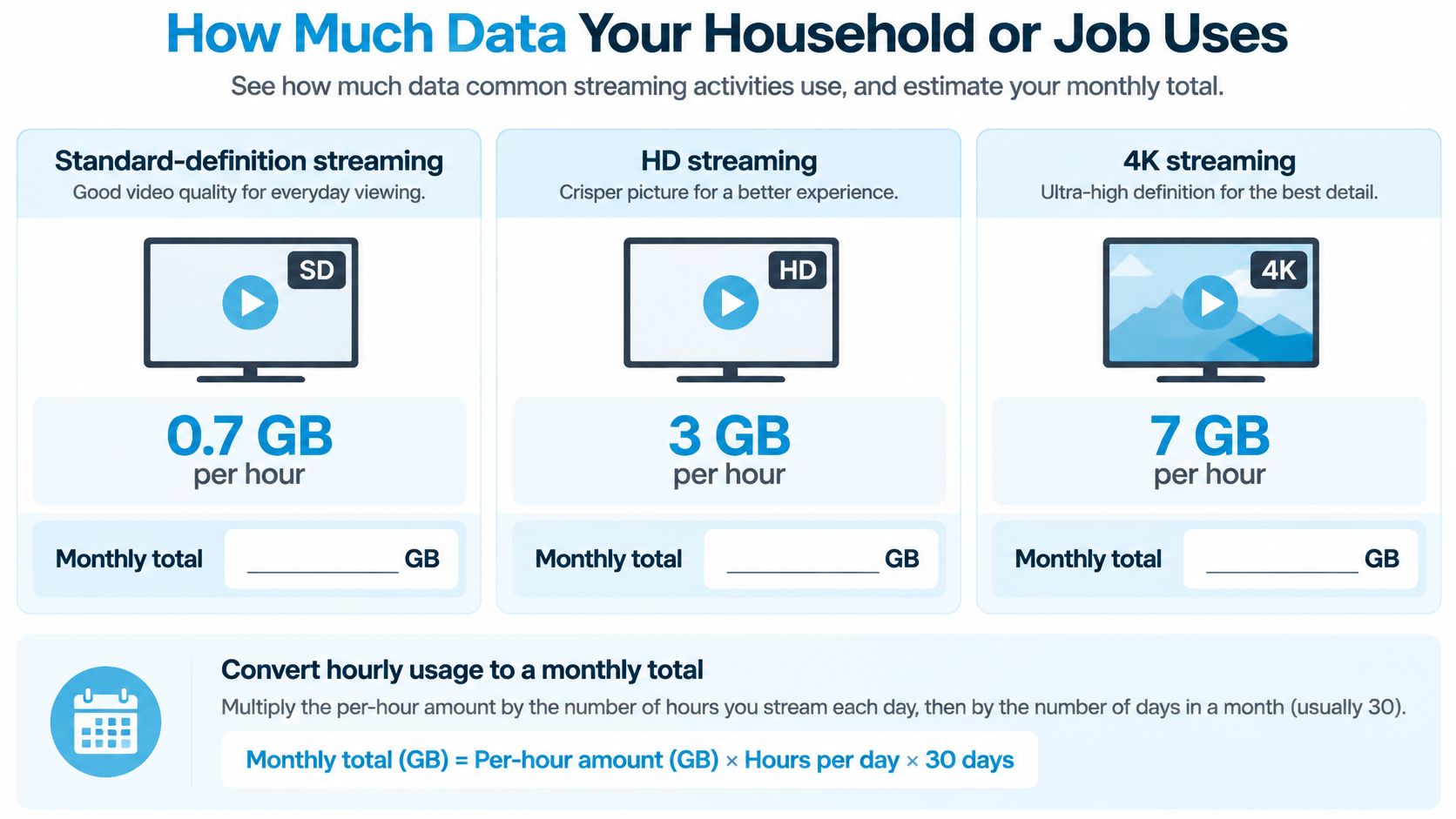
For a hypothetical month, use 30 days and a 20% planning buffer. Those are budgeting assumptions, not measured household averages. The hourly figures below are likewise illustrative inputs for estimating consumption; actual use changes with application settings, compression, resolution and background traffic.
Data use per hour by activity
| Activity | Typical data per hour | Notes |
|---|---|---|
| Standard-definition streaming | Planning assumption of about 0.7 GB | Common default on phones and tablets |
| HD streaming | Planning assumption of about 3 GB | Common on TVs and laptops |
| 4K streaming | Planning assumption of about 7 GB | Needs higher sustained speeds as well |
| Group video call | Planning range of 0.5 to 1.5 GB | Video quality and meeting layout change consumption |
| Web browsing and email | Planning range of 0.1 to 0.3 GB | Mostly text and images, excluding large downloads |
| Cloud backup or updates | Variable | Calculate from file size and number of devices |
Use the chart as a planning aid, then replace its assumptions with readings from your device's usage counter.
Turn activities into a household total
Say a remote worker spends 4 hours per workday on calls at an assumed 1 GB per hour. Across a hypothetical 30-day calling schedule, that produces 120 GB before streaming, or 144 GB with the planning buffer. Someone who only works weekdays should substitute their actual working days rather than budget as though every day contains meetings.
For an RV family, assume 2 hours of HD streaming each evening at the table's 3 GB hourly input. Across the same hypothetical month, that totals 180 GB, or 216 GB with the buffer.
Our guide to how long a gigabyte of data lasts can help you think through activity-based budgeting. Your own usage history remains the better input when it's available.
- Count connected phones: A phone joining the hotspot may download photos, podcasts and app updates.
- Schedule large transfers: Laptop updates and cloud backups can consume an allowance without anyone actively browsing.
- Inspect camera settings: Continuous cloud uploads require a separate estimate based on the camera's actual configuration.
Total the household's activities before choosing a tier. Don't use a smartphone-only average as a substitute for a shared connection supporting work, entertainment and background transfers.
How Caps and Throttling Shape Your Plan
Unlimited data and unlimited high-speed productivity aren't interchangeable. The 2025 Older Adults Technology Services report notes that some lower-priced plans cap 5G use or reduce speeds after a threshold.
That distinction matters more than the label printed above the monthly price. Separate a permanent speed restriction from deprioritization, which changes how your traffic is treated when network resources are contested.
Plan structures and what happens after the limit
| Plan type | Behaviour after allowance | Watch for | Suits |
|---|---|---|---|
| Fixed cap | Service stops or overage is billed | Per-gigabyte overage rates | Light browsing, one or two devices |
| High-speed then throttled | Speed drops to a slower tier | Slow tier may not support video calls | Mixed use with light streaming |
| Unlimited with priority tiers | Priority changes after a threshold; speeds may fall during congestion | Hotspot may sit in a lower tier | Households and remote workers who can tolerate variable performance |
| Unlimited without throttling | No allowance-based speed reduction, subject to plan terms | Fair-use terms and network congestion | Heavy streaming and video work |
A household's allowance runs out
Consider a hypothetical household sharing a 100 GB plan. Evening streaming and background downloads exhaust it in week three, triggering a restricted tier that can't sustain their video meetings.
Their remaining data may technically be unlimited, but their usable work connection isn't. If the plan instead bills overage, the same usage pattern creates a spending problem rather than a speed problem.
Practical rule: Compare what happens after the allowance, not just how large the allowance looks before it.
A capped plan can still suit someone whose work is mostly email and documents. A family sharing screens, updates and entertainment needs a different margin.
Before buying, identify the threshold, the speed or priority treatment afterward, and whether hotspot traffic has its own allowance. Also check whether a 5G-specific limit changes service independently of the overall data total.
Latency and Jitter Matter More Than Peak Speed
Opensignal's 2025 analysis reports approximately 20–30% lower latency and tighter jitter ranges for standalone 5G in markets with active deployments, and identifies sub-50 ms latency and under-10 ms jitter as demanding consistency thresholds for interactive services.
Those findings don't guarantee that a particular router or plan will deliver that experience. They show why the architecture and consistency of a connection deserve attention alongside download speed.
Understand what each measurement means
- Download and upload: These measure transfer capacity, including incoming streams and outgoing files.
- Latency or ping: This measures response delay, which affects conversational timing and remote interaction.
- Jitter: This measures changes in delay, which can make audio arrive unevenly.
- Packet loss: This measures missing traffic, which can cause broken audio, dropped frames or retransmissions.
- Time to first byte: This measures the delay before a requested response begins arriving, although the server also influences it.
For a deeper explanation of advertised capacity versus delivered traffic, explore practical network throughput basics from Finchum Fixes IT. That distinction helps explain why an impressive speed-test result doesn't necessarily translate into a responsive work session.
Match the metric to the task
Video calls deserve scrutiny of upload consistency and jitter, not just download capacity. A connection that transfers a large file quickly can still produce awkward pauses when outgoing traffic becomes uneven.
VPN sessions and cloud desktops are especially sensitive to response delay. Streaming can usually tolerate more delay because the player buffers ahead, but it still needs enough sustained download capacity to keep that buffer supplied.
A faster connection isn't the better connection when its interruptions prevent you from finishing the task.
Run Ookla Speedtest or another measurement tool alongside a real meeting, upload or cloud-desktop session. Keep the test method consistent, and avoid comparing an idle connection with another connection already carrying household traffic.
Write down median download, median upload, median latency with jitter, and worst-case packet loss. Keep time-to-first-byte results as a diagnostic note, particularly when pages feel slow despite adequate transfer speeds.
Why Coverage Maps Miss Indoor and Campground Performance
A coverage map is a screening tool, not an acceptance test. The FCC's consumer coverage guidance explains that mobile map areas represent outdoor or in-vehicle connections rather than indoor service; its May 2025 figure of 92% of U.S. homes and small businesses with access to advertised 5G speeds of at least 35/3 Mbps describes availability, not indoor quality or congestion.
A map can therefore look encouraging while your laptop struggles inside a metal RV. Terrain, walls, campground density, tower loading, antenna placement, weather and handoffs can all separate mapped availability from a usable connection.
The setting itself deserves attention, not just the destination name.
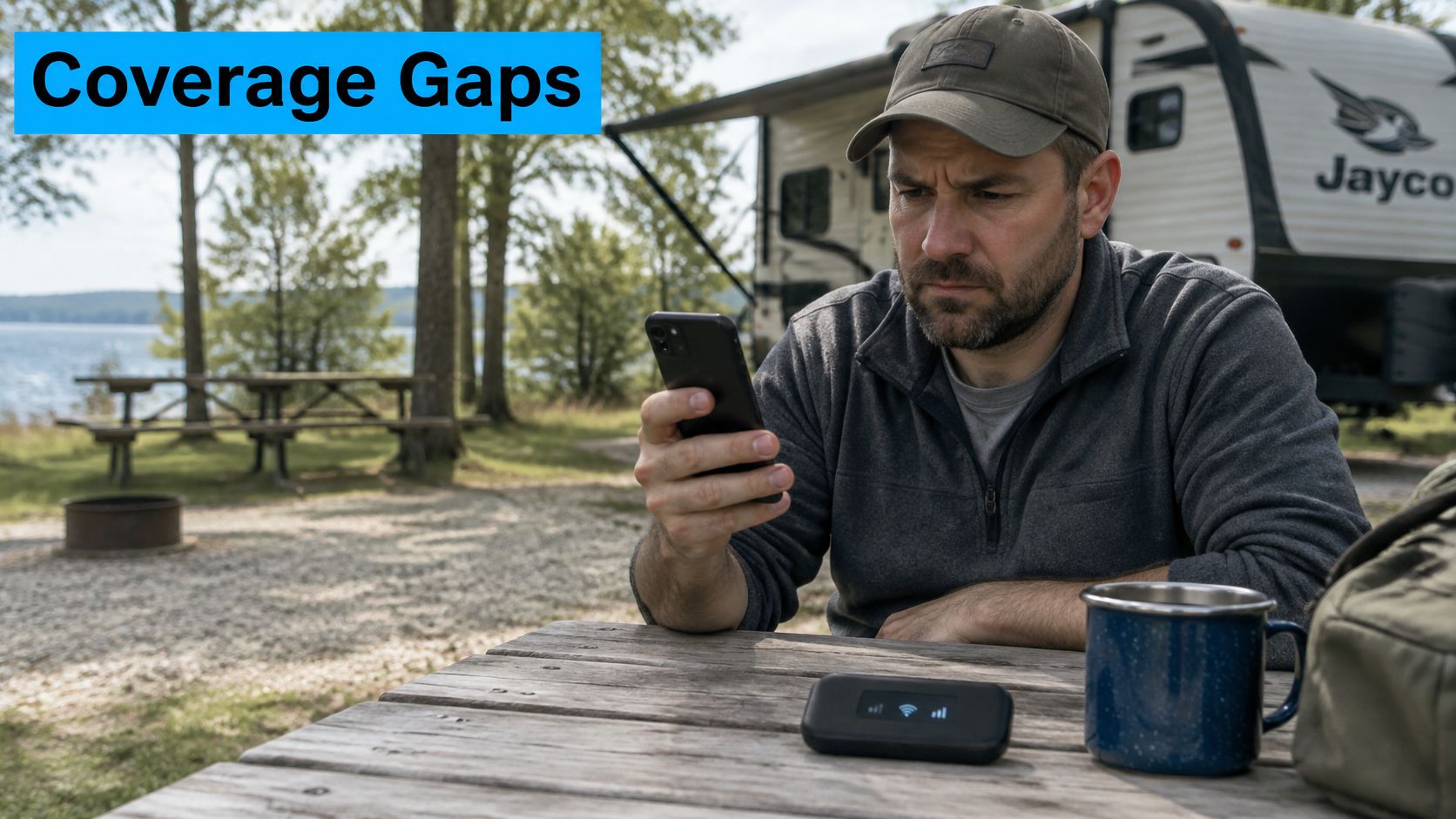
Test where the equipment will stay
Use this practical protocol: place the router in its intended position and run at least five tests across different times. That test count is a suggested procedure, not a statistical guarantee; log the median and worst result for each metric.
Include a sustained upload and repeat it during the evening's busy period. A brief test on a windowsill at arrival doesn't establish whether an installed router can support tomorrow's work.
| Observed result | Location rating | Practical response |
|---|---|---|
| Stable during busy periods and real tasks | Usable | Keep the tested placement |
| Reliable off-peak, inconsistent when busy | Usable with limits | Schedule transfers or test another network |
| Repeated disconnections or failed work sessions | Not suitable for work | Change location or connection |
Our cellular coverage comparison helps frame carrier selection, but the location log should decide whether you stay connected there. Network switching may rescue a weak spot only when another supported network performs better; failover isn't guaranteed to be smooth.
For mixed road-and-sea itineraries, CruiseLobster.com's cruise ship comparison can help with the separate vessel-selection decision. Don't carry a successful campground cellular test over to a shipboard connectivity assumption.
A strong map result is still only a reason to test, not a reason to stop testing.
What the Monthly Price Really Costs
Compare mobile WiFi data plans using cost per usable gigabyte, not price divided by the advertised allowance. Define usable data as traffic delivered well enough for your intended task, rather than every byte the billing system records.
The basic calculation is:
Effective monthly cost = plan price + hardware cost spread over your expected ownership term + expected overage and mandatory charges.
Then divide that total by your estimated usable monthly gigabytes.
Compare equal allowances without inventing prices
Suppose Plan A and Plan B advertise the same allowance. Plan A has the lower subscription price, but its restricted tier prevents useful work once the high-speed portion ends; Plan B costs more but maintains the performance the household needs.
| Comparison item | Plan A | Plan B |
|---|---|---|
| Advertised allowance | Same allowance | Same allowance |
| Headline subscription | Lower | Higher |
| Task-usable data | Reduced by restrictive terms | Larger usable portion |
| Effective value | Calculate after restrictions | Calculate after restrictions |
Plan A isn't automatically cheaper per usable gigabyte. Divide each provider's complete quoted monthly cost by the traffic you expect to use successfully, then compare the results.
- Activation and setup: Include unavoidable charges, spread over the period you expect to keep the service.
- Equipment: Distinguish purchasing, renting and temporarily deferred hardware charges.
- Billing dates: Check whether the opening billing period is charged in full.
- Commitment: Include contract obligations, cancellation conditions and trial-return requirements.
Buying hardware outright increases the initial payment but can remove an ongoing rental charge. A no-contract plan reduces commitment, though it doesn't erase equipment costs.
Budgeting insight: A trial is most valuable when you measure both the connection's usefulness and the complete cost of keeping it.
Don't assign every slow gigabyte a value of zero. Decide which restrictions prevent your activities, then use that definition consistently across quotes.
Which Plan Fits Your RV, Rural Home or Remote Job
Carrier choice deserves more weight outside dense population centers. In the FCC's cited coverage analysis, at least two 5G providers covered approximately 94% of the non-rural population versus 58% of the rural population, while named nationwide networks covered approximately 82% of the rural population for T-Mobile, 53% for AT&T and 18% for Verizon.
These are coverage figures from that analysis, not current performance rankings for your campsite. They support testing alternatives, not declaring a universal winner.
Use case, data need, speed priority and setup
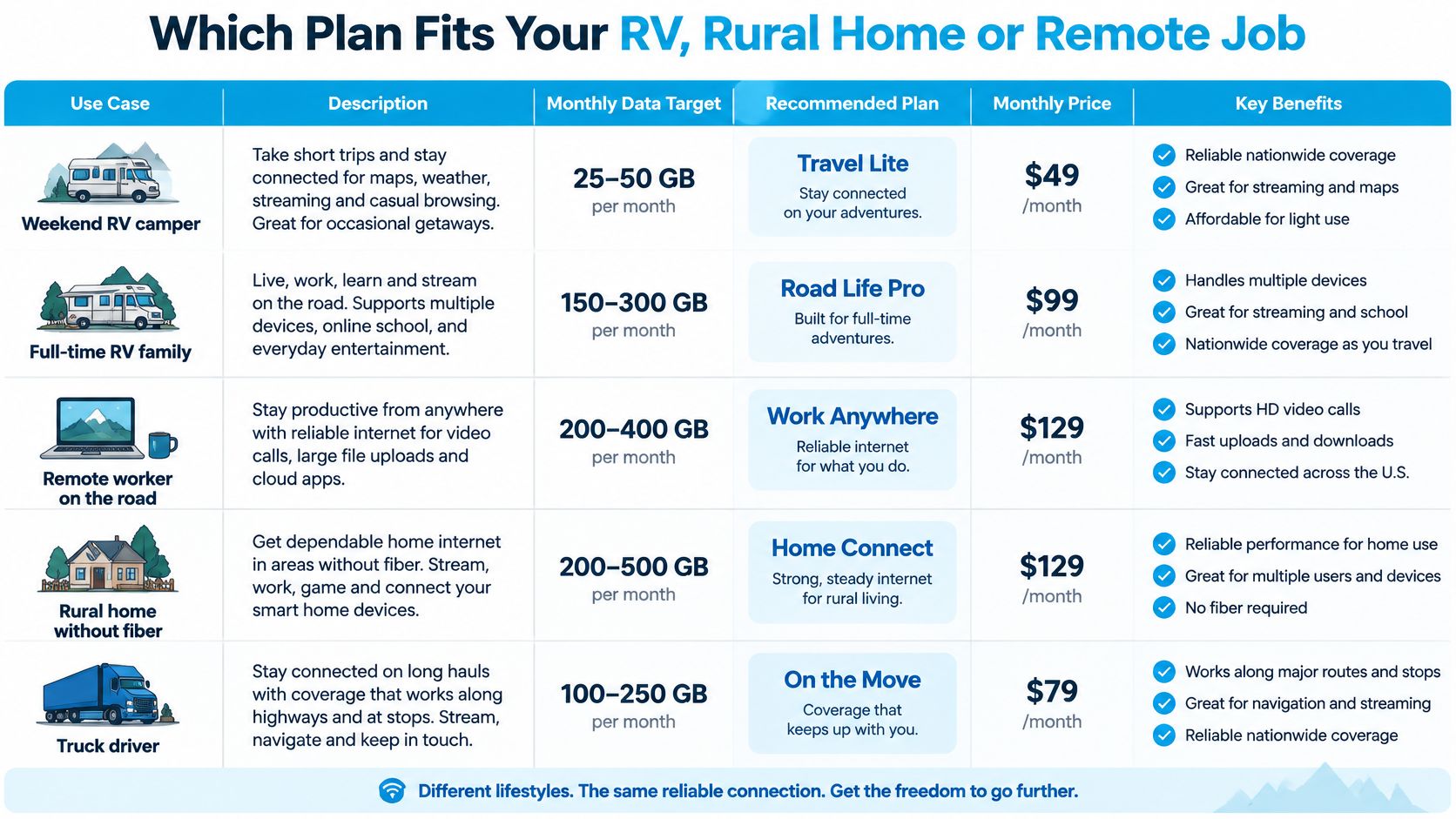
The numerical targets below are illustrative shopping budgets, not measured averages for these groups.
| Use case | Monthly data need | Speed priority | Setup |
|---|---|---|---|
| Weekend RV camper | Planning target of 50 to 100 GB | Steady download for streaming | Hotspot on a locally tested single carrier |
| Full-time RV family | Planning target of 200 GB or more | Consistent download at peak hours | Router with external antenna, multi-carrier SIM |
| Remote worker on the road | Planning target of 100 to 200 GB plus calls | Upload and low latency | Router with antenna ports and failover |
| Rural home without fiber | Set by the household activity formula | Sustained speed at peak hours | Outdoor-antenna router, best local carrier |
| Truck driver | Planning target of 50 to 100 GB | Reliable coverage on highways and at stops | Hotspot with external antenna option |
The visual comparison provides a quick way to match the installation to the use case.
Read the rows as different failure risks
A weekend camper can budget only for nights away and keep streaming settings modest. The single-carrier setup is sensible only after testing the destinations that matter.
A full-time RV family should build its budget around daily entertainment and every connected device. The hypothetical household streaming calculation already approaches the table's starting tier before adding everyone's other activity.
A remote worker should treat the table's general-use allowance and meeting traffic separately, without double-counting either. Failover is valuable when configured and tested, not merely listed on the equipment box.
For a rural home without fiber, sustained busy-hour performance matters more than choosing the largest allowance. A multi-carrier virtual SIM provides another network option where supported, but can't create coverage that isn't available.
A truck driver needs dependable service at legal stopping places as well as along a route. Pair connectivity planning with Find New Drivers' road life tips for truckers, and perform connection tests while parked.
The deciding question is simple: which metric would you feel first if it failed?
Choose Your Plan and Test It Before You Pay
Choose a testable service rather than committing on the strength of an unlimited label. Use the purchase page to identify the offer, then use the trial to assess the connection.
- Estimate monthly gigabytes from your activities, actual usage history and a planning reserve.
- Choose your speed priority: sustained upload for calls, steady download for streaming, or low latency for interactive work.
- Test the exact location during a busy hour, including the intended equipment position.
- Read the throttle terms and identify any separate hotspot allowance.
- Select the hardware for active device count, power and antenna needs.
- Compare complete costs against the data that remains usable for your tasks.
As one option to evaluate, our SwiftNet Wifi 4G Bronze hotspot offers 100GB, 200GB or unlimited plans, with no caps or throttling on the unlimited plan; our 5G Diamond router plan is advertised as unlimited, no-contract internet for RV and rural living. Review the applicable fair-use terms alongside the unlimited claim, and compare at least one other provider using the same tests.
Our 7-day trial doesn't mean the initial data month is free: today you pay for the first month of data, and the hotspot isn't charged during the trial. Record your results while the trial is active and review its return requirements before deciding to keep the service.
For an additional look at the service, the video provides another reference point.
Keep a purchase checklist
- Usage: Monthly GB and the activities behind the estimate.
- Performance: Speed priority and tested coverage.
- Restrictions: Throttle rules and hotspot treatment.
- Cost: Usable-data calculation and equipment charges.
- Fit: Device count, antenna needs and trial terms.
SwiftNet Wifi offers portable hotspot and cellular router plans for RV travel, rural living and remote work. Visit SwiftNet Wifi to compare the options, review the trial terms and choose a mobile WiFi data plan you can test against your own usage and locations.


